Performance & Accessibility
Core Web Vitals, WCAG conformance and the audit trail that proves both.
Last revised
This page is the whole picture: what we do, what it costs in the US, how long it takes, what we need from you, and every article we have written on the subject. If you already know what you want, ask for a quote or try us on a couple of files first — both are free and neither involves a sales call.
What Performance & Accessibility covers here
Fourteen disciplines sounds like a lot until you notice how often one job needs three of them. Within Performance & Accessibility specifically, this is the work:
- Largest Contentful Paint
- The time until the largest image or text block in the viewport has rendered — a proxy for when a page looks loaded.
- Interaction to Next Paint
- A measure of responsiveness: how long a page takes to render a visual response after a user interaction.
- Cumulative Layout Shift
- A measure of how much visible content moves unexpectedly during a page's life.
- WCAG Conformance Levels
- The three levels of the Web Content Accessibility Guidelines — A, AA and AAA — and what claiming one actually commits you to.
- Keyboard Accessibility
- Making every function of a site operable with a keyboard alone, in a logical order, with visible focus.
- Screen Reader Compatibility
- Making sure content is announced usefully by the software that reads a page aloud.
- Color Contrast
- The measurable difference in luminance between foreground and background, and the thresholds content must meet.
- Performance Budgets
- Agreed limits on page weight, request count or timing metrics, enforced automatically so they cannot be quietly exceeded.
- Critical Rendering Path
- The sequence of work a browser must complete before it can render anything useful.
- HTTP/2 and HTTP/3
- The newer versions of the protocol that carries web traffic, and what they change about how resources should be delivered.
- Content Delivery Networks
- Distributed servers that hold copies of your content close to the people requesting it.
- Real User Monitoring
- Collecting performance data from actual visits rather than from synthetic tests.
That is twelve of 163. The full index is further down this page.
What it costs in the US
Here's what this generally costs in the United States. Treat it as a sanity check rather than a price list: the honest number depends on the job, and anyone who gives you a firm price without looking at the work is guessing.
| Type of work | Typical range | What that buys |
|---|---|---|
| Performance audit | $2,500 – $10,000 | Field and lab measurement, prioritized findings, and a plan developers can act on. |
| Accessibility audit | $4,000 – $20,000 | Automated plus manual testing against WCAG 2.1 AA, with findings mapped to success criteria. |
| Remediation | $5,000 – $60,000+ | Actually fixing it, which depends entirely on what the audit found. |
Those are wide ranges, and they're wide for a reason. Here's what moves a job from one end to the other.
What actually drives the price
- Site size and template count
- Fixing six templates fixes a thousand pages. Fixing a thousand hand-built pages does not.
- How bad the starting point is
- A site built semantically needs adjustment. A site built from nested divs and click handlers needs rebuilding.
- Third-party scripts
- The slowest parts of most sites belong to somebody else. Removing them is a commercial negotiation as much as a technical task.
- Depth of accessibility testing
- Automated scanning is cheap. Manual testing with assistive technology and real users is the part that finds what matters.
- Framework constraints
- Some stacks make accessible markup harder than others, and working around that costs time.
- Whether it stays fixed
- Budgets and automated checks in CI cost a little to set up and save the whole thing from regressing.
How the money is usually structured
Separately from how much, there's the question of how. Five models cover almost everything in this industry, and the right one depends on how well the job can be described before it starts.
- Per unit
- A fixed price per image, per minute, per page, per asset. Best when the work is genuinely repeatable and you can describe one unit precisely. It is the easiest model to budget and the easiest to argue about, because everything hinges on whether your idea of one unit matches ours. Settle that on a sample before you settle it on an invoice.
- Hourly or day rate
- You buy time, and the output is whatever that time produces. Honest when nobody can scope the job yet — a rescue, an unknown archive, an exploratory phase. Ask for a not-to-exceed number anyway. An open hourly arrangement with no ceiling is a budget with no floor.
- Fixed project fee
- One number for a defined scope, usually with a stated number of revision rounds. The model most clients prefer and the one that punishes a vague brief hardest. The fee is only fixed if the scope is, so expect the scope document to be more specific than feels comfortable. That specificity is what protects you.
- Monthly retainer
- A set amount of capacity reserved for you every month. Worth it once the work is continuous rather than occasional — a catalog that refreshes, a channel that publishes weekly, a site that keeps changing. Below roughly ten to fifteen hours a month it usually costs more than buying the work as it comes.
- Value or outcome based
- Pricing tied to a business result rather than to effort. Rare, and rarely as clean as it sounds. It works where the outcome is unambiguous and attributable, and falls apart where it is neither. Treat an outcome-based proposal with the same scrutiny you would give any other claim about attribution.
If you want a real number rather than a range, the fastest route is to send us the actual brief — scope, volume, deadline, and a couple of sample files if you have them. That's usually enough for a fixed price rather than an estimate.
How long it takes
How long should this take? Here are the usual durations, with the caveat that every one of them assumes decisions get made when they're asked for.
| Phase | Usual duration |
|---|---|
| Measurement and audit | 2–4 weeks |
| Quick wins shipping | Week 3–4 |
| Structural remediation | 4–12 weeks |
| Assistive technology verification | 1–2 weeks |
| Budgets and monitoring in place | 1 week |
One thing worth saying plainly: the most common cause of a late project isn't production. It's waiting — for content, for a decision, for one person to look at something. If you want a project to move quickly, the highest-leverage thing you can do is name one person who can say yes and make sure they're available. That single change is worth more than any amount of chasing.
Rush work is possible and it's genuinely more expensive, because it means real people working real overtime or a job jumping a queue somebody else is in. We'll always tell you what a rush actually costs before you commit to it.
How the work actually runs
Here's the sequence a performance & accessibility job actually follows. It isn't a marketing diagram — it's the order things have to happen in, and most of the expensive problems in this field come from doing one of these steps out of order or skipping it entirely.
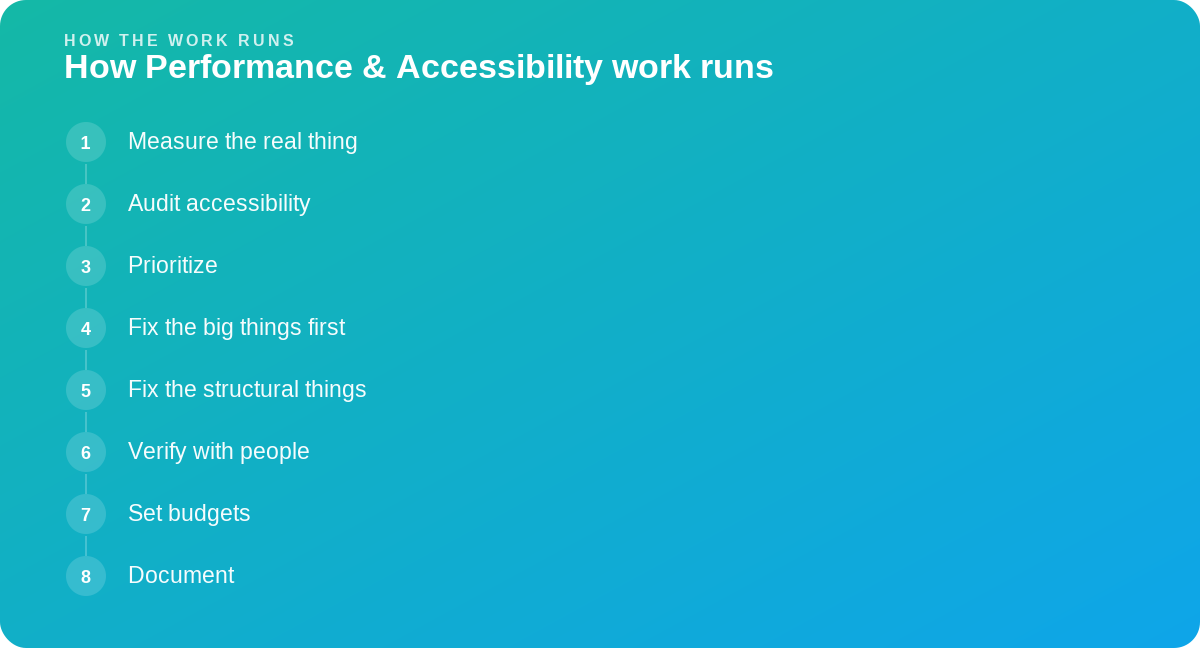
1. Measure the real thing
Field data first — what real visitors on real devices actually experienced — then lab tests to explain it. A lab score on a fast laptop is a hypothesis, not a measurement.
2. Audit accessibility
Automated testing catches perhaps a third of issues. The rest needs a keyboard, a screen reader and a person. Both passes, in that order.
3. Prioritize
Findings ranked by how many people are affected and how hard it is to fix. An audit tool's severity rating is not a priority list.
4. Fix the big things first
Images, fonts and third-party scripts are the usual top three for speed. Focus states, labels and headings are the usual top three for accessibility.
5. Fix the structural things
Semantic markup, heading order, landmark regions, focus management. Slower, and it is what actually makes a site usable rather than compliant.
6. Verify with people
Assistive technology testing with someone who uses it daily. Nothing else tells you whether the site is genuinely usable.
7. Set budgets
Performance budgets and accessibility checks in the build pipeline, so the next release cannot quietly undo the work.
8. Document
An accessibility statement that honestly describes the current state, known gaps and how to report a problem.
Where does Performance & Accessibility fit? Usually somewhere in the middle of that sequence, and it inherits every decision made before it. That's the argument for settling scope early: a change at stage two is a conversation, and the same change at stage seven is a rebuild.
What to send us
A brief doesn't need to be long. It needs to be specific about a handful of things, and vague about everything else is fine.
What belongs in the brief
- Who it is for
- The audience, in one sentence, in your own words. Not a persona document — a sentence.
- What it has to do
- The action you want someone to take, or the decision you want them to be able to make.
- Where it will live
- Every placement, at every size. This is the single most common omission, and it is the one that causes reshoots and recrops.
- What already exists
- Brand guidelines, prior work, the files nobody likes. Especially the files nobody likes, and why.
- What is fixed
- Colors, typefaces, legal copy, platform requirements, anything that is not up for discussion.
- What good looks like
- Two or three references, plus one example of something you actively dislike. The dislike is more useful than the likes.
- The real deadline
- The date something has to be live, not the date you would like to see a draft. Say which one you are giving.
- Who signs off
- One name. A brief with four approvers and no decider is a brief that will cost you two extra revision rounds.
Two of those deserve emphasis, because they're the ones that cost money when they're missing. Where it will live — every placement, at every size — is the omission that causes reshoots and recrops. And who signs off is the one that quietly adds revision rounds: a project with four approvers and no decider will always cost more than one with a single name on it.
Specific to Performance & Accessibility
On top of the general brief, this particular job benefits from you having settled the following before anyone starts:
- Core Web Vitals judged on field data from real users, not on a lab score from a fast machine
- LCP under 2.5 seconds, INP under 200 milliseconds, CLS under 0.1, at the 75th percentile
- Every interactive element operable by keyboard, with a focus state you can actually see
- Tested with a real screen reader, by someone who knows how to use one
If you've got files ready now, you can send them straight over — they go to private storage rather than to an inbox, and nothing is public. If you'd rather see the standard before committing to anything, try us on a couple of files first. No card, no commitment, and if it's not what you need you've lost nothing but an afternoon.
How to check what comes back
Reviewing work is a skill, and nobody is taught it. A good review saves a revision round; a vague one causes two.
- Check it where it will live
- Approve a web asset in a browser, a print asset on paper, an audio mix on a phone speaker. Approving a deliverable in the tool that made it is how problems reach the public.
- Check the edges, not the middle
- The middle is almost always fine. Look at the corners, the smallest size, the longest string, the darkest area, the last ten seconds.
- Check one thing at a time
- Color, then type, then spacing, then content. A review that tries to see everything at once sees the loudest thing and misses the rest.
- Collect feedback before you send it
- One consolidated list beats six emails. Contradictions inside your own organization are cheaper to resolve on your side than on ours.
- Be specific about what is wrong
- "Make it pop" costs a revision round. "The headline is hard to read against the sky, can we darken the area behind it" costs ten minutes.
- Say what is right too
- Not out of politeness. If you only flag problems, the next round can lose the thing you liked without anyone knowing it mattered.
The bar we hold ourselves to
So you know what you're measuring against, here's what gets checked on our side before anything reaches you. None of it is optional, and none of it is charged as an extra.
- Core Web Vitals judged on field data from real users, not on a lab score from a fast machine
- LCP under 2.5 seconds, INP under 200 milliseconds, CLS under 0.1, at the 75th percentile
- Every interactive element operable by keyboard, with a focus state you can actually see
- Tested with a real screen reader, by someone who knows how to use one
- Contrast verified at 4.5:1 for body text and 3:1 for large text and interface components
- An accessibility statement that says what is not yet fixed, rather than claiming everything is
Red flags specific to Performance & Accessibility
If you see any of these in what comes back, say so. They're all fixable, and they're all cheaper to fix now than after it's published.
- A site that scored 98 in the lab and felt slow
- An accessibility overlay that made things worse
- Focus states removed for aesthetics
You can see how we present finished work — including the before and after — in the portfolio. Anything marked as a sample is our own demonstration piece rather than a client project, and it says so on the item.
In house, freelance, studio, or a model?
This is the decision underneath "how much does it cost", and it deserves a straight answer rather than a pitch. There are four ways to get performance & accessibility work done, and we're only the right choice for some of them.

Keep it in house
Someone on your payroll does it.
What's good about it: Fastest feedback loop there is, deepest product knowledge, no briefing overhead for small changes.
What's not: You are buying a person, not a job: their vacation, their sick days, their ceiling, and the software. It stops making sense the moment demand is spiky, because you pay for the peak all year.
Hire a freelancer
One specialist, engaged directly.
What's good about it: Cheapest way to buy real expertise, and you get the actual person who does the work.
What's not: One person is one point of failure. No cover, limited throughput, and if they move on mid-project you inherit their files and their conventions.
Use a studio
A team with a process, a review layer and cover.
What's good about it: Handles volume and variety, carries the QC step, and does not disappear when one person is sick.
What's not: More expensive per hour than a freelancer, and you are one client among several. Worth it when consistency across a lot of output matters more than the lowest rate.
Use a model
Generative or automated tooling, with or without a person checking.
What's good about it: Genuinely fast and genuinely cheap on the parts it is good at, and it does not get tired on page four hundred.
What's not: It is confidently wrong in ways that are hard to spot at a glance, and the parts it fails at are the ones a client notices: hands, text, counts, edges, continuity. Nothing should ship without a person having looked at it, which is why our AI work is priced with the review included rather than as a discount.
The short version: if the work is constant and central to what you do, hire. If it's spiky, or it needs a range of skills you can't justify employing, use a studio. If it's one specialist thing and you've found the right specialist, use them. We'd rather tell you that up front than take on a job we're the wrong shape for.
Working with a studio you'll never meet
Most performance & accessibility work now happens between people in different places and often different time zones. That's fine — it's been fine for years — but it rewards a few habits and punishes a few others.
- Overlap, not coverage
- What matters is not whether a supplier is awake at 2pm Eastern, but whether there is a predictable window when you can both talk. Ask for the window and put it in the calendar.
- Batch your feedback
- Across a time difference, three rounds of one comment cost three days. One round of twelve comments costs one. This is the single biggest lever you have on turnaround.
- Send files once, properly
- A clean handoff with originals, a written brief and named files saves more time than any amount of chasing. Half of all "slow" projects were slow at the start.
- Agree what "urgent" means
- Everyone says urgent. Agree in advance what a rush actually triggers — a different queue, a different price, a different set of hands — so the word keeps its meaning.
- Keep one thread
- A decision made in a direct message is a decision nobody else on either side can find. One channel, one thread per job.
Our hours overlap the US business day, and we'd rather agree a standing window with you than promise round-the-clock availability nobody can actually sustain. If you want to talk it through before committing to anything, get in touch — there's no pitch deck and nobody will chase you.
The US rules worth knowing
This isn't legal advice and we're not lawyers. It's a list of the American rules that come up often enough in this kind of work that not knowing about them gets expensive. If any of it applies to you, it's worth twenty minutes with someone who is a lawyer.
ADA Title III
US courts have widely applied Title III of the Americans with Disabilities Act to commercial websites, and web accessibility lawsuits and demand letters are common. WCAG 2.1 AA is the de facto benchmark used in settlements and consent decrees.
Section 508
Federal agencies and organizations selling to them must meet Section 508, which adopts WCAG as its technical standard. If you sell to the federal government, an accessibility conformance report is part of procurement, not an afterthought.
State and sector rules
Several states have their own accessibility requirements for public entities, and sectors such as education, healthcare and finance carry additional obligations. The common denominator across all of them is still WCAG 2.1 AA.
And the general commercial stuff
Whatever the discipline, buying professional services in the United States raises the same handful of questions. These are the ones clients ask us most.
- Contracts and statements of work
- A statement of work that names the deliverables, the number of revision rounds, the ownership terms and the payment schedule is worth the hour it takes to read. Most disputes in this industry are not about quality; they are about two people having understood "done" differently.
- Ownership and work made for hire
- Under US copyright law, work created by an independent contractor generally belongs to the contractor unless there is a written assignment or it falls into one of the narrow statutory work-made-for-hire categories. That surprises a lot of buyers. Get the assignment in writing; any studio that hesitates is telling you something useful.
- Paying an outside supplier
- A US business paying a US contractor normally collects a Form W-9 and may need to file a 1099-NEC; paying a non-US supplier usually means a W-8BEN or W-8BEN-E instead. Your accountant will want these before the first invoice, not after the last one.
- Sales tax on services
- Whether a creative or digital service is taxable varies by state, and several states tax some digital deliverables and not others. It is worth one question to your accountant before a large engagement rather than one letter from a state revenue department after it.
- Advertising claims
- The Federal Trade Commission holds advertisers responsible for claims made in their marketing, including claims made in images. A retouched product photo that no longer represents the product is an advertising problem before it is a design one, and the liability sits with the advertiser rather than the retoucher.
- Accessibility
- Title III of the Americans with Disabilities Act has been read by US courts to cover websites in many circumstances, and federal agencies and their contractors are bound by Section 508, which points at WCAG. Accessibility is cheaper designed in than litigated out.
Our own terms are published rather than sent on request: you can read the terms and conditions, the payment terms, the refund policy and the confidentiality and NDA position before you talk to anybody. If something in them doesn't work for you, say so early — most of it is negotiable and all of it is better settled before the work than after it.
Questions to ask anyone quoting for this
Including us. If a supplier gets cagey about any of these, that's the answer to the question you were actually asking.
- Who is actually doing the work?
- Ask whether it stays with the person you are talking to, moves to a team, or gets subcontracted. None of those is wrong. Not knowing is.
- What exactly is a revision?
- Ask what counts as a revision versus a new brief, and how many are included. This is the single most common source of a bill you did not expect.
- Who owns the output?
- Get it in writing, including the working files. "You own the final" and "you own everything" are very different positions, and the second one costs more for a reason.
- What happens if it is wrong?
- Ask what a redo costs and how fast it happens. A studio with a clear answer has had the conversation before.
- Can I see work like mine?
- Not a showreel — work in your category, at your volume, with the constraints you have. A beautiful portfolio in another category proves taste, not fit.
- How do you handle my files?
- Where they are stored, who can reach them, how long they are kept, and what happens at the end. If you are sending anything unreleased, get this in the contract.
- What do you need from me?
- A supplier who cannot answer this has not thought about your side of the job, and you will discover that at the deadline.
One more, and it's the one people are most embarrassed to ask: what would make you turn this job down? A studio that has never turned work away is a studio that takes everything, and that tells you something about how carefully it's going to be handled.
The words people will use at you
Every field has vocabulary that gets deployed as a shortcut and lands as a barrier. Here's what the common terms in performance & accessibility actually mean, in plain English. You shouldn't need this to buy the work, but it makes the conversation shorter.
- Field data
- What real visitors experienced, gathered from real sessions. The measurement that counts.
- Lab data
- A synthetic test under controlled conditions. Useful for diagnosis, misleading as a verdict.
- 75th percentile
- The threshold Google uses for Core Web Vitals: three in four visits must meet the target, so the slow quarter cannot be ignored.
- WCAG 2.1 AA
- The accessibility standard most regulations point at, and the practical target for almost every commercial site.
- Screen reader
- Software that reads an interface aloud. What makes semantic markup matter in a way nothing else does.
- Focus state
- The visible indication of which element the keyboard is on. Removing it for aesthetics makes a site unusable by keyboard.
- Landmark
- Structural regions — header, navigation, main, footer — that let assistive technology skip around a page.
- Alt text
- A text alternative for an image. Describes function, not appearance, and is empty for purely decorative images.
- Render-blocking
- Resources that must load before anything appears. Usually fonts and stylesheets, usually fixable.
- Performance budget
- An agreed ceiling on size or timing, enforced in the build so regressions fail the pipeline rather than the user.
There's a fuller reference library if you want to go deeper on any of these, and everything in it is written the same way — plainly, with sources.
Three situations you might recognize
Abstract advice is easy to agree with and hard to use. These are the shapes this kind of problem actually arrives in, and what we'd do about each one.
A site that scored 98 in the lab and felt slow
The lab test ran on a fast connection with a warm cache. Field data showed real users hitting eight seconds because of two third-party tags and an uncompressed hero image. Neither showed up in the score everyone had been reporting.
An accessibility overlay that made things worse
A widget promising one-line compliance was added instead of fixing the markup. It broke keyboard navigation and did not address the underlying issues. Removing it and fixing the markup took longer and actually worked.
Focus states removed for aesthetics
A CSS reset had removed every focus outline. For keyboard users the site became an invisible maze. Restoring a designed, visible focus state took an afternoon.
None of those needed heroics. They needed somebody to look at the right thing early, which is most of what experience buys you in this field.
Everything we have written about Performance & Accessibility
One article per subject, each with the figures, what good looks like, what to avoid and where it all comes from.
- How to Get Largest Contentful Paint Right
- Interaction to Next Paint: The Decisions That Matter
- Cumulative Layout Shift, Done Properly
- How to Get WCAG Conformance Levels Right
- Keyboard Accessibility, Done Properly
- How to Get Screen Reader Compatibility Right
- Color Contrast: The Decisions That Matter
- How to Get Performance Budgets Right
- How to Get Critical Rendering Path Right
- HTTP/2 and HTTP/3, Done Properly
- Content Delivery Networks: What Actually Works
- Real User Monitoring: What Actually Works
- Accessible Forms: The Decisions That Matter
- ARIA: When to Use It and When Not To
- How to Get Server Response Time Right
- JavaScript Performance: What Actually Works
- Accessible Data Tables: What Actually Works
- A Practical Guide to Cognitive Accessibility
- Automated Accessibility Testing: What Actually Works
- A Practical Guide to Image and Font Loading Strategy
- A Practical Guide to Accessibility Statements
- How to Get Back/Forward Cache Right
- Preload and Preconnect: Using Resource Hints Well
- Speculative Loading, Done Properly
- A Practical Guide to Reflow and Zoom
- A Practical Guide to Skip Links and Landmarks
- Accessibility Overlays: Why They Are Not a Fix
- How to Get Transcripts for Audio and Video Right
- Live Captions, Done Properly
- Sign Language for Video: The Decisions That Matter
- Info and Relationships in Markup: The Decisions That Matter
- Meaningful Reading Order: The Decisions That Matter
- A Practical Guide to Sensory Characteristics in Instructions
- How to Get Screen Orientation Support Right
- Input Purpose and Autocomplete: The Decisions That Matter
- Autoplaying Audio Control: What Actually Works
- Images of Text: What Actually Works
- Non-text Contrast for Controls: The Decisions That Matter
- Tooltips and Content on Hover or Focus: What Actually Works
- Keyboard Traps: The Decisions That Matter
- How to Get Single-Key Keyboard Shortcuts Right
- Session Timeouts and Time Limits, Done Properly
- Page Titles for Accessibility, Done Properly
- How to Get Descriptive Link Text Right
- Multiple Ways to Find Pages: The Decisions That Matter
- Headings and Labels, Done Properly
- Pointer Gestures and Alternatives: What Actually Works
- Pointer Cancellation: What Actually Works
- Label in Name for Voice Control, Done Properly
- Motion Actuation, Done Properly
- Dragging Movements, Done Properly
- Page Language and Language of Parts, Done Properly
- How to Get Unexpected Context Changes Right
- Consistent Navigation and Identification: What Actually Works
- Consistent Help: The Decisions That Matter
- A Practical Guide to Error Identification and Suggestions
- Error Prevention for Important Transactions: The Decisions That Matter
- Redundant Entry: The Decisions That Matter
- A Practical Guide to Accessible Names and Roles
- Status Messages and Live Regions: What Actually Works
- How to Get Line Length and Text Presentation Right
- A Practical Guide to ADA Title II Web Accessibility Rule
- A Practical Guide to ADA Title III and Business Websites
- Section 508 for Federal Technology: What Actually Works
- What the European Accessibility Act Means for US Businesses
- A Practical Guide to VPAT and Accessibility Conformance Reports
- PDF Accessibility: What Actually Works
- Mobile App Accessibility: What Actually Works
- Accessible Email: The Decisions That Matter
- First Contentful Paint: What Actually Works
- Total Blocking Time: The Decisions That Matter
- Lab Data Versus Field Data: The Decisions That Matter
- Chrome UX Report: The Decisions That Matter
- PageSpeed Insights, Done Properly
- Long Tasks and the Main Thread, Done Properly
- Web Workers, Done Properly
- Tree Shaking and Bundle Size, Done Properly
- Text Compression with Brotli and Gzip: What Actually Works
- Critical CSS: The Decisions That Matter
- How to Get Lazy Loading Images Right
- Content Visibility and Rendering Work: The Decisions That Matter
- Long Animation Frames: The Decisions That Matter
- Server-Timing Header: What Actually Works
- A Practical Guide to 103 Early Hints
- A Practical Guide to Soft Navigations in Single-Page Apps
- A Practical Guide to Layout Thrashing
- A Practical Guide to Image CDNs
- Redirect Chains and Performance, Done Properly
- A Practical Guide to Excessive DOM Size
- How to Get Unused CSS and JavaScript Right
- A Practical Guide to Fetch Priority
- Video Loading Performance: The Decisions That Matter
- Hydration Cost and Islands, Done Properly
- A Practical Guide to Memory Leaks in Long-Lived Pages
- A Practical Guide to Scroll Performance
- Compositing and GPU Layers: The Decisions That Matter
- Field Debugging with the web-vitals Library: The Decisions That Matter
- A Practical Guide to Lighthouse in Continuous Integration
- A Practical Guide to Accessible Authentication
- A Practical Guide to Focus Appearance
- A Practical Guide to Text Spacing Overrides
- Accessible Maps: The Decisions That Matter
- Accessible Media Players: The Decisions That Matter
- A Practical Guide to Iframe Titles and Embedded Content
- How to Get Accessible SVG Right
- A Practical Guide to Switch Access and Alternative Input
- A Practical Guide to Forced Colors and High Contrast Mode
- Accessibility Remediation Planning, Done Properly
- WCAG 3 and What Comes Next, Done Properly
- Accessible Autocomplete Fields: What Actually Works
- Font Subsetting, Done Properly
- Code Splitting and Dynamic Imports: What Actually Works
- Asset Versioning and Cache Busting: The Decisions That Matter
- A Practical Guide to Infinite Scroll Accessibility
- Service Worker Caching Strategies: The Decisions That Matter
- Edge Caching for Dynamic Pages: What Actually Works
- A Practical Guide to Mobile Screen Reader Testing
- Abbreviations and Jargon in Markup: What Actually Works
- A Practical Guide to Focus Management in Single-Page Apps
- Error Summaries in Forms: What Actually Works
- How to Get Marking Required Fields Right
- Input Masks and Formatting, Done Properly
- A Practical Guide to Accessible File Upload Controls
- A Practical Guide to CAPTCHA Alternatives
- A Practical Guide to Manual Accessibility Test Scripts
- How to Get Accessibility Training for Teams Right
- Performance Regression Alerts: The Decisions That Matter
- How to Get Testing on Slow Networks Right
- Low-End Device Performance: The Decisions That Matter
- Embedded Widgets and Performance, Done Properly
- Focus Order with CSS Layout: The Decisions That Matter
- A Practical Guide to Accessible Rich Text Editors
- A Practical Guide to Accessible Chat Widgets
- How to Get Accessible Navigation Menus Right
- Accessible Accordions and Disclosure: What Actually Works
- How to Get Accessible Carousels Right
- A Practical Guide to Accessible Range Sliders
- A Practical Guide to Accessible Date Pickers
- Accessible Multi-Select Controls: What Actually Works
- A Practical Guide to Accessible Toast Notifications
- How to Get Accessible Breadcrumb Trails Right
- Progress Bars and Steppers, Done Properly
- Healthcare Digital Accessibility, Done Properly
- A Practical Guide to Financial Services Accessibility
- Education Technology Accessibility: What Actually Works
- Air Travel Website Accessibility: The Decisions That Matter
- Self-Service Kiosk Accessibility: What Actually Works
- A Practical Guide to Accessible Recruitment Systems
- Accessible Virtual Events, Done Properly
- Making Performance a Team Habit: What Actually Works
- How to Get Linking Performance to Business Metrics Right
- A Practical Guide to Third-Party Budgets
- A Practical Guide to Accessibility in Vendor Contracts
- How to Get Auditing Image Weight Right
- Auditing Cache Headers: What Actually Works
- Performance for Global Audiences, Done Properly
- Designing for Low Vision: The Decisions That Matter
- Measuring Accessibility Progress: What Actually Works
- Accessibility in Agile Teams: What Actually Works
- A Practical Guide to Testing Accessibility with Real Users
- How to Get Measuring Experience by Device Right
- Accessibility for Small Teams: The Decisions That Matter
- Performance for Content Sites, Done Properly
Work with us on Performance & Accessibility
Tell us what you are working on and we will tell you honestly whether we are the right studio for it — including when we are not. There is no pitch deck and nobody will chase you.
- Try it free — we will do a free technical review of one page, written up, no card and no commitment. It is a better test than any portfolio because it is your material.
- See the prices — published rates and the US market ranges, so you can sanity-check any quote including ours.
- Ask for a fixed price — send the brief and a sample and you get a number rather than a range.
- Look at the work in this discipline specifically.
- Ask a question. That is allowed too.










