Marketplace Integration: The Decisions That Matter
Learn the ten decisions behind successful marketplace integration: margin modeling, inventory sync, listing data, differentiation and when to get help.
 MediaScaleUp Editorial Team

Marketplace integration means selling through third-party marketplaces alongside your own online store, and building the catalog, inventory, order and data connections that make that possible without chaos. On paper it looks like a distribution decision: list the products somewhere with more shoppers and collect the extra orders. In practice it is an operations and systems decision, because every new channel needs its own product data, its own stock position, its own fee structure and its own rules, and all of them have to stay consistent with the store you already run.
This guide is for business owners, e-commerce managers and in-house teams weighing whether and how to add marketplaces, and for the developers and operations people who will have to make it work. Marketplaces bring volume, but they also take control: of how your prices are presented, of the relationship with the customer, and of much of the data that relationship produces. The operational complexity is almost always underestimated, and most of the painful failures, from overselling to rejected listings to a direct channel quietly hollowed out, trace back to a handful of decisions made, or skipped, before the first listing went live.
The format below is a checklist. The master list comes first, so you can see the whole job at once. Each section after it takes one item, explains why it matters, and describes how to do it well, with the trade-offs and the numbers to look at.
The Marketplace Integration Checklist
Treat this list as a gate. If you cannot tick an item, you have found the work that needs doing before launch, not after the first oversold weekend.
- Each target marketplace has a written reason to exist in the channel plan: which customers it reaches, which products go there, and what it must earn.
- Contribution margin has been modeled per SKU after commission, fulfillment, advertising, returns and payment costs, and loss-making SKUs are excluded.
- One system is the source of truth for available inventory, and every channel reads from it rather than keeping its own count.
- Product content, images and attributes have been mapped to each marketplace's specification, field by field, before submission.
- Orders, cancellations, shipping confirmations and returns flow back into the systems your team already uses.
- Your own store offers something the marketplace listing does not, and search engines can tell which page is the original.
- You have decided, explicitly, which controls you are willing to give up: price presentation, customer contact and data.
- Listings are monitored for unauthorized changes to content, pricing and seller attribution, and account health metrics have an owner.
- The integration architecture (native connector, middleware or custom) fits your SKU count, order volume and existing systems.
- There is an agreed trigger for bringing in help: overselling, repeated listing rejections or measurable cannibalization of direct sales.
The sections that follow work through these items in order. Several are interdependent: the margin model decides which SKUs you list, which shapes the data work, which shapes the architecture. It is worth reading the whole list before committing to any single piece.
Give Every Marketplace a Job Before You List on It
The first checklist item is strategic, and it is the one most often skipped. Teams add a marketplace because a competitor is there, because a platform representative made a persuasive call, or because "we should be everywhere." None of those is a reason that tells you what success looks like, which products to list, or when to stop.
Write the channel brief
For each marketplace, write a short brief that answers five questions. Who shops there that does not already find your store? Which part of your catalog suits that audience and the marketplace's format? What role does the channel play: customer acquisition, clearance of aged stock, reach into a new country, or pure incremental revenue? What contribution margin must it produce to be worth the operational load? And what would make you pull back: a margin floor, a return rate ceiling, or evidence that it is simply moving existing customers from your store to someone else's checkout?
That last question matters more than it seems. Marketplaces are good at capturing demand that already exists, including demand for your brand. If shoppers who would have searched for you and bought on your site instead find you on a marketplace, you have paid a commission for a sale you already had. The channel brief should say how you will tell the difference, for example by comparing branded search traffic and direct orders before and after launch.
Start narrow
A sensible first phase lists a deliberately limited range: products with stable supply, healthy margins, simple variants and low return rates. Complex configurable products, fragile items, and anything with frequent price changes are better added once the pipeline is proven. Starting narrow also limits the damage if your inventory sync or content mapping has a flaw you have not found yet.
If you are still building the direct store itself, sequence matters. Getting the fundamentals of your own site right first, as covered in our guide to the decisions behind launching an online store, gives you a clean catalog and a stable stock system to integrate from, rather than trying to fix both at once.
Tip: Put the exit criteria in the channel brief on day one. It is much easier to agree that "we pause this marketplace if contribution margin stays below our floor for two consecutive quarters" before launch than to argue about it once the channel has revenue, a team and internal champions.
Model the Margin After Fees, SKU by SKU
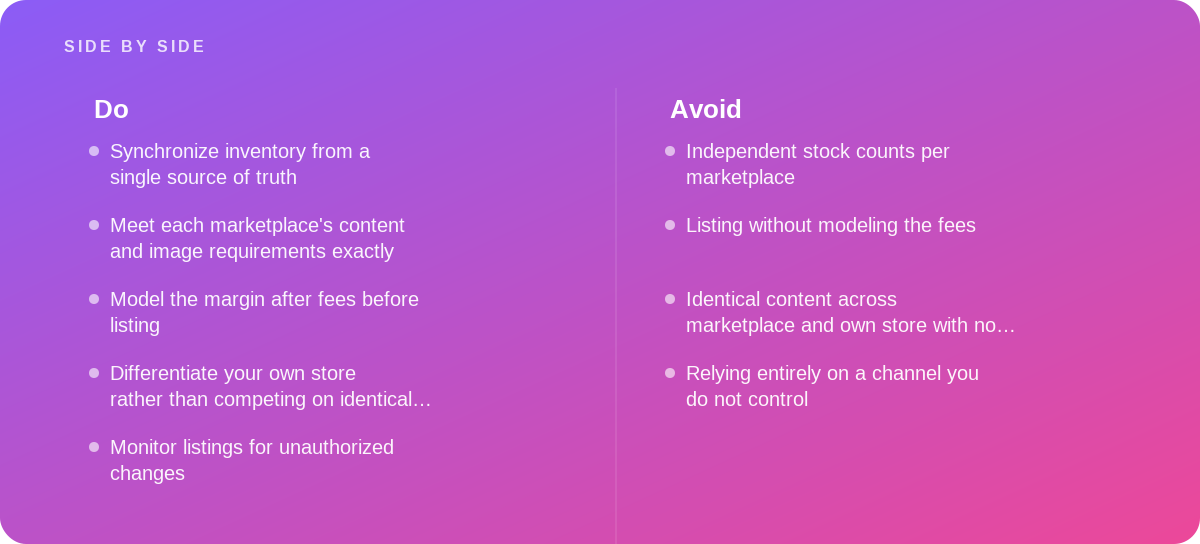
Commission structures vary by category, and they are only one of the costs that stand between the marketplace's selling price and your profit. Listing without modeling the fees is one of the classic mistakes, because the top-line revenue looks healthy while the per-unit contribution may be thin or negative, especially on lower-priced items where fixed per-order fees take a larger share.
What goes into the model
- Referral or commission fee. Usually a percentage of the item price, sometimes including shipping charged to the buyer, and often with a minimum per item. The rate depends on category, so map each SKU to the category it will actually be listed in.
- Fulfillment and shipping. Either the marketplace's fulfillment service fees, which typically depend on size and weight, or your own pick, pack and postage cost for seller-fulfilled orders.
- Advertising. Many marketplaces have become advertising businesses as much as retail ones, and visibility for new listings often depends on paid placement. Model advertising as a percentage of sales you expect to spend, not zero.
- Returns. Return rates and policies differ by marketplace, and some impose return terms more generous than your own. Include an allowance for the cost of returned items that cannot be resold at full price.
- Subscription and account fees. Monthly seller plans and optional services are fixed costs; spread them across expected units.
- Currency and payment costs. For cross-border marketplaces, conversion and payout fees reduce what arrives in your account.
- Cost of goods and packaging. The same as your own store, unless marketplace packaging requirements add material or labeling costs.
A worked example
The following is an illustrative example, not a quote of any marketplace's actual rate card. The percentages and fees are assumptions chosen to show the method; replace them with the current published rates for your category before making a decision. The product is a mid-priced home goods item that costs $24.00 to buy in, sold at $60.00 both on your own store and on a marketplace.
| Line item (illustrative) | Marketplace, seller-fulfilled | Own store |
|---|---|---|
| Selling price | $60.00 | $60.00 |
| Commission (assumed 15%) | -$9.00 | $0.00 |
| Payment processing (assumed 3%, own store only) | $0.00 | -$1.80 |
| Pick, pack and postage | -$6.50 | -$7.00 |
| Advertising (assumed 8% of price) | -$4.80 | $0.00 |
| Customer acquisition cost per order (assumed) | $0.00 | -$9.00 |
| Returns allowance (assumed 4% of price) | -$2.40 | -$2.40 |
| Cost of goods | -$24.00 | -$24.00 |
| Contribution per unit | $13.30 (22.2%) | $15.80 (26.3%) |
On these assumptions the marketplace sale is worth $2.50 less per unit than a direct sale, but it is still clearly profitable, and if the marketplace reaches customers your own acquisition spend never would, the extra volume can justify the lower unit contribution. Now run the same method on a lower-priced product: a $35.00 item costing $14.00. Commission at 15% is $5.25, postage stays at $6.50 because shipping cost does not shrink with price, advertising at 8% is $2.80, and returns at 4% is $1.40. Contribution falls to $5.05, or 14.4 percent. Add a marketplace-imposed free return on a meaningful share of orders and that item can go negative.
The lesson generalizes. Percentage fees scale with price, but fixed per-order costs do not, so low-priced items are where marketplace margins collapse first. The model also tells you where to intervene: bundling two low-priced items into one listing, setting a slightly higher marketplace price where the marketplace's rules allow it, or keeping certain SKUs direct-only.
Keep the model alive
Fee schedules change, advertising costs drift upward as competition for placement grows, and return rates only become visible after a few months of sales. Rebuild the margin model from actual settlement reports each quarter, compare it with the forecast, and remove SKUs that fall below the floor you set in the channel brief.
Tip: Build the margin model from the marketplace's settlement or payout reports, not from order values. Settlement data shows every deduction the marketplace actually made, including adjustments and chargebacks that never appear on the order itself.
Run Inventory From a Single Source of Truth
Inventory must be synchronized across every channel, and the most damaging mistake in marketplace integration is keeping independent stock counts per marketplace. It feels simple at first: allocate 20 units to the marketplace, 50 to your own store, and adjust by hand. It fails the first time a promotion drives an unexpected spike, a return is restocked in one system but not the other, or someone edits a quantity directly in a marketplace seller portal. The result is overselling, cancelled orders and, on most marketplaces, a hit to your seller performance metrics.
Choose the master system
One system must hold the authoritative available-to-sell quantity for each SKU. For smaller operations that is often the e-commerce platform itself. For businesses with warehouses, wholesale accounts or retail stores it is usually an ERP, a warehouse management system or an inventory management tool. What matters is that it is only one, and that every channel, including your own store, reads from it and writes sales back to it. If you already run an ERP, the patterns in our guide to ERP integration for online stores apply directly, because the marketplace simply becomes another sales channel feeding the same stock ledger.
Understand sync latency and set buffers
No sync is instant. Some connectors push stock changes in near real time using event notifications; others poll on a schedule, every five, fifteen or sixty minutes. During that window a SKU can sell on two channels at once. The arithmetic of exposure is simple: if a SKU sells about eight units an hour across all channels and your slowest channel updates every fifteen minutes, roughly two units can sell in a window before that channel knows. For a SKU with 200 units in stock that does not matter. For the last three units it matters a great deal.
The standard answer is a buffer, sometimes called safety stock or a channel reserve: when available quantity drops below a threshold, stop offering the item on the slowest or most penalizing channel first. Marketplaces that penalize cancellations heavily should get the most conservative buffer. Your own store, where you control the customer message and can offer a backorder, can run closer to zero.
Prefer events to polling where you can
Event-driven sync, where each sale, return or adjustment triggers an immediate update, narrows the exposure window from minutes to seconds. Most modern commerce platforms and marketplace APIs support some form of it. Our practical guide to webhooks for store integrations covers the reliability details that matter here: retries, idempotency, ordering and what to do when a notification is missed. A sensible design uses events for speed and a scheduled full reconciliation, typically nightly, to catch anything events missed.
Handle the edge cases explicitly
- Bundles and kits: stock for a bundle must be calculated from its component stock, not held as a separate number.
- Returns: decide who inspects returned items and when they re-enter available stock, and make sure that happens in the master system, not in a marketplace portal.
- Marketplace-fulfilled stock: inventory sitting in a marketplace's own warehouse is not available to your other channels. Treat it as a separate location in the master system.
- Pre-orders and backorders: most marketplaces handle these differently from your own store, and some do not allow them at all.
Build Product Data to Each Marketplace's Specification
Each marketplace specifies its own content, imagery and data format, and the requirement is to meet those specifications exactly. "Close enough" produces rejected listings, suppressed listings that are live but invisible in search, or listings attached to the wrong product page. Marketplace listing rejection is one of the clearest signals that an integration needs help, and it is almost always a data problem rather than a technical one.
Map attributes field by field
Marketplaces use category-specific attribute schemas: a clothing listing needs size, color, material and fit attributes drawn from the marketplace's own allowed values, while an electronics listing needs voltage, connectivity and compatibility fields. Your store's product data rarely matches those schemas directly. The job is to build a mapping for each category: which of your fields feeds which marketplace field, how your values translate into the marketplace's controlled vocabulary (your "Navy" might need to become "Blue" with a separate shade field), and what to do when you have no value for a required attribute.
That mapping is where a product information management tool, or at least a disciplined structured catalog, earns its keep. Keep product data rich and structured in one place, then transform it per channel, rather than editing marketplace listings by hand.
Identifiers and variants
Most large marketplaces match listings to a shared catalog using product identifiers such as GTINs. Get the identifier right and your offer attaches to the correct product; get it wrong and you may end up on someone else's listing or create a duplicate. Variant structure matters just as much: marketplaces define which attributes can vary within a parent listing, and a size-and-color matrix that works on your store may need restructuring to fit.
Images
Image rules typically cover minimum pixel dimensions, background color for the main image, whether text, logos or watermarks are allowed, how much of the frame the product must fill, and file format. These rules exist so that search results look consistent, and automated checks enforce them. Build channel-specific image renditions from high-resolution masters rather than reusing your lifestyle shots everywhere. A main image on a pure white background with the product filling most of the frame, plus lifestyle, detail and scale images in the secondary positions, satisfies most major marketplaces and still leaves your own store free to use more editorial photography.
Titles and descriptions
Marketplaces often prescribe title structure, for example brand, product type, key attribute, size, and they limit length and forbid promotional language. Descriptions may be plain text only, with limited formatting. Write these to each marketplace's rules deliberately, which also gives you the chance to differentiate them from your own product pages, a point the next sections return to.
| Data element | Typical marketplace requirement | Common cause of rejection | Fix at the source |
|---|---|---|---|
| Product identifiers | Valid GTIN or approved exemption | Missing, reused or invalid codes | Store verified identifiers in the master catalog |
| Category attributes | Required fields from a controlled list | Free-text values that do not match allowed options | Maintain a value mapping table per category |
| Main image | Specified background, size and framing | Lifestyle shot, text overlay or low resolution | Produce channel-specific renditions from masters |
| Title | Prescribed structure and length limit | Promotional words, excessive length, keyword lists | Generate titles from structured fields with a template |
| Variants | Allowed variation themes per category | Unsupported variant combinations | Restructure parent-child relationships per channel |
| Compliance data | Safety, labeling or restricted-category documents | Missing certificates or warnings | Attach compliance records to the product, not the listing |
If you are working in a regulated category, the listing rules get stricter. Food, for example, raises labeling, allergen and shelf-life questions that apply well before any marketplace rule does, and marketplaces often layer their own category approvals on top of legal requirements.
Connect Orders, Fulfillment and Returns Back to Your Operation
Stock sync gets most of the attention, but orders are where the customer experience is made or broken. Every marketplace order has to arrive in the system your warehouse or fulfillment partner works from, be picked and shipped within the marketplace's handling time, have tracking pushed back to the marketplace, and be handled correctly if it is cancelled or returned. Each of those steps is a data flow that can fail.
The order lifecycle to map
- Order import. The marketplace order is pulled or pushed into your order management system with the marketplace's order ID preserved, so every later update can be matched back to it.
- Acknowledgment. Some marketplaces expect you to confirm the order within a set time; failing to acknowledge can trigger automatic cancellation.
- Stock decrement. The sale reduces available stock in the master system immediately, which then propagates to every other channel.
- Fulfillment. Pick, pack and ship using marketplace-compliant packaging and, where required, the marketplace's approved carriers or shipping labels.
- Shipment confirmation. Carrier and tracking number go back to the marketplace promptly, because late or invalid tracking counts against seller performance.
- Cancellations and refunds. Cancellations initiated on either side must update the order, release stock and reconcile the refund.
- Returns. Return authorizations, receipt, inspection and restocking or write-off all need to be recorded against the original order.
- Settlement reconciliation. Marketplace payouts, net of fees, are matched to orders in your accounting system so finance can see true channel margin.
Customer service ownership
Marketplace buyers usually contact sellers through the marketplace's own messaging system, often with response time targets. Decide who monitors those inboxes and whether they are routed into your help desk. Also decide how your team identifies a marketplace customer when they call or email directly, because the marketplace may have masked their email address.
Payment is typically the marketplace's responsibility on marketplace orders, which simplifies one part of the stack but also means your own checkout choices, from wallets to installment options, do not carry over. If you are comparing the economics of the two paths, it helps to understand your direct costs too; the payment integration choices on your own site determine them.
Differentiate Your Own Store From Your Marketplace Listings
Marketplace listings compete with your own pages. When the same product, with the same title, the same description and the same images, appears on your store and on one or more marketplaces, you have created duplicate content, and the marketplace page, with its much larger domain and link profile, will often outrank yours in organic search for your own product names. Identical content across marketplace and own store with no differentiation is listed as a mistake to avoid for exactly this reason: it hands the marketplace your search traffic as well as your sale.
Differentiate the content
Your own product pages should be the richest version of the product. Write original descriptions that go beyond what marketplace formats allow: usage guidance, comparisons, sizing advice, care instructions, the story behind the product, reviews you collect directly and answers to real customer questions. Use the marketplace listing for the concise, structured, rule-compliant version. The two will naturally diverge if you author marketplace titles and bullets from structured fields and write your own pages as editorial content.
Make sure your own pages are also machine-readable. Adding product structured data, as described in Google Search Central's documentation on product structured data, helps search engines understand price, availability and review information on your pages and makes them eligible for richer search results, which is one of the few ways to compete visibly with a marketplace listing on the same results page.
Differentiate the offer
Content differentiation protects search visibility; offer differentiation protects the direct relationship. Common levers include exclusive products, colorways or bundles that are only available direct; a loyalty program or subscription that marketplaces cannot replicate; better warranty or service terms; free engraving, personalization or gift wrapping; and early access to new releases. Be careful with price differences: some marketplaces monitor external prices and may reduce visibility for listings priced higher than elsewhere, so read the terms before you use price as the differentiator.
A subscription or replenishment offer is often the strongest lever, because it turns a single purchase into a relationship the marketplace does not own. Our guide to subscription and recurring billing covers how to build one without creating a new set of operational problems.
Watch for cannibalization
Cannibalization is when marketplace sales replace direct sales rather than adding to them. Signs include falling branded search traffic to your site, a decline in direct orders from returning customers after the marketplace launch, and marketplace sales concentrated in your best-known products rather than spread across the range. Track these from before launch so you have a baseline. If marketplace sales are cannibalizing direct sales, that is one of the clear triggers for revisiting the channel plan.
Tip: Record a baseline for branded search clicks, direct revenue and returning-customer order share for at least a full quarter before the first marketplace launch. Without it, you cannot tell growth from substitution.
Decide What Control You Are Willing to Give Up
This is the key trade-off of marketplace integration, and it deserves to be made explicitly rather than discovered. A marketplace gives you access to its shoppers on its terms. It decides how your price is presented next to competitors, often in a buy box or a sorted grid. It frequently retains the customer data and controls or restricts direct communication with buyers. It sets return policies, performance standards and fee changes. And it can suspend or restrict your account.
Pros
- Access to a large audience that is already searching and ready to buy.
- Established buyer trust in the marketplace's checkout, delivery promises and dispute handling.
- Optional fulfillment services that offload storage, picking and delivery.
- A practical route into new countries without building local infrastructure first.
- Useful for testing demand for new products or clearing aged stock.
Cons
- Commissions, advertising and service fees that reduce unit contribution.
- Customer data and the ongoing relationship often stay with the marketplace.
- Price is presented side by side with competitors, pushing toward price competition.
- Rules, fees and ranking can change, and your account can be restricted.
- Listings can outrank your own pages and draw demand away from your store.
Do not rely entirely on a channel you do not control
Relying entirely on a channel you do not control is the strategic version of every operational mistake in this guide. A business that makes most of its revenue on one marketplace carries concentration risk: a policy change, a fee increase, a new competitor in the buy box or an account suspension can remove a large share of revenue overnight. Setting a ceiling on the share of revenue any single third-party channel may represent, and investing in the direct channel even when marketplaces are growing faster, is prudent risk management rather than conservatism.
The same logic applies to other channels you do not own, including social platforms; the considerations in our guide to the decisions behind social commerce overlap heavily with those here.
Know your rights as a business user
In the European Union, the platform-to-business regulation sets rules on how online intermediation services, including marketplaces, treat the businesses that sell through them. The European Commission's material on the platform-to-business rules explains the principles: clear and accessible terms and conditions, advance notice of changes to those terms, transparency about the main parameters that determine ranking, a statement of reasons when a seller is restricted or suspended, and access to internal complaint handling. If you sell to EU customers through marketplaces, read it; it tells you what you can expect and what to ask for when something goes wrong. For marketplaces selling across borders more broadly, pricing, tax and currency questions come up quickly, and our guide to multi-currency and cross-border selling covers them.
Monitor Listings and Account Health Continuously
A marketplace listing is not a page you publish and own. On shared-catalog marketplaces, multiple sellers can contribute data to the same product detail page, and the marketplace itself may alter titles, images or categories based on its own algorithms or other sellers' submissions. Unauthorized resellers may appear on your listings, sometimes with grey-market or counterfeit stock. Monitoring listings for unauthorized changes is part of the good-practice baseline, not an optional extra.
What to monitor
- Content drift: title, bullets, description, images and category compared against the version you submitted.
- Seller attribution: who else is offering your products, and who holds the buy box or featured offer.
- Price and availability: whether your offer is live, suppressed or displaced, and at what price.
- Reviews and questions: product problems often surface here before they reach your support team.
- Performance metrics: order defect rates, late shipment rates, cancellation rates and response times, which on most marketplaces determine whether you keep selling privileges.
How to monitor
For a small catalog, a weekly manual review of top SKUs against a stored reference version is workable. Beyond a few hundred SKUs you need automation: either the monitoring features of your integration tool, a dedicated listing monitoring service, or scheduled scripts that pull listing data through marketplace APIs and flag differences. Where marketplaces offer brand registry or brand protection programs, enrolling gives you more control over content and more effective routes to remove infringing sellers.
Account health deserves its own owner and its own dashboard. Performance thresholds are enforced automatically, and the consequences of breaching them range from lost visibility to suspension. We cover the metrics, the common causes of deterioration and how to structure an appeal in our guide to marketplace account health.
Choose an Integration Architecture That Fits Your Scale
With the business decisions made, the technical question is how to connect your systems to each marketplace. There are three broad patterns, and the right one depends on SKU count, order volume, number of marketplaces, and how complex your existing back office is.
Native connectors and sales channel apps
Many e-commerce platforms offer marketplace connections as built-in or app-based sales channels. Shopify, for example, lets you connect marketplaces as sales channels and choose which products are available on each; its Help Center documentation on sales channels explains how product availability, inventory and orders are handled per channel. Native connectors are the fastest way to start and are often sufficient for a single marketplace with a modest catalog. Their limits show up in attribute mapping flexibility, handling of complex variants, and support for multiple warehouses.
Multichannel middleware
Multichannel listing and inventory tools sit between your store or ERP and several marketplaces. They centralize listing templates, attribute mappings, stock buffers and order import. They suit businesses selling on three or more marketplaces, or with catalogs large enough that per-channel manual work becomes unmanageable. The trade-offs are subscription cost, which often scales with order volume, and dependence on the vendor's roadmap for new marketplace features.
Custom integration
A custom integration talks directly to marketplace APIs from your own systems or a dedicated integration service. It makes sense when you have unusual business logic, a legacy back office that off-the-shelf tools cannot connect to, very high volumes, or a need for tight control over data. It is the most expensive option to build and maintain, because marketplace APIs change and you own every update. If your core systems are older, the approaches in our guide to legacy system integration apply, and a middleware layer between old systems and marketplace APIs is often safer than connecting them directly.
| Factor | Native connector | Multichannel middleware | Custom integration |
|---|---|---|---|
| Time to first listing | Days | Weeks | Weeks to months |
| Number of marketplaces | One or two | Several | Any, each built separately |
| Attribute mapping flexibility | Limited | Good | Complete |
| Multi-warehouse inventory | Basic | Usually supported | As designed |
| Ongoing maintenance | Platform or app vendor | Middleware vendor | Your team or partner |
| Cost profile | Low, often usage-based | Subscription scaling with volume | Build cost plus maintenance |
Whichever pattern you choose, keep the same principles: one source of truth for stock and product data, event-driven updates with scheduled reconciliation, logging of every sync so you can trace a problem, and alerting when a sync fails rather than discovering it through an oversold order.
A note on inventory you do not hold: if some of your catalog ships directly from suppliers, stock accuracy depends on their feeds as well as yours. The specific risks of that model on marketplaces, which often have strict handling time and seller-of-record rules, deserve their own review before any supplier-shipped SKU goes live.
Know When the Integration Needs Outside Help
Three signals indicate that a marketplace integration has outgrown the team's current approach. None of them fixes itself with more manual effort.
- Overselling across channels. If orders are being cancelled because stock was sold twice, the inventory architecture is the problem: independent counts, slow polling, missing buffers or returns not flowing back to the master system. Every oversell damages seller metrics and customer trust, and the cost compounds.
- Marketplace listings being rejected or suppressed. Repeated rejections mean the product data model does not match the marketplace's specifications. Fixing individual listings by hand treats symptoms; the fix is in the attribute mapping and the source catalog.
- Marketplace sales cannibalizing direct sales. If branded search and direct orders fall as marketplace sales rise, the channel strategy and differentiation work need revisiting, which is as much a content and positioning job as a technical one.
Good outside help starts with an audit rather than a tool recommendation: how stock flows today, where product data lives and how it is transformed, how orders and returns move, and what the margin model says about each channel. From that, the decision between tightening the current setup, adopting middleware or building a custom integration becomes a matter of evidence. If you want a partner for that work, our marketplace integration service is built around exactly that sequence: audit, data model, sync architecture, then channel launch.
A phased rollout that limits risk
Whether you do it in house or with a partner, a phased plan keeps problems small. Phase one lists a narrow, high-margin range on a single marketplace with conservative stock buffers and daily manual checks. Phase two widens the range once overselling and rejection rates are at or near zero and the margin model has been checked against real settlement data. Phase three adds further marketplaces using the same data model and inventory architecture, which is when the investment in a clean source of truth pays back, because each new channel becomes a mapping exercise rather than a rebuild.
Verdict Marketplace integration is worth doing when each channel has a defined job, a modeled margin after all fees, and a direct store that stays clearly better for the customer. Build it on one source of truth for inventory and product data, meet every marketplace's specifications exactly, and monitor listings as closely as your own site. Treat marketplaces as channels that add reach, never as the foundation of the business, and the volume they bring will be profitable rather than fragile.
Where this comes from
- Shopify Help Center — Sales channels
- Google Search Central — Product structured data
- European Commission — Platform-to-business regulation
The figures and practices above come from the sources listed.
Working on something like this?
We take on E-commerce Development work for teams who want it done once, properly. Tell us what you are building and we will tell you honestly whether we are the right studio for it. Start a project.
Where to go next
Spotted something wrong? Report an error on this page. We correct on the page and say what changed.