Payment Integration: What Actually Works
A phase-by-phase payment integration playbook: PCI scope, 3-D Secure, idempotency, webhooks, refunds and daily reconciliation, with checks for each step.
 Marcus Adeyemi

Payment integration is the work of connecting an online store to the systems that actually move money: a payment gateway or processor, the card networks and banks behind it, and the alternative methods customers expect, such as wallets and bank transfers. It also brings security and compliance duties with it. The moment your store touches a card payment, the Payment Card Industry Data Security Standard applies, and if you sell to customers in the UK or the European Union, strong customer authentication rules decide how many of those payments need an extra verification step.
This matters to anyone who owns revenue at an online store: founders, e-commerce managers, finance leads who close the books every month, and the developers who get the call when an order shows as paid but the money never arrived. Payment is the one part of a store where mistakes cost money immediately. A broken product filter annoys shoppers. A broken payment flow charges them twice, loses orders that were paid, or quietly puts you out of compliance with a standard your acquiring bank requires you to meet.
This playbook walks through payment integration as a sequence of phases, in the order a team should work through them. Each phase has a goal, the actions that achieve it, the outputs you should have at the end, and the checks that tell you it is really done. It focuses on what actually works in production, not what looks finished in a demo.
The Payment Integration Playbook at a Glance
Most failed payment projects do not fail because the gateway's API is hard. They fail because the team built the happy path first and bolted on everything else later: the authentication challenge, the retry after a timeout, the webhook that arrives twice, the refund that finance cannot match to an order. The phases below reverse that habit. The difficult, unglamorous paths are designed before the checkout button is styled.
- Map the money flows List every way money enters and leaves the store: one-time purchases, subscriptions, deposits, partial captures, refunds, chargebacks and payouts. Decide which payment methods and currencies you will support at launch.
- Fix your compliance scope Choose an integration pattern, hosted fields, embedded payment elements or a full redirect, that keeps raw card data off your servers, and confirm which PCI DSS self-assessment applies to you.
- Build the checkout path Create payment intents or sessions server-side, collect card details through the provider's hosted components, and confirm the payment from the client.
- Treat authentication as a normal path Implement 3-D Secure challenges and the strong customer authentication rules as expected outcomes, with their own states and user interface.
- Make every request safe to retry Attach idempotency keys to every call that creates or moves money, and design your order creation so a retry cannot produce a second order or a second charge.
- Drive order state from events Consume webhooks idempotently, tolerate duplicates and out-of-order delivery, and let confirmed events, not browser redirects, mark orders as paid.
- Handle the money going back Build refunds, partial refunds, voids and dispute handling, and log every payment event without ever logging card data.
- Reconcile orders against the provider Match every order to a provider transaction, and every payout to the transactions it contains, on a daily schedule.
- Test, launch in stages, and operate Run the provider's test scenarios, launch to a fraction of traffic, and monitor authorization rates, authentication outcomes and reconciliation breaks.
If you are still deciding which platform the store will run on, settle that first. Hosted platforms such as Shopify bundle a payment stack and restrict how far you can customize it, while open-source and headless builds give you full control and full responsibility. Our guide to choosing an e-commerce platform covers how payment options should weigh in that decision.
Phase 1: Map Money Flows Before Choosing a Payment Provider
Goal: a written, agreed description of every movement of money the store needs, so that the provider and integration pattern you choose can actually support it.
Teams often choose a provider first and discover its limits later. A provider that is excellent for simple one-time card payments may be awkward for split shipments, where you authorize the full basket but capture item by item as they ship. Another may handle subscriptions well but not support the local bank transfer method your largest market prefers. Start from the business, not the API.
Actions
- List the transaction types. One-time purchase, pre-order, deposit and balance, subscription with trial, usage-based billing, gift cards, store credit, and marketplace-style splits between sellers. Mark each as needed at launch, needed within a year, or not needed.
- Decide on authorize-and-capture versus immediate capture. If you ship physical goods and sometimes cannot fulfill, authorizing at checkout and capturing on shipment avoids refunding money you never should have taken. Note that authorizations expire after a window set by the card network and provider, typically a matter of days, so long backorders need a different approach, such as re-authorization or taking payment later.
- Choose payment methods per market. Cards and wallets are close to universal, but bank-based methods matter a great deal in some countries and for higher-value business orders. If you sell to US businesses, bank debits deserve attention; see our guide to ACH payments for the trade-offs in settlement time and return risk.
- Decide on currencies. Presenting prices in the shopper's currency usually helps conversion, but you must decide whether you settle in that currency or convert, and who absorbs the conversion cost.
- Identify the downstream systems. Payment data rarely stops at the store. It flows to accounting, an ERP, a fraud tool and the customer service desk. Write down what each needs and when.
Outputs and checks
The output is a one- or two-page money-flow map and a requirements table for provider selection. The check is simple: walk a finance lead and a customer service lead through it. If finance cannot see how a refund on a partially shipped order will appear in the books, or support cannot see how they would find a payment from a customer's email address, the map is not finished.
- Every transaction type is listed and marked for launch, later or never.
- Capture timing is decided for each type, including what happens when an authorization expires.
- Payment methods and currencies are chosen per market, with the reason written down.
- Downstream systems that consume payment data are named, with the fields each one needs.
- Finance and customer service have reviewed and signed off on the map.
Phase 2: Choose an Integration Pattern That Shrinks Your PCI DSS Scope
Goal: an integration design in which raw card numbers never touch your servers, and a clear understanding of which compliance obligations remain yours.
The PCI Security Standards Council publishes PCI DSS, the standard that governs how cardholder data is stored, processed and transmitted. It applies to every merchant that accepts cards, regardless of size. What changes with your design is how much of it applies to you. The single most effective decision you can make is to keep card data off your own systems entirely, because every system that stores, processes or transmits card data, and every system connected to one, falls into scope.
The three common patterns
| Pattern | How it works | Card data on your servers? | Typical PCI self-assessment | Checkout control |
|---|---|---|---|---|
| Full redirect | Shopper leaves your site for a provider-hosted payment page, then returns | No | Usually SAQ A | Lowest; branding options vary by provider |
| Hosted fields or embedded elements | Provider-hosted iframes sit inside your checkout page and send card data directly to the provider | No | Often SAQ A, depending on eligibility criteria | High; looks native to your site |
| Direct post or client-side encryption on your own page | Your page's own code collects card data and sends it to the provider | No, but your page controls the fields | Usually SAQ A-EP | High |
| Server-to-server API with raw card numbers | Card numbers pass through your servers to the provider | Yes | SAQ D or a full assessment | Complete, at high cost |
The exact questionnaire that applies depends on your acquirer's requirements and the current eligibility criteria in the standard, so confirm it with your acquiring bank or provider rather than assuming. The direction, however, is consistent: the less of the payment page your code controls, the smaller your obligations.
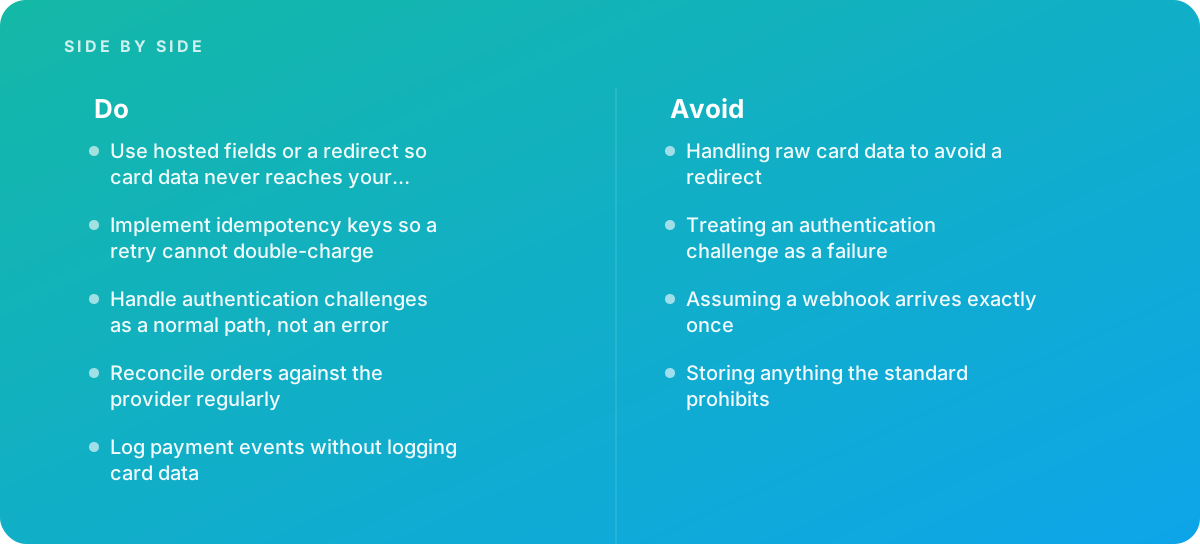
The fourth row is the one to avoid. Handling raw card data to avoid a redirect, or to keep a bespoke card form exactly as designed, is one of the most expensive mistakes a store can make. It pulls your servers, your logs, your backups and often your developers' laptops into scope, and it makes you responsible for protecting data that a hosted field would have kept away from you entirely. Modern hosted fields can be styled closely enough to match most designs, so the aesthetic argument rarely holds up.
What you still own with hosted fields
Hosted fields reduce scope; they do not remove it. You still control the page that loads the iframe, and an attacker who can change that page can replace the provider's fields with fake ones. That is why current versions of the standard put weight on controlling the scripts that run on payment pages, keeping an inventory of them, and detecting unauthorized changes. In practice that means a strict Content Security Policy on checkout pages, a short and justified list of third-party scripts there, no tag-manager containers that marketing can change without review, and monitoring for changes to the page.
Once card data is with the provider, you will usually work with tokens instead: references the provider gives you that stand in for a card on file. Our practical guide to payment tokenization explains how network tokens and provider tokens differ and how to store them safely.
Shortcut: remove every non-essential script from checkout and payment pages before you start the compliance paperwork. Analytics, chat widgets, heatmaps and A/B testing tools all widen the attack surface on the page that matters most. Fewer scripts means a shorter inventory, a tighter Content Security Policy and fewer questions to answer.
There is also the question of what you must never store. The standard prohibits storing sensitive authentication data, such as the card verification code and full magnetic-stripe or chip data, after authorization, even in encrypted form. If a developer ever proposes saving the security code "to make repeat purchases easier," the answer is no; use the provider's saved-payment-method feature and tokens instead.
Phase 3: Build the Checkout Path With Server-Created Payment Objects
Goal: a checkout in which the server decides what is being charged, the client only collects details and confirms, and every attempt is traceable from start to finish.
Most modern gateways follow a similar model, described in detail in the Stripe documentation on payments and authentication and mirrored with different names by other providers. The server creates a payment object, often called a payment intent, session or order, with the amount, currency and metadata. The client receives a short-lived secret or identifier, renders the provider's fields, and asks the provider to confirm the payment. The provider then reports the outcome to both the browser and your server.
Actions
- Calculate the amount on the server, always. Never trust a price, discount or shipping cost sent from the browser. Recalculate the basket server-side at the moment you create the payment object, and store the calculated breakdown with it.
- Create one payment object per checkout attempt, and reuse it. If the shopper changes the basket, update the existing object rather than creating a new one. Orphaned payment objects clutter reconciliation and can confuse support.
- Attach your identifiers as metadata. Put your order or cart reference on the provider object. It is the single most useful field during reconciliation and dispute handling.
- Use amounts in the smallest currency unit. Most APIs take integers in minor units, such as cents. Floating-point arithmetic on money produces rounding errors that surface later as reconciliation breaks of a cent or two.
- Design the order state machine before the UI. A typical set of states is: pending payment, requires action, processing, paid, partially refunded, refunded, failed, cancelled and disputed. Define which events move an order between them.
Where the order record comes from
There are two defensible approaches. In the first, you create an order record in a pending state before payment and update it on success. In the second, you create the order only once payment is confirmed. The first is easier to reconcile and to support, because every payment attempt has an order to attach to; the cost is some housekeeping to expire abandoned pending orders. The second keeps the orders table clean but makes it harder to trace a payment that succeeded when order creation failed. For most stores, the pending-order approach is safer, provided abandoned orders are clearly separated from real ones in reports and in any feed to an ERP or warehouse.
That downstream feed deserves care. If your store passes paid orders to an ERP or accounting system, the moment an order becomes "paid" is the moment it may trigger picking, invoicing and revenue recognition. Our guide to ERP integration for online stores covers how to hand off orders so that a payment reversal flows through as cleanly as the original sale.
Phase 4: Handle 3-D Secure and Strong Customer Authentication as a Normal Path
Goal: authentication challenges are handled smoothly as an expected step, not reported as failures, and exemptions are used where they legitimately apply.
In the European Economic Area, strong customer authentication is a requirement under the revised Payment Services Directive, known as PSD2, which the European Commission oversees as part of its payment services framework. The UK retained equivalent rules after leaving the EU. Strong customer authentication means the payer must confirm the payment with two of three factors: something they know, something they have, and something they are. For online card payments, 3-D Secure is the common mechanism: the card issuer may approve silently based on risk data (a frictionless flow), or it may present a challenge, such as a banking app confirmation or a one-time code.
The mistake that costs the most conversions
The most damaging error in this phase is treating an authentication challenge as a failure. When the provider returns a status such as "requires action," it means the payment is waiting for the customer to authenticate, not that it was declined. Code that shows an error message, cancels the order, or lets the shopper click "pay" again at this point loses sales and can generate duplicate attempts. The correct response is to hand control to the provider's client library, which displays the challenge, and then wait for the result.
Actions
- Model "requires action" as its own state. The order should sit in that state, the pay button should be disabled, and the interface should explain that the bank is asking the customer to confirm.
- Handle the return from out-of-band challenges. Many challenges now happen in a banking app on the customer's phone. The customer may switch apps and come back minutes later. Your checkout page must be able to resume, poll for or receive the result, and show the right message.
- Handle abandoned challenges. Some customers never complete the challenge. Decide how long a payment may sit in "requires action" before you cancel the payment object and release any stock you reserved.
- Use exemptions deliberately. The rules include exemptions and out-of-scope cases, such as certain low-value transactions, transactions the acquirer assesses as low risk, and merchant-initiated transactions like recurring charges against a card the customer authenticated when setting up the agreement. Your provider typically requests exemptions on your behalf; the issuer makes the final decision and can still insist on a challenge.
- Authenticate when saving cards. If you store a card for future use, authenticate at the point of saving and record the agreement correctly, so later charges can be flagged as merchant-initiated.
Shortcut: test the challenge flow on a real phone, not just in a desktop browser. Challenges that open in a banking app, then return the shopper to a mobile browser tab, expose session and redirect bugs that desktop testing never shows. Use your provider's test cards that force a challenge, and include one that fails authentication.
Outside the UK and EU, 3-D Secure is usually optional, but it can still be useful. Many providers let you apply it selectively, for instance to high-value orders or orders a fraud tool flags. An authenticated payment often shifts liability for certain fraud chargebacks from you to the issuer, which is worth weighing against the conversion cost of adding a step.
Phase 5: Make Every Payment Request Idempotent
Goal: no combination of timeouts, double clicks, retries or network failures can charge a customer twice or create two orders for one payment.
Networks fail in the least convenient place: after the provider has processed your request but before its response reaches you. Your server sees a timeout and does not know whether the charge happened. If it simply tries again, the customer may be charged twice. Idempotency solves this: you send a unique key with each request that creates or changes money, and if the provider receives the same key twice, it returns the original result instead of performing the operation again.
Actions
- Generate the key from your own domain objects. A good key is tied to the operation, such as the order reference plus the operation type and an attempt number you control. A random value generated fresh on each retry defeats the purpose.
- Store the key before sending the request. Write the key and the intended operation to your database first, then call the provider. If your process crashes mid-call, the retry reads the stored key and sends the same one.
- Retry with backoff, and only on safe errors. Retry timeouts, connection errors and server errors with exponential backoff. Do not retry declines or validation errors; they will fail again.
- Protect the client too. Disable the pay button on submit, but do not rely on that alone. A shopper can reload, open a second tab, or have a slow connection resend the form.
- Make your own endpoints idempotent. The endpoint that creates an order should also accept a key, so the browser retrying the checkout request cannot create two orders.
- Understand the key's lifetime. Providers keep idempotency records for a limited period. Read your provider's documentation for the window, and never reuse a key for a genuinely new operation.
A useful mental test: for every call in your payment code, ask "what happens if this runs twice?" and "what happens if this runs, but we never hear back?" If either answer is "the customer is charged twice" or "we lose track of the payment," the design is not finished.
- Every create, capture, refund and cancel call carries an idempotency key derived from your own records.
- Keys are persisted before the provider is called.
- Retries use backoff and apply only to timeouts, connection failures and server errors.
- The order-creation endpoint is itself idempotent.
- A test deliberately drops the response to a successful charge and confirms that the retry does not charge again.
Phase 6: Let Webhooks, Not Redirects, Confirm Payment
Goal: your order records reflect what actually happened at the provider, even when the browser never returns, and duplicate or delayed notifications cause no harm.
After a payment, the shopper's browser is redirected back to a confirmation page. It is tempting to mark the order as paid when that page loads. Do not. Shoppers close tabs, lose connectivity, and complete authentication on another device. Some payment methods, such as bank transfers and certain wallets, confirm minutes or days later. The authoritative signal is the provider's server-to-server notification, usually a webhook, confirmed where necessary by fetching the payment object from the provider's API.
The assumptions that break webhook handling
The most common mistake is assuming a webhook arrives exactly once. Providers generally deliver with an "at least once" guarantee: if your endpoint is slow or returns an error, the event is retried, sometimes over a long period. The same event can arrive twice, and events can arrive out of order, so a "payment succeeded" event may reach you after a "refund created" event for the same payment. Our practical guide to webhooks for store integrations goes deeper on delivery guarantees across platforms.
Actions
- Verify every signature. Check the provider's signature on each webhook using the signing secret, and reject anything that fails. An unauthenticated endpoint that marks orders as paid is an open invitation to fraud.
- Record event IDs and skip duplicates. Store each processed event's ID with a unique constraint. If the same ID arrives again, acknowledge it and do nothing.
- Acknowledge quickly, process asynchronously. Return a success response once the event is stored, then process it from a queue. Long processing inside the request leads to timeouts and redelivery.
- Make state transitions order-independent. Only allow transitions that make sense: an order that is already refunded should not move back to "paid" because a late success event arrived. When in doubt, fetch the current state of the payment from the provider and apply that.
- Keep a backstop job. Periodically query the provider for payments that are still pending on your side after a reasonable period. This catches events that were lost because your endpoint was down longer than the provider's retry window.
Webhook handling is also where many teams first discover the value of good deployment practice. A webhook handler that breaks in a release can silently stop orders from being marked paid. Covering it with automated tests and deploying it through a pipeline with health checks, as described in our guide to continuous integration pipelines, is cheap insurance.
Phase 7: Refunds, Disputes and Payment Logs That Stay Compliant
Goal: money can go back to customers correctly and traceably, disputes are answered on time, and your logs help you investigate without holding data the standard prohibits.
Refunds and voids
If a payment is only authorized, cancel the authorization (often called a void) rather than capturing and refunding; the customer never sees a completed charge, and you avoid processing fees on a sale that did not happen, depending on your provider's pricing. Once captured, refunds go back to the original payment method. Build partial refunds from the start, because returns of one item from a multi-item order are routine. Tie each refund to specific order lines and a reason code, so finance and support can explain it later.
Refund requests need the same idempotency discipline as charges. A support agent double-clicking "refund" should not return twice the money. Give support staff a refund tool inside your admin that calls the provider through your own code, rather than having them issue refunds directly in the provider dashboard, which bypasses your order records and creates reconciliation breaks. Our guide to customer service for online stores covers how to give agents the payment context they need without giving them more access than they should have.
Disputes and chargebacks
A dispute starts when a cardholder asks their bank to reverse a charge. You typically have a fixed window to respond with evidence, and missing it usually means losing by default. Subscribe to dispute events, create a task automatically, and gather evidence from your own systems: order details, delivery confirmation, authentication result, customer communication and the terms the customer accepted. Authentication data from Phase 4 matters here, because an authenticated transaction can change who bears the loss for some fraud disputes.
Logging without logging card data
Log every payment event: payment object created, confirmation attempted, authentication required, succeeded, failed with the decline code, captured, refunded, disputed. Include your order reference, the provider's object ID, amounts, currency, status and timestamps. Never log card numbers, security codes, full request bodies from payment forms, or full provider responses without reviewing what they contain. With hosted fields, card data should never reach your servers, but a debugging line that dumps a whole request can still capture something you did not intend. Add automated scanning of logs for patterns that look like card numbers, and treat a match as an incident.
A practical shortcut: define a single payment-event log format early, with a fixed list of allowed fields, and route all payment logging through one helper function. It is far easier to guarantee that a helper never writes card data than to audit hundreds of scattered log statements.
Phase 8: Reconcile Orders Against the Payment Provider Every Day
Goal: every order is matched to the provider transaction behind it, every payout is matched to the transactions it contains, and every difference is explained within days, not discovered at month end.
Reconciliation is where hidden integration bugs surface. A webhook handler that occasionally fails, a support agent refunding in the dashboard, a currency conversion rounding differently from your store: each produces a small mismatch that is invisible in the store admin and obvious in a reconciliation report. The practice is simple to describe: regularly compare what your store believes happened with what the provider says happened, and investigate the differences.
The three matches that matter
- Orders to payments. Every paid order should have exactly one successful payment for the right amount and currency, and every successful payment should belong to an order.
- Refunds to refunds. Every refund recorded in the store should exist at the provider, and vice versa.
- Payouts to transactions. Each bank deposit from the provider is a net figure: charges minus refunds, fees and dispute amounts. Break each payout down into its transactions using the provider's balance or settlement reports, so finance can post it correctly.
Worked example: one day of reconciliation
The following figures are illustrative, for a hypothetical store that ships physical goods, takes card and wallet payments, and captures on shipment. They show the kind of breaks a daily job surfaces and what each usually means.
| Check | Store records | Provider records | Difference | Likely cause |
|---|---|---|---|---|
| Orders marked paid | 412 | 414 successful payments | 2 payments without paid orders | Webhooks not processed; orders stuck in "requires action" or pending |
| Payments matched to orders | 411 | 411 | 1 paid order without a payment | Order marked paid from the redirect page rather than an event |
| Refunds | 9 | 10 | 1 refund only at provider | Refund issued directly in the provider dashboard |
| Captured total | $38,406.20 | $38,406.17 | $0.03 | Rounding on a converted currency or a tax calculation using floating point |
Each break points to a fix. The two unmatched payments are recovered by the backstop job from Phase 6 and the orders fulfilled; the process that let them slip is examined. The paid order without a payment is the most serious: the store may ship goods it was never paid for, so the code that marked it paid is found and removed. The dashboard refund prompts a change to support permissions. The three-cent difference, though small, reveals a systematic arithmetic error that would grow with volume, and leads to converting all money handling to integer minor units.
In a healthy integration, a daily run like this should come back clean on most days, and any break should have an owner and a resolution within a few working days. If breaks are routine and unexplained, that is precisely the point at which to bring in help. Marketplaces add their own layer of settlement reports and fees; if you sell through them, the decisions behind marketplace integration include how those payouts are reconciled alongside your own store's.
- A scheduled job compares orders, payments and refunds daily and produces a list of breaks.
- Each payout is broken down into its transactions, fees and adjustments.
- Every break has an owner and a target resolution date.
- Recurring break types lead to a code or process fix, not just a manual correction.
- Finance can close the month without a separate manual payments investigation.
Phase 9: A Realistic Schedule for Testing and Launch
Goal: go live with confidence, using the provider's test tools to cover failure paths, and a staged launch that limits the damage of anything you missed.
How long a payment integration takes depends on the platform, the number of payment methods, whether subscriptions are involved, and how much existing order logic needs to change. The schedule below is a realistic outline for a single-provider card and wallet integration on a custom or headless store, with a small team. A hosted platform using its native payment stack may compress the build phases considerably, while marketplaces, subscriptions or multiple providers extend them.
- Week 1 Money-flow mapping, provider selection, integration pattern decision and confirmation of the PCI self-assessment with the acquirer or provider.
- Weeks 2 to 3 Server-side payment objects, hosted fields, the order state machine, idempotency keys and the authentication flow in the provider's test mode.
- Week 4 Webhook consumer with signature checks and duplicate handling, backstop job, refunds, voids and dispute event handling.
- Week 5 Reconciliation job, payment-event logging, checkout page script review and Content Security Policy, plus end-to-end tests on real devices.
- Week 6 Live-mode test transactions with real cards, refunded immediately, then a staged launch to a portion of traffic with close monitoring.
- Weeks 7 to 8 Full rollout, first weekly reconciliation review with finance, and a retrospective on any breaks found.
What to test before going live
Providers supply test card numbers and scenarios that simulate declines, insufficient funds, expired cards, authentication challenges that succeed and fail, and disputes. Use all of them. Beyond the provider's scenarios, test your own failure modes: kill the server process between the provider call and the database write; delay webhook processing; deliver the same webhook twice; deliver events in reverse order; have two browser tabs submit the same checkout. Each test should end with the right number of orders and charges, and a clean reconciliation.
After launch, watch a small set of indicators daily for the first weeks: the share of payment attempts that succeed, the decline reasons behind the rest, the share of payments that require authentication and how many of those are completed, the number of reconciliation breaks, and webhook processing errors. A sudden change in any of these after a release is a reason to roll back first and investigate second.
When to Bring In Payment Integration Help
Many stores can complete a straightforward payment integration in-house, particularly on a hosted platform with its own payment stack. There are three points, though, at which outside expertise usually pays for itself.
- Before taking payments for the first time. Design decisions made in Phases 1 and 2 are expensive to reverse. An experienced review of the money-flow map and integration pattern takes little time compared with rebuilding a checkout that put the store in the wrong compliance scope.
- When compliance status is unclear. If nobody can say which PCI self-assessment applies, which scripts run on your payment pages, or whether anything prohibited is stored, you need an answer before your acquirer or an incident asks the question for you.
- When payments and orders do not reconcile. Persistent, unexplained breaks mean money is being lost, customers are being charged incorrectly, or both. They usually trace back to idempotency or webhook handling, which is exactly where experience shortens the investigation.
Our team handles payment gateway integration end to end, from mapping money flows and choosing a pattern that keeps card data off your servers through to reconciliation that finance trusts. If your priority is card acceptance specifically, including 3-D Secure and saved cards, see our card payment integration service.
One quick step before any outside review, export a week of provider transactions and a week of store orders into a spreadsheet and try to match them by your order reference. The breaks you find in an afternoon will tell you, and any specialist you bring in, where to look first.
The pattern that runs through every phase of this playbook is the same: payment integration works when it is designed for the failure paths first. Keep card data with the provider, treat authentication as an ordinary step, make every request safe to repeat, trust events rather than redirects, and check your records against the provider's every day. A store built that way can add payment methods, markets and volume without its payment code becoming the part everyone is afraid to touch.
Where this comes from
- PCI Security Standards Council — PCI DSS
- Stripe Documentation — Payments and authentication
- European Commission — Payment services regulation
The figures and practices above come from the sources listed.
Working on something like this?
We take on E-commerce Development work for teams who want it done once, properly. Tell us what you are building and we will tell you honestly whether we are the right studio for it. Start a project.
Where to go next
Spotted something wrong? Report an error on this page. We correct on the page and say what changed.