A Practical Guide to Inventory and Stock Management
Six common inventory myths, why each causes overselling, and the practices that fix them: one source of truth, checkout reservations, faster sync and more.
 Marcus Adeyemi

Inventory and stock management, for an online store, comes down to one promise: what the storefront says is available matches what the warehouse can actually pick, pack and ship. When that promise holds, nobody notices it. When it breaks, a customer pays for something that does not exist, and the store pays three times over: a refund, a support contact and a damaged relationship with someone who was ready to buy.
This guide is for store owners, e-commerce managers and in-house teams who sell physical goods, especially those selling on more than one channel or running promotions that move stock quickly. It is also for developers and operations leads who have been asked why the site keeps selling items that are not on the shelf. The short answer is almost always synchronization, not bad luck, and the fixes are more about design decisions than about buying a new tool.
The guide is organized around six persistent misconceptions about stock. Each one sounds reasonable, and each one quietly causes overselling, cancellations or confused customers. For every myth you will find the reasoning behind the correct practice, what to change in your systems and processes, and how to tell whether the change worked. A worked example with realistic numbers and a checklist of what to do instead follow at the end.
What Inventory and Stock Management Has to Get Right
Before tackling the myths, it helps to be precise about the job. An online store holds several different numbers for the same product, and most confusion starts when people treat them as one number.
- On hand: units physically in a location, whether or not they are already promised to someone.
- Committed or allocated: units attached to orders that have been placed but not yet shipped.
- Reserved: units temporarily held for a shopper who is in checkout, or held back for a specific channel or purpose.
- Available to sell: on hand minus committed minus reserved minus any safety buffer. This is the only number the storefront should show as purchasable.
- Incoming: units on a purchase order or in transit, which can support a pre-order or backorder promise but cannot be shipped today.
Modern commerce platforms model these states explicitly. The inventory documentation on Shopify Developers, for example, tracks quantities per location and separates states such as available, committed and on hand rather than storing a single stock figure per product. Whatever platform you use, your own processes should make the same distinction, because every myth below involves collapsing two of these numbers into one.
The job of inventory and stock management, then, is to keep available to sell accurate at every place a customer can buy, fast enough that the number is still true when the customer pays. It sits between several systems: the storefront, any marketplaces, the order management system, the warehouse management system or ERP, and supplier feeds. That is why it so often falls between teams. Marketing owns the storefront, operations owns the warehouse, and nobody owns the gap between them.
| Stock state | Where it usually lives | Who changes it | What goes wrong if it is ignored |
|---|---|---|---|
| On hand | Warehouse system or ERP | Receiving, picking, counts, adjustments | Storefront sells units that were damaged, lost or already picked |
| Committed | Order management system | Order placement, cancellation, shipment | The same unit is promised to two customers |
| Reserved | Storefront or order system | Checkout start, timeout, payment | Two shoppers pay for the last unit at the same moment |
| Available to sell | Calculated, then published to each channel | Synchronization jobs or events | Every channel shows a number that is slightly out of date |
| Incoming | Purchasing or ERP | Purchase orders, supplier confirmations | Pre-orders and backorders are promised against dates nobody confirmed |
Myth One: The Storefront Holds the Real Stock Number
Myth: The stock figure in the e-commerce admin is the real count, so the warehouse should update itself from the store.
Reality: The storefront is a sales channel, not a record of physical goods. The source of truth for stock is usually the warehouse or ERP system, because that is where units are received, counted, moved and shipped. The storefront should consume a published available-to-sell figure, not originate one.
This myth usually starts innocently. A store launches on a single platform, stock is entered by hand in the admin, and for a while the admin genuinely is the only record. Then a warehouse partner arrives, or an ERP, or a second channel, and the admin number carries on being treated as authoritative out of habit. Now two systems both believe they own the count, and each one overwrites the other on a schedule.
The symptoms are recognizable. Stock "jumps back" after someone corrects it. A manual adjustment made in the admin is wiped out by the next warehouse import. A return is restocked in one system but not the other. Staff stop trusting the numbers and start keeping their own spreadsheets, which makes the problem worse because there are now three sources of truth instead of two.
How to define a single source of truth
Pick the system where physical events are recorded first. If you use a third-party logistics provider or your own warehouse management system, that is normally the one, because goods-in, picking, damages and cycle counts all happen there. If you run a small operation without a warehouse system, an inventory or ERP application can play the role. The storefront, marketplaces and point-of-sale should all be downstream consumers.
Then write down, in plain language, which system owns each stock state from the table above, and which direction data flows. A simple rule works for most stores: on-hand quantities flow from the warehouse outward; orders and reservations flow from the channels inward; nobody edits on-hand quantities in a channel. If staff need to adjust stock, they do it in the source system, and the change propagates.
Product data deserves the same discipline. Stock problems are frequently caused by mismatched identifiers, such as a SKU that differs by a hyphen between the store and the warehouse, or a variant that exists in one system and not the other. A clean mapping of products and variants, covered in our guide to product information management, is a precondition for accurate stock, not an afterthought.
How to tell it is working
- Every stock adjustment in the audit log has a single origin system and a reason code.
- Correcting a number once is enough; it does not revert overnight.
- Channel stock figures can be explained as "source on-hand, minus committed, minus reserved, minus buffer" with no unexplained difference.
Myth Two: Checking Availability When the Order Is Placed Is Enough
Myth: As long as the system checks stock at the moment the order is submitted, it cannot oversell.
Reality: A check at order placement tells you stock existed a moment ago; it does not stop two shoppers from paying for the same last unit. Reserving stock during checkout, and releasing it on timeout or abandonment, is what prevents double-selling.
Consider the last unit of a popular item. Shopper A adds it to the cart and reaches the payment step. Shopper B does the same thirty seconds later. Both see "in stock" because nothing has been committed yet. A pays by card; B pays with a wallet that authorizes slightly faster. Depending on how the order pipeline is built, both orders may pass a stock check that reads the same figure before either write lands. One of them will be cancelled, usually by a person, usually after the confirmation email has gone out.
The risk is proportional to how long checkout takes and how contested stock is. Slow payment steps, third-party payment redirects, and address or fraud checks all widen the window. So do flash sales, product drops and low-stock items, which is exactly when a cancellation does the most damage.
Designing a checkout reservation
- Decide when to reserve. Reserving on add-to-cart ties up stock for browsers who never buy. Reserving when the shopper enters checkout, or when they reach the payment step, is a better balance for most stores.
- Make the reservation atomic. The decrement of available stock and the creation of the reservation must happen as one operation, so two requests cannot both succeed against the last unit. In database terms that means a conditional update or lock, not a read followed by a separate write.
- Set a timeout. A hold that never expires turns abandoned checkouts into phantom stock-outs. Many stores use a window in the range of ten to twenty minutes, tuned to how long a genuine checkout takes on their site. Longer holds suit complex checkouts; shorter holds suit high-demand launches.
- Release reliably. Release on timeout, on explicit cart removal, and on payment failure. Run a scheduled sweep to clear any reservation left behind by a crash or a lost event.
- Convert on payment. When payment is authorized, the reservation becomes a committed allocation against the order. When the order ships, on-hand decreases in the source system.
Tell the shopper what is happening. A short line such as "We are holding this item for you for 15 minutes" reduces anxiety during a drop and makes a timeout understandable rather than baffling. The wording and placement of that kind of message is covered in more depth in stock availability messaging that actually works.
Where reservations live in a multi-system setup
If the storefront is the only channel, the platform can usually handle reservations itself. Once several channels draw on the same stock, the reservation needs to be recorded somewhere every channel respects, typically the order management system, so that a hold placed by the website also reduces what the marketplace can sell. Our overview of order management systems explains how that central allocation layer is normally structured.
Myth Three: Syncing Stock Once an Hour Is Close Enough
Myth: An hourly or nightly stock sync is fine because most products do not sell that fast.
Reality: Synchronization lag is the window in which overselling happens. For slow lines a long interval is harmless, but for fast-moving items, promotions and low-stock variants the lag has to shrink, ideally to near real time, or buffers have to cover the gap.
Every integration has a lag: the time between a unit selling (or being received, damaged or returned) and every channel knowing about it. During that window, each channel is selling against a number that is no longer true. If a product sells slowly, the chance of a sale landing in the gap is small. If it sells quickly, or if stock is down to the last few units, the gap is where cancellations come from.
The useful mental model is exposure: the number of units that could sell unseen during one lag window. Exposure is roughly the sales rate multiplied by the lag. Ten units an hour with a one-hour lag means up to ten units can sell that another channel does not yet know about. The same rate with a two-minute lag means less than one.
Match the sync approach to the product, not the catalog
Most catalogs follow a long-tail pattern: a relatively small share of SKUs accounts for a large share of units sold. You do not need to make everything real-time. You need to make the fast movers and the nearly-sold-out items real-time, and let the rest update on a sensible schedule.
- Event-driven updates: the source system pushes a change the moment stock moves, often through webhooks or a message queue. Best for fast movers and any SKU below a low-stock threshold.
- Short-interval polling: a job fetches changed quantities every few minutes. Acceptable for steady sellers when the source cannot emit events.
- Scheduled full refresh: a complete overwrite of all quantities, typically nightly. Essential as a safety net that corrects drift, but never sufficient on its own for items that sell quickly.
Watch for hidden lag. A connector might claim five-minute syncs but batch changes, retry failures slowly, or be throttled by rate limits during a busy period, exactly when you need it most. Measure the actual time from a warehouse event to a channel update, rather than trusting the configured interval. Seasonal peaks deserve a specific rehearsal, which is part of preparing for peak trading properly.
Supplier and dropship feeds
If some stock lives with suppliers or dropship partners, their feeds introduce a second lag that you often do not control: a supplier file might arrive once a day and reflect stock from the previous evening. Treat those quantities with more caution, apply larger buffers, and flag items that depend on them. Validate each supplier file on arrival, reject files that are empty or implausibly different from the last one, and record when each file was generated so you know how stale it is.
Myth Four: Each Sales Channel Can Keep Its Own Stock Count
Myth: It is simpler to give the website, each marketplace and the shop their own stock counts and top them up when they run low.
Reality: Independent counts per channel guarantee that the totals drift from physical reality. Selling in several places multiplies the risk, so every channel should draw from one shared pool, with any channel-specific allocation calculated from that pool rather than maintained separately.
Separate counts feel safe because they seem to limit damage: if a marketplace has 20 units allocated, it cannot sell 21. In practice the physical stock is not separated. The same shelf supplies every channel, so a return processed against the website, a damaged unit written off in the warehouse, or a manual transfer to a wholesale order silently makes one or more channel counts wrong. Staff then top counts up by hand, which is how phantom stock appears.
The alternative is a pooled model. All channels see an available-to-sell figure derived from the same source. Where you genuinely need to ringfence stock, for instance to guarantee a marketplace commitment or to protect store stock for walk-in customers, you express that as a rule on the pool rather than as a separate count.
Allocation rules that keep channels honest
- Channel buffers: show a channel slightly less than the true pool, for example the pool minus two units, where that channel's sync is slower or its cancellation penalties are harsher.
- Percentage caps: let a channel sell up to a set share of the pool, useful when one channel should not be able to exhaust stock during a promotion elsewhere.
- Last-units rules: when the pool falls below a threshold, stop publishing to the slowest-syncing channels and sell only where updates are near real time.
- Location rules: for stores with several stock locations, decide which locations feed which channels, so that a store's display stock is not sold online unless you intend it to be.
Marketplaces are the channels where this matters most, because they typically impose their own consequences for cancellations and late shipments, and their sync paths tend to be the slowest. If you also hold stock in more than one building, the pooling logic has to account for where a unit is, not just how many exist; our guide to multi-warehouse inventory covers routing and split shipments. Click-and-collect adds another wrinkle, since stock on a shop floor is visible to customers and can be picked up by someone before the online order is prepared, which is why buy online, pick up in store usually relies on larger buffers than home delivery.
Myth Five: A Little Overselling Is Just a Cost of Doing Business
Myth: A few cancelled orders a week are inevitable, and the revenue from selling aggressively outweighs the cost.
Reality: Every oversold order costs a refund, a support contact and some of the customer's trust, and it is almost always a synchronization or process problem that can be fixed. Treating it as an acceptable cost means the root cause never gets addressed.
The argument for tolerating overselling usually runs like this: buffers hide stock that could have sold, so it is better to show everything and apologize occasionally. The flaw is that the costs of an oversold order are real, spread across several teams, and rarely measured in one place.
- Direct handling cost: someone has to spot the problem, cancel or edit the order, issue the refund and write to the customer. Payment processing fees on the original charge are not always returned when you refund.
- Support load: the customer often contacts you, sometimes more than once, to ask where the order is or why it was cancelled.
- Lost lifetime value: a shopper who was told "yes" and then "no" is less likely to come back, and more likely to say so publicly.
- Channel penalties: marketplaces may measure seller-initiated cancellations and use them in account health scoring.
- Acquisition waste: if the order came through paid media, you paid to acquire a customer and then disappointed them.
Once you total those costs per incident, the case for a buffer of a unit or two on fast movers usually becomes obvious. The trade-off is not "buffers versus sales"; it is "a small number of sales delayed until the stock figure is reliable" versus "a larger cost per failed order."
Measure it before you argue about it
Track oversells as a first-class metric: orders cancelled or edited because of insufficient stock, per week, per channel and per SKU. Tag them in the order system with a specific cancellation reason rather than a generic "cancelled by merchant." Then look for patterns. Clusters on particular SKUs point to data mapping problems or supplier feeds; clusters on a particular channel point to sync lag; clusters at particular times point to promotions or batch jobs. Setting up that kind of event tracking is part of a sound e-commerce analytics setup.
It is also worth giving your support team a clear script and authority for these cases. When overselling does happen, a fast, honest message with an immediate refund and, where appropriate, a restock date or a genuine alternative the customer can accept, limits the damage. Agree those responses in advance so nobody improvises under pressure.
Myth Six: Backorders and Substitutions Can Be Handled Quietly
Myth: If an item runs out, it is fine to take the order anyway and ship when stock arrives, or to send a close equivalent without making a fuss.
Reality: A backorder policy is a deliberate decision that must be communicated clearly before the customer pays, and silent substitution of unavailable items breaks the customer's trust and, in many markets, their consumer rights. Say what will happen, and let the customer choose.
Backorders and pre-orders are legitimate tools. They let you capture demand for a product that is coming back, smooth cash flow for a launch, and avoid sending customers to a competitor. The problem is not selling unavailable stock; it is selling it without saying so.
Making backorders an explicit policy
Decide, per product or per category, which of these applies when available stock reaches zero:
- Stop selling: show out of stock, offer a notification, and do not take payment.
- Backorder with a date: continue selling, with the expected dispatch date shown on the product page, in the cart and in the confirmation email.
- Pre-order: sell a product that has not yet launched or arrived, with the release date and any charging terms stated up front.
- Made to order: treat lead time as a normal part of the product, with a stated production window.
Base any backorder date on confirmed incoming stock, not on a hopeful estimate. If the purchase order has no confirmed arrival date, either do not offer the backorder or show a range with a clear explanation. Keep mixed carts in mind: if an order contains one backordered item and three in-stock items, decide whether you ship in parts or hold everything, and show that choice at checkout.
Legal expectations reinforce this. In the European Union, for example, consumer rules summarized by the European Commission set out that, unless a different delivery time has been agreed, the trader should deliver without undue delay and no later than 30 days after the contract is concluded, and the consumer has remedies if that does not happen. Other jurisdictions have their own rules on shipping times and advertised availability, so check the ones that apply to you. A backorder with an agreed date is a very different legal and customer-experience position from an order that simply ships late.
Why silent substitution backfires
Sending a different size, color or brand without asking can look like good service from inside the business. From the customer's side it is a product they did not choose, which often becomes a return, a complaint or a chargeback. If substitution makes sense for your category, such as groceries or consumables, ask for the customer's preference at checkout ("substitute with similar," "contact me," or "refund that item") and honor it. Otherwise, contact the customer and let them decide.
When an item is out of stock and you are not backordering it, a well-built notification flow keeps the demand without the risk. The guide to back-in-stock notifications done properly covers timing, fairness when stock is limited, and how to avoid alerting more people than you can serve. Research from the Baymard Institute on how stores communicate availability and delivery is also a useful reference when you decide where on the page this information should appear.
Reconciliation: Why Integrated Systems Still Drift
Even after you have a single source of truth, checkout reservations, tight sync on fast movers, pooled channel stock and clear backorder rules, numbers will drift. Integrations miss events, pickers make errors, returns are graded late, and units are damaged or mislaid. Integration reduces drift; it does not eliminate it. Regular reconciliation is what keeps small errors from compounding.
Reconciliation works at two levels. The first is system-to-system: compare what each channel shows with what the source says it should show, and investigate every difference that the buffers and reservations do not explain. The second is system-to-shelf: compare what the source system says is on hand with what is physically there.
System-to-system checks
- Run a daily report listing every SKU where a channel's published quantity differs from the calculated available-to-sell figure by more than the configured buffer.
- Monitor integration failures and retries, and alert when an update has been failing for longer than your acceptable lag.
- Check for orphaned reservations older than the timeout, which indicate a release process that is not firing.
- Check for SKUs that exist in one system but not another, which usually means a new product or variant was created without its mapping.
System-to-shelf checks
Full stocktakes once or twice a year are disruptive and quickly out of date. Cycle counting, where a subset of locations or SKUs is counted on a rolling basis, gives a steadier picture. A common approach is to count high-value and fast-moving items most often, and slow, low-value lines less often. Every variance should get a reason code, such as receiving error, pick error, damage or theft, so that you fix the process rather than just the number. Our guide to stock counts and accuracy goes into count scheduling and variance analysis in detail.
Reconciliation also improves planning. Accurate on-hand and sell-through data are the inputs to reorder points and forecasts; if the stock numbers are wrong, the forecast will be confidently wrong too. Once accuracy is under control, demand forecasting for stock becomes a far more reliable exercise.
Worked Example: Sizing Sync Lag and Buffers for a Promotion
The following example is illustrative. It uses round numbers to show the method, not results from a real store.
Imagine a store selling a popular kitchen appliance on its own website and two marketplaces. Stock is held in one warehouse whose system is the source of truth. For a weekend promotion, the team expects combined sales to peak at around 60 units an hour, split roughly 30 on the website and 15 on each marketplace. The warehouse holds 400 units at the start of the promotion.
The website uses event-driven updates from the warehouse, with an effective lag of about one minute. The first marketplace connector polls every 15 minutes. The second receives a file every 60 minutes. The question is how many units each channel could sell against stale information during one lag window, and what buffer would cover that exposure near the end of the stock.
| Channel | Effective lag | Sales by other channels during one lag window (at peak) | Suggested buffer near sell-out |
|---|---|---|---|
| Website | About 1 minute | About 0.5 units (30 per hour from the marketplaces, for 1 minute) | 0 to 1 unit |
| Marketplace A | 15 minutes | About 11 units (45 per hour from the other channels, for 15 minutes) | About 11 units, or stop publishing below a threshold |
| Marketplace B | 60 minutes | About 45 units (45 per hour from the other channels, for 60 minutes) | Stop publishing well before sell-out |
The arithmetic is straightforward. For each channel, the risk is that other channels sell units during the window before this channel learns about it. Marketplace A cannot see sales from the website and Marketplace B for up to 15 minutes. At a combined 45 units an hour from those two channels, that is about 11 units. If Marketplace A is showing 10 units while the true pool is already zero, it can sell all 10 before its next update.
Marketplace B is the real problem. With a 60-minute lag, around 45 units could sell elsewhere before it catches up. A buffer that large would hide a meaningful slice of stock for the whole promotion. The better answer is a last-units rule: when the pool drops below, say, 60 units, stop publishing to Marketplace B entirely and let the faster channels sell the remainder. Meanwhile, the team should ask whether the Marketplace B integration can be moved to a shorter interval before the next promotion.
Now add reservations. Suppose checkout on the website takes about four minutes for most shoppers and the store sets a 15-minute hold. At 30 website units an hour, a steady state of roughly two units is sitting in active checkouts at any moment, plus a small number of abandoned holds waiting to expire. That is a few units unavailable to other channels at any time, which is a small price for eliminating double-sells on the last units.
Finally, compare costs. Say the team estimates, for its own business, that handling one oversold order takes around 20 minutes of staff time across operations and support, plus any unrecovered payment fees and the risk of losing the customer. Against that, holding back 11 units on Marketplace A only near the end of the promotion means those units are simply sold on the website instead. The buffer does not lose the sale; it moves it to a channel that can confirm availability.
What to Do Instead: A Stock Management Checklist
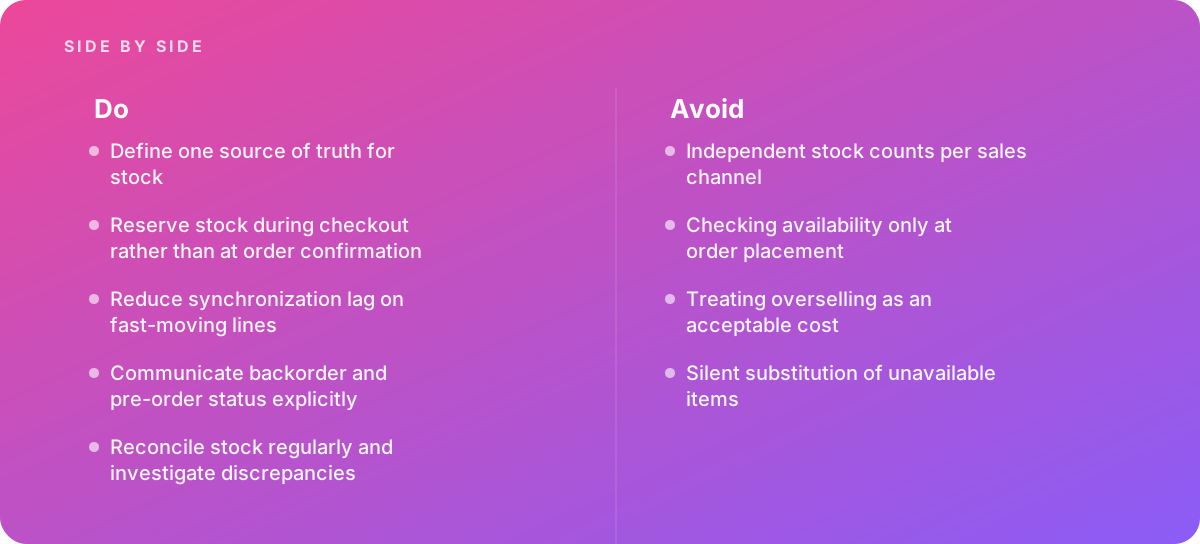
Each myth above has a corresponding practice. Taken together, they form a working standard you can audit your store against. Treat the list as a baseline, then tighten the thresholds for your fastest-moving and highest-value products.
- Name one source of truth for on-hand stock, usually the warehouse or ERP, and stop editing on-hand quantities in any sales channel.
- Document which system owns each stock state (on hand, committed, reserved, available, incoming) and the direction data flows.
- Map every product and variant to a single shared identifier across the store, marketplaces and warehouse.
- Reserve stock atomically when the shopper enters checkout or reaches payment, with a timeout and a scheduled sweep to release stale holds.
- Use event-driven or short-interval updates for fast movers and low-stock SKUs, and keep a nightly full refresh as a safety net.
- Measure real synchronization lag per channel, including during peak load, rather than trusting configured intervals.
- Pool stock across channels and express ringfencing as buffers, caps or last-units rules on that pool.
- Stop publishing to slow-syncing channels when stock falls below a defined threshold.
- Tag every stock-related cancellation with a specific reason and review oversells weekly by SKU and channel.
- Set an explicit backorder, pre-order or stop-selling policy per product, and show dates on the product page, cart and confirmation email.
- Never substitute an item without the customer's consent; offer a choice at checkout where substitution is normal for the category.
- Reconcile channel quantities against the source daily, and run cycle counts with reason codes for every variance.
Prioritizing the work
If this list looks long, sequence it by where your cancellations actually come from. Stores with a single channel usually get the most from checkout reservations and backorder clarity. Stores selling on marketplaces usually get the most from pooling and last-units rules. Stores with a separate warehouse system usually get the most from settling the source of truth and fixing identifier mapping. In each case, the oversell metric from Myth Five tells you whether the change worked.
When to Bring in Specialist Help
Plenty of stores manage stock well with their platform's built-in tools and a disciplined process. It is worth bringing in outside help when any of the following apply:
- Overselling is recurring. If cancellations for stock reasons appear every week despite manual effort, there is usually a structural sync or reservation problem that needs to be traced end to end.
- You sell across several channels. Pooling, allocation rules and per-channel lag measurement are where multi-channel stores most often need custom integration work.
- Stock data must integrate with a warehouse system. Connecting a storefront to a warehouse management system, a 3PL or an ERP involves identifier mapping, event handling, error recovery and monitoring, all of which need careful design.
Good help starts with a diagnosis: tracing a sample of oversold orders back through every system to find where the number went wrong, and measuring real lag per channel. Only then does it make sense to choose between tuning existing connectors, adding an order management layer, or building a custom integration. If you are at the stage of assessing options, our e-commerce development team works on exactly this kind of storefront-to-warehouse integration, from mapping and reservations through to monitoring.
Overselling is rarely bad luck. It is almost always a number that was true a few minutes ago, shown in a place that did not hear it change.
Whatever route you take, the principles stay the same: one source of truth, reservations during checkout, short lag where stock moves fast, one shared pool for all channels, explicit backorder policies, and steady reconciliation. Get those right and inventory and stock management becomes something customers never have to think about, which is exactly how it should be.
Where this comes from
- Shopify Developers — Inventory API documentation
- Baymard Institute — Availability communication research
- European Commission — Consumer rights on availability
The figures and practices above come from the sources listed.
Working on something like this?
We take on E-commerce Development work for teams who want it done once, properly. Tell us what you are building and we will tell you honestly whether we are the right studio for it. Start a project.
Where to go next
Spotted something wrong? Report an error on this page. We correct on the page and say what changed.