A Practical Guide to Headless Commerce
Learn when headless commerce pays off, what you must rebuild, how three architectures score on seven criteria, and which option fits your store's situation.
 MediaScaleUp Editorial Team

Headless commerce means separating the storefront from the commerce engine. The pages shoppers see are built as an independent front-end application, and the platform underneath keeps doing what it is good at: holding the catalog, calculating the cart, taking payment and recording orders. The two talk over APIs instead of sharing a theme layer. That single architectural change is why headless commerce is pitched as the route to faster pages and total design freedom, and it is also why so many headless projects go over budget.
The trade is simple to state and hard to price. Going headless buys you front-end freedom and control over performance. It costs you every storefront feature the platform used to provide for free: the theme, the cart interface, the checkout integration, on-site search, the merchandising tools your marketing team uses every morning, and the app ecosystem that plugged into all of those. Each of those has to be rebuilt, bought or deliberately dropped, and then maintained for as long as the store exists.
This guide is written for business owners, e-commerce managers and in-house technical leads who are weighing that trade. It sets out the realistic options, the criteria that actually separate them, a scored comparison, a worked cost example, and a recommendation for each common situation. If you are earlier in the process and still comparing platforms themselves, start with our guide to choosing an e-commerce platform that fits how you sell, because the platform decision and the headless decision interact.
What Headless Commerce Actually Changes in Your Stack
In a conventional, or monolithic, setup the platform renders your storefront. On Shopify that is a Liquid theme; on BigCommerce a Stencil theme; on Adobe Commerce a PHP-rendered theme. Product pages, collection pages, the cart drawer, search results and the checkout all come out of one system that also stores the data. When a merchandiser reorders a collection or a marketer adds a banner in the admin, the change appears on the live site because the same system owns both the data and the presentation.
In a headless setup, that rendering responsibility moves to a separate application, usually a JavaScript framework such as Next.js, Remix, Nuxt or Shopify's own Hydrogen, deployed to a hosting platform with edge caching. The commerce platform becomes a data and transaction service. The front end asks it for products, prices, inventory and cart state through an API, such as Shopify's Storefront API documented on Shopify Developers, and renders the result however it likes.
The features that move from "included" to "your problem"
The reference list of what you rebuild is short, but each line hides a project of its own:
- The storefront. Every template: home, collection, product, content pages, account area, 404, and all their responsive states.
- The cart interface. Line items, quantity changes, discount code entry, shipping estimates, free-shipping progress bars and cart-level upsells.
- The checkout integration. Either handing the shopper off to the platform's hosted checkout cleanly, with the right cart and customer session, or building your own.
- Search and merchandising tools. Site search, filtering and faceting, collection sorting, promotional banners, landing pages and the controls non-developers use to manage them.
Add to that list the things nobody writes down until they break: structured data for search engines, canonical tags and redirects, analytics events, consent management, customer account flows, gift cards, reviews widgets, and every third-party app that previously injected itself into the theme. In a monolith, installing an app often means a few clicks. In a headless front end, the same app either offers an API you integrate by hand, or it simply does not work.
What stays with the platform
The catalog, pricing, inventory, tax calculation, order management, customer records and, in most well-run projects, the checkout. The platform is still your system of record. Headless does not remove the platform; it removes the platform's opinion about what the store looks like and how it loads.
The Three Realistic Options on the Table
Discussions about headless commerce often frame it as a binary: stay on the theme or go headless. In practice there are three distinct options, and most of the risk sits in the difference between the second and third.
- Option A: an optimized platform theme
- Stay monolithic, but treat the theme as a performance project: audit apps, remove unused scripts, compress and size images correctly, defer non-critical JavaScript and fix layout shifts. The platform keeps rendering everything.
- Option B: a headless storefront with platform checkout
- Build the storefront as a separate application, but keep the platform's hosted checkout. The shopper browses on your custom front end and is handed off to the platform when they pay. This is the pattern Shopify's own headless tooling is designed around.
- Option C: fully composable, including a custom checkout
- Rebuild everything, checkout included, often combining several specialist services: a commerce engine, a separate search provider, a headless CMS, a payment gateway integrated directly, and custom order orchestration.
There are hybrids inside these, and they are worth knowing about. Some teams build only content-heavy pages (editorial, lookbooks, campaign landing pages) as a headless application and leave product and collection pages on the theme. Others start with Option B for a single market or brand before deciding whether to extend it. Those hybrids score between the options below, and the same criteria apply.
Decision Criteria That Separate the Options
Most failed headless projects were decided on one criterion, usually performance or design freedom, and ignored the rest. Use all seven of these, weighted for your business.
1. Front-end freedom
How far do you need to go beyond what the theme system allows? Genuine needs include highly interactive product configurators, a shared front end across several commerce back ends, content and commerce blended in ways the theme cannot represent, or a native-app-like experience. "We want a unique design" is usually not enough; modern themes accommodate a great deal of customization.
2. Performance ceiling
Performance is the main argument in favor of headless, and it is real: a well-built headless front end with aggressive edge caching can serve pages very quickly. But the question is not whether headless can be fast. It is whether your current platform can be made fast enough, and whether the headless build will actually be fast once analytics, personalization, reviews and chat scripts are added back. Measure against Core Web Vitals thresholds as defined on web.dev: Largest Contentful Paint within 2.5 seconds, Interaction to Next Paint within 200 milliseconds and Cumulative Layout Shift below 0.1, at the 75th percentile of real visits.
3. Merchandising autonomy
Can the people who run the store day to day change it without a developer? Collection sorting, banners, promotions, landing pages and search synonyms are daily work for merchandisers. Any option that removes their tools without replacing them first has a hidden cost measured in missed promotions and developer tickets.
4. Initial build cost
Headless carries a higher initial build. The front end, the integrations and the replacement tooling are all new work. Theme optimization is typically a fraction of the cost of a new headless storefront.
5. Ongoing maintenance
This is the most underestimated criterion. A headless front end is a software product: framework upgrades, dependency security patches, API version migrations on the commerce platform, hosting configuration, monitoring and on-call responsibility. It needs a team, not a one-off project budget.
6. Compliance and checkout risk
Checkout is where payment card data, tax rules, fraud screening and consumer protection requirements meet. Keeping it on the platform keeps most of that burden with a vendor whose business is carrying it. Rebuilding it moves the burden to you.
7. Time to value
How long until the change pays off? Theme optimization can show results within weeks. A headless storefront typically takes months to reach parity with the site it replaces, and only after parity do the benefits start to compound.
Scoring Headless Commerce Options Side by Side
The scorecard below rates each option from 1 (weak) to 5 (strong) against the seven criteria. For cost, maintenance and risk, a higher score means lower cost or lower risk, so that higher is always better. These are editorial judgments based on how the architectures behave, not measurements; your weights should change the outcome.
| Criterion | A: Optimized theme | B: Headless, platform checkout | C: Fully composable |
|---|---|---|---|
| Front-end freedom | 2 | 4 | 5 |
| Performance ceiling | 3 | 5 | 5 |
| Merchandising autonomy (out of the box) | 5 | 2 | 2 |
| Initial build cost (higher = cheaper) | 5 | 2 | 1 |
| Ongoing maintenance (higher = lighter) | 5 | 2 | 1 |
| Compliance and checkout risk (higher = safer) | 5 | 4 | 1 |
| Time to value | 5 | 2 | 1 |
| Unweighted total (of 35) | 30 | 21 | 16 |
An unweighted total favors staying on the theme, and for many stores that is the right reading. The totals change once you weight the criteria. A brand whose revenue depends on an immersive configurator might weight front-end freedom at three times the others, and a business with a mature engineering team might weight maintenance lightly because it already has the people. Run the numbers with your own weights before anyone commits to an architecture.
How to weight the criteria for your business
Give each criterion a weight from 1 to 3, multiply, and add. Be honest about three things in particular. First, whether front-end freedom is a revenue requirement or a preference. Second, whether you currently fail Core Web Vitals on the templates that drive revenue, which you can confirm from field data rather than a lab test. Third, whether you have, or will hire, the developers to maintain a front end indefinitely. If the answer to all three is no, the weighted score will almost always point to Option A.
Option A: Getting More From Your Platform Theme
Before assuming a theme is the performance bottleneck, check what is actually slow. On most monolithic stores the heaviest cost is not the platform's rendering but what has been layered on top: a dozen apps each loading their own scripts, unoptimized hero images, several analytics and marketing tags firing on every page, and embedded review or chat widgets that block interaction. Those problems follow you into a headless build unless someone deliberately removes them.
A structured theme performance project looks like this: pull field data for your product, collection and home templates; inventory every script and its owner; remove apps nobody uses and replace heavy ones with lighter alternatives; serve images at the rendered size in modern formats with explicit dimensions to prevent layout shift; defer below-the-fold content; and set a performance budget that new apps must fit within. Our guide to e-commerce performance that holds up after launch covers the measurement and budget side in detail.
Pros
- Merchandising tools, apps and the theme editor keep working exactly as the team knows them.
- Lowest cost and shortest time to measurable improvement.
- Checkout, compliance and platform upgrades remain the vendor's responsibility.
- No new application to host, monitor or patch.
Cons
- Design and interaction are bounded by what the theme system can express.
- Performance ceiling is lower, especially for highly interactive pages.
- App sprawl tends to return unless governance is enforced.
- Hard to share one front end across several brands or back ends.
Option A is not a consolation prize. For the large majority of stores the platform serves adequately, it is the correct answer, and going headless for such a store is one of the most expensive mistakes in e-commerce.
Option B: A Headless Storefront With Platform Checkout
This is the pattern most well-run headless projects land on, and for good reason. You get the front-end freedom and the performance control, while the most regulated, most failure-sensitive step in the journey stays on infrastructure built and certified by the platform vendor. On Shopify, for example, the headless front end builds a cart through the Storefront API and then sends the shopper to the platform's hosted checkout using the cart's checkout URL. The front end never touches card data.
What you still have to build well
The hand-off itself needs care. The shopper's cart, any applied discount codes, their logged-in customer session and their consent choices all need to arrive intact at checkout. Analytics must connect the browsing session on your domain to the purchase recorded on the platform, or your attribution will break at the most important step; our guide to setting up e-commerce analytics you can trust explains how to design that event model. Branding on the checkout should match the storefront closely enough that the transition does not feel like leaving the site.
The larger task is merchandising. Collection sorting and promotions may still be set in the platform admin, but banners, landing pages and editorial content usually move to a headless CMS, and search often moves to a dedicated search service. Each of those tools must be configured, connected to the front end and taught to the team before the old theme is switched off.
Pros
- Full control over templates, interactions and page weight.
- Highest practical performance ceiling with edge caching.
- Checkout, payment security and tax logic stay with the platform.
- One front end can present content and commerce seamlessly.
Cons
- Storefront, cart, search and merchandising tooling must all be rebuilt or replaced.
- Many platform apps stop working or need manual integration.
- Ongoing engineering is required for upgrades, API versions and hosting.
- Months to parity before any benefit is realized.
Option C: Fully Composable, Checkout Included
Option C takes the principle to its end: every capability is a separate, swappable service, and the business owns the orchestration between them, including the checkout. It suits a narrow set of businesses: those with checkout requirements the platform cannot meet, such as complex B2B approval flows, unusual payment arrangements, multi-party marketplaces, or transactions the platform's checkout simply does not model. Our guide to B2B e-commerce that works for trade buyers describes several of those requirements.
Rebuilding checkout without a compliance reason is one of the listed mistakes to avoid, and it is worth spelling out why. A custom checkout brings payment security into your scope. Under PCI DSS, a site that fully outsources card entry to a hosted payment page carries a much lighter self-assessment than one whose own pages load or handle the payment form. You also take on address validation, tax calculation edge cases, fraud screening, accessibility of the most important form on the site, and conversion work that platform vendors invest in continuously. Research from the Baymard Institute on checkout usability shows how many distinct design details affect whether shoppers complete a purchase, and every one of them becomes your responsibility.
Pros
- No constraints from any single vendor's checkout or data model.
- Each service can be replaced independently as needs change.
- Can support transaction types standard checkouts do not.
Cons
- Highest build cost and longest time to parity.
- Payment compliance, fraud, tax and checkout conversion become your responsibility.
- Many vendors and contracts to manage, with integration points that can fail.
- Requires a permanent, senior engineering team.
A Worked Example: Pricing the Headless Decision
The following example is illustrative. The store, its figures and its costs are invented to show the method, not drawn from any client. Replace every number with your own before relying on the conclusion.
Imagine an apparel brand on a hosted platform with annual online revenue of $6 million, a conversion rate of 2.0 percent and roughly 300,000 sessions a month. Its product pages fail the Largest Contentful Paint threshold on mobile, largely because of a heavy image carousel and nine third-party apps. The leadership team is considering a headless rebuild to fix this.
Step 1: estimate the costs of each path
| Cost line (illustrative) | A: Optimized theme | B: Headless, platform checkout |
|---|---|---|
| Initial build or optimization project | $25,000 | $180,000 |
| Replacement tools (CMS, search) per year | $0 | $30,000 |
| Front-end hosting per year | Included in platform | $6,000 |
| Ongoing development and maintenance per year | $15,000 | $90,000 |
| Three-year total cost | $70,000 | $558,000 |
The three-year totals are the initial project plus three years of recurring costs: $25,000 + 3 × $15,000 = $70,000 for Option A, and $180,000 + 3 × ($30,000 + $6,000 + $90,000) = $558,000 for Option B. The difference is $488,000 over three years.
Step 2: work out the revenue lift each path must deliver
To justify the difference, Option B has to cover roughly $163,000 more cost per year than Option A, and because that must come out of gross margin, the revenue required is larger still. At a 50 percent gross margin, it needs to produce about $325,000 more revenue per year to pay back its extra cost in contribution. On $6 million in revenue, that is a sustained improvement of just over 5 percent, over and above whatever Option A achieves.
Step 3: challenge the assumption
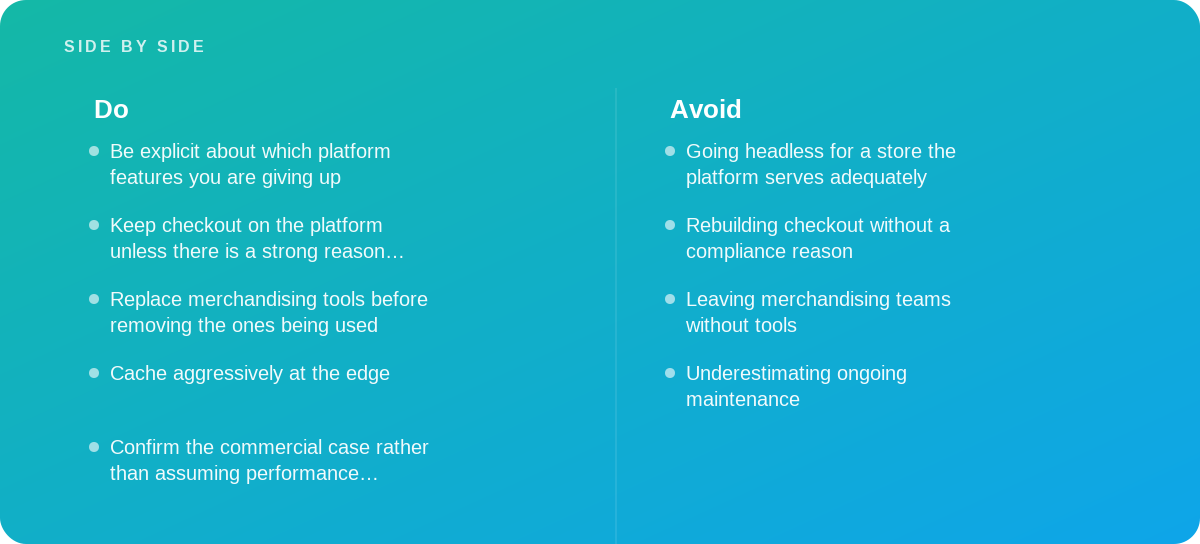
Now ask the uncomfortable question: if the optimized theme brings product pages within the Core Web Vitals thresholds, how much of the remaining improvement is attributable to the architecture rather than to the removal of the carousel and the apps? In this illustrative case, most of the measured slowness came from things Option A fixes. The headless build would need to find a further 5 percent lift from design freedom alone. Unless the brand has a specific, testable reason to believe that, such as a product configurator the theme cannot support, the commercial case does not hold. That is exactly what the good-practice rule "confirm the commercial case rather than assuming performance justifies it" is designed to catch.
Run the same exercise in the other direction too. A brand with $60 million in revenue, the same cost structure and a genuine front-end requirement would need a lift of only about half a percent to pay back the same difference. Scale changes the answer, which is why headless commerce tends to make sense for larger or more specialized stores first.
Warning: the most common way the worked example goes wrong in real life is by leaving maintenance out of the model. A headless front end that is built and then left without a team degrades quickly:
- Framework and dependency versions fall behind and accumulate security advisories.
- The commerce platform retires API versions on a schedule, forcing unplanned work.
- Merchandising requests queue behind engineering work, and promotions slip.
What to Rebuild, Replace or Drop Before You Commit
The first good-practice rule is to be explicit about which platform features you are giving up. Produce a feature inventory before any design work begins. List every template, every app, every admin workflow your team uses and every integration, then mark each one as rebuild, replace with a service, keep on the platform, or drop. The exercise usually surfaces three categories of surprise.
Apps that inject into the theme
Reviews, loyalty, subscriptions, product bundles, wishlists, size guides, back-in-stock alerts and upsell tools often work by inserting code into the theme. In a headless front end, each needs an API and a front-end component built for it. Some offer headless SDKs; some do not. Upsell and cross-sell logic is a common casualty, so review our guide to getting upsells and cross-sells right before deciding how you will rebuild those placements.
Merchandising workflows
Replace merchandising tools before removing the ones being used. Concretely, that means the new CMS, the search configuration and the promotion workflow should be live and in use by the merchandising team on a staging environment for several weeks before launch. Leaving merchandising teams without tools is a listed mistake precisely because it is so common: the engineering team ships a fast storefront, and the people who drive weekly revenue discover they now need a developer to change a banner.
Search engine and accessibility foundations
Themes provide sensible defaults for canonical URLs, structured product data, sitemaps and accessible markup. A custom front end starts with none of them. Accessibility in particular must be designed in from the first component, not audited in at the end; our guide to accessibility in e-commerce covers the patterns for product galleries, filters and carts. If URLs change, every old URL needs a redirect, and the product data itself may need cleaning on the way through, which our guide to product data migration addresses.
How a Headless Build Should Be Sequenced
If the scoring and the commercial case both point to headless commerce, the order of work determines whether the project lands. A sequence that protects revenue looks like this.
- Baseline and inventory. Record current field performance, conversion by template and device, and the full feature inventory described above. These are the numbers the new build must beat.
- Architecture and vendor choices. Choose the front-end framework, hosting, CMS and search service. Confirm the checkout stays on the platform unless a documented requirement says otherwise.
- Merchandising tools first. Configure the CMS and search, model the content types merchandisers need, and train the team on staging.
- Core templates. Build product, collection, cart and the checkout hand-off, with analytics events and accessibility built into each component.
- Caching strategy. Cache aggressively at the edge. Product and collection pages can usually be served from cache and revalidated when data changes, with only price, inventory and cart state fetched live.
- Parity testing. Compare every feature in the inventory against the old site, check redirects, test on real mid-range phones, and run the analytics pipeline end to end.
- Phased launch. Where the platform allows, route a share of traffic or a single market to the new front end first, compare conversion against the old site, and only then switch fully.
Treat a headless migration with the same discipline as any platform change. Our guide to replatforming without losing revenue covers the cutover, redirect and rollback planning that applies here too.
Edge caching in practice
Edge caching is where the performance argument is won or lost. The aim is for the HTML of a product page to be served from a location near the shopper without a round trip to the commerce API. Common patterns include static generation with revalidation on a timer or on a webhook from the platform when a product changes, and stale-while-revalidate headers so a slightly old page is served instantly while a fresh one is fetched. Price and stock should be treated carefully: either revalidate on every change via webhooks, or fetch them client-side after the cached page loads. A headless front end that renders every request on the server from the commerce API, without caching, can easily be slower than the theme it replaced.
Recommendations by Situation
With the criteria and scores in hand, the recommendation depends on which situation you are actually in. These are the ones we see most often.
A store the platform serves adequately
You sell a standard catalog, the theme supports your design with reasonable customization, and your performance problems trace back to apps, images and scripts. Headless would multiply your costs to fix problems a theme project fixes.
Verdict Choose Option A. Run a structured theme performance project, set a script budget, and revisit headless commerce only if field data still fails Core Web Vitals on revenue templates after the clean-up.
A brand with a genuine front-end requirement and an engineering team
You need interactions the theme cannot support, such as a visual product builder, a content-led shopping experience across several markets, or one front end over several back ends, and you have or will fund a permanent front-end team. You have confirmed the commercial case with your own numbers.
In this situation, headless is justified, but the checkout still should not move. Keep it on the platform, invest the budget you save into merchandising tools and caching, and phase the launch so you can measure the lift against the old storefront.
Verdict Choose Option B. Build a headless storefront with the platform's hosted checkout, replace merchandising tools before switching off the theme, and budget maintenance as a permanent line, not a project.
A business whose transactions the platform checkout cannot model
Complex trade approval chains, quote-to-order flows, split payments across vendors, or regulated purchases may genuinely need a custom checkout. Here Option C can be the right answer, but only with a documented compliance and payments plan, a dedicated team and an honest schedule. Before choosing it, check whether the platform's own checkout extensions or a B2B edition cover the requirement, since that keeps you in Option B.
A headless build that has left merchandisers blocked
If you are already headless and every banner change needs a developer, the fix is rarely to go back to the theme. It is to add the missing tooling: content models in the CMS that cover the page types merchandisers edit, preview environments, search merchandising controls, and a clear request process for anything that still needs engineering. This is one of the clearest moments to bring in outside help, alongside weighing a migration in the first place and performance goals the current platform cannot meet. Our e-commerce development service covers all three.
Common Headless Commerce Mistakes and How to Avoid Them
The same four mistakes account for most headless projects that disappoint. Each has a straightforward preventive check.
| Mistake | Why it happens | Preventive check |
|---|---|---|
| Going headless for a store the platform serves adequately | Performance or design freedom is assumed to justify the cost | Run the weighted scorecard and the commercial case before any vendor conversations |
| Rebuilding checkout without a compliance reason | A desire for total design control extends to the payment step | Require a written requirement the platform checkout cannot meet before scoping custom checkout |
| Leaving merchandising teams without tools | Engineering scope focuses on the shopper-facing front end | Make merchandiser sign-off on staging tools a launch criterion |
| Underestimating ongoing maintenance | Budgets are set as one-off projects | Fund a named team and an annual maintenance line before approving the build |
Two smaller mistakes are worth adding. The first is rebuilding app bloat: teams remove nine apps from the theme, then add eleven third-party scripts to the headless front end, and the performance advantage disappears. Apply the same script budget you would apply to a theme. The second is measuring success in the lab only. A fast lab score on a developer's laptop says little about the 75th-percentile experience of real shoppers on mid-range phones over mobile networks; judge the project on field data.
Headless commerce is worth its cost only when the front-end freedom it buys is something your revenue depends on, and when you have the people to keep that front end running. Seen that way, the decision stops being about fashion in architecture and becomes an ordinary investment question: what does each option cost over three years, what must it deliver to pay back, and who will run it. Answer those three and the right option is usually obvious. For more on the surrounding decisions, browse our e-commerce development articles.
Where this comes from
- Shopify Developers — Headless commerce documentation
- web.dev — Commerce performance
- Baymard Institute — E-commerce platform research
The figures and practices above come from the sources listed.
Working on something like this?
We take on E-commerce Development work for teams who want it done once, properly. Tell us what you are building and we will tell you honestly whether we are the right studio for it. Start a project.
Where to go next
Spotted something wrong? Report an error on this page. We correct on the page and say what changed.