Sample Rate and Bit Depth, Done Properly
Learn what sample rate and bit depth control, which settings to request for each deliverable, and how to vet suppliers, compare quotes and check files.
 MediaScaleUp Editorial Team

Every piece of digital audio you commission, whether it is a podcast season, a product video voiceover, a jingle or an oral history archive, is defined by two numbers that most buyers never see on a quote: sample rate and bit depth. The sample rate says how many times per second the analog signal was measured. The bit depth says how finely each of those measurements was recorded. Together they set the ceiling on frequency response and the floor under the noise, and getting sample rate and bit depth right at the start is one of the few decisions in audio production that cannot be fixed later.
This handbook is written for the person paying for the work: the marketing lead booking a voiceover session, the producer hiring an editor for a documentary, the operations manager digitizing a decade of recorded training sessions. You do not need to become an engineer, but you do need to know what to ask for, what a sensible specification looks like, how suppliers differ in the way they handle resolution, and how to check that what comes back matches what you paid for.
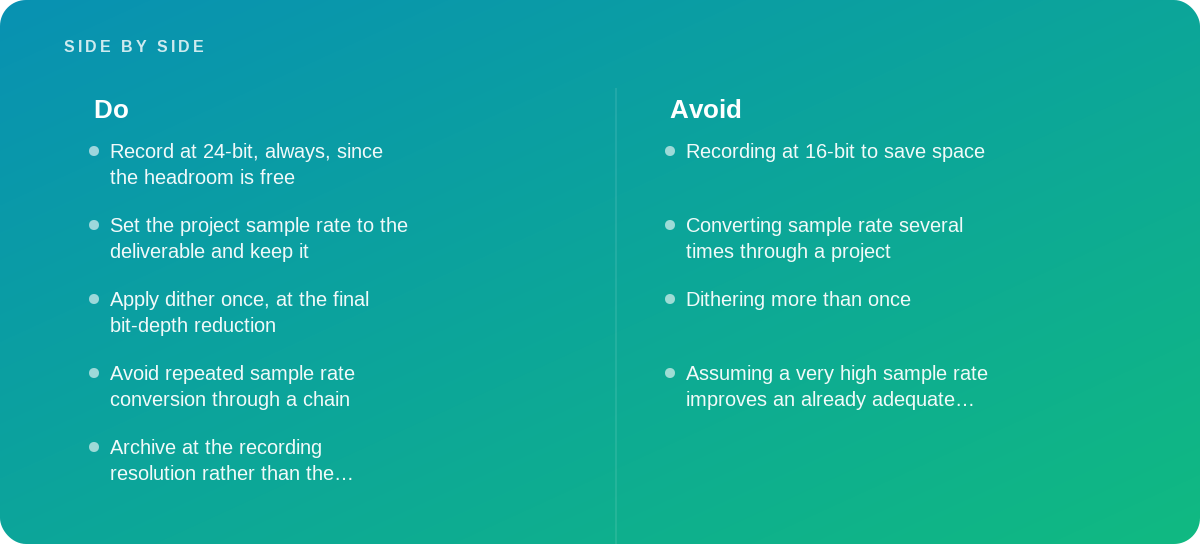
The good news is that the correct answers are not exotic. For almost every commercial project, the right approach is to record at 24-bit, run the project at the sample rate of the final deliverable, reduce bit depth once at the very end with dither, and archive the masters at the resolution they were recorded in. The difficult part is making sure a supplier actually works that way, across every file, every handoff and every revision.
What Sample Rate and Bit Depth Actually Control
Digital audio is a series of snapshots. A converter measures the voltage coming from a microphone or instrument at regular intervals and stores each measurement as a number. The two settings you will see on every recording interface and every delivery specification describe those snapshots.
Sample rate: how often the signal is measured
Sample rate is the number of measurements taken per second, expressed in kilohertz. At 48 kHz, the converter takes 48,000 samples every second. The practical consequence is set by the Nyquist principle: the highest frequency a digital system can represent is half its sample rate. A 44.1 kHz recording can therefore carry content up to 22.05 kHz, and a 48 kHz recording up to 24 kHz. Human hearing is generally described as reaching about 20 kHz at best, and that upper limit falls with age and noise exposure, which is why both of the standard rates already cover the audible range with some margin for the filters that stop higher frequencies from folding back into the audible band as distortion (aliasing).
Raising the sample rate extends the bandwidth the file can carry. It does not make audible content more detailed in the way that more pixels make a photo sharper. That distinction is the source of a great deal of confusion, and a fair amount of upselling.
Bit depth: how finely each measurement is recorded
Bit depth is the number of binary digits used to store each sample. Each additional bit doubles the number of possible values and adds roughly 6 dB of theoretical dynamic range. A 16-bit file can represent 65,536 levels, which works out to around 96 dB between the loudest possible signal and the quantization noise floor. A 24-bit file can represent over 16.7 million levels, around 144 dB in theory. No real converter reaches that full theoretical figure, because analog electronics and microphones generate their own noise, but the extra range is what gives a 24-bit recording its generous headroom.
Headroom is the distance between the level you record at and the point where the signal clips. At 24-bit, an engineer can leave plenty of space above a voice or instrument to catch an unexpected shout, laugh or drum hit, and the quiet parts still sit far above the digital noise floor. At 16-bit, the same cautious recording level leaves the quiet parts much closer to the noise, which becomes audible once the material is compressed, normalized and made louder for delivery.
Why these two numbers are not interchangeable
Buyers sometimes treat "high resolution" as one dial. It is two. Sample rate governs bandwidth, meaning how high the frequencies go. Bit depth governs dynamic range, meaning how quiet the quietest detail can be before it is lost in noise. A project can be generous in one and inadequate in the other. A 96 kHz, 16-bit recording made at a cautious level can sound noisier after processing than a 48 kHz, 24-bit recording of the same performance, because the problem in that case was never bandwidth.
- Record at 24-bit, for headroom without audible noise
- Music delivery 44.1 kHz, the long-standing CD and streaming rate
- Video and broadcast 48 kHz, the standard for picture work
- CD-quality master 16-bit, reduced once with dither
- Highest frequency half the sample rate (Nyquist)
- Archive at the original recording resolution, not the delivery one
Choosing the Right Specification for Your Deliverable
The single most useful thing a buyer can do is state the final deliverable before any recording happens. The project sample rate should be chosen to match it and then left alone. Every sensible specification flows backward from where the audio will end up.
Video, broadcast and anything with picture
If the audio will sit under video, including social clips, explainer animations, webinars, corporate films, advertising and broadcast programs, the working rate is almost always 48 kHz. Video editing software, broadcast chains and most streaming video platforms are built around it. Broadcast organizations publish detailed technical delivery requirements, and the European Broadcasting Union's technical resources are a good example of how specific those documents can be about file format, loudness and channel layout. When a broadcaster or platform supplies a delivery specification, it overrides any general rule in this article.
Music releases
For music intended for streaming services and CD, 44.1 kHz remains the most common delivery rate, and 16-bit is the CD standard. Many streaming services also accept 24-bit masters, and some distributors prefer them. The key is to know which masters you need before mixing begins, so the engineer can run the session at the right rate and produce each deliverable with a single, controlled conversion rather than a chain of them.
Podcasts, audiobooks and spoken word
Spoken-word projects are usually recorded at 48 kHz or 44.1 kHz, 24-bit, and delivered as a compressed file for distribution. The final format matters more here than the working rate, because the listener hears an encoded file. If you want to understand how the choice of MP3, AAC or Opus affects what reaches the listener, our guide to how MP3, AAC, Opus and FLAC compare covers the trade-offs. A supplier should still keep an uncompressed 24-bit master, since that is what you will need if a distributor changes its requirements.
Live streams and events
Streaming encoders generally run at 48 kHz, and mismatches between a mixing console, a capture card and the streaming software are a frequent source of drift and clicks. Our guide to getting live stream audio right goes into those chains in detail. For events, the multitrack backup recording should be set to the same rate as the main system so the two can be synchronized afterward without conversion.
| Deliverable | Working sample rate | Recording bit depth | Delivery bit depth | Notes |
|---|---|---|---|---|
| Video, social and broadcast | 48 kHz | 24-bit | 24-bit (or as specified) | Follow the broadcaster or platform specification where one exists |
| Music for CD | 44.1 kHz | 24-bit | 16-bit with dither | One dithered reduction at mastering |
| Music for streaming | 44.1 kHz or 48 kHz | 24-bit | 24-bit or 16-bit, per distributor | Confirm what the distributor accepts before mixing |
| Podcast or audiobook | 44.1 kHz or 48 kHz | 24-bit | Encoded file plus 24-bit master | Keep the uncompressed master for re-delivery |
| Live stream | 48 kHz | 24-bit capture | Encoder output | Match every device in the chain to one rate |
| Archive and preservation | Original recording rate | Original recording depth | Not reduced | Store what was captured, plus documentation |
Where Quality Is Lost and Never Comes Back
Most audio problems can be improved with editing, restoration or a better mix. Resolution mistakes are different. Once information is discarded or damaged, no later step can recreate it. As a buyer, these are the failure points you are protecting yourself against.
Recording at 16-bit to save space
Storage is cheap, and the difference in file size between 16-bit and 24-bit is 50 percent. That saving is almost never worth the loss of headroom. A 16-bit recording forces the engineer to choose between recording hot, which risks clipping on an unexpected peak, and recording cautiously, which leaves the quiet material near the noise floor. Either way, the problem surfaces during editing and mastering, when the audio is compressed and raised in level. Good suppliers record at 24-bit as a matter of habit, because the headroom is effectively free.
Converting sample rate repeatedly
Sample rate conversion is a mathematical resampling process. Modern converters are very good, but each pass involves filtering, and filtering has side effects near the top of the frequency range. One careful conversion to produce a deliverable is normal. Material that is converted from 48 kHz to 44.1 kHz for editing, back to 48 kHz for a video editor, and then again for a music platform accumulates small errors, and more importantly it multiplies the chance that someone uses a low-quality converter or a real-time conversion inside an application that was not designed for it. The cleaner path is to match the project to the deliverable at the start.
Dithering more than once
Dither is a small amount of carefully shaped noise added when bit depth is reduced, for example from 24-bit to 16-bit. It replaces a harsh, signal-dependent distortion with a benign, constant noise floor. Applied once at the final reduction, it is correct and inaudible in normal listening. Applied at several stages, for instance by a mix engineer, again by a mastering engineer and again by an export preset, the noise accumulates. Our article on dither and bit depth reduction explains the mechanics and the options for noise shaping in more depth.
Clipping and poor gain structure
Bit depth only helps if levels are set sensibly. A 24-bit recording that clips on every loud syllable is as damaged as any 16-bit file. Consistent levels through the chain, from microphone preamp to converter to plugins, are what let the extra resolution do its job, and the principles are covered in our practical guide to gain staging.
Red flag: a supplier who cannot tell you, without checking, what sample rate and bit depth they record at.
- Experienced studios have a house standard and state it on request.
- Vague answers such as "high quality" or "the best settings" often mean defaults have never been reviewed.
- Ask for the specification in writing on the quote, not just in conversation.
Questions to Ask a Supplier Before You Commission
You can learn most of what you need about a supplier's technical discipline in a short conversation. The goal is not to catch anyone out. It is to confirm that the supplier works to a defined standard, that the standard fits your deliverable, and that it will be applied consistently by everyone who touches the files, including freelancers they subcontract to.
Listen for specific answers. "We record at 48 kHz, 24-bit for anything going to video, and we keep that rate through to delivery" is the kind of reply that signals a workflow. "It depends" is also fine if it is followed by an explanation of what it depends on. What you want to avoid is a supplier whose settings change from session to session because nobody has written them down.
- What sample rate and bit depth will you record at, and why is that the right choice for my deliverable?
- Will the project stay at one sample rate from recording to delivery? If not, where will conversion happen and with what tool?
- At what stage is dither applied, and who is responsible for making sure it happens only once?
- If you work with freelancers or other studios, how do you communicate the session specification to them?
- How do you handle source material that arrives at mixed rates and bit depths?
- What will I receive at delivery: final masters only, or also the unmastered mix, stems and session files?
- At what resolution will you archive the project, and for how long?
- Can you provide a technical report for each delivered file, showing its format, rate, depth, peak and loudness?
- How will you check that delivered files meet my platform's or broadcaster's specification?
- What happens, and what does it cost, if a file fails a delivery check because of a technical error on your side?
The last two questions matter more than they look. A supplier who is confident in its process will usually commit to correcting technical errors at its own cost. One who hesitates may be telling you that its quality control is informal.
What Drives the Cost of Getting Resolution Right
Handling sample rate and bit depth correctly does not, by itself, add much to a quote. Record settings are free to change, and a disciplined studio does not charge extra for using sensible ones. Where the costs arise is in the surrounding work: preparing inconsistent source material, producing multiple deliverables, verifying files and building an archive that will last. Prices vary widely by market, studio and turnaround, so rather than quote figures, it is more useful to understand what moves the number up or down.
Source material condition
The biggest cost driver is usually what you bring. A project that arrives as a single multitrack session at one rate and depth is straightforward. A project assembled from phone recordings, Zoom calls, older interviews, stock music and field recordings, each at a different rate and depth, requires an engineer to audit every file, choose a project standard, convert what needs converting in a controlled way and document it. That audit is billable time, and it is time well spent.
Number and type of deliverables
A single 48 kHz, 24-bit WAV for a video editor is one export. A music release that needs a 16-bit CD master, a 24-bit streaming master, a set of stems and a set of compressed preview files is several distinct deliverables, each of which should be checked. Each extra version adds a small amount of time for rendering, verification and naming.
Verification and reporting
Some suppliers include a technical check of every file as standard. Others charge for it or skip it. Automated analysis tools make this quick, but a human still has to review the report and listen to the edges of each file. If your deliverable is going to a broadcaster with a strict specification, paying for verification is cheaper than a rejected delivery.
Archiving and storage
Keeping full-resolution session files, with all their media and documentation, costs storage and some organizing time. For a single promotional video, it may be enough to archive the final 24-bit mix and stems. For a podcast series, an oral history project or a catalog of music, a structured archive is a real deliverable and is usually quoted as such. Our guide to archiving audio sessions sets out what a durable archive should include.
A Worked Example: Commissioning a Twelve-Episode Video Podcast
The following is an illustrative project, not a client case study, built to show how the decisions in this handbook play out in numbers.
A company plans a twelve-episode video podcast. Each episode runs about 40 minutes and features a host and a guest, recorded in person with two microphones and three cameras. Episodes will be published as full videos on a video platform, as short clips on social channels and as audio-only files on podcast platforms. Two episodes will include remote guests recorded over a video call.
Step one: set the project specification from the deliverables
Because the primary deliverable is video, the project rate is 48 kHz. The cameras also record their scratch audio at 48 kHz, which makes synchronization simple. All microphones are recorded at 24-bit. The audio-only podcast version will be exported from the same 48 kHz session and encoded for distribution, so no sample rate conversion is needed at any stage for the main recordings.
Step two: estimate the storage
Uncompressed audio size is simple arithmetic: sample rate multiplied by bytes per sample multiplied by channels. At 48 kHz and 24-bit (3 bytes), a mono track uses 144,000 bytes per second, or roughly 8.6 MB per minute. Two microphone tracks for 40 minutes come to around 691 MB per episode, plus a stereo mix of around 691 MB for the same duration. Across twelve episodes, the raw microphone tracks total around 8.3 GB. Recording the same material at 16-bit would have saved about a third of that, roughly 2.8 GB, which is trivial next to the camera files and not worth the loss in headroom.
Step three: handle the exceptions
The two remote guests arrive as call recordings. One is a compressed file at 48 kHz; the other is at 44.1 kHz. The engineer converts the 44.1 kHz file to 48 kHz once, using a high-quality offline converter, before it enters the session, and notes the conversion in the project log. Both files are clearly lower quality than the studio microphones, and no setting can fix that; the realistic goal is to make them intelligible and consistent in level.
Step four: deliver and verify
For each episode, the supplier delivers a 48 kHz, 24-bit stereo WAV mix to the video editor, a loudness-normalized encoded file for podcast platforms, and a set of short clip exports. Because every deliverable stays at 24-bit or goes straight to an encoder, there is no 16-bit reduction and no dither step in this project at all. Loudness and true peak are checked against each platform's published targets, a topic covered in our guide to limiting and true peak.
Step five: archive
At the end of the season, the supplier archives the original 48 kHz, 24-bit microphone tracks, the converted remote-guest files alongside their untouched originals, the session files, the final mixes and a text file documenting settings and conversions. The whole archive for the audio side of the season is well under 20 GB, a modest cost for the ability to re-edit or re-deliver any episode years later.
Red flag: a delivery that arrives at a different sample rate from the one agreed, with no explanation.
- It often means a default export preset was used instead of the project settings.
- A 44.1 kHz file dropped into a 48 kHz video timeline can play back at the wrong speed or be converted silently by the editing software.
- Ask for the file to be re-exported from the session rather than converted from the delivered file.
How to Compare Supplier Quotes Side by Side
Quotes for audio work rarely line up neatly. One supplier quotes per finished minute, another per hour, a third per episode or per song. The easiest way to make a fair comparison is to strip each quote back to the same set of questions and score each supplier on how clearly it answers them. Price matters, but a lower quote that omits verification, stems or an archive is not cheaper if you end up paying to redo the work.
The scorecard below is a template. Rate each supplier from one to five on each line, based on what is written in the quote and what they told you in conversation. A blank or evasive answer scores a one. Weight the lines to suit your project: an archive project should weight preservation heavily, while a one-off social video may not need to.
| Criterion | What a strong answer looks like | Supplier A | Supplier B | Supplier C |
|---|---|---|---|---|
| Recording specification | States rate and depth in writing, justified by your deliverable | 1-5 | 1-5 | 1-5 |
| Sample rate policy | One rate throughout; any conversion named, done once, offline | 1-5 | 1-5 | 1-5 |
| Dither policy | Applied once, at the final reduction, by a named person | 1-5 | 1-5 | 1-5 |
| Mixed-source handling | Audits all incoming files and documents any conversions | 1-5 | 1-5 | 1-5 |
| Deliverables listed | Every format, rate, depth and version itemized | 1-5 | 1-5 | 1-5 |
| Verification | Technical report per file, checked against your spec | 1-5 | 1-5 | 1-5 |
| Archive | Original resolution, with documentation, for a stated period | 1-5 | 1-5 | 1-5 |
| Error correction | Commits to fixing technical errors at no charge | 1-5 | 1-5 | 1-5 |
After scoring, look at the pattern rather than just the total. A supplier that scores well on everything except the archive may be a good fit if you intend to hold the archive yourself. A supplier that scores low on dither and conversion policy is a concern regardless of price, because those are the areas where mistakes are permanent.
Reading between the lines of a quote
Some phrases deserve a follow-up question. "Delivered in high resolution" should be translated into specific numbers. "All formats included" should be itemized, since a supplier may mean two formats while you expected five. "Files available on request" may mean files are kept for a short period and then deleted. None of these are necessarily bad, but they are ambiguous, and ambiguity is where disputes start.
Myths That Push Budgets in the Wrong Direction
A handful of beliefs about resolution lead buyers to pay for things that do not help, or to skip things that do. It is worth addressing them directly, because suppliers sometimes lean on them in sales conversations.
"Higher sample rates always sound better"
Very high sample rates such as 96 kHz or 192 kHz have legitimate uses. Some engineers prefer them for sound design, where recordings are pitched down dramatically and ultrasonic content becomes audible; for certain types of heavy processing; or for archival capture of historical media, where the goal is to preserve everything the source can give. For a voiceover, a podcast or a typical corporate video that will be delivered at 48 kHz, recording at 96 kHz doubles the file sizes, increases processing load and requires a conversion at the end. It does not make an adequate recording audibly better for the listener. The reference material behind this handbook is clear on the point: assuming a very high sample rate improves an already adequate recording is a mistake.
"Bit depth doesn't matter because it all ends up as MP3"
The final file may be compressed, but every edit, fade, equalizer move, compressor and level change happens before that. A 24-bit working resolution gives those processes room to operate without raising the noise floor. The encoded file will sound better when it is made from a clean 24-bit master than when it is made from a 16-bit recording that has been pushed and processed.
"Converting up improves an old recording"
Converting a 16-bit, 44.1 kHz file to 24-bit, 96 kHz does not add detail. It creates a larger file containing the same information. Upconversion can occasionally be useful for workflow reasons, for example to bring material into a session running at a higher rate, but it is never an improvement in itself, and a supplier should not describe it as one.
Handling Mixed Sources, Unfamiliar Specs and Long-Term Archives
The reference guidance is specific about when to bring in specialist help: when material arrives at mixed rates and depths, when a delivery specification is unfamiliar, and when an archive must outlive the software that made it. These are also the situations where the difference between suppliers becomes most visible.
Mixed rates and depths
Projects built from many sources, such as a documentary with archival interviews, a brand film that reuses older music, or an internal training library assembled over several years, almost always contain files at different settings. The disciplined approach is to inventory every file, choose one project rate based on the deliverable, convert each non-matching file once with a high-quality offline converter, and keep the originals. Real-time conversion inside an editing application, which some programs do silently when a file does not match the timeline, should be avoided for anything that matters. Digital audio workstation manufacturers document how their project settings interact with imported files; Steinberg's project setup documentation is one example of how explicit these settings can be, and a competent engineer will know where the equivalent controls are in whatever software they use.
Unfamiliar delivery specifications
Broadcasters, streaming platforms, airlines, museum installations, telephone systems and public-address networks all have their own requirements, and some are unusual. Telephone and alert systems in particular can require low sample rates and specific formats that differ sharply from media delivery standards; our articles on emergency alert audio decisions and phone systems show how different those contexts are. The right response to an unfamiliar specification is to read it in full before recording, set the project up to meet it, and verify the final files against every line.
Archives that outlive the software
Session files from a digital audio workstation can become difficult to open after a few years of software updates, and plugins used in a mix may stop being available. A durable archive therefore includes more than the session. It should include the raw recordings as standard broadcast WAV or similar uncompressed files at their original rate and depth, rendered stems of each element with processing applied, the final masters, and a plain-text document recording the sample rate, bit depth, any conversions, dither settings and the software versions used. Standards bodies such as the Audio Engineering Society publish work on digital audio and preservation practice that informs how professional archives are structured.
Red flag: an archive offer that stores only the final compressed files or 16-bit masters.
- Delivery resolution is not archive resolution; you lose the headroom needed for future re-edits.
- An archive without documentation of settings and conversions may be unusable to the next engineer.
- Ask whether original recordings and stems are included, in what format, and for how long they will be kept.
Judging the Result When the Files Come Back
You can check most resolution-related issues yourself without specialist training, and a few minutes of checking on delivery is far cheaper than discovering a problem after publication.
Check the file properties
On most computers, the file information panel or a free media inspection tool will show the sample rate, bit depth, channel count and duration of each file. Compare these against the specification in your quote. Every delivered file should match. If a batch of files includes one or two at a different rate, that usually indicates a preset was changed partway through or a file was exported from the wrong session.
Ask for the technical report
If you agreed on a technical report, it should list each file with its format, rate, depth, peak level and loudness. Check that the loudness and true peak values fall within your platform's or broadcaster's targets. If no report was agreed, it is reasonable to ask for one on the first delivery of a new working relationship.
Listen in the right places
Most resolution problems are audible at the edges: the quiet tail of a fade, the silence between sentences, the room tone at the start and end of a file. Listen to those moments on good headphones at a moderate volume. Hiss that rises and falls with the material, a grainy texture on fades or clicks at edit points are worth querying. On the loud side, listen for the harsh, crackling quality of clipping on peaks. When reviewing with colleagues or stakeholders, it helps to agree on a structured review process so that technical comments do not get lost among creative ones; our guide to reviewing audio with clients suggests how to organize that.
Test in the destination
Drop a delivered file into the actual destination before approving the batch: the video timeline, the podcast host's upload preview or the platform's test environment. Speed and pitch errors from a sample rate mismatch, or unexpected level changes from a platform's normalization, show up immediately in context and can be missed in isolation.
A simple acceptance routine, repeated for every delivery, covers the essentials:
- Inspect the properties of every delivered file and compare rate, depth and channels with the agreed specification.
- Review the technical report for peak, true peak and loudness against the destination's targets.
- Listen to fades and silences on headphones for hiss, grain or distortion.
- Listen to the loudest passages for clipping or harsh limiting.
- Test one file in the destination before approving the full batch.
- Confirm the archive contents in writing, including original-resolution recordings and documentation.
Writing a Specification That Suppliers Cannot Misread
A short written specification attached to the purchase order removes most of the ambiguity described in this handbook. It does not need to be technical prose. A few lines covering the points below give any competent supplier a clear target and give you something objective to check against at delivery.
- Deliverables: list each file you expect, with its purpose, format, sample rate, bit depth and channel layout.
- Working resolution: state that recording will be at 24-bit and that the project will run at the delivery sample rate from start to finish.
- Conversion and dither: require that any sample rate conversion is done once, offline, and documented, and that dither is applied once at the final bit-depth reduction only.
- Delivery standard: name the platform or broadcaster specification the files must meet, and attach it if it is a document.
- Verification: request a technical report for each file.
- Archive: specify what will be archived, at what resolution, in what format, with what documentation and for how long.
- Rights and records: tie the archive to your licensing records so that anyone reusing the material later knows what is cleared; our article on audio rights and clearance records explains why these belong together.
If you are commissioning audio regularly, turn this into a standing document that every supplier receives. Consistency across projects makes future re-edits, compilations and re-deliveries dramatically simpler, because every file in your library will share the same foundations. If you would rather hand the whole process to a single team that already works this way, our audio editing and production service is built around exactly these standards.
Verdict Sample rate and bit depth are not where you should spend money on extravagance; they are where you should insist on discipline. Ask for 24-bit recording, a single project sample rate matched to your deliverable, one dithered reduction at the end, and an archive at the original resolution. A supplier who states those standards clearly in writing, applies them to every file and proves it with a technical report is worth more than one offering higher numbers with no process behind them.
Where this comes from
- Audio Engineering Society — Digital audio standards
- Steinberg — Project setup documentation
- European Broadcasting Union — Audio delivery specifications
The figures and practices above come from the sources listed.
Working on something like this?
We take on Audio Editing & Production work for teams who want it done once, properly. Tell us what you are building and we will tell you honestly whether we are the right studio for it. Start a project.
Where to go next
Spotted something wrong? Report an error on this page. We correct on the page and say what changed.