Audio Codecs Explained: MP3, AAC, Opus and FLAC
Learn how MP3, AAC, Opus and FLAC differ, where each codec fits, and how to keep masters lossless while delivering the right lossy file to every platform.
 MediaScaleUp Editorial Team

Every audio file that reaches a listener has been through a codec, the piece of software that packs sound into data and unpacks it again for playback. Audio codecs: MP3, AAC, Opus and FLAC are the four names most teams run into, and they do very different jobs. MP3, AAC and Opus are lossy: they throw away information the encoder judges you are unlikely to hear, in exchange for much smaller files. FLAC is lossless: it shrinks the file without discarding anything, so the decoded audio is bit-for-bit identical to the source.
The choice matters to anyone who publishes or handles sound. It matters to marketers shipping podcast episodes and social video, to product teams building voice features, to agencies sending mixes to clients for approval, and to anyone keeping an archive they expect to reuse in five years. Pick a codec that is too heavy and you pay for bandwidth, storage and slow page loads. Pick one that is too light, or convert between lossy formats one time too many, and you lose quality that no later step can restore.
This briefing is arranged in three layers. The first section is an executive summary for decision makers who need the answer quickly. The middle sections give specialists the technical depth: how perceptual coding works, what distinguishes each codec, how containers and browsers complicate things, and where generation loss comes from. The final sections translate that into a worked example and into implications for budgets, workflow and risk.
Executive summary: audio codecs, MP3, AAC, Opus and FLAC at a glance
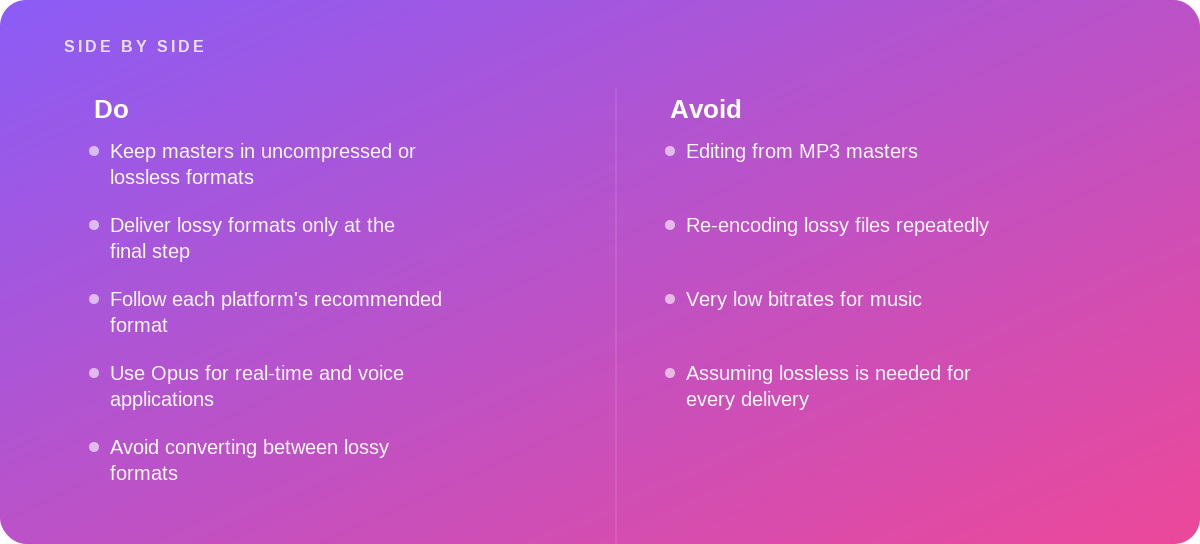
If you remember one rule, make it this: keep masters in an uncompressed or lossless format, and create lossy files only at the final delivery step, from that master, once per deliverable. Nearly every quality problem we see in audio workflows traces back to breaking that rule, usually by editing from an MP3 someone emailed, or by re-encoding a delivered file to meet a new platform's spec.
Beyond that rule, the practical positions are straightforward:
- MP3 is the universal fallback. Almost every device, browser and podcast app plays it. It is less efficient than newer codecs, so it needs more bits for the same perceived quality, but its compatibility is unmatched.
- AAC is the default lossy codec of the video world and of much of the streaming ecosystem. It is more efficient than MP3 at the same bitrate and is the normal audio track inside MP4 files for web and social video.
- Opus is an open IETF standard designed for both speech and music, including real-time use such as calls and conferencing. At low and moderate bitrates it is the most efficient of the three lossy options and the natural choice for voice applications and WebRTC.
- FLAC is the practical lossless format for masters, archives and high-fidelity distribution. ALAC is Apple's equivalent and serves the same role in Apple-centric workflows.
The business mistake to avoid runs in both directions. Treating lossless as necessary for every delivery wastes storage and bandwidth and can break platforms that expect a lossy upload. Treating a lossy file as a master quietly caps the quality of everything made from it afterward.
Insight: The codec decision is really two decisions. One is the archive format, which should almost always be lossless or uncompressed. The other is the delivery format, which should follow the destination platform's published recommendation. Teams that try to make one file serve both purposes usually end up compromising both.
How perceptual coding decides what to throw away
Lossy audio codecs rely on psychoacoustics: the study of what the human auditory system actually registers. The encoder splits the signal into short blocks, transforms each block into frequency components, and then uses a psychoacoustic model to estimate which components are masked, meaning they are hidden by louder sounds nearby in frequency or time. Masked detail gets fewer bits or none at all. The quantization noise introduced by this bit starvation is shaped so that, ideally, it sits underneath the masking threshold and stays inaudible.
Two masking effects do most of the work. Simultaneous masking means a loud tone makes quieter tones close to it in frequency hard to hear. Temporal masking means a loud event briefly hides quieter sounds just after it, and to a lesser degree just before it. A good encoder exploits both. When the bitrate is too low for the material, the model can no longer hide all of the noise, and artifacts appear: a swirly, watery texture on cymbals and reverb tails, smeared transients, a "pre-echo" that softens the attack of drums or plucked strings, and a narrowed or collapsed stereo image.
Why some material is harder to encode than others
Speech in a quiet room is relatively easy. The energy is concentrated in a limited band and the signal has predictable structure, which is why voice codecs can sound intelligible at very low bitrates. Dense music is harder, especially material with broadband noise-like content: applause, rain, distorted guitars, crash cymbals, and long reverbs. Solo piano and harpsichord are notorious in listening tests because sharp attacks followed by sustained tones expose pre-echo. Content that has already been heavily limited, with little dynamic variation, also leaves fewer quiet moments in which masking can hide noise.
This is why a single "good bitrate" does not exist. A 64 kbps stream can be perfectly adequate for a spoken-word podcast in mono and clearly inadequate for a stereo music mix. When you set delivery specs, set them by content type, not by a single house number.
Constant, variable and average bitrate
Encoders can spend bits in different ways. Constant bitrate (CBR) spends the same amount every second regardless of content, which makes file size and streaming bandwidth predictable but wastes bits on silence and starves difficult passages. Variable bitrate (VBR) targets a quality level and lets the bitrate rise and fall with complexity, which usually gives better quality per byte. Average bitrate (ABR) and constrained VBR sit between the two: they vary within limits and average out to a target. For file downloads and on-demand playback, VBR or constrained VBR is usually the better trade. For live streams and real-time links where the network path has a fixed budget, CBR or tightly constrained VBR keeps behavior predictable.
- Codec
- The encoder and decoder pair that compresses audio into a bitstream and reconstructs it for playback.
- Container
- The file wrapper that holds one or more encoded streams plus metadata, such as MP4, Ogg, WebM or Matroska. The container is not the codec.
- Bitrate
- The amount of data used per second of audio, usually expressed in kilobits per second (kbps).
- Lossy
- Compression that permanently discards information judged inaudible, so the decoded output differs from the source.
- Lossless
- Compression that reduces file size while allowing exact reconstruction of every original sample.
- Generation loss
- The cumulative degradation caused by decoding and re-encoding lossy audio repeatedly.
- Encoder delay
- Padding samples that some codecs add at the start of a stream; if not handled, they cause gaps or clicks between tracks meant to play seamlessly.
MP3: why the oldest codec is still the safest fallback
MP3, formally MPEG-1 and MPEG-2 Audio Layer III, dates from the early 1990s. Its longevity comes from a simple fact: it plays almost everywhere. Car stereos, smart speakers, old media players, podcast apps and every mainstream browser handle it. The patents that once complicated its use have expired, so encoders and decoders can be shipped freely today. If you need one file that will open on the widest possible range of devices without anyone asking questions, MP3 is still that file.
Its weaknesses are technical. MP3 uses a hybrid filter bank that is less efficient than the pure modified discrete cosine transform used in AAC and Opus, its block switching handles transients less gracefully, and it is limited to sample rates up to 48 kHz and a maximum of 320 kbps for standard stereo streams. In practice, that means MP3 needs more bits than AAC or Opus to reach the same perceived quality, and at low bitrates it degrades sooner and more audibly.
Encoder choice and settings still matter
Not all MP3 encoders are equal. LAME, the long-standing open-source encoder, is the reference most tools build on, and its VBR presets are well tuned. When you export from an editor, check which encoder it uses and whether it writes a proper header with gapless information. Joint stereo, which exploits the similarity between left and right channels, is almost always better than forcing independent left-right stereo at the same bitrate, because it frees bits for the parts of the signal that differ.
Typical practical ranges look like this. For spoken-word podcasts, many producers deliver mono or joint-stereo MP3 somewhere between 64 and 128 kbps, choosing the higher end when there is music in the intro or beds. For music intended for casual listening, 192 kbps and above, or a high-quality VBR preset, is the common starting point. These are ranges, not rules: follow the platform's own specification when it publishes one.
Where MP3 falls short
MP3 has no native support for more than two channels in common practice, so it is not a choice for surround or immersive deliverables. Its handling of encoder delay relies on optional metadata, so gapless playback of live albums or continuous DJ mixes can break on players that ignore that metadata. And it is poorly suited to very low bitrates; at 32 kbps or below, speech becomes metallic and music collapses. When bandwidth is genuinely tight, Opus or HE-AAC does far better.
AAC and its profiles: the codec inside most video
Advanced Audio Coding was developed as MP3's successor within the MPEG family. It uses a cleaner transform design, better handling of transients through block switching and temporal noise shaping, and more flexible channel configurations, including multichannel audio. At the same bitrate, a good AAC encoder typically sounds better than a good MP3 encoder, which is why AAC became the default audio track for MP4 video, for Apple's ecosystem, and for many broadcast and streaming systems.
"AAC" is not one thing, and that confuses a lot of delivery specs. The family includes several profiles:
- AAC-LC (Low Complexity) is the workhorse profile and what most people mean by AAC. It is the right choice for music and mixed content at moderate and high bitrates, and it is the profile most social and video platforms expect.
- HE-AAC (High Efficiency, sometimes called AAC+) adds spectral band replication, which encodes the lower frequencies normally and reconstructs the high frequencies from compact side information. It is designed for low bitrates, where it sounds far better than AAC-LC would, but at higher bitrates it offers little benefit.
- HE-AACv2 adds parametric stereo, representing the stereo image as a mono signal plus a small set of spatial parameters. It works at very low bitrates for streaming radio and similar uses, at the cost of stereo precision.
- AAC-LD and AAC-ELD are low-delay variants aimed at communications, where latency matters more than raw efficiency.
Practical AAC delivery
For video published to the web and social platforms, AAC-LC in an MP4 container at 44.1 or 48 kHz is the near-universal expectation. Stereo mixes are commonly delivered somewhere in the 128 to 320 kbps range, with platforms often re-encoding whatever you upload. That last point matters: if a platform will transcode your upload anyway, sending it a heavily compressed file forces a second lossy generation on top of your first. Upload the highest quality the platform accepts and let its encoder make the only lossy pass, or at least make your pass generous enough that the second one does little damage. Our guide to audio for short-form video covers how this plays out on vertical video platforms.
AAC encoders also vary. Apple's encoder and the Fraunhofer FDK encoder are widely regarded as strong, while some default encoders bundled with free tools have historically been weaker at lower bitrates. If your AAC output sounds worse than you expect, check the encoder before blaming the codec.
Keep the master lossless and make every lossy file directly from it, once. Quality lost to a lossy encode is gone for good, and no later step can bring it back.
Opus: the IETF codec built for voice, music and real time
Opus is the youngest codec in this group and the only one designed from the outset as an open internet standard. It is defined in RFC 6716, published through the RFC Editor, and was built to cover everything from narrowband speech to full-band stereo music within a single codec. Its range is wide: bitrates from 6 kbps to 510 kbps, sampling up to 48 kHz, and frame sizes from 2.5 ms to 60 ms. The short frames are what make it suitable for interactive audio, where every millisecond of delay adds to the awkward pause in a conversation.
Internally, Opus combines two technologies. SILK, a linear-prediction codec with roots in internet telephony, handles speech efficiently at low bitrates. CELT, a transform codec, handles music and wideband content with low latency. The encoder can use either mode or a hybrid of both, switching as the content and bitrate demand. That is why the same codec can carry a noisy phone call at a very low bitrate and a stereo music stream at a high one.
Where Opus fits best
Opus is the natural choice for real-time and voice applications: video calls, conferencing systems, voice chat, live streams that need low latency, and voice features inside apps. It is mandatory to implement in WebRTC, the browser real-time communication stack, which means browsers that support WebRTC can encode and decode it. It also includes features specifically for unreliable networks, such as in-band forward error correction and packet loss concealment, so a dropped packet causes a brief smoothing rather than a harsh gap.
For on-demand content, Opus is also very efficient. At the low and moderate bitrates typical of spoken word, it generally sounds clearly better than MP3 and competitive with or better than AAC. The limit is compatibility rather than quality: some older devices, some car systems and some podcast apps still do not play Opus files reliably. For a podcast feed meant to work everywhere, MP3 or AAC remains safer; for audio played inside your own web app, where you control the player, Opus is often the most bandwidth-efficient option. If you run conferencing or hybrid meetings, remember that capture quality still sets the ceiling: Opus can only carry what the microphones in the room deliver to it.
Containers for Opus
Opus is usually stored in Ogg (with the .opus extension), in WebM for web video, or in Matroska. It can also be carried in MP4, though player support for that combination is less uniform. When you publish Opus on the web, check the container as well as the codec, because a browser that plays Opus in one wrapper may not accept it in another.
Insight: Latency, not quality, is the deciding factor for real-time audio. A lossy codec that sounds marginally better but adds tens of milliseconds of algorithmic delay makes conversation worse, not better. For calls and live interaction, choose the codec by its delay and resilience to packet loss first, then tune the bitrate.
- Use shorter frames when interaction matters and the network is good.
- Enable forward error correction when the network drops packets.
- Reserve longer frames for streaming where delay is less important than efficiency.
FLAC and ALAC: lossless formats for masters and archives
FLAC, the Free Lossless Audio Codec, compresses audio with linear prediction and efficient entropy coding of the prediction error. Decoding reverses the process exactly, so the output matches the original samples bit for bit. How much space it saves depends entirely on the material. Quiet, sparse recordings compress well; dense, loud, noisy recordings compress less. As a working rule, expect a FLAC file to be meaningfully smaller than the equivalent WAV but still several times larger than a good lossy encode, and measure your own material if exact storage figures matter.
FLAC supports high sample rates and bit depths and multiple channels, carries robust metadata through Vorbis comments, and includes checksums so you can verify that a file decodes to exactly what was encoded. That last feature is quietly valuable for archives: an integrity check can confirm a file has not been corrupted in storage or transfer. ALAC, the Apple Lossless Audio Codec, offers the same basic promise inside an MP4-family container and integrates natively with Apple software and devices. Choose between them based on the ecosystem your files will live in; the audio is equally preserved in both.
Lossless is not the same as high resolution
A frequent confusion: lossless describes compression, not quality. A FLAC file made from a 16-bit, 44.1 kHz source is a perfect copy of a 16-bit, 44.1 kHz source, nothing more. And a FLAC file made from a decoded MP3 is a perfect copy of an MP3, artifacts included. Converting a lossy file to a lossless format never recovers what was lost; it only makes the damaged file larger. When you audit an archive, check provenance, not just file extensions.
Where lossless belongs in a workflow
Lossless or uncompressed formats belong wherever a file might be edited, mixed, mastered, repurposed, or kept for the long term. That includes raw recordings, session stems, final mixes and masters, and any archive you expect to mine later. Our guides to audio archiving and preservation and to archiving audio sessions go deeper on storage strategy, file naming and verification. Many studios keep WAV or BWF as the working format during production, because every editor opens it and it carries broadcast metadata, and then use FLAC for long-term storage and transfer to save space without losing anything.
Lossless is usually unnecessary at the final delivery step for mass audiences. A social video, a website background track, an IVR prompt or a podcast episode gains nothing audible from a lossless delivery, and the larger file slows loading and may be rejected or transcoded anyway. Assuming lossless is needed for every delivery is a common and expensive mistake.
Generation loss: what repeated lossy encoding does to audio
Every lossy encode adds a layer of quantization noise shaped around the psychoacoustic model's guesses about what you will not hear. The first encode, done carefully from a clean master, can be transparent to most listeners. The problem starts when a lossy file is decoded and encoded again, whether to change format, bitrate, sample rate, or just because an editor re-exported it. The second encoder sees the artifacts of the first as part of the signal. It spends bits trying to preserve that noise, and it adds its own noise on top. Artifacts compound, and they compound faster when the two encoders use different transforms, frame boundaries or psychoacoustic models, as when converting MP3 to AAC or AAC to Opus.
This is why the reference guidance is explicit: avoid converting between lossy formats, and never edit from MP3 masters. An edit session built on an MP3 inherits that file's ceiling, then adds a new lossy generation on export. If the result is later uploaded to a platform that transcodes it, that is three generations before anyone presses play.
How generation loss sneaks into ordinary workflows
- A client emails an MP3 of a voiceover because the WAV was "too big," and it becomes the source for the final edit.
- A video editor drops an AAC music track into a timeline, the editor exports AAC again, and the platform re-encodes on upload.
- A podcast network changes feed specs, and someone batch-converts the back catalog from 128 kbps MP3 to a different codec instead of re-exporting from the masters.
- Review files sent to clients, which are intentionally lightweight, are mistakenly picked up as delivery files. A clear naming convention and a review process, as described in our guide to reviewing audio with clients, prevents that mix-up.
The fix is organizational as much as technical. Make the lossless master the only valid source for any deliverable, label lossy files clearly as derivatives, and store derivatives separately from masters. When a new format is needed, go back to the master. A structured audio quality control check at delivery can also catch the telltale signs: a spectrum that falls off sharply around 16 kHz in a file claiming to be lossless is a strong hint that a lossy file was somewhere in its history.
Converting one lossy format into another never improves quality. It stacks a second set of artifacts on top of the first, so any new format should be made from the lossless master.
Containers, metadata and browser playback
A codec and a container are different layers, and many delivery errors come from mixing them up. The codec defines how audio is compressed. The container defines how that compressed stream is stored alongside timing, metadata, artwork, chapter markers and other streams. An .m4a or .mp4 file usually holds AAC but may hold ALAC. A .webm file may hold Opus or Vorbis. An .ogg file may hold Vorbis, Opus or FLAC. A .flac file holds FLAC in its native container. When a spec says "deliver MP4," confirm which audio codec and profile it expects inside.
For web playback, the MDN Web Docs audio codec guide is the most practical reference for which codecs and containers each browser supports. In broad terms, MP3, AAC and Opus are widely supported across modern browsers, but support depends on the combination of codec and container, and it has changed over time. Before relying on a format for a public site, check current compatibility and provide a fallback source where support is uncertain. The HTML audio element lets you list several sources, so the browser can pick the first one it can play.
Metadata that should survive encoding
Metadata is easy to lose when converting. Title, artist, episode numbers, artwork, loudness information, and rights data all live in container-specific tags: ID3 for MP3, MP4 atoms for AAC and ALAC, and Vorbis comments for FLAC and Opus. Converting from one container to another can drop fields that do not map cleanly. Keep authoritative metadata in your asset management system or your rights records, not only inside the files; our guide to audio rights and clearance records explains why that separation matters when a license is questioned.
Gapless playback and encoder delay
Lossy codecs add a small amount of padding at the start and end of a stream because they encode in fixed-size frames. Players that know how much padding was added can trim it and play tracks back to back without gaps. MP3 relies on optional header information for this; AAC in MP4 typically records the delay in the container; Opus signals a pre-skip value in its header. If your deliverable is a continuous album, a live recording split into tracks, or looping audio for a website or game, test gapless behavior on the target players before sign-off.
Choosing a codec for each deliverable
With the technical background in place, the decision becomes a matter of matching the file to its destination. The table below summarizes typical choices. Where a platform publishes its own specification, follow it; the table is a starting point for cases where no specification exists or where you control the player.
| Deliverable | Typical codec | Why | Watch out for |
|---|---|---|---|
| Master and archive | WAV/BWF or FLAC (ALAC in Apple workflows) | No loss; safe source for every future format | Provenance: never archive a decoded lossy file as a master |
| Podcast feed | MP3 or AAC | Broadest app and device compatibility | Very low bitrates if music beds are present |
| Social and web video | AAC-LC in MP4 | Expected by nearly all video platforms | Platforms re-encode; upload generous quality |
| Calls, conferencing, voice chat | Opus | Low latency, resilience to packet loss, efficient for speech | Frame size and error correction settings |
| In-app or web player you control | Opus or AAC, with a fallback | High efficiency at moderate bitrates | Container support differs by browser and device |
| Phone systems and IVR | The telephony system's required format | The network will transcode to narrowband codecs anyway | Mastering for a narrow band and low bit depth |
| High-fidelity music sales | FLAC or ALAC | Buyers expect exact copies of the master | Metadata and artwork mapping |
Special destinations
Some destinations impose their own rules regardless of codec preference. Telephony is the clearest example: IVR prompts and on-hold audio pass through narrowband or wideband telephone codecs, so the delivery format is dictated by the phone system, and the mix should be prepared for that bandwidth. Our guide to IVR and phone audio covers that preparation. Emergency alerts and public-address systems have their own intelligibility requirements that matter more than codec efficiency. Website audio, meanwhile, should be light and should respect autoplay rules that browsers enforce.
A useful mental model: When a platform will transcode your file, your upload is not the listener's file; it is the platform's source. Treat it as a mezzanine: high quality, in a format the platform accepts, so that the platform's encode is the only lossy step that really counts.
Worked example: one interview master, five deliverables
The following example is illustrative, built to show the decision process rather than to describe a real client. A marketing team records a 40-minute interview for a podcast episode, a set of short social clips, a website feature, and an internal archive. Recording is done at 48 kHz, 24-bit, in WAV.
First, the arithmetic of what the choices cost in size. Uncompressed stereo at 48 kHz and 24 bits runs at 48,000 × 24 × 2 = 2,304 kbps. For 40 minutes (2,400 seconds), that is 2,304 × 2,400 = 5,529,600 kilobits, or roughly 691 megabytes. A lossy file at 128 kbps for the same length is 128 × 2,400 = 307,200 kilobits, about 38 megabytes. A mono spoken-word encode at 64 kbps is about 19 megabytes. A FLAC archive copy will fall somewhere between the lossy files and the WAV, depending on how much silence and noise the recording contains.
- Archive the source. Keep the raw multitrack WAV files and the final mixed master. Store a FLAC copy of the master for long-term storage and verify it decodes with a valid checksum.
- Podcast feed. From the master, export one MP3 or AAC file at a bitrate chosen for the content. Speech with a short music intro might go at 96 to 128 kbps joint stereo; pure speech could be mono at a lower rate.
- Social clips. Cut the clips in the video editor from the WAV master, not from the podcast MP3. Export AAC-LC in MP4 at a generous bitrate, knowing the platform will re-encode.
- Website player. Provide an Opus file in a web-friendly container with an AAC or MP3 fallback source, so browsers choose what they can play.
- Client review. Send a clearly labeled, low-bitrate review copy and keep it out of the delivery folder, so it can never be mistaken for a source.
Now consider the mistaken version of the same project. The editor downloads the podcast MP3 from the hosting platform and uses it to cut the social clips. The clips are exported as AAC, and the platform re-encodes them. That is three lossy generations, across two different codecs, before a viewer hears anything. The damage shows up most in the music intro and in any sibilance, precisely the parts that get attention in a short clip. The correct workflow costs nothing extra; it only requires that everyone knows where the master lives.
Two other details in the example are worth noting. The sample rate stays at 48 kHz for video deliverables, because video workflows standardize on it, which avoids a resampling step. And loudness normalization should be applied in the master or at the export stage for each target, not by re-processing a delivered lossy file. Where the mix needs polish for video, sweetening happens on the lossless timeline too; see our audio sweetening service for what that involves.
What codec choices mean for budgets, bandwidth and risk
For most organizations, codec choice looks like a technical detail until it shows up as a cost. The implications fall into four areas.
Storage and bandwidth
Lossless archives cost more to store than lossy libraries, but storage is usually a modest line item compared with the cost of re-recording or re-mixing because the only surviving copy was a lossy file. On the delivery side, the balance flips: serving large files to many listeners costs bandwidth and slows playback start, especially on mobile networks. Efficient lossy codecs, well chosen, reduce delivery cost without a quality penalty the audience will notice. Opus in particular can deliver acceptable speech at bitrates where older codecs struggle, which matters for apps with users on constrained connections.
Quality risk and reputational risk
Degraded audio is noticed even by listeners who cannot name the problem. A brand video with swirly music, a podcast with metallic sibilance, or a product demo that sounds underwater undermines the content around it. Most of these problems are caused by workflow, not by the codecs themselves. If you see quality degrading as files move between people and tools, that is the moment to audit the chain from capture to delivery. Some damage, such as clipping introduced upstream, needs repair rather than a better codec; our guide to repairing clipped audio explains the options.
Compatibility and future-proofing
Format support changes. A lossless master protects you against that change: whatever codec platforms prefer in five years can be made from it cleanly. An archive of lossy files locks you into their quality ceiling and forces a new generation of loss for every future format. The safest long-term position is lossless masters, documented metadata, and lossy derivatives treated as disposable outputs that can be regenerated.
Process and ownership
Assign someone to own delivery specifications. That person keeps a short table of each platform's requirements, confirms which files are masters, and signs off exports. It is a small role, but it prevents the most common failure: everyone assuming someone else kept the original.
Verdict Keep masters lossless, deliver lossy only at the last step, and choose the lossy codec by destination: MP3 or AAC for broad compatibility, AAC-LC for video, Opus for real-time and voice, FLAC or ALAC when the listener genuinely needs an exact copy.
When to bring in specialist help with audio formats
Most teams can apply the rules in this briefing without outside support. Specialist help pays off in a few specific situations. The first is when quality is degrading somewhere in a workflow and nobody can pinpoint where, which usually requires listening tests, spectral analysis, and a trace of every conversion step. The second is when you are choosing formats for a new platform, product or device, especially where latency, bandwidth limits, or unusual playback hardware are involved. The third is when an archive needs to be sorted into true masters and lossy derivatives before anyone relies on it.
A good audio partner will ask for your masters rather than your delivered files, will document the export settings for each deliverable, and will explain why each codec was chosen. If you want support with any of this, from rescuing a degraded project to building a delivery spec for a new channel, our audio editing and production team handles codec and delivery planning as part of every project.
Before engaging anyone, gather three things: the original recordings or the earliest surviving copies, a list of every place the audio will be published, and any platform specifications you have been given. With those in hand, the codec decisions become quick and the quality of every deliverable is protected from the start.
Where this comes from
- MDN Web Docs — Web audio codec guide
- RFC Editor — RFC 6716 Definition of the Opus Audio Codec
The figures and practices above come from the sources listed.
Working on something like this?
We take on Audio Editing & Production work for teams who want it done once, properly. Tell us what you are building and we will tell you honestly whether we are the right studio for it. Start a project.
Where to go next
Spotted something wrong? Report an error on this page. We correct on the page and say what changed.