Headless CMS Architecture, Done Properly
Follow an illustrative headless CMS project from brief to launch, covering content modeling, editor preview, URL ownership, edge caching and migration.
 MediaScaleUp Editorial Team

Headless CMS architecture separates where content is stored and edited from where it is presented. Editors work in a content management system that exposes everything through an API, and one or more front ends, such as a website, an app or a screen on a wall, request that content and decide how to display it. The appeal is real: the same content can serve several channels, and developers can build the front end with whatever tools suit the job instead of the CMS's own template system.
The cost is just as real, and it is the part most proposals leave out. A traditional CMS gives you templates, routing, preview and usually URL management without anyone having to think about them. Go headless and those features disappear from the CMS; they have to be rebuilt in the front end or somewhere else, deliberately. The trade that runs through every headless project is developer flexibility against editor autonomy, and a project succeeds or fails on whether it rebuilds enough of the second to justify the first.
This article follows one project from brief to delivery to show how that trade plays out decision by decision. The project is an illustrative example, a composite built to be realistic rather than an account of a specific client, and every number in it is illustrative. What is not invented is the reasoning: these are the decisions any team designing headless CMS architecture has to make, in roughly the order they arise.
The illustrative project: one menu, three channels
Our example client is a regional restaurant group with twelve locations. Its content currently lives in three places. A traditional CMS runs the marketing website. A separate ordering app, built by another supplier, holds its own copy of the menu. And each restaurant runs digital menu boards whose content is updated by a manager uploading image files to a screen-management tool. When a dish changes, whether a price, an ingredient or an allergen, someone has to update it in three places, and in practice the three versions drift apart.
The brief asked for a new website, but the underlying problem was not the website. It was that the group had no single source of truth for its menu, and the inconsistency had moved from embarrassing to risky: an allergen listed correctly on the website but missing from a menu board is a genuine safety issue. That framing is what made this a headless project. Content had to serve more than one channel, the same dish had to be described once and appear everywhere, and the website was only one consumer of it.
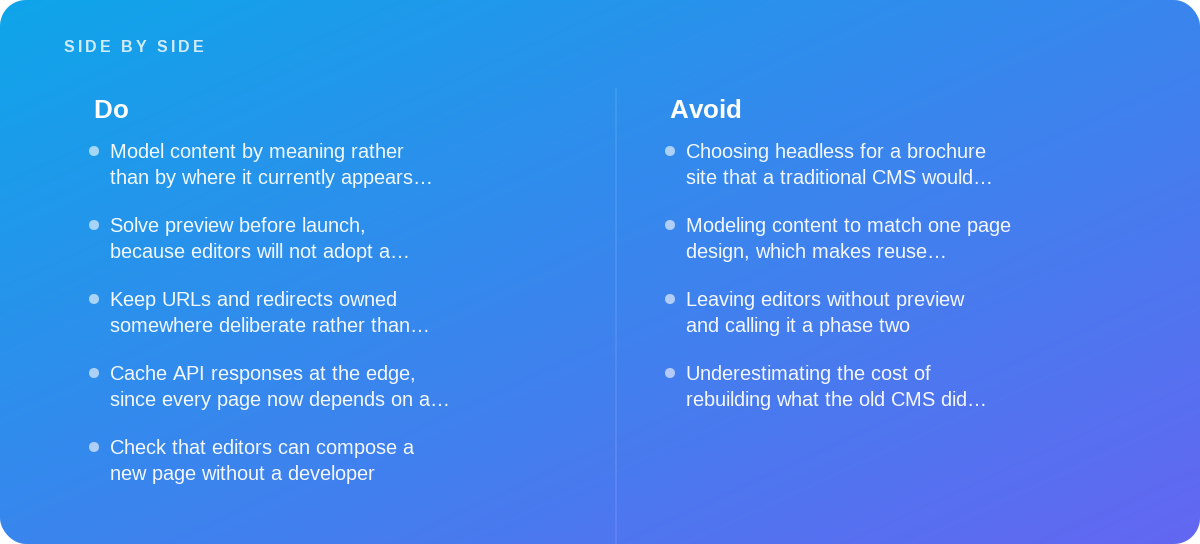
It is worth saying at the start what would have made this the wrong architecture. If the group had needed only a better website, with menus as pages and no app or screens, a well-built traditional CMS would have served it better, faster and more cheaply. Choosing headless for a brochure site that a traditional CMS would handle well is the most common and most expensive mistake in this field, and our guide to choosing between a custom build and a template covers that earlier question in detail.
Discovery: auditing content, channels and URLs first
The first three weeks produced no code. They produced three inventories, because the rest of the project depended on them and every one of them turned up surprises.
The content inventory
The team exported every page from the existing website and every item from the ordering app's menu database, then listed what kinds of thing the content actually described. Not pages, but things: dishes, menus, locations, opening hours, allergens, promotions, job openings, news posts, and a handful of legal pages. For each type, the inventory recorded where it currently lived, who edited it, how often it changed, and which channels needed it. Dishes changed weekly and were needed everywhere. Legal pages changed yearly and were needed only on the web. That difference would later shape both the content model and the caching strategy.
The channel inventory
For each consumer, the team recorded what it needed and how it would fetch it. The website needed everything, rendered as HTML for search engines and fast first loads. The ordering app needed dishes, prices, allergens and availability per location, and needed them to be current within minutes. The menu boards needed a small subset per location, formatted for a landscape screen, and needed to keep working if the network dropped for an hour. Writing these requirements down early made it clear that one API would serve three quite different access patterns.
The URL inventory
The existing site had around 1,800 indexed URLs, including old campaign pages, dish pages from a previous redesign that still received links, and location pages with two different URL patterns from different eras. The team crawled the site, joined the crawl with the search console export and analytics data, and marked each URL as keep, redirect or retire. This inventory became the single most useful document in the project, because URL handling is one of the things a headless CMS stops doing for you. Our article on information architecture decisions explains how this kind of audit feeds a site structure that holds up.
- Weeks 1 to 3 Discovery: content, channel and URL inventories; editor interviews; success criteria agreed
- Weeks 4 to 5 Backend selection and content modeling, tested against real dishes and pages
- Weeks 6 to 9 Front-end build with preview working from the first sprint, section library for page composition
- Weeks 10 to 11 Routing, redirects and edge caching; ordering app and menu board integrations
- Weeks 12 to 14 Content migration, editor training, redirect testing against the full URL inventory
- Weeks 15 to 16 Parallel running, launch, and a two-week stabilization period
Choosing the backend: what the shortlist was judged on
With the inventories done, the team could judge candidate systems against the project's actual needs rather than feature lists. Three options made the shortlist: WordPress used headlessly through its REST API, a hosted headless CMS offered as a service, and a custom content API built on Laravel.
The criteria came straight from discovery. Editors needed an interface they could learn quickly. The content model needed structured types with relationships, such as a dish belonging to menus and referencing allergens. The API had to support filtering by location. Preview had to be buildable. And the group wanted to avoid a system that only one developer could maintain.
| Criterion | Headless WordPress | Hosted headless CMS | Custom Laravel API |
|---|---|---|---|
| Editor familiarity | High; the marketing team already used WordPress | Moderate; clean interface but new to the team | Low; admin interface has to be built |
| Structured content and relationships | Good with custom post types, taxonomies and custom fields | Strong; designed for structured content | Complete control, at the cost of building it |
| API maturity | Mature REST API with documented extension points | Mature REST or GraphQL APIs | Only as mature as the team makes it |
| Preview support | Must be built in the front end; draft access via authenticated API | Often has preview hooks, still needs front-end work | Must be built entirely |
| Hosting and running cost drivers | Hosting and maintenance of the WordPress install | Subscription tier, seats and API usage | Hosting plus ongoing development time |
| Maintainability by others | Large pool of developers | Depends on vendor; data export matters | Depends on code quality and documentation |
Decision: The team chose WordPress as a headless backend. Editors already knew it, the WordPress REST API handbook documents how to register custom endpoints and fields, and the pool of developers who can maintain it is large. The hosted option scored well on modeling but would have added a new tool for editors and a recurring cost the group wanted to avoid; the custom Laravel API offered the most control but would have made the group dependent on whoever wrote it.
The custom API was not discarded entirely. The ordering app already had a backend, and the team considered building a small Laravel service to sit between the CMS and the app, using Eloquent models and API resources to shape responses. They deferred it: the app's needs could be met directly from WordPress endpoints at launch, and the service could be added later if the app's requirements grew. Deferring a component you might need is cheaper than maintaining one you do not. For a deeper treatment of this particular backend choice, see how to get headless WordPress right.
Modeling content by meaning, not by page
The content model is where headless projects are won or lost, and the rule that matters most is to model content by what it means rather than by where it currently appears. A dish is a dish. It has a name, a description, a price, a set of allergens, dietary flags, an image and a list of locations where it is available. It is not a block of text on the "Dinner" page, and it should not be modeled as one.
The types that came out of the inventory
- Dish: name, short description, long description, base price, allergens (a relationship to the Allergen type, not free text), dietary flags, image, and availability per location with optional location-specific price.
- Allergen: a controlled list with a name, an icon reference and a plain-language description, maintained by one person, so that every channel uses identical wording.
- Menu: a named, ordered collection of sections, each section an ordered list of dishes, with the locations and times it applies to.
- Location: address, coordinates, opening hours with exceptions for holidays, contact details, and the menus it serves.
- Promotion: title, body, image, start and end dates, applicable locations and channels.
- Page: for genuinely page-shaped content such as the about page and landing pages, composed from sections, described in the next part of this article.
In WordPress, each of these became a custom post type or taxonomy with registered fields exposed through the REST API. Our guide to WordPress custom post types covers the registration details, including the show_in_rest settings that decide what the API exposes.
Testing the model against reality
Before any front-end work, the team entered thirty real dishes, three complete menus and four locations into the model, then asked three questions. Could the website's current menu page be produced from this data? Could the ordering app's data needs be met? Could a menu board for one location at lunchtime be produced? Each question exposed a gap. Some dishes had a different price at the airport location, which the first model did not allow. Breakfast menus had items that were available only until a certain time. And the menu boards needed a shorter description than the website used. All three were fixed in the model before anyone built on it, which is far cheaper than fixing them after launch.
Trap avoided: The first draft of the model had a "Dinner Menu Page" type with a rich-text field for each section, because that was how the old website was laid out. It would have been quick to build and impossible to reuse. The ordering app and menu boards could not have consumed dishes embedded in formatted text, and allergens typed by hand would have drifted again. Modeling content to match one page design makes reuse impossible.
Allergen information carries legal and safety weight, and the way it is presented online has its own requirements; our article on online menus and allergen information sets out what works for diners and for compliance.
Page composition editors can use without a developer
Structured types handle dishes and locations well. They handle a promotional landing page badly, because a landing page is a composition: a hero, some text, a featured set of dishes, a location finder, a call to action. In a traditional CMS, editors compose such pages with the theme's blocks or a page builder. In a headless setup, that capability has to be designed.
A section library with a fixed vocabulary
The team built a library of eleven section types, each defined once in the CMS and once as a component in the front end: hero, rich text, image with caption, featured dishes, menu embed, location finder, promotion strip, two-column text and image, frequently asked questions, call to action, and a form embed. Each section type had a small number of fields and, where needed, one or two presentation options, such as light or dark background, rather than free control of spacing and fonts. Editors built pages by stacking sections in any order.
The discipline here is restraint. Every option added to a section is another combination the front end must render correctly and another way for pages to look inconsistent. Fewer, well-chosen options gave editors real freedom within a design that stayed coherent. The featured dishes section is a good example of why structured content pays: an editor picks dishes by reference, and the section always shows their current name, price and allergens, because it pulls them from the Dish type rather than from copied text.
Decision: The success criterion for page composition was written down in discovery and tested before launch: an editor must be able to create a new landing page for a seasonal promotion, from a blank page to published, without asking a developer. During training, two editors did exactly that in under an hour each, which the team treated as the pass mark for the section library.
Where the sections are stored
The section list for each page was stored as structured data on the Page type and exposed through the API as an ordered array of typed objects. The front end mapped each type to a component. Unknown section types, for example one added in the CMS before the front end supported it, were logged and skipped rather than breaking the page. Any rich text returned by the API was treated as untrusted input and sanitized before rendering, because an API response is just another input to a front end; our guide to cross-site scripting explains why that matters even when only staff can edit content.
Preview, built before launch
Preview is the feature most often left out of headless projects, and it is the one that most reliably determines whether editors adopt the system. In a traditional CMS, the preview button shows the draft rendered by the same templates as the live site. In a headless setup, the CMS has no templates, so it cannot render anything. Preview has to be rebuilt in the front end.
How preview worked in this project
- The editor clicks Preview in WordPress. A small customization in the CMS builds a link to a preview route on the front end, carrying the content ID and a short-lived signed token.
- The front-end preview route validates the token, sets a preview session, and renders the requested page on the server rather than from the static cache.
- In preview mode, the front end requests draft content from the WordPress REST API with authenticated credentials held server side, never in the browser.
- The page renders with the same components as the live site, with a visible banner showing that the editor is viewing a draft and a link to exit preview.
- Preview pages send headers that stop them being cached at the edge or indexed by search engines.
Preview also had to work for the other channels. Editors could open a menu board preview for any location and time of day, rendered in a browser at the screen's resolution, so they could see how a new dish would look before it appeared in twelve restaurants.
Trap avoided: An early plan put preview in a "phase two" to protect the launch date. The team reversed that in week five, after editor interviews made it plain that the marketing team would keep drafting in documents and emailing screenshots if they could not see their work. Leaving editors without preview and calling it a phase two is how headless systems end up abandoned. Preview was working in the first front-end sprint and was used by every developer from then on, which also kept it from breaking.
Usability research on content management systems, such as that published by the Nielsen Norman Group, consistently treats the editor's experience as a design problem in its own right. Headless projects make that especially true, because every convenience editors had before has to be rebuilt on purpose.
URLs, redirects and routing, owned deliberately
In a traditional CMS, the URL of a page is a field on the page, and the CMS routes requests to it. In a headless setup, the front end decides which URL shows which content. Unless someone designs this deliberately, URL structure ends up defined implicitly by file names in a front-end codebase, which is fine until an editor needs to change a slug or a marketer needs a redirect for a campaign.
Where the team put URL ownership
The team made the CMS the owner of URLs. Every routable content type had a slug field and a computed path, and a dedicated Redirect type held source path, destination and status code. The front end, at build time and on request, asked the CMS which content lived at a given path and which redirects existed. Editors could therefore change a slug and add a redirect from the old one in the same place, without a deployment.
The 1,800-URL inventory from discovery was loaded into the Redirect type during migration. Redirects were then applied at the edge, before the request reached the front-end application, so they were fast and did not depend on the application being healthy. The team tested every row in the inventory with an automated script that requested each old URL and checked for the right status code and destination, then reran it after each migration batch.
Routing rules the front end followed
- Paths are lowercase with hyphens, and trailing slashes are normalized with a single permanent redirect.
- Dish pages live under the menu path, and location pages under a single locations path, retiring the two historical patterns.
- A request for a path the CMS does not know returns a genuine 404 status with a helpful page, not a 200 status with an error message.
- Canonical URLs are set from the CMS path, never from the request URL, so query strings and tracking parameters do not create duplicates.
Delivery, caching and the network call on every page
A headless front end depends on a network call to the CMS for every page it renders. If that call is slow, every page is slow; if the CMS is down, every page fails. Caching is therefore not an optimization to add later. It is part of the architecture.
Build time or request time
Content can be consumed at build time, producing static pages, or at request time, rendering on demand. The team used both, matched to how each content type changed. Legal pages, news posts and most landing pages were rendered statically and rebuilt when their content changed. Menu and location pages were rendered on request and cached at the edge, because they changed more often and a full rebuild for every price change was wasteful. The ordering app called the API directly through the same edge cache. The menu boards fetched their content on a schedule and stored the last good copy locally, so they kept working through a network outage.
Caching and invalidation
API responses and rendered pages were cached at the edge with cache tags identifying the content they contained, such as the dish IDs on a menu page. When an editor published a change, a webhook from WordPress told the front end which content had changed, and the front end purged the tagged cache entries. The pages were also served with a stale-while-revalidate policy, so a visitor never waited for a rebuild: they received the cached version while a fresh one was prepared. A failure in the CMS therefore degraded to slightly stale content rather than an error page.
| Content type | Rendering | Cache policy | Invalidation trigger |
|---|---|---|---|
| Legal pages, news | Static at build | Long edge cache | Rebuild of affected page on publish |
| Landing pages | Static at build | Long edge cache | Rebuild on publish of the page or any referenced dish |
| Menus, dishes, locations | On request | Edge cache with stale-while-revalidate | Tag purge by webhook on publish |
| Ordering app API responses | API through edge | Short edge cache | Tag purge by webhook on publish |
| Menu boards | Scheduled fetch | Local copy on device | Next scheduled fetch after publish |
Protecting the API
A public content API is an easy target for scrapers and automated traffic, and every uncached request costs the CMS server work. The team exposed only published content publicly, required authentication for drafts, rate-limited the origin, and let the edge absorb repeated requests. The methods are covered in our practical guide to blocking scrapers.
Decision: The WordPress admin was moved to a separate hostname behind access controls, and the public site never talked to WordPress directly from the browser. Only the front-end server and the edge cache called the API. That removed the CMS from the public attack surface and meant a slow CMS never affected a visitor's page load directly.
Migration and launch
Migration took three weeks and was mostly scripted. Dishes and menus came from the ordering app's database, which was cleaner and more current than the website. Pages and news posts came from the old website's export. Location data was rebuilt by hand, because the three existing sources disagreed with one another and the correct version had to be confirmed with each restaurant manager.
Scripted, repeatable, reversible
The migration scripts were written to run repeatedly against a fresh copy of the new CMS, so the team could fix a mapping problem and rerun the whole migration rather than patching data by hand. Every migrated item kept a reference to its source ID, which made it possible to check counts, spot missing items and trace any oddity back to its origin. Allergen assignments were reviewed dish by dish by the group's food safety lead before launch, because a scripted mapping of free text to a controlled list is exactly where silent errors hide.
Parallel running and cutover
For the final two weeks, the new system ran alongside the old ones. Editors made changes in the new CMS only, and the team compared the output of all three channels against the old sources daily. Launch was a DNS change with redirects already live at the edge, followed by the full redirect test against the URL inventory and a crawl of the new site to catch broken internal links. The old CMS stayed available in read-only mode for a month in case anything had been missed.
Running the system after launch
A headless setup has more moving parts than a traditional CMS: the CMS itself, the front-end application, the edge configuration, webhooks, and the integrations with other channels. Each needs an owner and a maintenance routine. The team agreed on a maintenance plan before launch that covered updates to WordPress and its plugins, dependency updates for the front end, monitoring of webhook deliveries, and a monthly check that preview, redirects and cache purges still worked end to end. Our article on planning website maintenance sets out how to structure that kind of routine and budget for it.
Monitoring focused on the joins between systems, because that is where headless architectures fail quietly. A webhook that stops firing means published changes never appear, and nobody notices until a customer points out an old price. The team added an alert for webhook failures and a daily check comparing a sample of dish prices in the CMS against what the website, app and a test menu board displayed.
What editors could do on their own
The practical test of the project was editor autonomy. After launch, the marketing team could create landing pages, change dishes and prices across all channels in one place, preview any change on any channel, change a URL and add a redirect, and schedule promotions by date and location, all without a developer. The things that still needed a developer were deliberate: new section types, new content types and changes to the design system. That boundary was agreed in discovery and written into the handover documentation.
When headless CMS architecture is the wrong answer
This project was a good fit because content genuinely served three channels and the cost of inconsistency was high. Many projects are not a good fit, and it is worth being clear about the signs.
- Only one channel. If the website is the only consumer of the content for the foreseeable future, a traditional CMS, well built, delivers templates, preview, routing and URL management out of the box.
- A small team with no ongoing development budget. Headless systems need developer attention for anything the section library does not cover. Without that budget, editors will hit walls.
- Underestimated rebuild costs. Preview, routing, redirects, sitemaps, search, forms and page composition all have to be rebuilt. If the estimate does not list them, it is too low.
- Editors who need layout freedom. A structured section library deliberately limits layout options. Teams that need to design pages visually may be better served by a traditional CMS with a good block editor.
Hybrid approaches exist too. A traditional CMS can serve its own website normally while exposing some content through its API to an app, which captures much of the multi-channel benefit with far less rebuilding. That was a serious option in this project, rejected only because the menu boards and ordering app needed the same structured dish data as the website, and the website's own templates would have had to be rewritten around structured content anyway.
When to bring in help
Three situations usually justify specialist help with headless CMS architecture: content that has to serve more than one channel, editors who have stopped using a system because it is too slow to see their work, and a migration that has to preserve thousands of existing URLs. Our headless CMS development team covers all three, from the content model and preview pipeline to the redirect map that protects years of search visibility.
Where this comes from
- WordPress Developer Resources — REST API handbook
- Laravel Documentation — Eloquent and API resources
- Nielsen Norman Group — Content management usability
The figures and practices above come from the sources listed.
Working on something like this?
We take on Web Design & Development work for teams who want it done once, properly. Tell us what you are building and we will tell you honestly whether we are the right studio for it. Start a project.
Where to go next
Spotted something wrong? Report an error on this page. We correct on the page and say what changed.






