Audio File Formats and Delivery, Done Properly
Learn which audio file formats to use for archiving, editing and distribution, how to avoid generational loss, and how to deliver files right the first time.
 MediaScaleUp Editorial Team
Audio file formats and delivery sound like an afterthought, the last click at the end of a long edit. In practice they decide whether the work you paid for survives contact with the next person in the chain. The format is two choices stacked together: a container, which is the file wrapper that holds audio plus metadata, and a codec, which is the method used to store the audio samples inside it. WAV, AIFF and FLAC keep every sample the recording captured. MP3, AAC and Opus throw information away on purpose to make files smaller. Both families are useful, and the whole skill lies in knowing which one belongs at which point in a project.
This guide is for business owners commissioning podcasts, ads and video, marketers who receive files from several suppliers, and in-house teams that edit, archive and publish their own audio. It is also for practitioners who want a clear framework they can hand to clients. The stakes are simple: delivering a lossy file where a lossless one was expected cannot be undone, and every process that follows compounds the loss. A mix engineer cannot recover what an MP3 encoder discarded, and an archive built on compressed files is an archive of approximations.
The framework below sets out the options, the criteria that separate them, a scored comparison, and a recommendation for each common situation, from long-term archiving to social uploads and broadcast delivery.
The Six Formats That Cover Almost Every Delivery
There are dozens of audio formats in circulation, but six do nearly all the real work. They fall into two families, and the family matters more than the individual member.
Lossless: WAV, AIFF and FLAC
WAV is the default interchange format of audio production. It normally carries uncompressed linear PCM, meaning each sample is stored exactly as the converter or the digital audio workstation produced it. Its broadcast variant, Broadcast Wave Format (BWF), adds a standardized metadata chunk with fields for description, originator, origination date and a timecode reference, which is why post-production and broadcast facilities ask for it. Standard WAV uses 32-bit size fields, which caps a file at about 4 GB; long multichannel recordings use the RF64 or BW64 extensions to get past that limit.
AIFF is Apple's equivalent: also uncompressed PCM, with a different internal byte order and a different way of storing metadata. Sonically it is identical to WAV at the same sample rate and bit depth. It survives mainly in Mac-centric music workflows and some older sample libraries.
FLAC is lossless but compressed. It packs the same samples into a smaller file, the way a ZIP file packs a document, and decodes back to a bit-identical copy of the original. Typical savings depend heavily on the material: dense, loud music compresses less than sparse speech or recordings with silence. FLAC has strong, flexible tagging and a built-in checksum of the decoded audio, which makes it attractive for archives and for music distribution to listeners who care about quality.
Lossy: MP3, AAC and Opus
MP3 is the universal lossy format. Every device plays it and every podcast host accepts it. It is also the oldest of the three, and at a given bit rate it generally needs more data than newer codecs to sound equally clean.
AAC, usually wrapped in an MP4 or M4A container, is the audio codec inside most video files and much streaming audio. It is more efficient than MP3 and is the expected audio track for video delivered to most online platforms.
Opus is a modern, open codec designed for everything from low-latency voice calls to full-band music. It is highly efficient at low bit rates, which is why it turns up in web conferencing and in some streaming services. Its weak point is compatibility: support in older hardware and in some consumer software is patchier than MP3 or AAC.
If you want a deeper look at how each lossy codec actually discards data, and why the same bit rate sounds different across codecs, our explainer on how MP3, AAC, Opus and FLAC encode audio covers the mechanics. For the decision at hand, the key fact is that lossy encoding is a one-way street.
What Separates Them: Six Criteria That Decide the Choice
Choosing a format is not about which one is "best". It is about which one fits a specific job. Six criteria do almost all the deciding.
- Fidelity and reversibility. Does the file contain every sample of the source, or an approximation? Lossless formats can be converted between each other indefinitely with no change to the audio. Lossy formats cannot be restored, and re-encoding a lossy file degrades it further each time.
- Editability. Will someone cut, process, mix or master this file? Processing reveals and amplifies lossy artifacts. EQ that lifts the high end, for example, can make the swirling, watery sound of a low-bit-rate encode suddenly obvious.
- File size and bandwidth. Uncompressed stereo at 48 kHz and 24-bit runs to roughly 17 MB per minute. A 128 kbps MP3 of the same minute is under 1 MB. For a podcast listener on mobile data, that difference matters; for an archive on a storage array, it rarely does.
- Compatibility. Will the receiving system, device or person be able to open it without friction? MP3 and WAV are close to universal. FLAC and Opus are well supported in modern software but can trip up older players, some video editors and some corporate systems.
- Metadata. Each format carries metadata differently: BWF uses the broadcast extension chunk and often iXML, MP3 uses ID3 tags, FLAC uses Vorbis comments, and MP4 files use their own atom structure. Metadata is often lost in conversion, and a format with the wrong metadata model can strip timecode, credits or rights information on the way out.
- Longevity. Will this file still open and verify in ten or twenty years? Open, well-documented formats with wide tool support are the safest bet. Proprietary session formats and obscure codecs are not.
Standards bodies publish the specifications that make these formats predictable. The Audio Engineering Society maintains standards and recommended practices for audio file interchange and metadata, and they are the right reference when a supplier and a client disagree about what a "standard" file should contain.
Scoring the Formats Against the Criteria
The scorecard below rates each format from 1 (poor) to 5 (excellent) on each criterion. The scores are editorial judgments for general production use, not measurements, and a specific workflow can shift them. A video editor on a platform that handles FLAC badly, for instance, would mark FLAC's compatibility lower.
| Format | Fidelity | Editability | File size | Compatibility | Metadata | Longevity |
|---|---|---|---|---|---|---|
| WAV / BWF | 5 | 5 | 1 | 5 | 4 | 5 |
| AIFF | 5 | 5 | 1 | 4 | 3 | 4 |
| FLAC | 5 | 4 | 3 | 3 | 5 | 5 |
| MP3 | 2 | 1 | 5 | 5 | 3 | 4 |
| AAC (M4A/MP4) | 3 | 1 | 5 | 4 | 3 | 4 |
| Opus | 3 | 1 | 5 | 3 | 3 | 4 |
Three patterns stand out. First, no lossy format scores above 1 on editability, because any editing on a lossy file starts from damaged material. Second, WAV and FLAC both score top marks on fidelity and longevity; the choice between them is a trade between WAV's near-universal compatibility and FLAC's smaller size and stronger tagging. Third, the lossy formats are ranked mostly on compatibility and efficiency, since that is what they exist for. None of them should appear anywhere in a production chain before the final encode.
Read the table as a map rather than a leaderboard. A format that scores 1 on file size can still be the right choice, and a format that scores 5 can be the wrong one. The scenarios later in this guide show how the criteria are weighted differently depending on where the file is going.
The Lossless Masters: When WAV, AIFF or FLAC Is the Answer
A lossless file is the correct choice whenever the audio is going to be worked on, stored for the long term, or handed to another professional. That covers far more deliveries than most clients expect: stems to a mix engineer, dialogue to a video editor, a finished mix to a mastering engineer, a master to a distributor, and every file that goes into the archive.
Resolution: keep what you recorded
The archive rule is to keep audio uncompressed or lossless at the recording resolution. If a session was recorded at 48 kHz and 24-bit, the archive holds 48 kHz, 24-bit files. Converting to 44.1 kHz and 16-bit for archiving saves space but throws away headroom and forces a sample-rate conversion that cannot be reversed. Delivery copies at other resolutions can always be made later from the original; the original cannot be rebuilt from them.
Two conventions are worth knowing. Audio for video almost always runs at 48 kHz, because that is the rate video production and broadcast settled on. Music destined only for consumer distribution has historically been mastered to 44.1 kHz, 16-bit, the CD standard, although many distributors now accept higher resolutions. When a destination needs a lower bit depth than the master, the reduction should be done once, with dither, at the final stage.
WAV versus FLAC for the master
For exchange between people and systems, WAV (specifically BWF where timecode or broadcast metadata matter) remains the safest default. Nearly every editor, DAW and broadcast system opens it without a second thought. FLAC makes the most sense in two places: large archives, where its space savings and built-in checksum pay off over years, and music distribution to listeners who want lossless audio. Converting between WAV and FLAC is lossless in both directions, so choosing one does not lock you out of the other, as long as you check that the metadata came along.
Pros
- Every sample of the source is preserved, so any future edit, remix or re-encode starts from full quality.
- Conversions between WAV, AIFF and FLAC are bit-transparent and can be repeated indefinitely.
- BWF metadata carries timecode and origination details that post-production depends on.
- FLAC adds a stored checksum, so an archive can verify that files have not been silently corrupted.
Cons
- Uncompressed files are large: an hour of 48 kHz, 24-bit stereo is about 1 GB, and multitrack sessions multiply that.
- Too heavy for direct streaming to listeners or for many upload forms and email.
- Plain WAV metadata support is inconsistent between applications, and standard WAV hits a 4 GB ceiling.
- FLAC is not accepted by every video editor, broadcast system or consumer device.
For multitrack projects, lossless delivery also means sensible file organization: consistent sample rate across all stems, identical start points so tracks line up when imported, and clear names. The same discipline matters when an entire session goes into storage, which our practical guide to archiving audio sessions covers in detail.
The Lossy Distribution Formats: When MP3, AAC or Opus Is the Answer
Lossy formats are the right answer at exactly one point: the moment audio leaves the production chain for a listener. Their job is to make files small enough to download or stream while sounding as close to the master as the bit rate allows. Used there, they are excellent. Used anywhere earlier, they cause problems that cannot be fixed.
Encode once, from the master, for each destination
The governing principle is to encode to lossy once, from the lossless master, separately for each destination. If a podcast needs an MP3 for its RSS host and an AAC track for a video version, both are made directly from the WAV master. You never make the AAC from the MP3. Each lossy encode discards information according to its own model of hearing; chaining two different models stacks their errors, and the result is audibly worse than either encode alone.
Choosing among the three
MP3 is the pragmatic choice when compatibility trumps everything: podcast feeds, downloads for a general audience, audio attached to emails or learning platforms. AAC is the natural choice inside video files and for platforms built around the MP4 family. Opus is worth choosing when you control the playback environment, such as a web player you build, a voice application, or a platform that asks for it, and you want the best quality at low bit rates.
Bit rate matters as much as codec. Speech-only content tolerates lower bit rates than music, and mono is often sufficient for a single voice. Music, dense sound design and wide stereo images need more. Where a platform publishes a required bit rate or codec, follow it exactly; where it does not, test a few settings against the master and listen on the devices your audience uses.
Pros
- Files are a small fraction of the lossless size, which suits streaming, mobile data and download limits.
- MP3 and AAC play on almost every phone, browser, car system and smart speaker.
- At sensible bit rates, well-encoded files are hard to tell from the master on typical listening systems.
- Opus delivers strong quality at low bit rates for voice and web use.
Cons
- The discarded information is gone for good; nothing can restore a lossy file to master quality.
- Each further lossy encode degrades the audio again, and artifacts compound.
- Editing, EQ and loudness processing expose encoding artifacts that were previously masked.
- Some codecs add silent padding at the start and end, which can break gapless playback and sample-accurate sync.
One technical detail causes a surprising number of rejected deliveries: peaks. Lossy encoding can produce sample values slightly higher than the original, so a master that peaks right at 0 dBFS may clip after encoding. Leaving headroom, measured as true peak rather than sample peak, avoids this. The broadcast loudness recommendation EBU R128, published by the European Broadcasting Union, sets a maximum true peak of -1 dBTP for exactly this kind of reason, and many online specifications follow a similar approach.
Generational Loss and the Mistakes That Cannot Be Undone
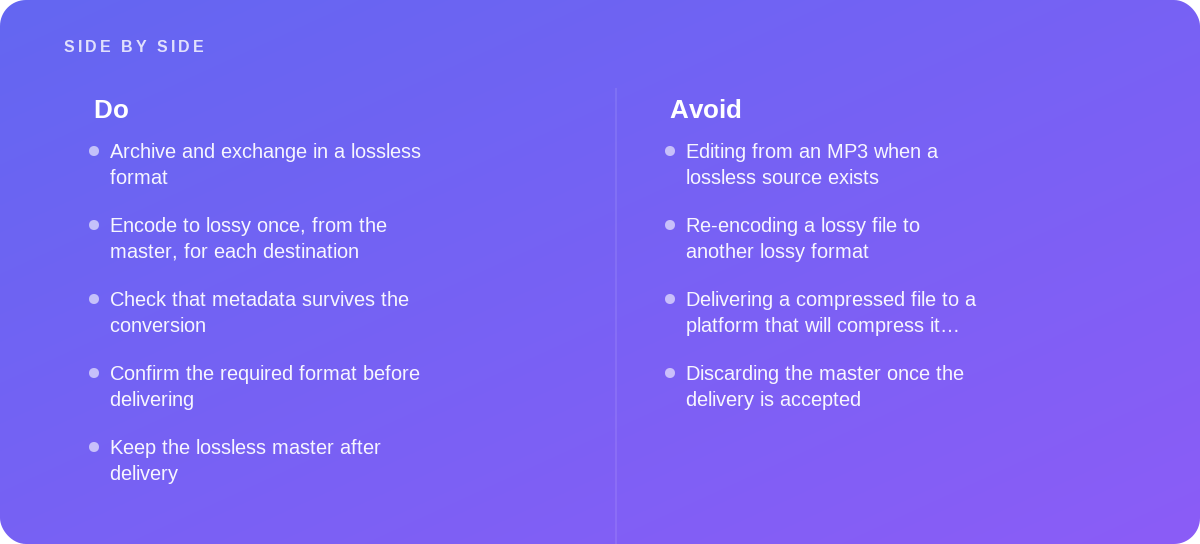
Most format failures are not dramatic. They are small decisions, made under deadline, that quietly lower the quality of everything downstream. Four recur again and again.
Editing from an MP3 when a lossless source exists
Someone downloads the review copy, drops it into an editor, and cuts the final from it. The edit may sound fine on laptop speakers, but the finished product is now built on a lossy file, and it will be encoded again on delivery. Always ask for the lossless source before editing, and label review files clearly so no one mistakes them for masters.
Re-encoding a lossy file to another lossy format
Converting an MP3 to AAC because a platform prefers AAC seems harmless. It is not. The AAC encoder treats the MP3's artifacts as part of the signal and spends bits reproducing them, while adding its own. Each generation is worse. If only an MP3 exists, it is often better to deliver it as it is, where the platform allows, than to transcode it.
Delivering a compressed file to a platform that compresses again
Many video, social and streaming platforms transcode everything they receive into their own delivery formats. If you upload a low-bit-rate MP3 or a heavily compressed AAC track, the platform's encoder becomes the second lossy generation. Uploading the highest quality the platform accepts, lossless where permitted, means its encoder works from the best possible source. This is especially relevant for social video; our guide to audio for short-form video covers the platform side of that workflow.
Discarding the master once the delivery is accepted
Once the client signs off, the working drive gets cleared, and the WAV master goes with it. Six months later the same audio is needed at a different loudness, in a different format or with one line changed, and the only surviving copy is the MP3 on the website. Keep the lossless master after delivery, stored somewhere backed up and findable.
Irreversible: no software can turn an MP3 back into a master. Converting a lossy file to WAV or FLAC makes it bigger, not better; the result is a lossless copy of a lossy file, and it still carries every artifact of the original encode.
This last point deserves emphasis because it fools experienced people. A WAV file tells you nothing about its history. A file that was once an MP3 and was later converted to WAV looks, by its extension and header, exactly like a pristine master. When provenance matters, ask where the file came from, and inspect its frequency content: many lossy encoders cut the top of the spectrum, leaving a telltale shelf where high-frequency content abruptly stops.
Metadata: The Part of the Delivery Everyone Forgets
Audio metadata is the information that travels with the file: title, artist or speaker, episode number, ISRC codes for music, timecode for post-production, originator and date for broadcast, and increasingly rights and licensing notes. Each format carries it differently, and conversions are where it gets lost.
| Format | Main metadata model | Typically used for | Common conversion risk |
|---|---|---|---|
| BWF (WAV) | Broadcast extension chunk, often with iXML | Description, originator, date, timecode reference, production notes | Consumer tools may ignore or drop the chunk on re-save |
| AIFF | Native text chunks, sometimes ID3 | Basic title and author fields | Fields not mapped when converted to WAV |
| FLAC | Vorbis comments, embedded artwork | Rich music tagging, free-form fields | Custom fields discarded when converted to WAV or MP3 |
| MP3 | ID3 tags | Titles, artwork, podcast and music tagging | Tag versions differ; some players read only part of them |
| AAC (M4A/MP4) | MP4 metadata atoms | Titles, artwork, chapter markers | Chapters and artwork lost in simple conversions |
The practical rule is to check that metadata survives every conversion rather than assume it will. Open the converted file in a tag editor or a media inspection tool and compare the fields with the source. For broadcast and post-production deliveries, confirm that the BWF timecode reference is intact, because a missing reference can make a file land at the wrong point on a timeline.
Rights metadata deserves particular care. Music licenses, voice talent agreements and usage windows are usually tracked outside the file, but embedding a reference or license identifier where the format allows it helps the file stay connected to its paperwork. How to structure that record is its own topic, covered in our piece on audio rights and clearance records.
A Worked Example: One Podcast Season, Five Destinations
To see the framework applied, consider an illustrative project, not a real client: a company podcast season of 10 episodes, each about 40 minutes, recorded as two voices on separate tracks at 48 kHz, 24-bit. The finished season needs to go to five places: the podcast host, a video version on the company's channel, short social clips, a broadcast partner that has asked for a BWF file, and the company archive.
Sizing the files
Uncompressed PCM size is simple arithmetic: sample rate times bytes per sample times channels. At 48 kHz, 24-bit (3 bytes) and stereo, that is 48,000 x 3 x 2 = 288,000 bytes per second, or about 17.3 MB per minute. A 40-minute stereo master is therefore about 690 MB, and the full season of masters about 6.9 GB. Each episode's two mono voice tracks together are the same size as a stereo file, so the raw recordings add roughly another 6.9 GB.
A 128 kbps MP3 uses 128,000 bits, or 16,000 bytes, per second: about 0.96 MB per minute, or roughly 38 MB per episode. That is the file a listener downloads, and it is about one-eighteenth of the master. A 96 kbps mono MP3, which is often adequate for speech, halves that again.
| Destination | Format chosen | Made from | Approximate size per episode |
|---|---|---|---|
| Archive | FLAC or WAV at 48 kHz, 24-bit (raw tracks plus master) | Original recordings and final mix | About 1.4 GB as WAV; smaller as FLAC, depending on content |
| Broadcast partner | BWF, 48 kHz, 24-bit, to their loudness specification | Lossless master | About 690 MB |
| Podcast host | MP3, 128 kbps stereo (or as the host specifies) | Lossless master | About 38 MB |
| Video version | AAC track inside the video file, or WAV to the editor | Lossless master | Depends on the video encode |
| Social clips | Highest quality the platform accepts | Lossless master, trimmed | Small; clips are short |
What goes wrong without a plan
The common failure in a project like this is a chain: the MP3 is made first because it is needed first, the video editor is sent the MP3 because it is small, the editor exports an AAC track from it, and the social team cuts clips from the finished video and uploads them to a platform that re-encodes again. By the social clip, the audio has been through three or four lossy generations. Every one of those files could have been made in a single step from the 690 MB master.
What the plan costs
The disciplined version costs a few extra exports and roughly 14 GB of storage for the season, which is a trivial amount on modern drives or cloud storage. In exchange, every destination gets first-generation audio, the broadcast partner gets the metadata they asked for, and the archive can produce any future format, including ones that do not exist yet.
A Delivery Procedure That Prevents Rework
Most rejected deliveries fail on something that could have been checked in advance: the wrong sample rate, a missing channel, loudness outside the specification, clipped peaks, or a stripped timecode. A short, repeatable procedure catches them before the client does.
- Confirm the specification in writing Before exporting anything, get the destination's requirements: container, codec, sample rate, bit depth, channel layout, loudness target, peak ceiling, file naming and metadata fields. If the request just says "high quality", ask what that means to them.
- Export the lossless master first Render the final mix at the session's native resolution to WAV or BWF. This file is the parent of every other deliverable.
- Measure loudness and true peak Check integrated loudness and true peak against the specification, and correct the master rather than the derived files, so every encode inherits the fix.
- Derive each deliverable directly from the master Make each destination's file in a single step from the master: resample and dither once if needed, and encode to lossy once. Never chain derived files.
- Verify metadata and duration Open each output and check tags, timecode references, channel count and length against the master. Codec padding can alter duration slightly; confirm that sync-critical files still line up.
- Listen to the output, not the master Play the actual delivery files from start to end, or at least spot-check the start, the end and dense sections, on the kind of system the audience will use.
- Archive the master and record what was sent Store the lossless master and session with a note of every derivative, its settings and where it went.
For batch work, command-line tools make this procedure repeatable. FFmpeg, for example, documents encoders and options for all six formats covered here, and a scripted conversion guarantees that every file in a batch gets identical settings. The trade-off is that scripts do exactly what they are told: a wrong setting applied to 200 files produces 200 wrong files, so test on one before running the lot.
When the audio sits inside a larger production, such as a commercial with separate music, voice and effects deliverables, the specification often also covers stems and split tracks. Our guide to audio post-production for advertising covers those multi-file deliveries, and the same logic applies to immersive formats, where the choice of channel layout and object metadata adds another layer, discussed in surround and immersive audio decisions.
Recommendations by Scenario
Pulling the criteria and the scorecard together, here is what to choose in the situations that come up most often. Each recommendation assumes a lossless master exists; if it does not, see the next section.
Archiving and long-term storage
Weight fidelity and longevity above everything; file size is a minor cost. Store uncompressed WAV/BWF or FLAC at the original recording resolution, keep raw tracks as well as the final mix, and keep a checksum or verification record so that corruption can be detected. FLAC's built-in checksum is a practical advantage here, and WAV's universality is the counter-argument. Either is defensible; a mixture of formats without documentation is not.
Exchange between professionals
When files go to a mix engineer, a video editor, a mastering engineer or a broadcaster, weight compatibility and metadata. BWF at the project's resolution is the default. Deliver at 48 kHz for anything that touches video. Include a short note listing sample rate, bit depth, channel layout and loudness, so the recipient does not have to guess. This is also the moment to agree how feedback rounds will work, and our guide to reviewing audio with clients explains how to share lossy review copies without them turning into masters.
Consumer distribution
For podcasts, downloads and web players, weight compatibility and size. MP3 is the safest general choice; AAC is appropriate within video and on MP4-based platforms; Opus suits environments you control. Encode once from the master, at a bit rate matched to the content, with true-peak headroom.
Platforms that transcode
For video and social platforms that re-encode uploads, weight fidelity of the upload. Send the highest quality the platform accepts, which is often lossless audio in the video file or a high-bit-rate AAC track, so that the platform's encode is the only lossy generation.
Verdict Archive and exchange in lossless (WAV/BWF for maximum compatibility, FLAC for space-efficient archives), and create each lossy file once, directly from that master, for the specific destination it serves. For platforms that re-encode, upload the best quality they accept rather than a pre-compressed file.
When Only Lossy Sources Survive, and Other Cases for Specialist Help
Sometimes the framework cannot be followed because the damage is already done. The master was deleted, a supplier only ever sent MP3s, or an old project exists only as compressed files on a website. There are sensible ways to limit further harm.
- Treat the best surviving file as the new master. Convert it once to WAV so that editing does not add further lossy generations, and label it clearly as sourced from a lossy file.
- Edit gently. Heavy EQ in the high frequencies, aggressive noise reduction and strong compression tend to make encoding artifacts more audible. Aim for small, targeted moves.
- Deliver in the same codec where possible. If the destination accepts the original codec and bit rate, delivering an edited file encoded at a bit rate at least as high as the source limits additional damage. It does not eliminate it.
- Look for other copies. Old drives, email attachments, a video editor's project folder or a distributor's upload may hold a better version than the one you have.
Specialist help earns its cost in three situations. First, when only lossy sources survive and the audio still has to be broadcast, re-edited or combined with new material, because an experienced engineer knows how far processing can go before artifacts show. Second, when a delivery specification is unfamiliar, such as a broadcaster's technical requirements or a multichannel format, and a rejected delivery would cost a slot or a deadline. Third, when an archive has to be migrated between formats, where the risks are silent metadata loss, inconsistent sample rates and files that fail to verify years later.
Before you brief a supplier: send them the destination's written specification, tell them where the lossless source is, and ask them to return the master alongside the deliverables. Those three sentences prevent most format problems.
MediaScaleUp's audio editing and production service handles format planning, delivery to specification and archive preparation as part of the work, and our audio post for video team delivers stems and final mixes in the formats video editors and broadcasters expect. If you are comparing suppliers, the questions in choosing an audio studio include how a studio handles masters and delivery.
Whoever does the work, the principle stays the same. Keep one lossless master, make every other file directly from it, check what each conversion kept and lost, and never let the only surviving copy be the smallest one.
Where this comes from
- Audio Engineering Society — File format standards
- European Broadcasting Union — Audio file delivery
- FFmpeg — Audio encoding documentation
The figures and practices above come from the sources listed.
Working on something like this?
We take on Audio Editing & Production work for teams who want it done once, properly. Tell us what you are building and we will tell you honestly whether we are the right studio for it. Start a project.
Where to go next
Spotted something wrong? Report an error on this page. We correct on the page and say what changed.