XML Sitemaps, Done Properly
Six common misconceptions about XML sitemaps, debunked, with a worked example, inclusion rules, lastmod practice and a checklist for doing sitemaps properly.
 Samir Haddad

XML sitemaps are among the oldest and least glamorous tools in technical SEO, and also among the most misunderstood. A sitemap is a machine-readable list of the URLs on your site that you want search engines to know about, written in XML according to the sitemaps protocol. It does not rank anything and it does not force anything into an index. What it does is help crawlers discover pages, particularly on large sites and sites with weak internal linking, and it gives you a coverage report you can reconcile against what search engines actually did with those URLs.
That second job is the one most teams overlook. A well-built sitemap is a statement of intent: these are the canonical, indexable pages we care about. When Search Console or Bing Webmaster Tools tells you how many of those pages were indexed and why the rest were not, you have a precise, actionable diagnostic. A sloppy sitemap full of redirects, noindexed pages and stale dates destroys that signal, and it quietly teaches search engines to trust your file less.
This guide is for marketers, site owners and in-house developers who manage sites of any size, from a 60-page service business to a catalog with hundreds of thousands of URLs. It is organized around the six misconceptions we run into most often when we audit sites, each followed by the reasoning and the practice that actually works, a worked example with realistic numbers, and a checklist you can hand to whoever owns your sitemap generation.
What XML Sitemaps Actually Do, and What They Leave to Other Signals
Before taking the myths apart, it helps to be exact about the mechanism. Search engines find URLs in three main ways: by following links from pages they already know, by reading URLs submitted through feeds and sitemaps, and, for some engines, through push notifications such as IndexNow. A sitemap feeds the second channel. When a crawler fetches your sitemap, it adds the listed URLs to its queue of candidates, possibly with a hint about when each one last changed. From there, the normal process takes over: the crawler schedules a fetch, the page is rendered and evaluated, canonicalization is resolved, and the engine decides whether the page earns a place in the index.
The sitemap therefore influences discovery and, to a limited degree, recrawl timing. It does not influence quality assessment, duplicate handling or ranking. Google's own Search Central documentation on sitemaps is explicit that submitting a sitemap is a hint, not a directive, and that it does not guarantee every listed URL will be crawled or indexed.
The anatomy of a sitemap file
The protocol is small. A standard sitemap is a UTF-8 encoded XML file with a urlset root element containing one url entry per page. Each entry requires a loc element and may include optional elements. The table below summarizes what each element is and how much weight it carries in practice.
| Element | Required? | What it holds | How engines treat it in practice |
|---|---|---|---|
| loc | Yes | The fully qualified, absolute URL, including protocol, entity-escaped | The core of the file; must exactly match the canonical URL you want indexed |
| lastmod | No | The date (optionally date and time, W3C Datetime format) the page content last changed meaningfully | Used as a recrawl hint when it has proven accurate over time; ignored when it has not |
| changefreq | No | A guess at how often the page changes (daily, weekly and so on) | Google has stated it ignores this value |
| priority | No | A relative value from 0.0 to 1.0 | Google has stated it ignores this value; it never affected ranking |
| Extensions (image, video, news, hreflang links) | No | Additional namespaced data about media or language alternates | Useful for specific content types; each has its own rules and limits |
Each sitemap file is capped at 50,000 URLs or 50MB uncompressed, whichever comes first. You can gzip the file to save bandwidth, but the 50MB limit applies to the uncompressed size. Sites that exceed either limit, or that simply want to organize their URLs by type, use a sitemap index: a separate XML file that lists the locations of multiple child sitemaps. Search engines fetch the index, then each sitemap it references.
A few protocol details catch teams out. URLs must be absolute, so /services/ is invalid while https://www.example.com/services/ is valid. Special characters such as ampersands must be escaped as XML entities. A sitemap generally should only list URLs on the same host and under the same path as the sitemap itself, unless ownership of the other hosts is verified, for example through Search Console or a robots.txt reference. And the file must be served with a 200 status, not behind authentication, a firewall challenge or a redirect chain.
Myth 1: Submitting XML Sitemaps Gets Your Pages Indexed
Myth: Once a page is in the sitemap and the sitemap is submitted, search engines will index it.
Reality: A sitemap makes a URL known; it does not make it indexed. Indexing depends on whether the page is crawlable, renders properly, is the canonical version, is not a near-duplicate, and offers enough value to earn a place. Inclusion is an invitation, not a guarantee.
This is the misconception behind most frustrated support tickets. A client launches 400 new location pages, adds them to the sitemap, submits it, and two months later sees that 140 of them are indexed. The sitemap did its job: Search Console reports all 400 as discovered. The problem sits downstream. Perhaps 250 of those pages share the same template with only the city name swapped, and search engines reasonably decided most of them add nothing new.
Why discovery and indexing are separate decisions
Crawling and indexing cost search engines real resources, so they are selective. After a URL is discovered, the engine weighs signals such as the strength of internal links pointing to it, whether its content duplicates something already indexed, whether it declares a different canonical, and whether the host can handle the crawl load. Pages marked "Discovered, currently not indexed" in Search Console were found but not yet fetched, which often points to crawl scheduling or perceived low value. Pages marked "Crawled, currently not indexed" were fetched and evaluated, and the engine chose not to include them, which almost always points to content quality or duplication.
The practical consequence is that the sitemap is a diagnostic instrument as much as a discovery tool. When you filter the page indexing report in Search Console to a specific sitemap, you see exactly how your intended pages fared. That is far more useful than a site-wide total, because it removes the noise of parameter URLs, pagination and other pages you never wanted indexed. If you are not yet comfortable navigating those reports, our practical guide to Search Console walks through the relevant views.
What to do instead
- Treat the submitted-versus-indexed ratio per sitemap as a key health metric and review it monthly.
- When a sitemap section shows a low indexing rate, investigate the pages, not the sitemap: thin or templated content, weak internal links, conflicting canonicals and slow responses are the usual causes.
- Strengthen internal linking to important pages. A URL that appears only in a sitemap, with no internal links, is an orphan, and orphans tend to be crawled rarely and valued lightly.
- Do not resubmit the same sitemap repeatedly hoping to trigger indexing. It changes nothing when the underlying pages are the issue.
Myth 2: Every URL on the Site Belongs in the Sitemap
Myth: The more complete the sitemap, the better, so it should include every URL the site can produce.
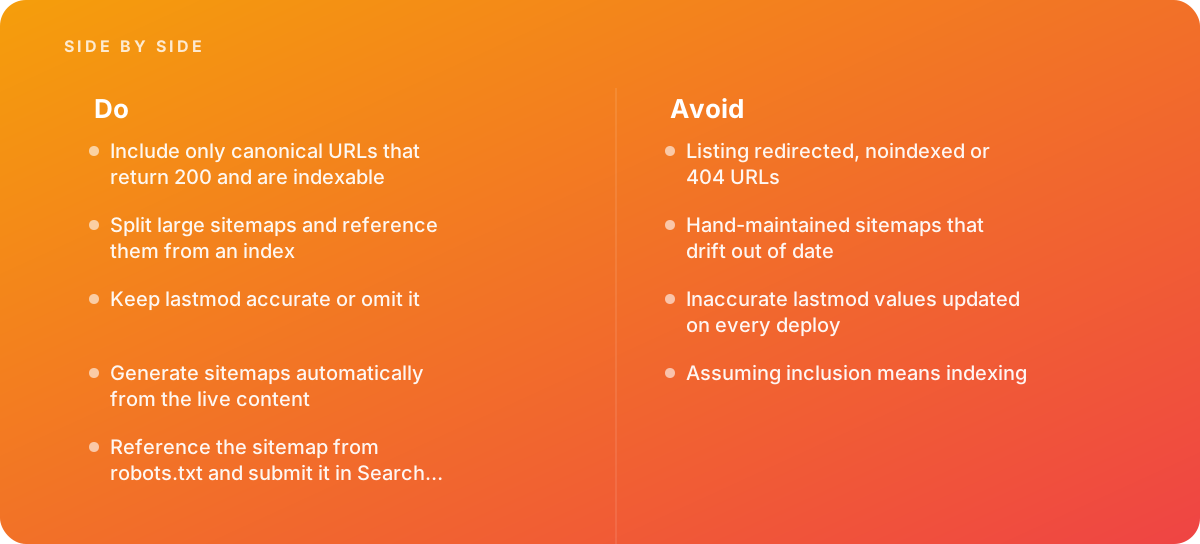
Reality: A sitemap should contain only canonical, indexable URLs that return a 200 status. Redirects, noindexed pages, 404s, parameter variations and non-canonical duplicates make the file less trustworthy and turn your coverage report into noise.
Many sitemap generators default to listing everything the CMS knows about: tag archives, author pages, paginated listings, internal search results, print versions, filtered category URLs and, on e-commerce sites, every color and size variant with its own query string. The resulting file can be many times larger than the set of pages you actually want in search results.
The contradictions that undermine trust
Every URL in a sitemap is an implicit claim that the page is the preferred version and should be indexed. When that claim conflicts with another signal on the page, you are sending mixed messages:
- Redirected URLs. Listing http:// or non-trailing-slash versions that redirect to the real page tells crawlers to fetch a URL you have already retired. List the final destination only.
- Noindexed URLs. A page carrying a noindex directive while sitting in the sitemap asks for indexing and refuses it at the same time. Search Console flags this as "Submitted URL marked noindex."
- 404 and 410 URLs. Deleted pages that linger in the file waste crawl requests and generate error reports that obscure real problems.
- Non-canonical URLs. If a page declares a different URL as canonical, the sitemap should list that canonical, not the duplicate.
- Blocked URLs. A URL disallowed in robots.txt cannot be crawled, so listing it produces a warning and no benefit. Our guide to robots.txt and crawl control covers how those two files should agree.
Why it matters more on larger sites
On a 50-page brochure site, a few stray redirects in the sitemap are an untidiness rather than a crisis. On a site with 200,000 URLs, where crawl capacity is genuinely finite, a sitemap in which a third of the entries redirect or return errors means search engines spend part of their visits on URLs that can never be indexed. The effect on crawl allocation is real, and the effect on your ability to diagnose problems is worse, because the reports fill with errors you already know about. The broader discussion of what actually works for crawl budget explains when this becomes a limiting factor.
The fix is to build the sitemap from the same rules that decide indexability. If the CMS knows a page is noindexed, canonicalized elsewhere, unpublished or redirected, the generator should exclude it automatically. Then spot-check: crawl every URL in the sitemap with a crawler such as Screaming Frog or Sitebulb in list mode and confirm that each returns a 200, is indexable and is self-canonical. Anything that fails is a bug in the generator logic, not something to fix by hand.
Myth 3: Updating lastmod on Every Deploy Signals Freshness
Myth: Setting every lastmod value to today's date, or refreshing it on each deploy, encourages search engines to recrawl the site more often.
Reality: lastmod is useful only when it is accurate. Search engines compare it with what they find when they fetch the page, and when dates change without meaningful content changes, they learn to ignore the field for your site. Keep lastmod accurate or omit it.
The lastmod element is the one optional field that carries genuine value, which is exactly why abusing it is so costly. When a search engine sees that lastmod has moved forward for a page it already knows, it can prioritize a recrawl. If the page turns out to be unchanged, that recrawl was wasted, and after enough of those experiences, the engine stops treating your dates as a reliable signal. You have then lost the one lever the sitemap gave you for faster recrawls of pages that really did change.
What counts as a meaningful modification
A good working definition is a change a reader would notice or that affects what the page is about. That includes rewriting sections, updating prices or specifications, adding or removing products from a category, changing the main heading or updating structured data that describes the page's primary entity. It excludes:
- A sitewide footer change, such as a new copyright year or a revised navigation menu.
- Rebuilding static pages during a deploy, even if file timestamps change.
- Updating a "related posts" widget or a comment count.
- Rotating ads, tracking scripts or cache-busting query strings on assets.
The common technical failure is deriving lastmod from the wrong source. Static site generators often use file modification times, which reset on every build. Some CMS plugins use the database row's updated timestamp, which changes when a plugin writes metadata to it. The correct source is a content-level field that editors or your publishing workflow update deliberately, such as a "content updated" date that changes only when the body, title or key attributes change.
What about changefreq and priority?
These fields are a legacy of the protocol's early days. Google has said publicly that it ignores both, and in our experience they add file size and maintenance without benefit. Leaving them out is the simplest choice. If an existing generator emits them, they do no harm, but do not spend time tuning them, and do not believe anyone who suggests that setting priority to 1.0 on key pages improves rankings. Priority never influenced ranking, and its value was always relative within your own site.
Note too that Google retired its sitemap "ping" endpoint in 2023, citing the unreliability of the signal. That decision reflects the same principle: search engines reward accurate lastmod data in the sitemap itself, not attempts to prod them into crawling.
Myth 4: One Big Sitemap File Is Simpler and Works Just as Well
Myth: Keeping all URLs in a single sitemap file is simpler to manage and search engines handle it the same way.
Reality: A single file stops being valid once it passes 50,000 URLs or 50MB uncompressed, and even below those limits it hides problems. Splitting sitemaps by content type and referencing them from a sitemap index keeps each file valid and turns your coverage report into a per-section diagnostic.
The protocol limits are hard ones. A file with 50,001 URLs, or one that grows past 50MB uncompressed because of long URLs and image extensions, can be rejected or partially read. Growing sites often cross these thresholds without anyone noticing, particularly when a product feed, a user-generated section or an archive expands quickly.
Segmentation is the real benefit
Even a site well below the limits benefits from splitting. Consider a site with products, categories, blog posts, help articles and location pages. With one sitemap, Search Console tells you that 7,400 of 9,100 submitted URLs are indexed, which is interesting but not actionable. With five sitemaps, one per content type, you might learn that categories and locations are fully indexed, blog posts sit at 92 percent, help articles at 85 percent and products at 71 percent. Now you know where to look.
Useful ways to segment include:
- By content type, matching your templates: products, categories, articles, landing pages.
- By site section or market, particularly for international sites using separate directories per language or country.
- By freshness, keeping a small sitemap of recently published or updated URLs alongside the full archive, so the pages most likely to change are fetched in a small, quick file.
- By numbered ranges when a single type is very large, for example products split into files of 10,000 to 25,000 URLs each, which keeps files fast to generate and fetch.
A sitemap index can itself list up to 50,000 sitemaps, which is enough for almost any site. Keep the child file names stable, because Search Console reports are tied to the submitted URL, and renaming files resets the history you use for comparison. For the finer points, including how to nest, name and submit index files, see our dedicated guide on getting sitemap index files right.
Media and language extensions
If you use image, video or hreflang annotations in sitemaps, the per-file size grows quickly, because each URL entry can carry several additional elements. Monitor uncompressed size, not just URL count, for those files. For hreflang in particular, every language version must list every alternate, including itself, and the annotations must be reciprocal; a sitemap is often the most maintainable place to manage this on large multilingual sites, provided it is generated from a single source of truth.
Myth 5: A Carefully Hand-Built Sitemap Is Good Enough
Myth: A sitemap created once, by hand or with a one-off crawler export, and uploaded to the server, will serve the site well.
Reality: Static sitemaps drift out of date as soon as content changes. New pages are missing, deleted pages linger and lastmod values freeze. Generate sitemaps automatically from the live content, using the same data that publishes the pages.
We see this pattern constantly on inherited sites. Someone ran a desktop crawler, exported a sitemap.xml, uploaded it by FTP three years ago, and no one has touched it since. It lists pages that were deleted in a redesign, it omits entire sections launched afterward, and its lastmod values are all identical. Search engines still fetch it, so it still influences their crawling, just not in the direction you want. Our guide to auditing an inherited site treats the sitemap as one of the first artifacts to check for exactly this reason.
Where automated generation should live
The best source for a sitemap is the system that knows which pages exist and whether they should be indexed. In practice that means:
- CMS-generated sitemaps, such as those built into WordPress since version 5.5 or produced by SEO plugins like Yoast SEO or Rank Math. These are typically dynamic and update on publish. Review their settings to exclude taxonomies, attachment pages and post types you do not want indexed.
- Framework-level generation in headless or custom builds, where a route or build step queries the content store and outputs the XML. Next.js, Nuxt, Laravel and most other mainstream frameworks have established packages or conventions for this.
- Platform sitemaps on hosted e-commerce systems such as Shopify, which generate files automatically. Their structure is fixed, so control what appears in them by managing product visibility and canonical settings rather than editing the files.
Avoid generating a sitemap by crawling your own site. A crawler can only list what it finds through links, so it misses orphaned pages, which are precisely the pages that most need a sitemap. It also bakes in whatever redirects and errors exist on the day of the crawl.
Performance and caching
Dynamic generation on very large sites can be expensive if every sitemap request triggers a full database query. The usual solution is to generate files on a schedule or on publish events, cache them, and serve the cached copies as static files. Regenerate at least daily on active sites, and immediately after bulk operations such as imports or migrations. Whatever the method, a sitemap request should return quickly with a 200 status; a file that times out is a file crawlers cannot read.
Sitemaps during a redesign or migration
A related assumption, that the sitemap can wait until a new site settles, causes real damage. A migration is when the sitemap matters most: generate the new site's sitemap before launch so it contains only final URLs, and verify it against your redirect map on day one. After a domain change or URL restructure, search engines need to discover the new URLs quickly and process the redirects from the old ones. A correct sitemap of new URLs, submitted on launch day, speeds discovery; a leftover sitemap of old URLs keeps crawlers focused on redirects. Some teams temporarily submit the old sitemap as well to encourage crawlers to find the redirects faster, which can be useful, but it should be removed once the old URLs have been recrawled. The full sequence is covered in our guide to protecting SEO in a redesign.
Worked Example: Rebuilding the Sitemaps for a 60,000-URL Retailer
The following example is illustrative, built from patterns we commonly see rather than from a specific client, but the numbers are realistic for a mid-sized online retailer.
The site has roughly 38,000 product pages, 1,200 category pages, 900 blog posts, 150 static and help pages and around 20,000 filtered category URLs created by faceted navigation. The existing setup is a single plugin-generated sitemap listing 61,500 URLs, which is already over the 50,000 limit, so the plugin had silently truncated it. It also included every filtered URL, and lastmod on every product was set to the date of the nightly inventory sync.
Step 1: Measure the current state
A list-mode crawl of the 50,000 URLs that were actually in the file produced the following breakdown:
| URL group | URLs listed | Returned 200 and indexable | Problem found |
|---|---|---|---|
| Products | 28,400 of 38,000 (truncated) | 24,100 | 4,300 discontinued products redirecting to categories; 9,600 live products missing entirely |
| Filtered category URLs | 19,800 | 0 intended | All canonicalized to their parent category; should never have been listed |
| Categories | 1,200 | 1,140 | 60 empty categories set to noindex but still listed |
| Blog and static pages | 600 of 1,050 (truncated) | 580 | 20 old posts returning 404; 450 pages missing |
In other words, only about 25,800 of the 50,000 listed URLs were valid entries, and more than 10,000 legitimate pages were not listed at all. The coverage report was unusable, because the errors drowned out any genuine signal.
Step 2: Define inclusion rules
The team agreed on a rule the generator could enforce: a URL enters the sitemap only if it is published, returns 200, has no noindex, is self-canonical and belongs to an allowed template. That removed filtered URLs, discontinued products, empty categories and deleted posts in one stroke. The expected total dropped to about 40,050 URLs: 37,200 in-stock or temporarily unavailable products, 1,140 categories, 880 blog posts and 130 static pages.
Step 3: Segment and index
The new structure used a sitemap index pointing to six children: products split into two files of about 18,600 URLs each, one file for categories, one for blog posts, one for static pages and one small "recent" sitemap containing anything published or meaningfully updated in the last 14 days. All files stayed comfortably under 50,000 URLs and a few megabytes each.
Step 4: Fix lastmod
Instead of the inventory sync timestamp, lastmod was tied to a content hash of each product's title, description, price and main specifications. The date updates only when that hash changes. Stock-level changes no longer touch it, which cut the number of daily lastmod changes from all 38,000 products to a few hundred.
Step 5: Submit, reference and monitor
The index file was referenced from robots.txt, submitted in Google Search Console and in Bing Webmaster Tools, and the old single sitemap was removed from both. After the first full recrawl cycle, the team compared submitted versus indexed per sitemap. A plausible outcome would be categories and static pages near fully indexed, blog posts in the high 80s to low 90s in percentage terms, and products lower, with the gap concentrated in near-identical variants. That last finding is the real value of the exercise: it points the next piece of work at product content and variant consolidation, not at the sitemap.
It is worth stressing what the rebuild will not do. Clean sitemaps will not close the product indexing gap by themselves; they make the gap visible and measurable. Closing it requires content and architecture work on the affected pages, such as consolidating variants that differ only by color, writing distinct descriptions for top sellers and linking to important products from category and editorial pages.
Myth 6: Submitting Once in Search Console Finishes the Job
Myth: Submitting the sitemap once in Search Console and seeing a "Success" status means the work is done.
Reality: "Success" only means the file was fetched and parsed. Reference the sitemap in robots.txt, submit it to Bing as well, and monitor it on a schedule, because generators break, sites change and the coverage report is only valuable if someone reads it.
The last misconception is about process. Teams often treat sitemap submission as a launch-day checkbox: submit the file, see a green "Success" status, move on. That status only confirms the file was fetched and parsed. It says nothing about whether the URLs inside are correct, current or indexed.
Make the sitemap discoverable by every engine
Search Console is Google's reporting and submission channel, but it is not the only engine that matters. Add a line such as Sitemap: https://www.example.com/sitemap_index.xml to your robots.txt file. Every major crawler reads robots.txt, so this single line makes your sitemap discoverable without separate submissions, and it survives if someone loses access to a Search Console property. Then submit the index in Bing Webmaster Tools as well, which provides its own sitemap reports and also feeds other search products that use Bing's index. For sites that change frequently, Bing and several other engines also support IndexNow, a protocol for pushing URL changes as they happen; our practical guide to IndexNow and Bing Webmaster Tools explains how it complements, rather than replaces, a sitemap.
Build a monitoring routine
A sitemap needs light but regular attention. A realistic routine for most sites is:
- Weekly, automated: fetch each sitemap, confirm a 200 response, validate the XML and alert if the URL count changes by more than an agreed threshold, such as 10 percent, since a sudden drop usually means a generator bug.
- Monthly: review the Sitemaps report and the page indexing report filtered by sitemap in Search Console, and the equivalent in Bing Webmaster Tools. Note the indexed ratio per section and investigate any section that falls.
- Quarterly: run a list-mode crawl of every sitemap URL and confirm all are 200, indexable and self-canonical. Compare the sitemap against a full site crawl to find orphaned pages or indexable pages the generator is missing.
- On every release that touches templates, URLs or the CMS: check the sitemap output in staging before deploy.
Know which errors matter
Not every warning deserves a fire drill. "Couldn't fetch" on the sitemap itself is urgent, since it means crawlers cannot read your file at all; common causes include a firewall or bot-protection rule blocking crawlers, a server timeout or a URL typo. "Submitted URL has crawl issue," "Submitted URL not found (404)" and "Submitted URL marked noindex" are generator bugs to fix at the source. By contrast, a steady proportion of "Crawled, currently not indexed" in a content-heavy section is a content question, as discussed under Myth 1.
Be aware that sitemap data does not replace other reports. Page experience and performance problems show up elsewhere, for example in the Core Web Vitals report in Search Console, and a clean sitemap will not compensate for them.
Nor is a sitemap a substitute for structured data, a confusion that surfaces surprisingly often. The two solve different problems. A sitemap tells engines which URLs exist; structured data, typically using the Schema.org vocabulary, describes what is on a page. A site that wants rich results needs markup on the pages themselves, regardless of how good its sitemap is.
How Sitemap Needs Change With Site Size and Type
The principles above apply everywhere, but the effort they deserve varies considerably. Getting the proportion right saves time on small sites and prevents expensive blind spots on large ones.
Small sites with strong internal linking
A service business with 40 to 300 pages, each reachable within a few clicks from the home page, will usually be crawled thoroughly without a sitemap. A sitemap still helps, mainly as a coverage report and as a way to surface new pages faster, but the CMS default, configured to exclude unwanted archives, is usually sufficient. The key checks are that it exists, is referenced in robots.txt, contains no redirects or noindexed pages and is submitted in Search Console.
Content-heavy and news sites
Publishers with thousands of articles benefit from segmentation by date or section and from a small, frequently regenerated sitemap of recent content. Accurate lastmod matters a great deal here, because articles are updated after publication and those updates should be recrawled promptly. Publishers eligible for news surfaces should also follow the specific requirements for news sitemaps, which are restricted to recently published articles.
Large e-commerce and marketplace sites
These sites have the most to gain and the most to lose. Product catalogs change daily, faceted navigation can generate near-infinite URL combinations, and discontinued products create a steady stream of redirects and removals. Inclusion rules, segmentation and monitoring are essential. Multi-location businesses face a similar challenge at a smaller scale, and the patterns described in our guide to getting franchise SEO right apply to how location pages are listed and monitored.
International and multi-domain sites
Sites with separate country or language versions should generally maintain a sitemap set per property, each verified separately, and use hreflang annotations consistently whether in sitemaps or in page markup. Cross-domain sitemaps are possible when every host is verified in the same Search Console account or referenced correctly from each host's robots.txt, but they add complexity; keep them only when there is a good operational reason.
When to Bring In Specialist Help With XML Sitemaps
Most organizations can run a healthy sitemap with a well-configured CMS and the routine above. Some situations warrant a specialist, usually because the sitemap is a symptom of a deeper architectural issue:
- Whole sections are missing from a large site's sitemaps. If a product line, a regional subdirectory or a new template never appears, the generator's logic or data source is broken, and fixing it may require developer time alongside SEO judgment about what should be listed.
- Search Console reports persistent sitemap errors. Recurring "Couldn't fetch" statuses, parsing errors, or large volumes of submitted URLs flagged as redirected, noindexed or not found point to generation or server issues that need diagnosis.
- A new content type is not being discovered. When pages launched weeks ago still show as unknown to search engines, the cause may be the sitemap, robots.txt, rendering or internal linking, and working out which takes technical investigation.
- A migration or replatforming is planned. Sitemap generation should be designed into the new platform and tested before launch, not retrofitted afterward.
Our team handles this work as part of XML sitemap and robots.txt configuration, and within broader technical engagements through our SEO services. A typical engagement starts with the measurement described in the worked example, so that the scope of the fix is based on what the data shows rather than on assumptions.
Whoever does the work, the goal is the same: a sitemap that accurately reflects the pages you want indexed, updates itself as the site changes, and gives you a trustworthy report on how search engines are treating those pages. Everything else in this guide is a means to that end.
Doing XML Sitemaps Properly: What to Do Instead
Use this checklist when setting up a new sitemap, auditing an existing one or briefing a developer. Each item corresponds to one of the misconceptions above.
- List only canonical URLs that return a 200 status and are indexable: no redirects, noindexed pages, 404s, parameter variants or robots.txt-blocked URLs.
- Generate sitemaps automatically from the live content source, using the same rules that decide whether a page is published and indexable.
- Keep every file under 50,000 URLs and 50MB uncompressed, and split by content type or section under a sitemap index.
- Tie lastmod to meaningful content changes, or omit it; never update it on every deploy or data sync.
- Drop changefreq and priority, or ignore them if your generator emits them.
- Use absolute URLs with the correct protocol and host, and escape special characters.
- Reference the sitemap index from robots.txt and submit it in Google Search Console and Bing Webmaster Tools.
- Keep child sitemap file names stable so reporting history remains comparable.
- Review submitted versus indexed ratios per sitemap monthly and investigate the pages behind any drop.
- Crawl every sitemap URL in list mode at least quarterly and compare the sitemap against a full site crawl for missing or orphaned pages.
- Build and test the new sitemap before any redesign or migration goes live.
- Treat inclusion as discovery, not indexing, and fix low indexing rates through content, canonicalization and internal links.
Where this comes from
- Google Search Central — Sitemaps documentation
- Bing Webmaster Tools — Sitemap submission
- Schema.org — Sitemap protocol references
The figures and practices above come from the sources listed.
Working on something like this?
We take on SEO Services work for teams who want it done once, properly. Tell us what you are building and we will tell you honestly whether we are the right studio for it. Start a project.
Where to go next
Spotted something wrong? Report an error on this page. We correct on the page and say what changed.