How to Get Templating Motion for Scale Right
A phase-by-phase playbook for templating motion for scale: approve a hero, pick parameters, design for translation, stress-test, document and automate output.
 MediaScaleUp Editorial Team

Templating motion for scale means building an animated asset once, as a controlled system, so that dozens or hundreds of versions can be produced without anyone re-animating each one. Instead of a single finished After Effects project, you end up with a template: a locked design and animation with a small, deliberate set of exposed parameters (headline text, product image, price, color accent, duration) that a producer, editor or script can change safely. The template does the repetitive work; people do the judgment work.
This matters to anyone running campaigns that multiply. A single product launch can easily need versions for four markets, three offers, four aspect ratios and two lengths. Hand-building every one of those is slow, and worse, it is the main source of inconsistency: a logo nudged a few pixels in one version, an ease curve changed in another, a translated headline shrunk to fit in a third. Marketing leads feel it as missed deadlines and off-brand output. Motion designers feel it as weeks of copy-and-paste work that nobody learns anything from.
This guide is a step-by-step playbook. It walks through seven phases in the order you should do them, from locking the approved hero design to driving variants from a spreadsheet, and each phase has a goal, concrete actions, the outputs it should produce and the checks that tell you it is done. It closes with a worked example, a realistic schedule and the signs that tell you when to bring in outside help.
The Seven-Phase Playbook for Templating Motion for Scale
The single most common reason motion templates fail is that teams start in the middle. Someone opens After Effects, starts adding sliders to a design that has not been signed off, and three weeks later the template is both unfinished and out of date. The sequence below exists to prevent that. Each phase depends on the outputs of the one before it, so skipping ahead tends to create rework rather than save time.
- Approve a hand-made hero version Finish one real, fully animated asset and get it signed off before any templating work begins. This is the reference every variant will be judged against.
- Map the variant matrix List every dimension that multiplies (language, offer, format, duration, audience) and decide which ones the template must handle and which are separate builds.
- Design for the longest content Rework text areas and layout so the design survives the longest translation, the longest product name and the tallest image, not just the source copy.
- Build the template architecture Rebuild the hero as a template with a minimal set of parameters, responsive text containers and protected timing regions.
- Stress-test at the extremes Push every parameter to its minimum and maximum, in combination, and fix what breaks before anyone else touches the template.
- Document and hand over Write down what each parameter does, its limits and who owns it, then have someone other than the author produce a variant from the documentation alone.
- Produce, automate and maintain Run production manually or from data, review output against the hero, and version the template as the campaign evolves.
Notice that the actual template build is phase four, not phase one. In a well-run project, the first three phases often take as long as the build itself, and that is time well spent. A template is a set of decisions about what may change and what may not; those decisions are design and business decisions first and technical ones second.
Phase 1: Lock the Approved Hero Design Before It Becomes a Template
Goal: a single, finished, approved animation that represents the campaign at its best. Every template is a generalization of something specific, and if the specific thing is not settled, the generalization will be wrong.
Why the hero comes first
Templating an unapproved design is the most expensive mistake in this whole discipline. Parameters, expressions and responsive rigs are built around a particular layout, a particular typographic hierarchy and a particular timing structure. When the client or creative director changes any of those after the rig is built, the rig usually has to be rebuilt rather than edited, because the logic that holds text boxes, image frames and animation timing together was written for the old structure. Changing a headline position on a finished single asset takes minutes. Changing it on a template can take a day, because every dependent layer and expression has to be re-examined.
The hero also gives you something concrete to test against. When a template variant looks wrong, the question is always "wrong compared to what?" The approved hero answers it. If you are still negotiating the creative, go back to the brief; our guide to scoping motion graphics briefs covers how to get that agreement in writing before production starts.
Actions
- Choose the hero variant deliberately: the primary language, the primary offer and the format that carries the most media spend or the most complex layout. A 16:9 hero is often the wrong choice if most of the spend is in vertical placements.
- Animate it fully by hand, including the end card, legal line and logo lock-up. Do not leave placeholder timing "for the template to handle."
- Get formal sign-off on layout, type, color, timing and sound, and record who approved it and when.
- Note which elements the approvers expect to change across versions. This becomes the first draft of your parameter list in phase two.
Outputs and checks
The output of this phase is an approved project file, a rendered reference movie and a short list of expected variable elements. The check is simple: could you show the reference movie to a new team member and say "every variant should feel exactly like this"? If the answer involves caveats, the design is not locked yet. Make sure the hero also respects the fundamentals of timing, spacing and easing covered in our piece on motion design principles, because any weakness in the hero will be copied into every variant.
- The hero animation is complete, including end card, legal copy and logo lock-up.
- Layout, typography, color, timing and audio have written sign-off from the named approver.
- A rendered reference movie is stored with the project and labeled as the approved master.
- The elements expected to vary across versions are listed, even informally.
- No open creative feedback remains on the hero.
Phase 2: Map the Variant Matrix and Decide What Genuinely Varies
Goal: a written map of every version the campaign needs and a short, justified list of the parameters the template must expose. This phase is where you decide how big the template needs to be, and the right answer is usually smaller than people expect.
Build the matrix first
Start by listing every dimension along which the campaign multiplies. Typical dimensions are language or market, offer or product, aspect ratio, duration, and audience segment. Multiply them out and you have the theoretical number of deliverables. Then look at which combinations will actually be ordered; campaigns rarely need every cell of the matrix, and knowing that early keeps the template honest.
| Dimension | Typical values | Handled by | Why |
|---|---|---|---|
| Language | English, German, French, Spanish | Template text parameters | Same layout, different copy; text containers must flex |
| Offer or product | Three product shots with price and headline | Template image and text parameters | Swapped media within a fixed frame |
| Brand accent color | One color per product line | Template color parameter, limited to approved swatches | Small, controlled variation |
| Aspect ratio | 16:9, 1:1, 4:5, 9:16 | Separate compositions sharing one parameter set | Layouts differ too much to reflow automatically |
| Duration | 6 seconds, 15 seconds | Separate timing structures, or protected-region stretching | A 6-second cut is a different edit, not a shorter one |
The "handled by" column is the key decision. Some dimensions are cheap to parameterize because the layout stays the same and only content changes. Others, like aspect ratio, change the composition so much that a single auto-reflowing layout produces weak results. The usual answer is one template per aspect ratio, all driven by the same parameter set, so a producer enters the German copy once and gets four formats. Our guide to social media motion assets explains why each ratio deserves its own composition rather than a crop.
Expose only what needs to vary
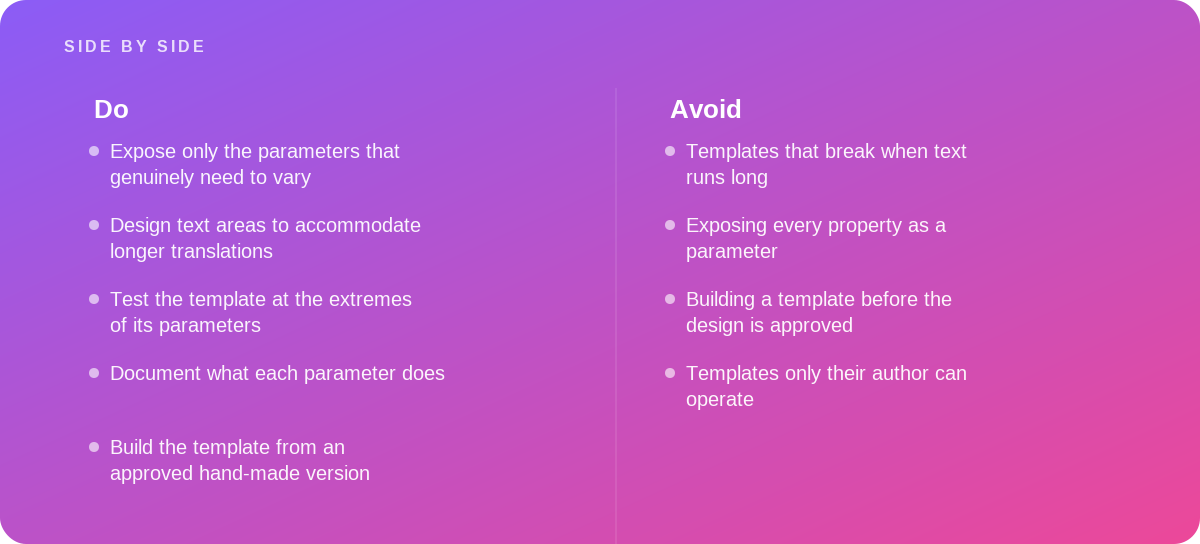
Once you know the matrix, list the parameters. For every candidate parameter, ask two questions: will this actually change between versions in this campaign, and should the person operating the template be allowed to change it? If either answer is no, do not expose it. Exposing every property is a well-known failure: the template becomes a control panel with sixty sliders, operators change things they should not, and the brand consistency the template was supposed to protect disappears.
In practice, a strong campaign template usually exposes something like four to twelve controls: a few text fields, one or two media slots, a color choice from a restricted set, perhaps a checkbox to show or hide a legal line or a badge. Position, scale, easing, typeface and animation timing are normally locked. When someone later asks for a control you did not expose, that is a conversation worth having, not a failure of the template.
Shortcut: write the parameter list as a spreadsheet header before you build anything. If you cannot fill one row of that sheet for every variant in the matrix, you are missing a parameter; if a column is identical in every row, you do not need it.
Outputs and checks
The outputs are the variant matrix, the list of which dimensions are templated versus built separately, and the parameter list with an owner and allowed range for each. The check: every cell in the matrix can be produced by setting parameters, without anyone opening the animation layers.
Phase 3: Design Text Areas for the Longest Language, Not the Source Copy
Goal: a layout that holds up when the copy is longer, shorter, or written in a different script than the hero. Templates that break when text runs long are the most visible failure in templated motion, and localization is where they break first.
How much text actually changes
Translated text length varies significantly between languages, and the variation is not uniform. The W3C's internationalization guidance on text size in translation makes the point that short strings, such as buttons, labels and headlines, tend to expand proportionally much more than long paragraphs, because a single English word may need a phrase in another language. Motion design is dominated by exactly those short strings. A three-word English headline can come back from translation noticeably longer in German or Finnish, while Chinese or Japanese may use fewer characters but need a larger point size to stay legible at the same distance.
The practical rule is to design for the longest real copy you expect, not the copy in the hero. If translations are available early, use them. If not, build a test string set: the English headline, a deliberately long version (roughly double the character count is a reasonable stress case for short headlines), a single long compound word that cannot break, and a version in any non-Latin script the campaign will use.
Layout decisions that absorb expansion
- Give text boxes room to grow. Plan headline areas that can take a second line without colliding with the product image or logo. If the hero only works with one line, the design is too tight for localization.
- Decide the overflow rule in advance. When copy exceeds the box, does the text wrap to another line, scale down to a minimum size, or trigger a layout change? Pick one per text field and write it down. Uncontrolled shrinking is how legal lines end up unreadable.
- Set a minimum type size. Automatic scale-to-fit is useful, but only above a floor. Our article on text legibility in motion covers how size, weight and on-screen duration interact; use it to set the floor for each format.
- Tie reading time to length. Longer text needs longer on screen. If the template lets copy grow, it should also let the hold time grow, or it should cap length so reading time stays adequate.
- Plan for right-to-left scripts. Arabic or Hebrew versions often need mirrored layouts and reversed animation direction, which is usually a separate composition rather than a parameter.
- Check fonts for coverage. Confirm the brand typeface has the glyphs for every target language, including accented characters, and name the fallback font where it does not.
Outputs and checks
The output is a revised layout (approved by the same person who approved the hero) with defined text areas, an overflow rule per field, a minimum type size per format and a test string set. The check is to mock up the longest and shortest strings by hand in the hero file. If either looks wrong, fix the design now; it is far cheaper than fixing the rig later.
- Every text field has a defined maximum length or a defined overflow behavior.
- A minimum legible type size is set for each output format.
- The longest test string has been mocked up by hand and approved.
- Font coverage has been checked for every target language and script.
- Right-to-left requirements, if any, are identified and scoped as separate builds.
- On-screen hold time scales with text length or text length is capped.
Phase 4: Build the Template Architecture in Your Tool of Choice
Goal: a working template, rebuilt from the approved hero, that exposes exactly the parameters from phase two and behaves according to the layout rules from phase three.
Choose the template format
The format depends on who will operate the template and where. The most common options are:
- Motion Graphics templates (.mogrt) from After Effects. Built with the Essential Graphics panel, these package an After Effects composition with a defined set of controls that editors can use in Premiere Pro without opening After Effects. Adobe's Help Center documents the Essential Graphics workflow, including text, color, checkbox, slider and media replacement controls, and the responsive design features for protecting timing and pinning layers to one another.
- Templated After Effects projects driven by expressions and data. Better when variants will be rendered in bulk rather than edited individually, because the project can read values from a data file and be rendered from the command line.
- Fusion templates in DaVinci Resolve. Blackmagic Design supports saving Fusion compositions as macros and title templates that appear in Resolve's effects library with published controls, which suits teams that finish in Resolve.
If editors will be the main operators, our guide to motion graphics templates for editors goes deeper into what makes a template pleasant to use inside an edit timeline.
Rebuild from the hero, cleanly
Duplicate the approved hero project and rebuild it as a template rather than bolting controls onto the original. The rebuild is where you remove hacks that were fine for a single asset (a layer nudged by hand on one frame, a mask drawn around specific letters) and replace them with rules that work for any content. Typical structural decisions include:
- One control layer or composition. Keep every exposed value in one place, with each animated layer referencing it. This makes the template easier to debug and easier to document.
- Responsive text containers. Size background plates, underlines and frames from the measured bounds of the text (in After Effects, typically via an expression using sourceRectAtTime) so they grow with the copy instead of being fixed shapes.
- Pinned layouts. Attach dependent elements, such as a price badge that sits under the headline, to the element they depend on, so a second line of headline pushes the badge down rather than overlapping it.
- Protected timing regions. If duration is a parameter, protect the intro and outro animations so stretching the template lengthens the hold in the middle, not the motion at either end.
- Restricted color choice. Rather than an open color picker, expose a dropdown or index that selects from approved brand swatches. Our practical guide to color in motion design explains why an unrestricted picker tends to erode a palette quickly.
- Media slots with defined framing. For replaceable images and video, define the frame, the scaling behavior (fill or fit) and the safe crop area, and state the required source resolution and aspect ratio.
Shortcut: name every exposed control in the language the operator uses, not the language of the rig. "Headline, line 1" and "Show legal line" are self-explanatory; "txt_A_ctrl" and "Checkbox 3" guarantee support questions.
Outputs and checks
The output is a template file that, with the hero's content entered, renders a result visually identical to the approved hero. That identity test is the most important check in this phase: set the parameters to the hero values, render, and compare frame by frame with the reference movie. Any difference is a bug in the template, not an acceptable variation.
Phase 5: Stress-Test the Template at the Extremes of Its Parameters
Goal: find everything that breaks before operators do. A template that works with the hero content proves almost nothing; its value is in how it behaves with content nobody has seen yet.
Build an extremes test set
For every parameter, define its minimum, maximum and awkward cases, then test combinations. A useful test set for a typical campaign template includes:
- The shortest plausible headline (a single short word) and the longest (your phase-three stress string).
- A long word that cannot wrap, such as a German compound noun or a product name with a model number.
- Characters with accents, descenders and ascenders, which reveal clipping in tightly sized text boxes.
- Prices with the most digits and currency formats (for example, a currency symbol after the number, or a comma decimal separator).
- Product images that are very wide, very tall, very light on a light background and very dark on a dark one.
- The shortest and longest allowed duration.
- Every optional element switched on at once, and every one switched off.
Test combinations, not only individual parameters. Many failures only appear when a long headline, a long price and the legal line are all present in the vertical format at the shortest duration. That worst-case combination deserves its own render.
Decide how to fix what breaks
Each failure has three possible fixes: change the template so it handles the case, restrict the parameter so the case cannot happen (a character limit, a list of allowed values), or accept the case as out of scope and document it. All three are legitimate. What is not legitimate is leaving a known break undocumented, because an operator will find it on deadline.
- Every parameter has been tested at its minimum, maximum and at least one awkward case.
- The worst-case combination has been rendered in every format.
- No text clips, overlaps another element or falls below the minimum size.
- Timing holds at the shortest and longest durations, with intro and outro intact.
- Each failure found is fixed, restricted or documented as out of scope.
- The hero identity render still matches the reference after all fixes.
Phase 6: Document Every Parameter So Anyone Can Operate the Template
Goal: a template that works without its author in the room. Templates only their author can operate are a quiet but costly failure: the whole point of templating is to move routine production away from the specialist, and an undocumented template pulls it straight back.
What the documentation should contain
Documentation for a motion template does not need to be long, but it needs to be specific. A one- or two-page operator sheet usually covers it:
- A parameter table. Each control, what it does, allowed values or length, and what happens at the limit.
- Source requirements. Image resolution, aspect ratio, file format, color space and background treatment for each media slot.
- Known limitations. The cases from phase five that are out of scope, stated plainly.
- A review standard. What a correct variant looks like, with a link to the reference movie.
- Ownership and versioning. Who maintains the template, the current version number and where change requests go.
- Output settings. Which render preset, codec and naming convention to use for each format.
The handover test
The check for this phase is behavioral, not editorial. Give the template and the operator sheet to someone who did not build it, ideally the person who will actually run production, and ask them to produce two or three variants without help. Watch where they hesitate, which controls they misread and which questions they ask. Every question is a gap in the documentation or a naming problem in the template. Fix both, then repeat with a second person if the template will be widely used.
The output is an operator sheet stored alongside the template, plus a confirmed handover: at least one non-author has produced correct variants from the documentation alone.
Phase 7: Drive Production From Data and Review Against the Hero
Goal: produce the full variant set efficiently, with consistent quality, and with a clear record of what was produced from which inputs.
Manual versus data-driven production
For a few dozen variants, manual production through the template's controls is often fine: an editor enters values in the Essential Graphics panel, exports, and moves on. Beyond that, or when the same template will be reused across many campaigns, it pays to drive the template from data. The spreadsheet you drafted in phase two becomes the production input: one row per variant, one column per parameter, plus columns for format, output filename and approval status.
Data-driven production can range from simple to heavily automated. At the simple end, After Effects can import a CSV or JSON file and read values from it with expressions, so changing the row index changes the variant. At the automated end, render scripts or dedicated automation platforms read each row, set the parameters, and queue renders through the command-line renderer, without anyone opening the project. The same principle drives data visualization in motion: when content comes from data, the design has to be robust to whatever the data contains, which is exactly what phases three and five were for.
A useful safeguard is to add a validation step to the spreadsheet itself. Character-count formulas that flag any headline over the documented limit, and a dropdown for approved colors, catch most errors before a single frame is rendered.
Rendering and naming
At scale, output management is as much work as the animation. Define a filename convention that encodes campaign, market, offer, format and duration, so any file can be traced back to its row. Choose render presets per destination, and keep a mezzanine master where later re-encodes are likely. Our guide to rendering and output for motion covers codecs, presets and delivery specifications in more detail.
Review
Do not skip review because a template produced the files. Automated output fails in automated ways: a wrong image in one row, a translation pasted into the wrong language column, a price with a missing digit. A practical review process checks every variant at a few fixed points (the first readable frame of the headline, the product reveal and the end card) against the reference movie and the source spreadsheet. Contact sheets that show those frames for many variants side by side make this fast.
The outputs of this phase are the delivered variant set, the populated spreadsheet recording what was produced and approved, and a log of any issues found in review that should feed back into the template.
Worked Example: Templating a 96-Variant Product Launch
The following project is illustrative, built to show how the phases and numbers fit together; it is not a client case. The figures are planning assumptions and will differ with the complexity of the design, the team and the tools.
The brief
A consumer electronics brand launches three products across four markets: US English, German, French and Spanish. Each product needs a 15-second and a 6-second social ad in four aspect ratios: 16:9, 1:1, 4:5 and 9:16. That is 3 products x 4 languages x 2 durations x 4 ratios = 96 deliverables. The animation is a headline build, a product reveal, a price and offer badge, and an end card with logo and a legal line.
Comparing the approaches
| Item | Hand-built approach | Templated approach |
|---|---|---|
| Hero design and approval | 1 hero, about 4 to 5 days | 1 hero, about 4 to 5 days |
| Layout rework for localization | Handled ad hoc per version | About 1 day, once |
| Template build (8 compositions: 4 ratios x 2 durations) | Not applicable | About 4 to 6 days |
| Stress testing and documentation | Not applicable | About 2 days |
| Per-variant production | Assumed 1 to 2 hours each for 95 versions: roughly 95 to 190 hours | Assumed 10 to 15 minutes each for 96 versions, including review: roughly 16 to 24 hours |
| Late copy change across all markets | Every affected file edited by hand | Spreadsheet edit and re-render |
Under these assumptions, the hand-built route costs roughly 12 to 24 working days of production after the hero, while the templated route costs roughly 9 to 12 days including the template build. The time difference is meaningful, but the bigger gain is in the last row. When the legal team changes the disclaimer wording in week three, the templated team edits one cell per language and re-renders; the hand-built team opens every file. The consistency difference is also real: every templated variant shares the same easing, positions and timing because none of it was ever retyped.
The same arithmetic shows where templating does not pay. If the campaign needed only one language and two formats, 12 variants in total, the template build and testing would take longer than simply hand-making them. That threshold moves with complexity, but a rough rule is that templating becomes worthwhile once the variant count is in the dozens or once the same structure will be reused in later campaigns.
A realistic schedule
- Week 1, days 1 to 5 Hero 15-second 9:16 English version designed, animated and approved; variable elements listed.
- Week 2, day 1 Variant matrix and parameter spreadsheet drafted; translations requested for all headlines, offers and legal lines.
- Week 2, day 2 Layout reworked for longest German copy; minimum type sizes set per format; revised layout approved.
- Week 2, days 3 to 5 and Week 3, days 1 to 2 Template built: control layer, responsive text, pinned badge, protected intro and outro, four ratios at two durations.
- Week 3, days 3 to 4 Extremes testing across all eight compositions; fixes and parameter limits applied; operator sheet written; handover test with a producer.
- Week 3, day 5 and Week 4, days 1 to 2 Spreadsheet-driven production of 96 variants, contact-sheet review against the hero, corrections and delivery.
The schedule assumes translations arrive by the start of week three. Late translations are the most common reason this kind of timeline slips, which is one more reason to request them in phase two rather than at production time.
When Templating Stops Paying Off and Outside Help Makes Sense
Templates constrain design in exchange for scale. That trade is usually worth it, but not always, and it can quietly turn negative. Watch for these signals.
Signs the template is working against you
- Template production is slower than hand-building. If operators spend more time fighting controls, working around breaks or waiting for the author than they would spend making the variant by hand, the template has failed at its one job.
- Localization keeps breaking layouts. Repeated overflow, clipped accents or unreadable scaled-down text mean phase three was skipped or the copy has outgrown the design.
- Every request needs a new parameter. A template that grows a new control for each campaign is drifting toward the "expose everything" failure. It may be time to build a new template from a new hero instead.
- Only one person can run it. If the author's holiday stops production, documentation and handover are the priority, not new features.
- The design is starting to look templated. When every variant feels flat and the creative team is designing around the template's limits, the constraint has become the creative direction. Some hero pieces deserve to be hand-made.
What good outside help looks like
Bring in help when campaigns need many variants and your team has not built templates at that scale before, when localization is breaking layouts, or when template production has become slower than hand-building. A specialist partner should start by asking for the approved hero and the variant matrix, not by quoting a template build in the abstract. They should be able to show you an operator sheet from past work, explain how they test extremes, and hand over a template your own team can run. If that is the kind of support you need, our animation and motion graphics team builds and documents campaign templates as well as the hero pieces they start from.
Maintaining and Versioning Templates After Launch
A template is a small piece of software, and it ages like one. Brand guidelines change, new placements appear, a typeface license is updated, a platform changes its safe areas. A template that is not maintained eventually produces off-brand output with perfect consistency, which is worse than inconsistent output because nobody notices.
A lightweight maintenance routine
- Version numbers. Give every released template a version and record it in the filename and the operator sheet. Record which version produced each delivered variant in the production spreadsheet.
- A change log. Note what changed, why and who approved it. When a variant from three months ago looks different from today's, the log explains it.
- Regression checks. After any change, re-render the hero identity test and the worst-case combination from phase five. Changes to one expression commonly break an unrelated layer.
- A single source of truth. Keep one master location for the current template and retire old copies. Templates duplicated onto individual laptops diverge quickly.
- Periodic review with the creative owner. Every campaign or quarter, ask whether the template still reflects the brand and whether any parameters should be removed. Removing unused controls is as valuable as adding needed ones.
Knowing when to retire a template
Templates rarely need to live forever. When a campaign ends or a brand refresh lands, the best move is often to archive the template with its documentation and build the next one from a new approved hero, rather than stretching the old rig to fit a new design. The playbook is repeatable precisely because each phase is explicit: approve a hero, map the matrix, design for the longest content, build lean, test the extremes, document, then produce and maintain.
Above all, remember that the template is only as good as the hand-made version it came from. Put your best creative effort into the hero, and treat the template as a way to protect that work at scale, not as a substitute for it.
Where this comes from
- Adobe Help Center — Essential graphics and templates
- W3C — Internationalization and text expansion
- Blackmagic Design — Template workflows
The figures and practices above come from the sources listed.
Working on something like this?
We take on Motion Graphics & Animation work for teams who want it done once, properly. Tell us what you are building and we will tell you honestly whether we are the right studio for it. Start a project.
Where to go next
Spotted something wrong? Report an error on this page. We correct on the page and say what changed.