Sound Design for Motion Graphics: The Decisions That Matter
Learn how to brief, budget and judge sound design for motion graphics: licensing, loudness targets, quote comparison, red flags and what good sync sounds like.
 MediaScaleUp Editorial Team

Sound design for motion graphics is the craft of adding sound effects, music and small audio cues to animated work so that movement and transitions feel physical, deliberate and engaging. A logo that snaps into place with a crisp click, a chart bar that rises under a soft riser, a scene change carried by a short whoosh: each of these is a decision someone made about timing, texture and level. When those decisions are good, viewers rarely notice them. When they are missing or wrong, even a beautifully animated piece can feel empty, cheap or tiring to watch.
This handbook is written for the person commissioning the work: a marketing lead ordering a product explainer, an in-house team adding motion to a campaign, a founder who has been sent three quotes and cannot tell why one is double the others. It covers what to ask for, what actually drives cost, how to compare suppliers on something other than price, the red flags that predict a painful project, and how to judge the finished mix when you are not an audio engineer yourself.
The short version: sound is not a finishing garnish. It shapes how your animation is timed, how your voiceover is heard and whether your video passes a platform's or broadcaster's delivery check. Treat it as a line item with its own brief, its own licensing trail and its own acceptance criteria, and most of the common problems disappear.
What sound design for motion graphics covers, and what it doesn't
Suppliers use the phrase loosely, so the first job is to agree on scope. In practice, a sound design pass on a motion piece touches five kinds of material, and a quote should say which of them it includes.
- Transition sounds. Whooshes, swipes and risers that carry the viewer from one scene or layout to the next. These are the most common element and the most frequently overused.
- Interface and object sounds. Clicks, pops, taps, ticks and small tonal blips that give weight to a button press, an icon appearing or a counter ticking up. They are short, often under a quarter of a second, and they live or die on sync.
- Impacts and accents. Hits, thuds and bright stingers that mark a key moment: the product reveal, the logo lock-up, the headline number.
- Music. A bed that sets pace and mood. It might be licensed stock, a library track edited to length, or an original composition.
- Voiceover. Not strictly sound design, but everything else has to be mixed around it, so it belongs in the same conversation even if a different vendor records it.
What sound design usually does not include, unless stated: casting and recording the voiceover, writing the script, producing an original score, recording custom Foley in a studio, and creating separate mixes for every language. Each of those can be added, and each changes the price. If a quote says "sound design included" with no breakdown, ask which of the items above that phrase covers.
- Core elements Whooshes, clicks, impacts, music and voiceover
- Sync Sounds are timed to key movements, often to the individual frame
- Licensing Every effect and music track needs an appropriate license for your use
- Silent viewing Many social viewers watch muted, so visuals must carry the message alone
- Loudness Final mixes are measured against platform or broadcast targets in LUFS
Sound design also interacts with the rest of the motion craft. The easing on a move, the anticipation before a pop and the overshoot after it all suggest a sound. If you are still getting the animation itself right, the ideas in our guide to motion design principles are worth reading alongside this one, because a well-timed move is much easier to score than a mushy one.
Sound-on, sound-off: deciding what your piece actually needs
Before you ask anyone for a price, decide how the piece will mostly be watched. That single decision changes how much sound design is worth buying and where it should be spent.
Pieces that will mostly be watched muted
Many viewers scroll social feeds with sound off. For a feed ad, a short product teaser or a looping social cutdown, the animation and on-screen text must carry every essential message on their own. Sound is still worth doing, because the viewers who tap to unmute should be rewarded, but the budget should favor clean, restrained effects and a well-chosen music bed over elaborate layered design. Captions or kinetic type do the heavy lifting; legibility matters more than sonic detail. Our piece on text legibility in motion covers the visual side of that trade-off.
Pieces that will be watched with sound
Website hero videos that users click to play, explainer videos on a landing page, event openers, broadcast spots, trade show loops with speakers, and presentation videos all tend to be heard. Here, sound design earns its keep. It sets pace, directs attention to the right part of the frame and makes a brand feel more premium. If your motion work lives inside decks or keynotes, see motion graphics in presentations for how playback environments affect what you can rely on.
Pieces where sound is part of the product
App onboarding animations, UI demos and brand idents sometimes need a small, reusable sound palette: a signature click, a confirm tone, a logo sting. That is a different commission. You are buying a set of assets that will be reused across many pieces, so consistency, file naming and licensing for reuse become the main concerns.
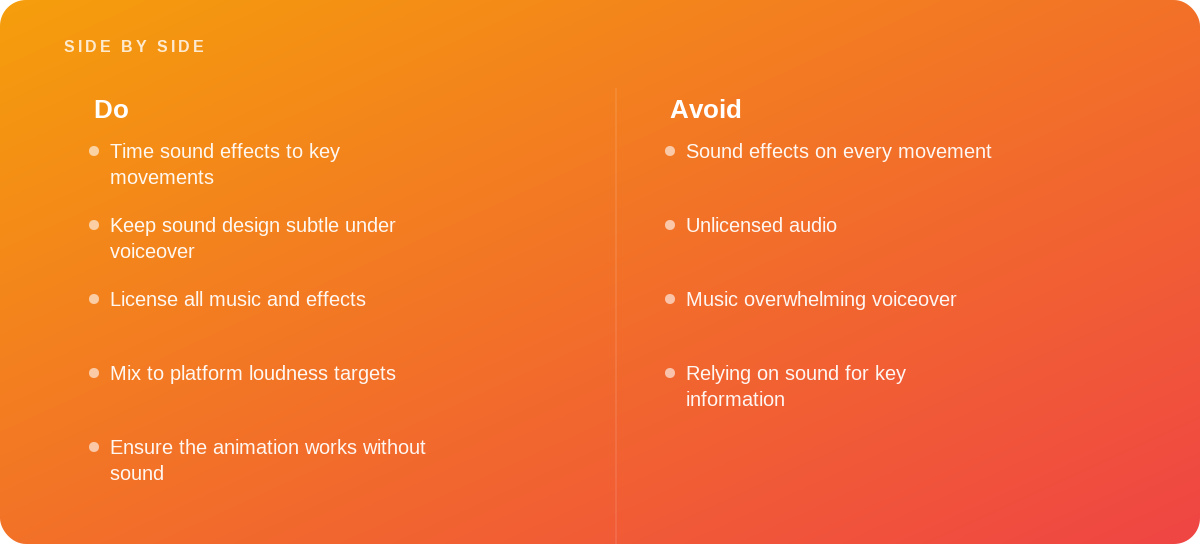
Whichever category you are in, one rule holds: never rely on sound to deliver key information. If the only cue that a step completed is a chime, a muted viewer, a viewer in a noisy room or a viewer who is hard of hearing will miss it. Sound should reinforce what the picture already says.
Writing the audio brief: what to ask for and what to ask suppliers
A vague brief produces a vague quote. The most useful brief for sound design is short but specific, and it answers the questions a sound designer would otherwise have to guess at.
What to put in the brief
- Runtime and versions. The master length plus every cutdown you need (for example a 60-second master, a 30-second and a 15-second edit, and a 6-second bumper). Each version needs its own mix.
- Voiceover status. Is there voiceover, is it recorded yet, who is supplying it, and in how many languages?
- Music route. Stock library, custom composition, or "supplier's choice within budget." Include two or three reference tracks you like and one you do not.
- Sound character. Three to five adjectives: organic or synthetic, soft or punchy, playful or restrained. References from existing videos help more than adjectives.
- Distribution. Every place the piece will run: social platforms, your website, paid ads, broadcast, events. This determines licensing scope and loudness targets.
- Deliverables. Final mixed file, separate stems, or an open project file. Ask for these now, not after the fact.
- Sign-off. Who approves audio and how many rounds of revision are included.
Questions to ask every supplier
These questions reveal more about a supplier's process than a showreel does. Good suppliers answer them quickly and specifically; weaker ones answer with enthusiasm and no detail.
- Which sound effects libraries and music sources will you use, and what license tier covers my stated distribution?
- Will I receive license documentation or receipts for every music track and effect in the final mix?
- What integrated loudness and true-peak targets will you mix to for each platform on my list?
- Do you design sound after picture lock, or in parallel with animation? What happens if picture changes after the mix?
- How many revision rounds are included, and what counts as a round?
- Will you deliver stems (dialogue, music, effects) as separate files, and at what sample rate and bit depth?
- How do you handle music ducking under voiceover: automated, manual, or both?
- Can you show me a before-and-after of a similar piece, with and without your sound pass?
- Who actually does the mix, and on what monitoring? Will you check it on phone speakers and earbuds as well as studio monitors?
- If a track is flagged by a platform's content ID system after launch, what will you do?
The last question is not paranoid. Library music, even when properly licensed, is sometimes registered with automated content identification systems, and a claim on a paid ad can pause a campaign. A supplier who has seen this happen will have an answer ready, usually involving license documentation you can submit to dispute the claim.
What drives the cost of sound design for motion graphics
Prices for this work vary enormously, and there is no single market rate worth quoting. What you can do is understand the variables, so that when two quotes differ you know why. In rough order of impact, these are the main cost drivers.
Music route
The biggest swing in most budgets is music. A stock track from a subscription library costs little per project but may also appear in competitors' videos. A single-use license from a premium library costs more and usually covers broader use. An original composition costs the most but gives you something no one else has, and depending on the contract, you may own it outright. Ask which route is being quoted and whether the price includes editing the track to fit your cut, which is skilled work in its own right.
Density and runtime
A 30-second piece with eight key moments is quicker to design than a 90-second piece with forty. Sound designers price by the amount of synchronized material, not simply by the minute. A dense UI demo in which every tap, swipe and state change needs a sound can take longer than a slower, longer brand film.
Custom versus library effects
Most motion work is well served by carefully chosen and processed library effects. Custom-recorded or synthesized sounds cost more but make sense for brand idents, signature product sounds and anything you will reuse for years.
Versions and cutdowns
Every cutdown needs its own edit of the music and its own mix. A 15-second version is not a trimmed 60-second version; the music must resolve properly and the key accents must still land. Expect each extra version to add cost, though less than the master.
Languages
If you are localizing voiceover, each language needs a mix pass because reads differ in length and energy. Planning for this early is cheaper than retrofitting; our guide to localizing motion graphics covers the timing problems that ripple into audio.
Changes after the mix
Sound is synchronized to specific frames. If the animation changes after the mix, every affected sound may need to move. This is the most common source of cost overruns, and it is avoidable if picture is locked before final sound design begins.
| Cost driver | Lower-cost end | Higher-cost end | What to ask |
|---|---|---|---|
| Music | Subscription stock track, minimal edit | Original composition with buyout | Who owns it, and where can I use it? |
| Effects | Curated library sounds | Custom-recorded or synthesized palette | Will any sounds be exclusive to us? |
| Density | A handful of key accents | Every UI action and transition scored | How many sync points are you pricing? |
| Versions | One master mix | Master plus several cutdowns and aspect ratios | Is each cutdown a separate mix? |
| Languages | One voiceover language | Multiple language mixes | Is there a per-language mix fee? |
| Revisions | One round after picture lock | Open-ended changes during animation | What counts as a revision round? |
Licensing: the part buyers most often get wrong
Every sound effect and every piece of music in your video needs an appropriate license. This is the single area where a cheap shortcut can cost more than the whole project, because unlicensed audio can lead to takedowns, muted videos, blocked ads or legal claims long after the supplier has been paid.
What "appropriate" means
A license is appropriate when it covers the specific way you will use the audio. Most music and effects licenses define scope along several axes: the type of media (web, social, broadcast, cinema, events), whether the use is paid advertising or organic content, the territory, the duration, and sometimes audience size. A track licensed for an organic social post may not be licensed for a paid campaign on the same platform. A track licensed for web use may not cover a television spot.
Who holds the license
Clarify whether the license is issued to you or to the supplier. If a studio licenses a track under its own subscription, check that the terms allow use in client work and that the license survives if the studio's subscription later lapses. Many library terms handle this, but you should see it in writing rather than assume it.
What to keep on file
Ask for a simple cue sheet or asset list that names every music track and, where practical, the sources of the effects, alongside license IDs or receipts. Keep it with the project files. If a platform flags your video, this document is how you prove you have the rights.
Red flag: a supplier who cannot tell you where the music came from, or says "it's royalty-free, you don't need anything." Royalty-free describes a payment model, not an absence of license terms. Walk away or insist on documentation before sign-off.
- Popular commercial songs used "because it's only for social."
- Effects ripped from other videos, games or films.
- Music from a free site with no written license terms.
Licensing also affects reuse. If you plan to reuse a logo sting across all future videos, make sure the license or commission agreement allows that. Buying a signature sound once and then discovering it can only be used in the original video is an avoidable annoyance.
Loudness, mixing and delivery specs to put in the contract
Buyers rarely ask about loudness, and it is one of the clearest differences between a professional sound pass and an amateur one. "Loud enough" is not a spec. Integrated loudness, measured in LUFS (Loudness Units relative to Full Scale, also written LKFS in some North American documents), is.
Broadcast targets
If your piece will air on television, the broadcaster will specify a loudness standard and may reject files that miss it. In Europe the reference is the European Broadcasting Union's R 128 recommendation, which sets a target integrated loudness of -23 LUFS with a maximum true peak of -1 dBTP. In the United States, broadcasters commonly work to the ATSC A/85 practice with a target of -24 LKFS. Always use the delivery spec the specific broadcaster sends you, because individual networks add their own requirements.
Online and social targets
Streaming and social platforms normalize playback loudness, meaning they turn loud content down and sometimes quiet content up to a reference level. Reference levels differ by platform and can change, so ask your supplier which target they are using and why. Many online mixes land in the range of roughly -16 to -14 LUFS integrated with a true peak ceiling around -1 dBTP, but the right answer depends on the destination. What matters for a buyer is that the supplier mixes to a stated target and can show you a loudness measurement for the final file.
Voiceover and music balance
When voiceover is present, it is the priority. Music should sit clearly underneath it, and sound effects under voiceover should be subtle. Mixers do this by lowering the music under speech, a technique called ducking, either with automation drawn by hand or with an automatic side-chain tool. Editing software supports this too; the Adobe Help Center's documentation on Premiere Pro audio workflows describes features such as automatic ducking and loudness tools that editors use for exactly this job. Hand-tuned ducking usually sounds more natural, because it can lift the music in the gaps between sentences.
Delivery specs worth writing down
- Sample rate of 48 kHz, the standard for video, and a bit depth of 24-bit for masters and stems.
- Integrated loudness target and true-peak ceiling per destination.
- Stereo mix as standard; state it explicitly if you need a mono-compatible mix or surround.
- Stems delivered as separate files: dialogue, music, effects, all aligned to the same start point.
- A "music and effects" (M&E) mix without voiceover, if the piece may be localized later.
- Final video files with audio embedded and verified in sync.
Stems and an M&E mix cost little extra if requested at the start and can save an entire re-mix later when you need a new voiceover, a new language or a shorter version.
Comparing supplier quotes line by line
Quotes for sound design are hard to compare because suppliers bundle things differently. One quote says "sound design and music: one price." Another itemizes music licensing, design, mix and stems. A third includes sound in an overall motion graphics fee. To compare them fairly, normalize them into the same set of questions.
The scorecard below is a practical way to do that. Fill in one column per supplier. Rate each row as clear and included, unclear, or missing. Price comes last, deliberately.
| Criterion | What a strong quote says | What a weak quote says | Weight |
|---|---|---|---|
| Scope of design | Lists transitions, UI sounds, accents and how many sync points | "Sound design included" | High |
| Music route and license | Names the source, license tier and permitted media | "Royalty-free music" | High |
| License documentation | Cue sheet and license IDs delivered at handover | Not mentioned | High |
| Loudness spec | States LUFS target and true-peak ceiling per platform | "Mastered for web" | Medium |
| Voiceover handling | Explains ducking approach and priority of dialogue | Silent on voiceover | Medium |
| Deliverables | Master mix, stems, M&E, cutdown mixes named | "Final video file" | Medium |
| Revisions | Number of rounds, and a definition of a round | "Unlimited revisions" | Medium |
| Change policy | States cost of re-sync if picture changes after lock | Not mentioned | Medium |
| Relevant samples | Before-and-after examples in a similar style | General showreel only | Medium |
| Price | Itemized, so you can see where money goes | Single figure, no breakdown | Compare last |
A note on "unlimited revisions": it sounds generous, but it usually means either the supplier has not thought about process or the revisions will be slow. A fixed number of well-defined rounds, typically one or two after picture lock, tends to produce better results because both sides prepare consolidated feedback.
If sound is bundled into a broader animation contract, which is common when you hire a studio for full animation and motion graphics production, you can still ask the studio to break out the audio portion. A studio that runs sound in-house should be able to tell you who does it and what the pass includes.
Worked example: budgeting a 60-second product explainer
The following scenario is illustrative, not a real client project, and the figures are hypothetical. It is here to show how scope decisions turn into hours and how two reasonable quotes can differ.
A software company commissions a 60-second product explainer at 30 frames per second, with an English voiceover already recorded. They need three versions: a 60-second master for their website, a 30-second paid social cutdown, and a 15-second teaser. The piece has 12 scene transitions, about 25 UI interactions (taps, toggles, cards sliding in), and three hero moments: the product reveal, a key metric counting up, and the logo lock-up at the end.
Supplier A's approach
Supplier A proposes a library music track licensed for web and paid social, edited to fit each version. They will score all 12 transitions, the three hero moments and about half of the UI interactions, deliberately leaving the rest silent so the piece does not become cluttered. They estimate roughly 4 hours to source and edit music, 6 hours for effects design and sync on the master, 3 hours for the master mix and loudness check, and 2 hours each for the two cutdown mixes: about 17 hours in total. Deliverables include stems and an M&E mix.
Supplier B's approach
Supplier B proposes an original 60-second composition with a buyout, then edits of that composition for the cutdowns. They will design a small custom sound palette (a signature click, a confirm tone and a logo sting) that the client can reuse. Their estimate is around 12 hours for composition, 8 hours for custom palette design, 7 hours for effects sync, 3 hours for the master mix and 3 hours each for the cutdowns: about 36 hours, more than double Supplier A.
How to decide
Neither quote is wrong. Supplier A delivers a professional, well-balanced piece for this video. Supplier B delivers that plus reusable brand assets and exclusive music. The question is whether the company will reuse those assets. If they plan a series of product videos over the next year, Supplier B's palette is used again and again, and its cost per video falls. If this is a one-off, Supplier A is the sensible choice.
| Line | Supplier A (hours) | Supplier B (hours) |
|---|---|---|
| Music sourcing or composition | 4 | 12 |
| Custom sound palette | 0 | 8 |
| Effects design and sync (master) | 6 | 7 |
| Master mix and loudness check | 3 | 3 |
| Cutdown mixes (30s and 15s) | 4 | 6 |
| Total | 17 | 36 |
Multiply each supplier's hours by their day or hourly rate, add any music license fee, and you have a like-for-like comparison. Notice that in both cases the cutdown mixes are a meaningful share of the work. Buyers who forget to mention cutdowns in the brief often get a lower initial quote followed by a change order.
One more detail in this example is worth noticing. At 30 frames per second, a single frame lasts about 33 milliseconds. A click that lands two frames late, roughly 67 milliseconds, is already perceptible to many viewers as sloppy on a sharp UI move. That is why sync is priced as skilled work rather than a drag-and-drop task.
Red flags in supplier pitches and first drafts
Most sound design problems are visible early, either in the pitch or in the first draft. Catching them then is far cheaper than fixing them after launch.
In the pitch
- No questions about voiceover, distribution or versions. A supplier who can quote without knowing where the piece will run is guessing.
- A showreel where every example sounds the same: the same whoosh pack, the same riser, the same epic drums.
- Vague licensing language, or no mention of licensing at all.
- A plan to start sound design before picture is locked, with no mention of what happens when the animation changes.
In the first draft
Red flag: a sound on every movement. When every element that moves gets its own whoosh or pop, the result is fatiguing and the important moments lose their emphasis. Good sound design is selective; silence is part of the palette.
- Music that competes with or buries the voiceover.
- Effects that are loud enough to be heard clearly under speech.
- A key message delivered only by sound, such as an alert tone with no visual cue.
- A mix that sounds fine on studio speakers but harsh or thin on a phone.
- Obvious clipping or distortion on impacts and logo stings.
Other warning signs include sounds that are consistently a frame or two off the movement they are meant to reinforce, stock effects that do not match the visual material (a heavy metallic slam on a soft, rounded interface), and music edits with audible jumps where the track was cut to length. None of these requires expert ears to notice once you know to listen for them.
Some motion techniques create their own audio expectations. Complex particle work, for example, often calls for textured, granular sounds rather than single hits; our article on particle effects in motion design explains the visual side, and a good sound designer should be able to explain how they will match it.
How to judge the finished mix without being an audio engineer
You do not need specialist training to evaluate a sound pass. You need a routine, a few listening environments and a clear idea of what the audio is supposed to do. Use the following checks before you sign off.
Watch it muted first
Play the piece with sound off. Does every key message still come across? Can a viewer follow the story, read the text and understand the call to action? If not, the problem is in the animation or on-screen text, not the sound, and it should be fixed there.
Listen on the devices your audience uses
Play the piece on a phone speaker, on cheap earbuds, on laptop speakers and, if available, on good headphones. Phone speakers reproduce very little bass, so a mix that relies on deep impacts for emphasis can lose its punch. Voiceover should be clearly intelligible on all of them.
Check voiceover intelligibility
Close your eyes during a voiceover section. Can you understand every word without effort? If you strain at any point, music or effects are too loud underneath. This is the most common and most fixable problem.
Check sync on the key moments
Pick the three or four most important moments and watch them frame by frame if your player allows it. The accent should land on the frame where the movement resolves, or, for anticipation effects like risers, should build into it. Consistent lateness or earliness signals a rushed sync pass.
Ask for the numbers
Ask the supplier for a loudness report on the final file: integrated loudness and true peak. Compare it with the targets in your contract. You do not need to interpret the waveform; you only need to confirm the numbers match what was agreed.
Listen for fatigue
Watch the whole piece three times in a row. If it starts to feel busy or tiring by the third viewing, the sound design is probably too dense. This matters most for loops, such as trade show screens and website backgrounds, which some people will hear dozens of times. Motion for public spaces has its own considerations, covered in museum exhibit motion graphics.
If you strain to hear a single word of the voiceover, the mix is wrong, however impressive the effects sound on their own.
Planning the schedule so sound is not an afterthought
Sound design is often squeezed into the last day before delivery, which is exactly when it is hardest to do well. A little planning avoids this.
Involve the sound designer at animatic stage
Sharing an animatic or rough cut early lets the sound designer suggest timing adjustments that make the audio land better: a beat of hold before a reveal, a slightly longer transition to let a whoosh breathe. It also lets them propose a music direction before the animation is final, so the pace of the cut and the tempo of the track can support each other.
Lock picture before final sync
Final sound design and sync should start after picture lock. Temporary sounds during animation are fine, and useful for the animator, but the precise frame-by-frame pass should wait until the timing is fixed. Agree in writing what happens if picture changes afterward.
Allow time for review on real devices
Schedule at least one review round in which stakeholders listen on their own phones and laptops rather than in a meeting room with a conference speaker. Meeting room speakers are rarely representative of anything your audience uses.
For pieces that combine live footage and graphics, sound often has to bridge the two worlds, blending location audio with designed effects. Tracked elements are a common example; see motion tracking for graphics for how those composites are built, because sounds attached to tracked graphics need to feel as if they belong in the filmed space.
When to bring in specialist sound help
Plenty of motion designers handle basic sound competently, especially for short social pieces with a music bed and a handful of accents. There are clear signs, though, that a project needs a dedicated sound designer or a studio with audio in-house.
- Your motion pieces feel flat. The animation is good, yet the finished videos lack energy or polish. Sound is often the missing layer.
- Audio is poorly balanced. Viewers or colleagues mention that the music is too loud, the voiceover is hard to follow, or the volume jumps between videos.
- You are delivering to broadcast. Broadcast loudness specs are strict and files are checked; getting this wrong means rejection and redelivery.
- You need reusable brand sounds. A signature sound palette is a design project in its own right and benefits from dedicated expertise.
- You are producing many versions or languages. Managing stems, M&E mixes and multiple loudness targets is where process discipline pays off.
If you are hiring a studio for the whole job, ask whether sound is done by the same team or subcontracted, and meet or hear from whoever does the mix. A studio that offers dedicated motion graphics services with audio in the same pipeline can usually move faster through revisions, because the animator and sound designer work from the same timeline.
Verdict Buy sound design for motion graphics as a defined line item, not a vague extra. Brief it with your versions, voiceover status and distribution; insist on documented licenses and stated loudness targets; compare quotes on scope and deliverables before price; and judge the result muted first, then on a phone, then for voiceover clarity. Restraint, sync and balance matter far more than the number of effects.
Where this comes from
- Adobe Help Center — Premiere Pro audio workflows
- European Broadcasting Union — EBU R 128 loudness recommendation
The figures and practices above come from the sources listed.
Working on something like this?
We take on Motion Graphics & Animation work for teams who want it done once, properly. Tell us what you are building and we will tell you honestly whether we are the right studio for it. Start a project.
Where to go next
Spotted something wrong? Report an error on this page. We correct on the page and say what changed.