Caption Quality and FCC Rules: The Decisions That Matter
A checklist for caption quality and FCC rules: accuracy, sync, completeness, placement, CVAA online captioning, WCAG, and fixing automatic captions.
 MediaScaleUp Editorial Team

Captions are one of the few parts of a video that are judged by rules rather than taste. Caption quality and FCC rules are the standards captions are held to in the United States: the Federal Communications Commission's quality standards for television, the obligation to caption TV programming again when it is posted online, and the Web Content Accessibility Guidelines that most organizations use for video on their own sites. Together they turn captions from a nice-to-have into a deliverable with a definition of done.
This matters to more people than broadcasters. A marketing team that repurposes a TV spot for YouTube, a training department publishing safety videos to an intranet, a university posting lectures, and an agency delivering a campaign to a client with an accessibility clause in the contract are all working inside these rules. The key point that surprises most teams is that US rules define quality, not just presence. A caption file that exists but is wrong, late or sitting on top of the one graphic the viewer needed to read fails the people who rely on it, and it can fail a compliance review too.
This guide is organized as a checklist. The master list comes first, and each section after it takes one item, explains why it matters and describes how to do it well in a real post-production workflow. Use the list as a sign-off sheet; use the sections when a reviewer asks why a caption was rejected.
Every item below maps to a named standard or to a failure that reviewers see repeatedly. Work through them in order, because the early items decide what the later ones have to achieve.
- Identify which rules apply: FCC television standards, the CVAA online requirement, WCAG, a contract, or several at once.
- Make captions accurate: the words actually spoken, correctly spelled and punctuated, with no paraphrasing.
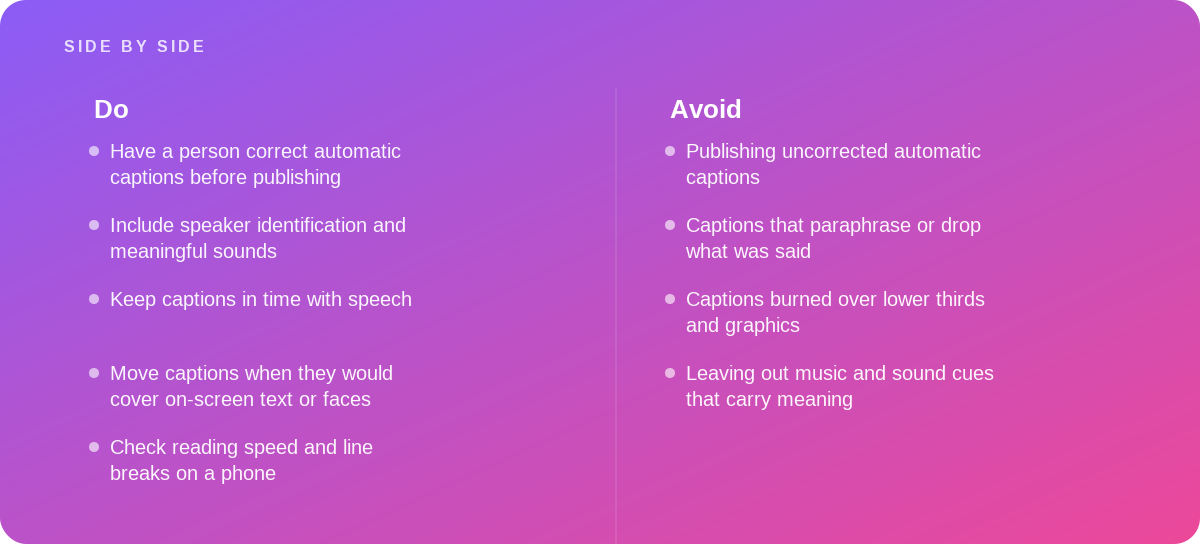
- Have a person correct every automatic caption file before it is published.
- Keep captions in sync with speech, entering and leaving with the audio they represent.
- Caption the whole program, from the first line to the last, including credits and post-credit dialogue.
- Identify speakers and include music and sound cues that carry meaning.
- Place captions so they never cover on-screen text, lower thirds, graphics or faces that matter.
- Check reading speed and line breaks on a phone, not only on an edit-suite monitor.
- Deliver in the right format: WebVTT for the HTML track element, and the formats each platform or broadcaster specifies.
- Run a final caption QC pass and keep a record of what was checked.
The four quality pillars in this list, accuracy, synchronicity, completeness and placement, come straight from the caption quality standards the FCC adopted in 2014. The rest are the practical steps that make those four achievable on a normal schedule.
Which Rules Apply to Your Video: FCC, CVAA and WCAG
Before anyone opens a caption editor, decide which standard the video will be judged against. The answer changes how much review time to budget, which file formats to produce and who signs off.
FCC caption quality standards for television
For programming shown on US television, the FCC's 2014 caption quality order set four standards: captions must be accurate, synchronous, complete and properly placed. The order also recognized that prerecorded, live and near-live programming are produced differently, so expectations for live captioning account for the real-time nature of the work, while prerecorded programming, which has time for review, is held to a higher practical bar. If you deliver programming to a broadcaster or cable network, the network's own caption specification usually builds on these four standards and adds technical requirements such as caption encoding.
The CVAA and TV programming posted online
Under the Twenty-First Century Communications and Video Accessibility Act (CVAA), video programming that aired on television with captions must also be captioned when it is delivered online over the internet. The Federal Communications Commission's guidance on captioning of internet video programming explains who is covered and how the obligation works, including how it applies to clips taken from televised programs. The practical consequence is simple: if a program or segment aired on TV with captions, you cannot publish it to a website or app without them, and the online captions should be of comparable quality to the broadcast version.
WCAG for web video
Video that never aired on television is not covered by the CVAA, but most organizations publishing it still work to the Web Content Accessibility Guidelines, often because a contract, a procurement rule or an internal policy says so. Two success criteria matter most. WCAG 1.2.2 Captions (Prerecorded), at Level A, requires captions for all prerecorded audio content in synchronized media. WCAG 1.2.4 Captions (Live), at Level AA, requires captions for live audio content in synchronized media. The W3C Web Accessibility Initiative's explanation of SC 1.2.2 is the reference to hand to anyone who asks whether a marketing video on a product page really needs captions; under Level A, it does.
| Video type | Main standard | What it requires | Who usually checks |
|---|---|---|---|
| Programming delivered to US television | FCC caption quality standards (2014) | Accuracy, synchronicity, completeness and placement | Network or distributor QC |
| TV programming reposted online | CVAA online captioning rules | Captions online if it aired on TV with captions | Distributor, platform, complaints process |
| Prerecorded web video | WCAG 1.2.2, Level A | Captions for all prerecorded audio | Accessibility audit, client acceptance |
| Live web streams and webinars | WCAG 1.2.4, Level AA | Captions for live audio | Accessibility audit, event owner |
| Contracted deliverables | Whatever the contract names | Often WCAG AA plus a style guide | Client QA team |
Many projects fall into more than one row. A regulated firm's TV commercial that also runs on its website, of the kind discussed in our guide to financial services video, may need a broadcast caption file, an online caption file and a record showing both were checked. Decide this at the brief stage, not at delivery.
Tip: Write the applicable standard into the project brief in one line, for example "Captions: FCC quality standards for broadcast; WCAG 2.x AA for web; client style guide v3." Everyone downstream, from the editor to the caption vendor, then knows what done means.
Accuracy: The Words Actually Spoken, Spelled Correctly
Accuracy is the first FCC pillar and the one viewers notice fastest. An accurate caption matches the spoken dialogue in its original language, conveys the tone and intent of the speaker, and uses correct spelling, grammar and punctuation. It includes proper names, product names, technical terms and numbers written the way the audience would expect to read them.
Why paraphrasing is a failure, not a style choice
Editors sometimes shorten dialogue in captions to make them easier to read, and it feels harmless. It is not. A viewer who can partly hear, or who lip-reads, sees one thing on screen and another in the caption and loses trust in both. More seriously, paraphrase changes meaning. "We may be able to ship by Friday" condensed to "Shipping Friday" has turned a hedge into a promise. In regulated content, such as a safety briefing or a financial product explanation, that difference can matter legally. The default for prerecorded content should be verbatim captioning, with only the lightest editing where reading speed genuinely demands it, and never an edit that changes meaning.
How to get accuracy right in practice
- Build a term list before captioning starts. Collect speaker names and titles, product names, place names, acronyms and jargon from the script, the lower-third list and the client. Give it to whoever captions the video, whether a person or a speech recognition tool that accepts custom vocabulary.
- Decide on number and style conventions. Choose whether to write "ten" or "10," "percent" or "%," and how to handle times and currency. Consistency is part of readability, and a short style sheet prevents a reviewer from spending an hour on inconsistencies.
- Keep disfluencies consistent with the program's purpose. Verbatim for a drama or a deposition-style interview may mean keeping false starts; for a polished corporate video, most style guides allow removing "um" and "uh" that carry no meaning. Write the rule down so it is applied the same way throughout.
- Check against the final mix, not the script. Presenters depart from scripts. Captions must follow what is said in the locked audio, which is why captioning belongs after picture and sound lock.
If your team already edits with transcripts, the transcript can be a head start, but it is not a caption file. Text-based editing workflows produce transcripts tuned for finding and cutting material, and they often normalize or drop words in ways that are fine for editing and wrong for captions.
Correcting Automatic Captions Before They Go Live
Automatic speech recognition has made first-draft captions nearly free and nearly instant. It has also made it easy to publish captions that look complete and are quietly wrong. The single most useful rule in this guide is to have a person correct automatic captions before publishing.
Where automatic captions typically fail
Speech recognition is strongest on clear, single-speaker audio with common vocabulary and weakest exactly where accuracy matters most: names, brand terms, technical language, accented speech, overlapping speakers, music beds under dialogue and quiet asides. It also tends to produce no punctuation or poor punctuation, no speaker identification and no sound descriptions, which means that even a transcript with correct words fails the completeness and meaning tests. An error such as "can" heard as "can't" is a single character and reverses the meaning of the sentence.
Pros
- Automatic captions produce a timed first draft in minutes, which removes most of the typing from the job.
- Timing from recognition engines is often close enough to be refined rather than rebuilt.
- Custom vocabulary and speaker diarization in better tools reduce the correction load on clean audio.
- They make it practical to caption large back catalogs that would otherwise go uncaptioned.
Cons
- Uncorrected output fails on names, terms and numbers, the words viewers most need to get right.
- They rarely include speaker identification or meaningful sound and music cues.
- Line breaks and caption lengths are usually mechanical, which hurts readability on phones.
- Errors look authoritative on screen, so viewers cannot tell which lines to distrust.
The trade-off is not automatic versus human; it is how much human correction the automatic draft gets. For most prerecorded work, the efficient workflow is automatic draft, then a full human correction pass that listens to every line, then a separate review on the target device.
What a proper correction pass includes
- Import the draft into a caption editor that shows waveform and picture together, so timing and placement can be corrected in the same pass as text.
- Listen to the entire program at normal speed with the captions visible. Correct words, spelling and punctuation as you go, using the term list.
- Add speaker identification and sound cues where the program needs them.
- Re-break lines for meaning rather than character count, then fix timing so captions start with speech and do not linger.
- Check every caption against graphics and lower thirds, and move any that collide.
- Export in each required format and spot-check the exports, since conversion can change timing or strip positioning.
Budget correction time as a multiple of program length, not a fixed fee per video. Clean single-speaker audio with a good term list may need only a little more than the running time for correction; a multi-speaker panel with jargon and crosstalk can take several times the running time. The drivers are audio quality, number of speakers, vocabulary density and how many graphics the captions must work around.
Synchronicity: Captions That Arrive With the Speech
Synchronicity, the second FCC pillar, means captions coincide with the dialogue and sounds they represent, appearing when the words begin and staying on screen long enough to be read. Late captions force viewers to match text to faces that have already stopped talking; early captions spoil jokes, reveals and answers to questions.
Practical timing rules
- Start with the speech. For prerecorded content, a caption should appear as the first word of the line is spoken. Many style guides allow the caption to appear a few frames early so the eye arrives in time, but never a full sentence ahead.
- Respect shot changes. A caption that straddles a cut by a few frames looks like a mistake and pulls the eye. Snap in and out points to the cut when the speech allows.
- Set a minimum display time. Very short captions that flash for less than about a second are hard to read. Where speech is fast, combine short phrases rather than flashing them.
- Close gaps sensibly. Tiny gaps between consecutive captions create a flicker. Either chain captions directly or leave a gap large enough to register as a pause.
- Keep timecode consistent. Caption timing is only as reliable as the timecode it references.
Timecode deserves its own attention. A caption file timed against 29.97 frames per second drop-frame timecode and played against a non-drop-frame master, or the reverse, drifts steadily over a long program, until dialogue and captions are visibly apart by the end. If your deliverables involve broadcast frame rates, read our explanation of drop-frame timecode before exporting caption files, and confirm the start timecode of the master (often 01:00:00:00 for broadcast) matches the caption file's offset.
Live captioning is held to a different practical standard because a human or machine captioner can only react to speech after it happens. The FCC's approach recognizes this delay. For live web streams covered by WCAG 1.2.4, the goal is the smallest delay the captioning method allows, with the understanding that live captions are corrected where possible when the recording is later posted as on-demand video.
Tip: When a recorded webinar or live event is republished as on-demand video, do not simply reuse the live captions. Treat them as an automatic draft and give them a full correction and retiming pass, because the on-demand version will be judged as prerecorded content.
Completeness: Caption the Program From First Line to Last
Completeness, the third FCC pillar, means captions run from the beginning of the program to the end. It sounds obvious, but incomplete captions are common, and they tend to fail at the edges of a program where nobody looks during review.
Where captions go missing
- Cold opens and teasers added late in the edit after captions were already produced.
- End credits and post-credit scenes, where dialogue or narration continues but the caption file stops.
- Re-edits and versions: a 30-second cut-down, a social version or a re-voiced regional version that reused the long-form caption file without adjusting it.
- Inserted segments such as sponsor messages, disclosures read aloud or updated pricing slates added after lock.
- Foreign-language lines in an otherwise English program, which need either a caption of the words or an indication of the language, according to the program's style.
How to guarantee completeness
The most reliable method is version control between picture and captions. Every caption file should be named against the exact version of the edit it was produced for, and any change to the locked picture or audio should trigger a caption update. Before delivery, compare the caption file's first and last event against the program's first and last audible content. A simple check is to play the first minute and the last two minutes of every deliverable with captions on, because that is where completeness failures cluster.
Completeness also connects to your broader delivery process. If the program is being packaged for a distributor, caption files are usually listed as required components alongside picture and audio; our guide to IMF packages covers how timed text travels with a master in component-based deliveries, and why a caption track that does not match the composition's duration will be rejected.
Speaker Identification and Meaningful Sounds
Captions exist to give access to all the audio that carries meaning, not just the words. Two elements separate genuine captions from a transcript laid over the picture: speaker identification and sound information.
Identifying who is speaking
When the speaker is visible and clearly talking, no label is needed. Identification becomes necessary when a voice is off screen, when several people are in shot and it is not obvious who is speaking, when a narrator speaks over footage, or when the speaker changes mid-caption. Common conventions include a name label in brackets or capitals at the start of the line, a dash at the start of each new speaker's line within one caption, and caption placement near the speaker. Choose one convention and use it throughout. Labels should use names the viewer knows from the program, so "Narrator" or a first name, not a job code from the script.
Including sounds that carry meaning
Leaving out music and sound cues that carry meaning is one of the mistakes to avoid on every project. A door slamming off screen, a phone ringing, laughter from an audience, an alarm in a factory safety video, or a sudden silence all change what the viewer understands. The test is whether a hearing viewer would react to the sound. If they would, the caption viewer needs it.
- Describe, do not editorialize. Write "[alarm blaring]" rather than "[scary alarm]."
- Describe music by its role. "[upbeat music]" or "[tense music]" helps; naming the track helps when the song itself is part of the content, and lyrics that matter to the story should be captioned.
- Do not over-caption. Constant labels for ambient room tone or a continuous music bed clutter the screen. Caption when music starts, changes character or stops meaningfully.
- Caption tone when words alone mislead. "[sarcastically]" or "[whispering]" is justified when the delivery changes the meaning of the line.
Industrial and training content deserves special care here, because sounds are often safety information. If a procedure video relies on a warning tone, a machine changing pitch or a spoken caution from off camera, those cues must be captioned exactly. Our guide to manufacturing and safety video covers why these productions need an accessibility review as part of sign-off.
Placement: Keep Captions Off Lower Thirds, Graphics and Faces
Placement is the fourth FCC pillar. Captions should not block important visual content, such as character faces, on-screen text, graphics or other information essential to understanding the program, and the text should be readable in size and contrast. Placement failures are especially common in corporate and marketing video, where lower thirds, on-screen statistics and product callouts are a large part of the message.
Why burned-over graphics are a real failure
Picture a caption file with every event at the bottom center of the frame, played over an interview where the lower third names the speaker and their title. For several seconds, the viewer who relies on captions cannot read the name, and the viewer who does not use captions sees two blocks of text fighting. The same happens with price slates, legal disclosures, chart labels and subtitle-style text already in the edit. Captions burned over lower thirds and graphics are listed among the mistakes to avoid because they remove information from exactly the audience captions are meant to serve.
Warning: Open captions burned into the picture cannot be moved by the player and cannot be turned off. If a burned-in caption collides with a graphic, the only fix is a re-render. For social cut-downs where open captions are the norm, design the graphics and captions together in the edit rather than adding captions as a final layer.
How to place captions well
- Move captions to the top of the frame while a lower third or bottom graphic is on screen, then return them to the bottom.
- Use horizontal positioning to keep captions near the speaker in two-shots, if the format and player support it.
- Keep captions inside the title-safe area so they are not cropped on televisions or by social platform interface elements.
- Check platform overlays. Vertical video apps place usernames, buttons and descriptions over the bottom and right side of the frame; captions and graphics both need to avoid those zones.
- Confirm that positioning survives export. Some formats and conversions discard position information, silently moving every caption back to the bottom.
The best defense is to share the graphics list with the caption team. When captioners know every timecode at which a lower third or full-screen text appears, they can plan placement rather than discover conflicts in review.
Reading Speed and Line Breaks on a Phone
A caption that is accurate, timed and well placed can still fail if nobody can read it in the time it is on screen. Reading speed and line breaks are where caption craft shows, and most viewing now happens on phones, where the text is small and a thumb may be half over the screen.
Reading speed
Reading speed is usually measured in characters per second or words per minute. Style guides differ, and audiences differ: programs for children and for general education are typically captioned at lower rates than programs for adult general audiences. Rather than chasing a single figure, set a target rate in your style sheet, have your caption software flag events that exceed it, and review flagged events by eye. When a speaker talks faster than the target rate, the choices are to extend display time into pauses, to merge short captions, or, as a last resort, to lightly condense wording without changing meaning. Verbatim programs, such as legal or regulated content, should favor timing adjustments over condensing.
Line length and breaks
Broadcast line-21 captions based on the CEA-608 standard are limited to 32 characters per line, which is a useful discipline even for web captions. Most caption styles use no more than two lines per caption. Within those limits, the quality of line breaks matters more than the exact count:
- Break at natural linguistic points, after punctuation or between clauses, rather than splitting an article from its noun or a first name from a last name.
- Keep the two lines roughly balanced or make the top line shorter, which reads more naturally than a long top line over a single word.
- Avoid ending a caption mid-sentence where the next caption's first word completes a phrase that only makes sense together.
- Do not place a speaker change in the middle of a line.
Why the phone check is not optional
Caption editors show text at a comfortable size on a large monitor. On a phone in portrait mode, the same caption may wrap onto three lines because the player scales text differently, or may sit under the progress bar. The good-practice rule is to check reading speed and line breaks on a phone, in the actual player your audience will use. Watch a representative stretch of dialogue, a graphics-heavy section and the busiest passage of the program. This is also where contrast problems appear: text without a background box can disappear against bright skies, white product shots or snow.
Tip: Keep one test phone set to default caption styling and one set to large text. If captions remain readable and correctly placed on both, most viewers' custom settings will work too.
Caption Formats and Delivery: WebVTT, Sidecar Files and Open Captions
The last technical decision is format. For web video, WebVTT is the caption format used with the HTML track element, and it supports cue timing, basic styling, line positioning and speaker voice tags. Other deliverables use other formats: broadcasters often require embedded captions or specific sidecar formats, some platforms accept SRT, and component-based packages use timed text formats defined in their specifications. The detail of each is covered in our guide to subtitle and caption file formats; the decisions that affect quality are summarized below.
Closed captions versus open captions
Closed captions are delivered as a separate track the viewer can turn on or off and that players can restyle. Open captions are burned into the picture. Closed captions are the default choice for compliance because they are editable, searchable, restylable for low-vision viewers and can carry positioning. Open captions are popular on social platforms because many viewers watch muted and some platforms handle sidecar files inconsistently. When a program needs both, produce the closed caption file first, correct it fully, and then generate the open caption version from it so that both carry the same corrected text.
Format decisions that affect quality
- Positioning support. If placement matters for the program, confirm that the delivery format and the player preserve caption position. SRT, for example, has no standard positioning, so moving captions away from graphics may not survive.
- Character encoding. Save text formats as UTF-8 so accented names, symbols and punctuation display correctly.
- Frame rate and offset. Timed formats must match the frame rate and start time of the video they accompany.
- One language per track. Captions and translated subtitles are separate tracks with separate labels; do not mix them.
Scheduling matters as well. If a TV program is going online, the caption file needs to be ready when the video goes live, not added a week later. Our guide to publishing and scheduling video covers how to build caption upload and verification into the release checklist so a video is never public without its track.
Worked Example: Moving a Broadcast Episode Online
The following example is illustrative, not a client project. It shows how the checklist turns into a plan with realistic quantities.
A company produces a 22-minute magazine-style program that airs on a regional cable channel with captions. It now wants to publish the full episode on its website and three short clips on social platforms. Because the program aired on TV with captions, the online versions fall under the CVAA requirement, and the company's web policy also calls for WCAG Level AA.
Scoping the work
At a typical conversational pace of around 140 to 160 words per minute, 22 minutes of mostly spoken content is in the range of 3,000 to 3,500 words. At two lines of up to 32 characters per caption, that usually works out to several hundred caption events, commonly in the range of 600 to 900 depending on pace and how often speakers change. The episode has four speakers, 14 lower thirds, two full-screen statistic graphics and a music bed under the opening and closing segments.
The plan
- Start from the broadcast caption file, not a fresh automatic draft. The broadcast captions were already reviewed, so they are the best base. They are converted to WebVTT for the website.
- Verify timing against the web master. The web master was exported from the same edit but trimmed: the broadcast slate, bars and a 10-second channel ident were removed. That shifts every caption. Rather than retiming by hand, the team applies an offset equal to the removed material and confirms sync at the beginning, middle and end.
- Check placement against the web graphics. The web version replaced two broadcast lower thirds with larger, branded ones that sit higher in frame. The captions under those graphics are moved to the top of the frame for their duration.
- Check completeness. The web version adds a 20-second end card with a spoken call to subscribe that did not exist on broadcast. Four new caption events are written and reviewed.
- Build the clips from the corrected file. Each social clip, between 45 and 90 seconds, takes its captions from the corrected web file, re-timed to the clip. Because the clips will use open captions for muted autoplay, the editor styles them in the edit with graphics repositioned so nothing collides.
- Review on a phone. A reviewer watches the full episode on a phone in the website player and each clip in the platform apps, noting any lines that wrap badly or are too fast.
In this scenario, the most time goes into the placement check and the clips, not into the words, because the broadcast file was already accurate. Had the company started from uncorrected automatic captions instead, the correction pass on four speakers with names and industry terms would likely have become the largest single task.
Final Caption QC and Records
The last checklist item ties the others together: a final caption QC pass by someone who did not produce the captions, with a short record of what was checked. It belongs in the same process as picture and sound review, as described in our guide to video quality control, rather than as a separate afterthought.
What the QC pass covers
- Spot-checks of accuracy on names, numbers and technical terms against the term list.
- Sync at the start, the middle and the end of the program, and at every edit point where material was added or removed.
- The first and last caption against the first and last audible content.
- Every graphic and lower third, with captions checked for collisions.
- Speaker identification wherever a voice is off screen or ambiguous.
- Meaningful sounds and music cues, sampled across the program.
- Reading speed flags from the caption software, reviewed rather than ignored.
- Playback of each delivered format in its target player, including at least one phone.
Why keep a record
A one-page QC record naming the standard, the version checked, the reviewer, the date and any known exceptions is inexpensive and valuable. It lets a client's accessibility team accept the work without repeating the review, it answers a complaint with evidence of process, and it tells the next editor which caption file matches which version of the program. For organizations that publish a lot of video, that record becomes the backbone of a repeatable caption workflow.
When to Bring in Caption Help
Many teams can caption short, single-speaker web videos well in-house with a good caption editor, a term list and a disciplined correction pass. The calculation changes in two situations named in the reference guidance: when video content originally aired on television is being published online, and when captions must meet a contract or accessibility standard. In both cases, the work is judged against a written standard, and the cost of a failed review, a re-render, a delayed launch or a complaint is higher than the cost of doing it properly the first time.
Other signals that outside help is worth it include large back catalogs, multi-speaker panels with dense vocabulary, programs with heavy graphics where placement is complicated, and deliveries to broadcasters or distributors with their own technical specifications. A production partner that handles editing and captioning together can also plan graphics and captions as one system, which removes most placement conflicts before they occur. Our video editing and production service includes caption correction, placement and format delivery as part of finishing, and our broader guide to video captions and subtitles covers translation and subtitling decisions that sit alongside the compliance work described here.
Verdict Treat captions as a deliverable with a written definition of done. Decide which standard applies, start from the best available text, have a person correct every automatic draft, and check accuracy, sync, completeness and placement on the device your audience actually uses. Teams that follow the checklist rarely fail a caption review; teams that publish raw automatic captions eventually do.
Where this comes from
- Federal Communications Commission — Closed captioning of video programming on television
- Federal Communications Commission — Captioning of internet video programming
- W3C Web Accessibility Initiative — Understanding SC 1.2.2 Captions (Prerecorded)
The figures and practices above come from the sources listed.
Working on something like this?
We take on Video Editing & Production work for teams who want it done once, properly. Tell us what you are building and we will tell you honestly whether we are the right studio for it. Start a project.
Where to go next
Spotted something wrong? Report an error on this page. We correct on the page and say what changed.













