Building a Motion Reel: What Actually Works
Learn how to build a motion reel step by step: define the audience, clear client permissions, license music, order shots, cut under two minutes and update.
 MediaScaleUp Editorial Team

A motion reel is a short showreel that presents an animator's or a studio's best work to prospective clients, producers and art directors. It is the single piece of video that stands in for your whole portfolio when someone is deciding whether to open a conversation with you. Building a motion reel sounds like an editing job, but in practice it is closer to a small production: you are choosing an audience, clearing rights, licensing music, making hard selection calls, cutting to a beat, and then keeping the result current for years.
It matters because reels are usually watched for seconds, not minutes. A recruiter screening thirty applicants or a marketing lead comparing four studios will often decide within the first few shots whether to keep watching. That makes structure and rights clearance as important as the work itself. A brilliant shot placed at the ninety-second mark may never be seen, and a strong reel that uses unlicensed music or shows a client's embargoed campaign can cost you the relationship it was meant to win.
This playbook walks through the process in the order you should actually do it, phase by phase. Each phase has a goal, a set of actions, the outputs you should have when you finish, and the checks that tell you it is done. It is written for freelance motion designers, in-house teams presenting capability to internal stakeholders, and studio owners who need a reel that works in pitches.
How the Motion Reel Playbook Fits Together
Most weak reels fail for the same reason: the maker opened the editing software first. They dropped every project they had ever worked on into a timeline, found a track they liked, and started cutting. The result is usually long, repetitive and legally shaky. The fix is to treat the edit as the fifth step of eight, not the first. The earlier phases decide what goes in and what you are allowed to show; the later ones decide how it reaches the viewer and how it stays fresh.
- Define the audience and the pitch Decide who the reel is for and the one sentence you want them to remember, because that sentence drives every selection decision that follows.
- Audit footage and clear permissions Inventory candidate projects, confirm what you own or may show, and flag anything under embargo or confidentiality before you invest time cutting it.
- Choose and license the music Pick a track whose structure suits a short edit and secure a license that covers portfolio and promotional use on the platforms you plan to use.
- Select and order the shots Pull the strongest moments, remove near-duplicates, and put your best work first rather than saving it for a finale.
- Cut the edit Build the reel to the music, keep it under two minutes, and vary pace, color and technique so no stretch feels like a montage of similar shots.
- Add titles, credits and breakdowns Brand the open and close, credit your role honestly, and prepare optional breakdown material for viewers who want depth.
- Export, host and share Master at high quality, upload with sensible privacy settings, and prepare the variants each channel needs.
- Maintain and update Set a review cadence so the reel always reflects recent work and never quietly goes stale.
The phases are sequential for a reason. You cannot choose shots sensibly until you know who the reel is for; you should not cut shots you may not be allowed to show; and you cannot cut to music you have not licensed without risking a painful re-edit later. If you are refreshing an existing reel rather than starting from scratch, you can move faster through phases one and three, but do not skip phase two. Permissions change as campaigns launch and contracts expire, and a clearance check from last year is not a clearance check for this year.
Phase 1: Define Who the Reel Is For Before You Touch a Timeline
Goal: a written statement of the audience, the primary use, and the single impression the reel must leave.
A reel built for a broadcast design studio hiring a 3D generalist looks very different from one built for a software company looking for a freelancer to animate product explainers. The first audience wants to see lighting, materials, camera work and compositing. The second wants to see clear communication of ideas, clean typography, interface animation and evidence that you can deliver on a brand system. If you try to serve both in one cut, both audiences see a reel that is half irrelevant to them.
Actions
- List the two or three buyer types you most want to hear from in the next twelve months, such as agency creative directors, in-house brand teams, game studios or post-production houses.
- For each, write down what they are trying to judge. A post house wants proof of craft and speed; an in-house brand team wants proof that you understand constraints like brand guidelines, accessibility and localization.
- Write a one-sentence positioning line, for example: "Character-driven 2D animation for product explainers" or "Real-time and 3D motion for live events and exhibitions." If you cannot write this sentence, the reel will not communicate it either.
- Decide whether you need one reel or a primary reel plus short specialist cuts. Many working designers keep a general reel and one or two focused cuts of thirty to sixty seconds for specific pitches.
Outputs and checks
You should end this phase with a short document: audience, positioning line, primary use (website hero, job applications, pitches, social), and a list of the capabilities the reel must prove. The check is simple: show the positioning line to someone who knows your work and ask whether it is accurate and specific. "I do motion graphics" fails. "Explainer animation and UI motion for B2B software, with specs developers can build from" passes, and it immediately tells you that a shot demonstrating clean interface animation matters more than a particle-heavy title sequence. If that kind of work is central to your pitch, it helps to understand how motion specs for developer handoff are prepared, because a reel shot that hints at that rigor carries weight with product teams.
Specialist audiences deserve specialist cuts. A designer who works on installations should consider a separate reel for cultural clients, where the priorities of museum exhibit motion graphics, such as long dwell times, large-format displays and multi-screen layouts, need different framing than a thirty-second social ad.
Phase 2: Audit Your Footage and Clear Client Permissions
Goal: a cleared shortlist of projects, each marked with what you may show, where, and with what credit.
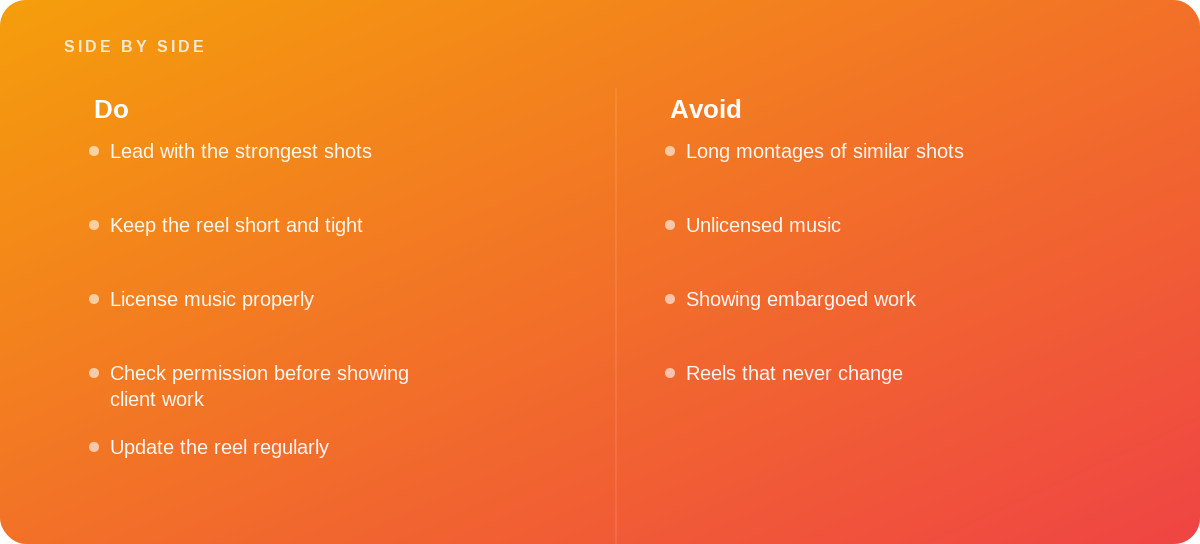
This is the phase most people skip, and it is the one that causes the worst problems. Being the person who animated a shot does not automatically mean you may publish it. Client work is commonly created under contracts that assign ownership to the client or treat the work as made for hire, and those contracts may also include confidentiality clauses. Unreleased work may be under embargo until a launch date, and some work, such as internal training content, pitch material that never ran, or white-label work delivered through an agency, may never be cleared for public display at all.
Copyright ownership questions are ultimately contractual and legal ones, and if you are unsure you should read your agreements and ask the client. For background on the general principles, including who owns a work and how works made for hire are treated, the U.S. Copyright Office's frequently asked questions are a plain-language starting point. They are not a substitute for reading your own contracts, which is where portfolio rights are usually granted or withheld.
Actions
- Build an inventory spreadsheet with one row per project: client, agency (if any), date delivered, public launch date, your role, contract terms on portfolio use, and a status column.
- Pull the contract or statement of work for each candidate and search for words like "portfolio," "confidential," "publicity," "embargo" and "ownership."
- Where the contract is silent or unclear, email the client or the agency producer and ask specifically: "May I include a short excerpt of this work in my public showreel, with a credit to your company?" Keep the written answer.
- Record any conditions attached to the permission, such as "after launch," "no client logo," "password-protected only," or "credit the agency, not the end client."
- Check third-party elements inside the work. Stock footage, licensed fonts, music beds and celebrity likenesses may have been licensed for the original campaign but not for your reel.
- Every project on the shortlist has a status of cleared, cleared with conditions, or excluded.
- Written permission exists for any work where the contract is silent about portfolio use.
- No shot comes from a campaign that has not publicly launched.
- Conditions such as logo removal or private hosting are written next to the project.
- Stock, fonts and third-party footage inside each shot have been checked for portfolio use.
- Your credit line for each project accurately describes your role.
Pay particular attention to stock elements. A shot that leans on a licensed stock background or a template may be fine to show, but a reel is a showcase of your craft, and a viewer who recognizes a popular stock asset will discount the shot. Our guide to using stock motion assets covers license scope in more detail; the short version for reels is to prefer shots where the visible work is clearly yours.
Outputs and checks
The output is the cleared inventory. The check is to read down the status column and confirm that nothing marked "pending" will be cut into the reel. Pending items can be prepared as optional shots and dropped in later if permission arrives, but the reel must stand up without them.
Phase 3: Choose and License Music That Fits a Short Edit
Goal: a licensed music track, with a license that covers the uses and platforms you plan, and a trimmed edit of that track at your target length.
Reels need licensed music. Using a commercially released song you like without a license is one of the most common mistakes, and the consequences are practical as well as legal: video platforms routinely detect copyrighted recordings, which can lead to muted audio, blocked playback in some regions, claims on the video, or takedowns. Even if nothing happens on day one, a reel you cannot send to a prospective client without worrying about it is a liability.
Where licensed music comes from
- Production music libraries and subscription services. Most offer licenses that cover online portfolio and promotional use. Read the terms for coverage of paid advertising if you plan to run the reel as an ad, and check whether the license continues after a subscription ends for videos already published.
- Single-track licenses. Buying a license for one track is often the cleanest option for a reel you plan to keep for a year or more.
- Commissioned music. Working with a composer gives you a unique track built to your edit. Agree in writing who owns the music and what you may do with it.
- Original sound design. Some reels use designed sound instead of, or on top of, music. This can be very effective for motion work because it demonstrates timing and sync. The thinking in sound design for motion graphics applies directly.
What to listen for
For a reel, the structure of the track matters more than its genre. You want a clear start that establishes energy quickly (a long ambient intro wastes the seconds that matter most), a steady and readable pulse you can cut to, one or two distinct shifts in intensity you can use to change sections, and an ending you can land cleanly. Tracks with an obvious lyric rarely work, because vocals compete with the visuals for attention.
Shortcut: choose the track before the final shot order, but after your shortlist. Knowing the tempo lets you calculate how many cuts fit. At 120 beats per minute, one beat lasts half a second and a four-beat bar lasts two seconds, so a 90-second reel spans roughly 45 bars. If most shots last one or two bars, you are looking at 25 to 45 shots, which tells you how hard to cut the shortlist.
Outputs and checks
You should have the licensed track, a saved copy of the license or receipt, and a note of what it covers. Check the license against every place the reel will appear: your website, a video host, social platforms, email attachments to prospects, and any paid promotion. If a platform or use is not covered, either pick a different track or leave that channel out.
Phase 4: Select and Order Shots with the Strongest Work First
Goal: an ordered selects list, strongest shots at the top, with duplicates and weaker variations removed.
The strongest work belongs first. That is the most important structural rule in building a motion reel, and it runs against the instinct to build to a climax. A film trailer can hold back its biggest moment because the audience has chosen to watch; a reel viewer has not committed to anything. If your first ten seconds are logo reveals and your best character animation arrives at the one-minute mark, many viewers will never see it.
Actions
- From your cleared inventory, pull every candidate moment into a bin, not whole projects. You are selecting shots of two to six seconds, not sequences.
- Rate each shot on three questions: Is it among the best things I have made? Does it prove a capability my audience cares about? Does it read instantly, without context?
- Group shots by visual similarity. If you have five similar kinetic type moments, keep the best one or two. Long montages of similar shots are one of the most reliable ways to lose a viewer.
- Choose your opening three shots. They should be your strongest, most distinct and most on-brief work, and ideally they should show different skills.
- Arrange the rest in rough sections that alternate technique, color and energy, so the reel has contrast rather than a flat list.
Judging what reads in seconds
Shots that depended on narrative context in the original project often fall flat when isolated. A slow, beautiful reveal that took eight seconds to set up may not work in a reel; the payoff frame alone might. Look for moments with a clear change within two or three seconds: a transformation, a strong camera move, a satisfying match, a character acting beat. Text-heavy shots need special care, because a viewer cannot read a paragraph in a two-second cut. The principles in text legibility in motion apply here: if the type is part of the point of the shot, hold it long enough to read, or choose a frame where the typography is the design, not the message.
Technique variety helps, but only in service of your positioning line. If your pitch is 3D, the reel should be mostly 3D; a single strong 2D shot can show range, but a reel that splits evenly across five disciplines reads as unfocused. Designers who work across disciplines often benefit from the specialist cuts discussed in phase one. For 3D-leaning reels, the craft decisions described in this practical guide to 3D in motion graphics are exactly what a discerning viewer will be looking for in your shots.
Outputs and checks
The output is an ordered selects list, usually with more shots than you will use. Check it by reading only the first five entries: if someone saw only those, would they understand what you do and want to see more? If not, reorder before you cut.
Phase 5: Cut the Edit to Under Two Minutes
Goal: a locked edit under two minutes, cut to the music, with a strong open, varied pacing and a clean end.
Reels are typically under two minutes, and many strong reels land well below that. The right length is the length your best work can sustain. A designer with two years of experience may have 45 seconds of truly strong material; padding that to two minutes with weaker shots makes the whole reel look weaker. A studio with a decade of work can often sustain 90 seconds to two minutes, but still benefits from cutting hard.
Building the edit
- Lay the music first. Place markers on the downbeats and on the section changes you identified in phase three. Cut the track to length before cutting pictures to it, so you are not chasing a moving target.
- Place the opening shots. The first three shots should arrive within the first few seconds. Avoid a long title card at the top; if you use one, keep it to a second or two, or overlay your name on the first shot.
- Cut on action and on the beat, but not on every beat. Cutting relentlessly on every beat becomes monotonous. Use bar lines for most cuts and occasional off-beat cuts or held shots for contrast.
- Use the music's shifts. A change in intensity is a natural place to switch technique or color palette, which gives the reel a sense of sections without needing section titles.
- Trim every shot to its best frames. Each shot should start as late and end as early as it can while still reading.
- End cleanly. Land the last strong shot on the track's ending, then cut to your end card.
Worked example: a 90-second freelance reel
The following is an illustrative example, not a real project. Imagine a freelance motion designer positioning themselves for "explainer and brand motion for technology companies." After the permissions audit, they have 14 cleared projects and pull 62 candidate shots. They license a track at 120 beats per minute, so one bar lasts two seconds. They target 90 seconds, which at 24 frames per second is 2,160 frames, or 45 bars.
| Section | Timecode | Bars | Shots | Average shot length | Purpose |
|---|---|---|---|---|---|
| Open | 0:00 to 0:12 | 6 | 5 | About 2.4 seconds | Strongest brand and character work, name overlaid on first shot |
| Section A: brand motion | 0:12 to 0:40 | 14 | 11 | About 2.5 seconds | Logo systems, kinetic type, brand toolkits |
| Section B: product and UI | 0:40 to 1:06 | 13 | 9 | About 2.9 seconds | Interface animation and product explainers, slightly longer holds |
| Section C: 3D and texture | 1:06 to 1:24 | 9 | 7 | About 2.6 seconds | Range shots, lit 3D and compositing |
| Close and end card | 1:24 to 1:30 | 3 | 2 | About 3 seconds | One final strong shot, then name, specialty and contact |
| Total | 1:30 | 45 | 34 | About 2.6 seconds | 28 of 62 candidate shots cut |
A few things are worth noticing. Only 34 of 62 candidates made it in, which is typical of a disciplined selection; the other 28 were duplicates, weaker variations, or shots that did not read out of context. The product and UI section uses slightly longer holds because interface animation needs a moment to be understood. And the end card gets its own few seconds, because a viewer who reaches the end is interested and needs to know exactly how to get in touch.
If the designer found, after a first pass, that Section C felt weaker than the rest, the right move would be to cut it to three or four shots and bring the reel down to around 75 seconds, not to keep it at 90 for the sake of a round number.
Outputs and checks
You should have a locked edit and a list of every shot with its source project, so you can match each one against the permissions inventory. Check the edit three ways: watch it at full speed on a laptop without pausing; watch only the first fifteen seconds and ask whether that alone would make you continue; and have someone unfamiliar with the work tell you what you do based on the reel alone. If their answer does not match your positioning line, adjust the selection, not just the pacing.
Phase 6: Titles, Credits and Breakdowns That Build Trust
Goal: a branded open and close, accurate role credits, and supporting breakdown material ready for viewers who want more detail.
Titles are where many reels lose time. An animated logo sting that runs five seconds before the first shot costs you the most valuable five seconds of the reel. The better pattern is a very short open, often your name and specialty overlaid on the first shot, and a clear end card with your name, what you do, your website and an email address. Keep the end card on screen long enough to read and screenshot, usually a few seconds.
Crediting your role honestly
Motion work is often collaborative. If you animated a shot but someone else designed the frames, or you composited a shot someone else modeled and lit, say so. On the reel itself this can be a small lower-third or a credit list at the end; on your website it belongs in the project description. Overclaiming is a real risk in a small industry where art directors know who worked on what, and an honest credit such as "animation and compositing; design by the agency team" usually reads as more credible than a vague "created by."
Breakdowns and supporting material
A reel shows results; a breakdown shows process. Breakdowns are especially valuable for technical work such as compositing, tracking and simulation, where the viewer cannot tell from the final frame how much was done. A short before-and-after of a tracked shot, for example, demonstrates skill that a finished frame hides; the decisions behind motion tracking for graphics are the kind of thing a breakdown makes visible. Keep breakdowns as separate videos or project-page extras, not inside the main reel, so the reel stays short.
- The first shot arrives within the first second or two, not after a long logo sting.
- Your name and specialty appear early, overlaid or on a very short title.
- The end card shows name, specialty, website and email, and stays up long enough to read.
- Collaborative shots are credited accurately, on the reel or on the accompanying page.
- Client logos appear only where permission allows them.
- Breakdowns for technical shots exist as separate videos or project pages.
Outputs and checks
The output is the finished reel with titles and credits, plus any breakdown videos. Check that every credit is accurate by comparing it with the role column in your permissions inventory, and check that the type on the end card is legible at small sizes, since many people will first see the reel in an embedded player or on a phone.
A Realistic Schedule for Building a Motion Reel
How long a reel takes depends far more on the permissions phase and on how organized your archive is than on the edit itself. Waiting for clients to reply to permission requests can take longer than cutting the reel. The schedule below is a realistic plan for a freelancer or small studio working on the reel alongside client work, roughly two to three focused days of effort spread across about four weeks. It is a planning guide, not a guarantee; your archive, your clients' response times and your own standards will move it.
- Week 1, days 1 to 2 Write the audience and positioning statement, build the project inventory, and send all permission requests at once so replies arrive while you work on other phases.
- Week 1, days 3 to 5 Gather source files, re-render or re-export shots from project files where the delivered versions are compressed or watermarked, and pull candidate shots into bins.
- Week 2 Shortlist and license the music, rate and group candidate shots, remove duplicates, and draft the selects order with the strongest work first.
- Week 3 Cut the first full edit to music, review it at full speed, get feedback from one or two trusted viewers, and revise. Swap in any shots whose permission has now been confirmed.
- Week 4 Add titles, credits and end card, master and export, upload with the right privacy settings, prepare social and pitch variants, and update your website.
- Every 3 to 6 months after launch Review the reel against recent work, replace the weakest shots, and re-check any conditions attached to client permissions.
If you have an urgent pitch and cannot wait four weeks, a short specialist cut built only from work you already have clear permission to show is a better answer than rushing a full reel. Thirty to sixty seconds of the right work is enough for a specific pitch.
Phase 7: Export, Host and Share Without Losing Quality or Control
Goal: a high-quality master, uploaded versions on your chosen host with appropriate privacy settings, and channel-specific variants.
Your reel will be recompressed by every platform that hosts it, so start from the highest quality master you can. Export a high-bitrate master, typically a mezzanine codec such as ProRes, or a high-bitrate H.264 or H.265 file, at your project's native frame rate and at the highest resolution your source shots support. Mixing frame rates in the edit is common in reels because shots come from different projects; conform them thoughtfully rather than letting the software blend frames, which smears motion. The technical detail in rendering and output for motion covers codecs, color and bit depth for the master.
Audio levels
Balance the music and any sound design so the reel plays at a comfortable level alongside other online video. Many editors normalize online deliverables to an integrated loudness around the levels streaming platforms commonly target, and check that peaks do not clip. A reel that is much quieter or louder than whatever the viewer just watched makes a poor first impression before a single shot has registered.
Hosting and privacy
Where you host the reel affects both quality and control. A video host with good playback quality and privacy controls is the usual choice for the main reel, embedded on your website. Privacy settings matter when some shots were cleared only for private viewing, or when you prepare a pitch-specific cut you do not want indexed. The Vimeo Help Center's privacy settings overview explains options such as password protection and restricting who can view or embed a video, and similar controls exist on other professional hosts. Use them to create a public general reel and separately shared, password-protected pitch cuts.
Channel variants
- Website hero: a muted, looping excerpt of the strongest ten to twenty seconds often works better as a background than the full reel, with a clear button to play the full version with sound.
- Social: square or vertical crops need reframing, not just cropping; shots composed for 16:9 often lose their focal point. Pick shots that survive the crop, or rebuild them.
- Pitch decks: embed or link a short cut relevant to the pitch. If you present reels live, the considerations in motion graphics in presentations about playback reliability and file handling apply.
- Job applications: send a link, not a large attachment, and make sure it plays without a login.
- A high-quality master is archived with the project files, music license and permissions inventory.
- Mixed frame rates are conformed deliberately, with no blended or stuttering frames.
- Audio levels are balanced and peaks do not clip.
- The public reel contains only shots cleared for public display.
- Pitch-specific or conditionally cleared cuts are password-protected or privately shared.
- The reel plays on a phone, a laptop and an embedded player without login prompts.
Outputs and checks
The output is the master file, the hosted reel, and the variants. Check playback on at least three devices, check that the embed on your website loads quickly and shows a strong poster frame, and send the link to a colleague who has never visited your site to confirm it plays for someone who is not logged in.
Phase 8: Keep the Reel Current Instead of Letting It Go Stale
Goal: a maintenance routine that keeps the reel reflecting your best and most recent work.
Reels that never change are a quiet but real problem. A prospective client who watched your reel last year and sees the same cut today learns that either you have not done anything worth showing since, or you are not paying attention to how you present yourself. Neither impression helps. Styles and tools also date visibly, so shots that looked current a few years ago can start to look old.
A maintenance routine
- Keep a running "reel candidates" folder. Every time you finish a project, drop in the two or three strongest shots and note their permission status and any launch date.
- Review the reel every three to six months. Ask whether any new shot is stronger than the weakest shot currently in the reel. If so, swap it in.
- Re-check permissions on a schedule. Conditions such as "after launch" or "for twelve months" change over time, and client relationships sometimes end in ways that change what they are comfortable with.
- Do a full rebuild when your positioning changes, for example when you move from 2D explainers to real-time and interactive work. A refresh of an old structure will not express a new direction.
- Keep previous versions archived with their music licenses, so you can answer questions about what was shown and when.
Shortcut: build the reel project with a replaceable structure. Keep each section on its own nested sequence or precomp, lock the music edit, and treat shots as slots of fixed bar length. Swapping a stronger shot into a two-bar slot then takes minutes rather than a re-edit, which makes regular updates realistic instead of a dreaded annual job.
Emerging work areas often deserve early placement in updates. If you have started doing live or interactive work, for instance, a strong shot of real-time motion graphics built in a game engine can signal a new capability long before you have enough of it for a dedicated reel.
Outputs and checks
The output is a calendar reminder and a candidates folder. The check, at each review, is whether the reel still contains any shot you would not choose if you were building it today. If it does, that shot is the first to go.
When Building a Motion Reel Calls for Outside Help
Most individual designers can and should build their own reel; doing it yourself demonstrates editing judgment, and you know your work best. The point at which outside help pays off is when you are presenting work for pitches, particularly as a studio. A studio reel has to represent many people's work, balance different clients and disciplines, and often be tailored to a specific prospect under time pressure. It also has to be right on permissions across dozens of projects, which is a production-management task as much as a creative one.
Signs you should bring in help
- You are preparing a capabilities reel for a pitch where the outcome matters commercially, and you need an outside eye to make hard cuts to work the team is attached to.
- You need several tailored cuts for different sectors or regions, possibly with localized titles; the issues in localizing motion graphics apply to reel variants too.
- Your archive is disorganized, and the source files for strong shots need re-rendering or rebuilding before they can be used.
- You need custom sound design or a commissioned score to set the reel apart.
An editor or motion partner who does this regularly brings two things you cannot easily supply yourself: distance from the work, which makes selection easier, and a process for permissions and deliverables. If you are commissioning help, give them your positioning statement, your cleared inventory and your licensed music, or ask them to manage those steps explicitly as part of the job. Studios that need this kind of support can look at our animation and motion graphics services to see how a reel project can be scoped alongside other production work.
If you commission a studio reel, fix the length, the audience and the number of variants in the brief before work begins. Most overruns on reel projects come from scope that drifts once people start watching cuts, typically requests to add "just one more" project or to make a second version for a different audience.
Common Motion Reel Mistakes and How Each Phase Prevents Them
Almost every common reel problem maps to a skipped or rushed phase. Treating the phases as a checklist is therefore the most reliable way to avoid them, and it helps to know which phase to revisit when feedback points to a problem.
| Mistake | What the viewer experiences | Phase that prevents it | Fix |
|---|---|---|---|
| Best work saved for the end | Leaves before the strongest shots | Phase 4 | Move the three strongest, most distinct shots to the open |
| Long montage of similar shots | Boredom; assumes limited range | Phase 4 | Keep the best one or two from each visual group |
| Reel over two minutes padded with weaker work | Judges you by the weakest shots | Phase 5 | Cut to the length your strongest material can sustain |
| Unlicensed music | Muted, blocked or removed video | Phase 3 | License a track for portfolio and promotional use |
| Embargoed or unapproved client work | Damaged client relationship, takedown requests | Phase 2 | Confirm permission and launch date before cutting |
| Long logo sting at the start | Wasted seconds before any work appears | Phase 6 | Overlay name on the first shot; keep titles to a second or two |
| Reel unchanged for years | Assumes you are inactive or dated | Phase 8 | Review every three to six months and replace the weakest shots |
One more subtle mistake is building the reel around what you enjoyed making rather than what the audience wants to buy. Personal projects can and should appear in a reel, especially early in a career, but they earn a place for the same reasons client work does: they are among your best work and they prove a capability your audience values. Particle-heavy experiments are a good example: they can look spectacular, but, as the trade-offs behind particle effects in motion design show, clients usually care about whether an effect serves a message, so one strong particle shot carries more weight than five.
Finally, remember that a reel is a door, not the whole house. It exists to make the right viewer curious enough to look at your project pages, read your credits, or send an email. Keep it short, strong at the start, legally clean and current, and let the rest of your portfolio carry the detail.
Where this comes from
- U.S. Copyright Office — Frequently asked questions
- Vimeo Help Center — Privacy settings overview
The figures and practices above come from the sources listed.
Working on something like this?
We take on Motion Graphics & Animation work for teams who want it done once, properly. Tell us what you are building and we will tell you honestly whether we are the right studio for it. Start a project.
Where to go next
Spotted something wrong? Report an error on this page. We correct on the page and say what changed.