A Practical Guide to Parenting and Null Objects
Learn what to ask for when commissioning rigged animation, what drives rigging cost, how to compare quotes and how to inspect parenting and null objects.
 MediaScaleUp Editorial Team

Parenting and null objects are the plumbing of motion graphics. Parenting links one layer to another so the child follows the parent's position, rotation and scale; a null object is an invisible layer that exists only to be a parent, a controller that animators move, rotate and scale instead of touching a dozen layers individually. Together they turn a pile of loose artwork into a hierarchy, or rig, that behaves predictably: a character's hand follows the forearm, the forearm follows the upper arm, and one null moves the whole figure across the frame.
If you commission animation, you will rarely see these structures, yet they decide a surprising amount of what you pay and what you get. A well-built hierarchy makes revisions quick, keeps motion consistent across a series and lets another studio or your in-house team pick up the file next year. A careless one produces drifting limbs, jittery logos and change requests that take a day instead of an hour. This handbook is written for the person paying for the work: marketers, producers, founders and in-house creative leads who need to know what to ask for, what drives the cost of rigging, how to compare suppliers and how to inspect what gets delivered.
You do not need to animate to use it. Where the detail gets technical, the point is to give you the right questions and the vocabulary to understand the answers, so you can tell a studio that treats parenting and null objects as core craft from one that treats them as an afterthought.
What Parenting and Null Objects Do Inside an Animation File
In After Effects, which is where most commercial 2D motion graphics are built, every layer has a Parent column. Point a layer at another layer, and the child inherits the parent's transforms. Move the parent 200 pixels to the right and the child moves 200 pixels with it. Rotate the parent 30 degrees and the child swings around the parent's anchor point. Scale the parent to 50 percent and the child shrinks with it, staying in the same relative position. Opacity is the notable exception: in After Effects, children do not inherit a parent's opacity, which is one reason animators handle fades with precomps or expressions instead.
A child can still be animated on its own. Its own position, rotation and scale values are now measured relative to the parent rather than to the composition. That is the whole point: the parent handles the big move, the child handles the local detail. A hand can wave while the arm swings while the body walks, and each motion is authored once, on one layer, rather than calculated by hand on every frame.
A null object is simply a layer that does not render. Adobe's documentation on null object layers describes them as invisible layers that carry transform properties and can serve as parents, which is exactly how professionals use them: as handles. You will find the same idea under other names in other tools. Cinema 4D calls them Null objects, Blender calls them Empties, and most game engines use empty transforms or pivots. The concept transfers across all of them, so the buying advice here applies whether your project is 2D, 3D or a mix.
Why anchor points matter as much as the hierarchy
Every layer rotates and scales around its anchor point. If an arm's anchor point sits at the center of the artwork rather than at the shoulder, rotating it makes the arm spin like a propeller instead of swinging from the joint. When that arm is also a parent to a forearm and hand, the error compounds down the chain. Setting anchor points before parenting is one of the first habits you should expect from any supplier, and it depends heavily on how the artwork was prepared. Our guide to preparing artwork for animation covers the layer separation and pivot planning that make this step painless.
Rigs, controllers and hierarchies
A rig is a hierarchy of parented layers designed to be animated efficiently. A simple rig might be a logo lockup with one null controlling the whole mark and two child nulls controlling the icon and wordmark separately. A complex rig might be a full character with inverse kinematics on the limbs, sliders for facial expressions and a master null that places the character in the scene. Controllers are the layers the animator actually keys, usually nulls, often with expression controls such as sliders, checkboxes and angle controls attached so that one number can drive several properties at once.
- Parent
- A layer whose position, rotation and scale are passed down to the layers linked to it.
- Child
- A layer linked to a parent; its own transforms are measured relative to that parent.
- Null object
- An invisible, non-rendering layer used as a controller or grouping handle.
- Anchor point
- The pivot around which a layer rotates and scales; its placement decides whether joints bend naturally.
- Rig
- A deliberate hierarchy of parented layers and controllers built so artwork can be animated quickly and consistently.
- Controller
- The layer, usually a null, that the animator keys; it may carry sliders or other expression controls.
Why Rig Structure Should Matter to the Person Paying
Buyers tend to judge animation by the render: does it look good, does it move well, does it match the brand. That is right, but it misses where much of the lifetime cost of an animation sits. The render is a snapshot. The project file is the asset that will be revised, localized, cut down for social formats and reused in next quarter's campaign. The structure inside that file, and parenting is the backbone of that structure, decides how expensive all of those later jobs will be.
Consider three common situations. First, revisions. A stakeholder asks for the product shot to enter from the left instead of the right. If every element of the product shot is parented to one clearly named null, that is a change to a couple of keyframes. If the elements were animated individually, the animator has to re-key each layer and re-check that their timing still lines up. Second, versioning. A 16:9 hero video needs a 9:16 cut and a 1:1 cut. With clean controllers, repositioning each scene for a new frame is a matter of moving parent nulls; without them, it is a rebuild. Third, handover. If your in-house team or a different studio inherits the file, a shallow, well-named hierarchy can be understood in minutes. A deep, unnamed one can take longer to decode than to rebuild.
Consistency is the other payoff. When several animators work on a series, a shared rig guarantees that the character's walk, the logo's settle and the lower-third's entrance behave the same way in episode twelve as in episode one. That is the practical foundation of motion systems and guidelines, and it is why good studios treat rigs as reusable products rather than one-off scaffolding.
What to Ask For in the Brief and Statement of Work
Most animation briefs describe the output: length, aspect ratios, style references, voiceover, deadline. Few say anything about how the file should be built, so suppliers default to whatever is fastest for them. If you expect to revise, extend or reuse the work, put the structural expectations in writing. They add little cost when stated up front and a lot when requested after delivery.
Deliverables that should be named explicitly
- Source files, not just renders. Specify the application and version (for example, the After Effects version your team runs), and that the project should be collected with all assets and fonts listed.
- Controller conventions. Ask that grouped elements, characters and repeated components be driven by named null controllers, and that controller names describe what they move, such as CTRL_Logo_Master or CTRL_Arm_L, rather than the default Null 1, Null 2.
- Hierarchy depth. Ask for hierarchies to be kept shallow and logical. A reasonable default for most commercial work is that no chain should go deeper than it anatomically or logically needs to; a character arm naturally runs shoulder to upper arm to forearm to hand, but a text block should not sit under five nested nulls.
- Rig documentation. For any character or reusable template, request a short readme or an annotated guide layer explaining which controllers exist, what each slider does and any expressions or scripts the rig depends on.
- Third-party dependencies. If the supplier uses rigging tools such as Duik, RubberHose or Joysticks 'n Sliders, the file may need those tools installed to be edited properly. Ask them to disclose every plugin and script up front.
Match the rig to the reuse you actually expect
Not every project needs a sophisticated rig. A single 20-second social loop that will never be touched again can be animated with minimal structure, and paying for a full rig there wastes money. A mascot that will appear in forty videos over two years is the opposite: rig quality is the single biggest lever on the per-video cost of the whole series. Tell suppliers honestly which situation you are in. If you are commissioning a character, the specifics of 2D character rigging are worth reading before you write the brief, because they help you describe the range of motion you need.
What Drives the Cost of Rigging with Parenting and Null Objects
There is no standard price for rigging, and any supplier who quotes a flat figure without asking about the artwork and the motion range is guessing. What you can do is understand the factors that push effort up or down, and ask each supplier how they have accounted for them.
Artwork readiness
The biggest hidden variable is the state of the source artwork. Illustrations delivered as flattened images, or as vector files where the arm and torso share one path, must be cut apart, redrawn at the overlaps and given correct pivot points before any parenting can happen. Artwork built for animation from the start, with each moving part on its own layer, sensibly named and with overlaps painted in, can go straight into rigging. The difference can easily be a day or more on a single character.
Range of motion
A character that only needs to wave and nod needs a simpler hierarchy than one that walks, sits, turns three-quarters and holds objects. Each additional behavior means more controllers, more testing and often alternate artwork, such as hand poses or head turns, swapped in by the rig. Ask for the motion list in the quote.
Automation and expressions
Simple parenting is fast. Rigs that add inverse kinematics, automatic secondary motion, slider-driven expressions or switchable poses take longer to build and much longer to test. They pay for themselves only if the rig will be animated a lot. For a single short piece, a supplier who proposes a heavily automated rig may be building for their portfolio rather than for your budget.
Reusability and handover requirements
A rig built for the original animator's private use can be rough around the edges. A rig built for other people to use, whether your team, a template in Essential Graphics or a series with several animators, needs locked layers, clear naming, documentation and protection against common misuse. That polish is real work and belongs in the quote as its own line.
Integration with the rest of the project
Parenting interacts with everything else in the file: precomps, 3D layers, masks and mattes, and layer effects. A rig that has to live inside a 2.5D camera move or be combined with track mattes needs more planning than one sitting on a flat background. Decisions about precomposing and project structure made early on can either simplify or complicate the rig considerably.
Red flag: a quote with a single line for "animation" and no mention of rigging, artwork prep or source files.
- It usually means structure has not been considered, and revisions will be priced as surprises later.
- Ask for rigging and artwork preparation to be broken out as separate lines, even as estimated hours.
Worked Example: Budgeting Hours for an Illustrative Explainer Rig
The following example is illustrative, not a real client project, and the hours are realistic planning ranges rather than industry benchmarks. It shows how structure changes where the effort goes across a small series.
Imagine a software company commissioning three 60-second explainers featuring the same flat-style mascot, plus a logo animation used at the end of each. The brand team expects to produce more episodes later in the year. The artwork exists as an illustrator's presentation file: the mascot is drawn in four poses, but limbs are merged into the body in each pose.
Two approaches are on the table. In approach A, the studio animates each episode directly, with light parenting where it is obviously useful and no reusable rig. In approach B, the studio spends time up front separating the artwork, setting anchor points, building a shallow rig with named null controllers and a small set of sliders for expressions, and documenting it.
| Task | Approach A: no reusable rig (hours) | Approach B: shallow documented rig (hours) |
|---|---|---|
| Artwork separation and pivot planning | 4 to 6 per episode | 10 to 14, once |
| Rig build and testing with extreme poses | 0 | 12 to 18, once |
| Rig documentation and naming pass | 0 | 2 to 4, once |
| Character animation per 60-second episode | 22 to 30 | 14 to 20 |
| Typical revision round per episode | 4 to 8 | 2 to 4 |
| Total for three episodes | 90 to 132 | 72 to 108 |
| Each additional episode later | 30 to 44 | 16 to 24 |
Read the numbers the way a producer would. For three episodes, the two approaches overlap: the rig roughly pays for itself, with a modest saving at the midpoint of the ranges. The real difference shows up in the last row. Every additional episode under approach B costs roughly half as much animation time, and revision rounds are shorter because changes happen at the controller level instead of across many individual layers. If the brand goes on to make six more episodes, the gap becomes large.
The example also shows why the answer is not always "build a rig." If the company only ever makes one explainer, approach A is cheaper. The right question for a buyer is not whether a supplier rigs, but whether their proposal matches the amount of reuse you have told them to expect. To turn these hours into money, multiply by each supplier's day or hourly rate; rates vary widely by market, seniority and studio overhead, so compare hours and scope first and rates second.
Questions to Ask a Supplier Before You Sign
You are not trying to audit an animator's technique. You are trying to find out whether they think about structure at all, whether that thinking matches your plans for the work, and whether you will be able to use the files after they hand them over. The questions below are designed so that a competent supplier can answer them quickly and a weak one will struggle.
- How will you structure the file so that repositioning a scene or element takes minutes rather than a re-animation? Walk me through the controllers you expect to use.
- Will controllers be named null objects, and what naming convention do you follow?
- How deep do your hierarchies typically go, and how do you decide when a chain is too deep?
- When do you set anchor points relative to parenting, and who fixes artwork that was not drawn with pivots in mind?
- How do you test a rig before animating with it? Do you push it through extreme poses and fast moves?
- Which plugins, scripts or rigging tools will the project depend on, and will our team need them to edit it?
- What documentation will you provide for any character rig or reusable template?
- Can you show a project file, or a screen recording of one, from a past job with similar complexity?
- How are revisions priced, and does a revision that only moves a controller count the same as one that changes artwork?
- Who owns the rig when the project ends, and can we give it to another supplier?
Two of these deserve extra weight. The request to see a project file, even a redacted or recorded walkthrough, cuts through portfolio polish better than anything else; a reel shows the finished motion, but a file shows the discipline behind it. The ownership question matters because some studios treat rigs as proprietary tools and license only the renders. That can be a fair commercial position, but you should know about it before you sign, not when you ask a new supplier to produce episode four.
Comparing Motion Quotes Side by Side
Animation quotes are notoriously hard to compare because each studio bundles work differently. One lists "design, animation, sound"; another lists fifteen lines of hours. Normalize them by scoring each against the same criteria. The scorecard below is a template; adjust the weighting to your project, giving reusability more weight for a series and less for a one-off.
| Criterion | What a strong quote shows | What a weak quote shows | Suggested weight |
|---|---|---|---|
| Artwork preparation | Separate line for layer separation and pivot setup, with assumptions about the supplied files | Not mentioned, or assumed free | High if artwork is not animation-ready |
| Rig scope | Motion list, controller plan and testing time stated | "Character animation" as one lump | High for characters and series |
| Source file delivery | Collected project, named software version, plugin list | Renders only, or source files at extra unstated cost | High if you plan to reuse |
| Documentation | Readme or guide layer for rigs and templates | None offered | Medium to high for reusable work |
| Revision terms | Number of rounds and what counts as a change versus new scope | "Unlimited revisions" or no terms at all | Medium |
| Evidence of structure | Willing to show a past file or walkthrough | Reel only | Medium |
| Ownership of rigs | Clear statement of who owns and can reuse the rig | Silent or ambiguous | High for recurring characters |
Score each quote from 1 to 5 on every criterion, multiply by weight and total. Then, and only then, look at the price. A quote that is 20 percent more expensive but scores well on source files, documentation and ownership is frequently the cheaper option across the life of a series. If the numbers come out close, the tie-breaker is the project file walkthrough: whichever supplier's file you would rather inherit is usually the better choice.
Reading "unlimited revisions" correctly
A promise of unlimited revisions sounds generous but often signals a supplier who has not thought about scope, or who will absorb the cost by cutting corners elsewhere, including structure. Studios that rig properly tend to define revisions precisely because a good hierarchy makes some changes trivial and others, such as redrawing artwork, expensive. Precision here is a sign of competence rather than stinginess.
Red Flags in Proposals and Delivered Files
Most structural problems are invisible in the render until someone asks for a change. The warning signs below show up either in how a supplier talks about the work or, after delivery, in the file itself. None is automatically disqualifying, but each is worth a direct question.
In the proposal and conversation
- Vague answers about structure. If a supplier cannot describe how they would organize controllers for your project, they probably will not organize them.
- Every job gets the same heavy rig. Over-engineering is as much a problem as under-engineering. A logo sting does not need inverse kinematics.
- Refusal to share any file. Confidentiality is legitimate, but a studio that cannot show even a screen recording of a stripped-down project may not want you to see how it works.
- Undisclosed plugins. Finding out at handover that the file needs paid tools your team does not own is avoidable.
In the delivered project
- Unnamed nulls. A timeline full of Null 1 through Null 27 means nobody, including the original animator six months from now, can tell what controls what.
- Deep chains. Hierarchies eight or ten levels deep for things that are not anatomically chained are hard to debug; a small change at the top can ripple unpredictably to the bottom.
- Drift. Elements that slowly slide out of alignment during rotation or scaling usually point to wrong anchor points or to non-uniform scale on a parent.
- Double animation. Keyframes on both a parent and a child for the same move, often by accident, produce motion that looks fine at one moment and wrong the next, and every revision risks breaking it further.
Red flag: a parent layer that has been scaled non-uniformly, for example 100 percent wide by 80 percent tall.
- Rotated children under a non-uniformly scaled parent can skew and distort, because the squash is applied in the parent's space.
- Ask the supplier to keep controllers at uniform scale and handle squash-and-stretch on the artwork layers themselves or on a dedicated control.
How to Judge the Delivered Rig: A Handover Inspection
You can check a delivered project yourself in under an hour, even without animation experience, provided you have the software installed. If you do not, ask the supplier to run these checks on a screen share. The goal is not to grade their artistry but to confirm the file is usable by someone other than its author.
- Open and collect. Open the project on a clean machine or ask your team to. Note any missing fonts, footage or plugin warnings; these should all have been declared in advance.
- Read the controller names. Scan the layer panel of the main composition. Controllers should be easy to find, clearly named and ideally color-labeled consistently. If you cannot tell which null moves the logo, neither will the next animator.
- Trace one hierarchy. Pick a key element and follow its Parent column upward. Count the levels. For most non-character elements, two or three levels is typical; for character limbs, the chain should follow the anatomy and no further.
- Move a master controller. Duplicate the composition so you do not damage the original, then move and rotate the master null for a scene. Everything that belongs to it should move together, with nothing left behind or drifting.
- Stress the rig. On a character, push limbs to extreme angles and scrub quickly through the timeline. Joints should stay attached, overlapping artwork should hide the seams, and nothing should flip or pop.
- Check the documentation. Read the readme or guide layer. Could a competent animator who has never seen the project use the rig from it? If not, request an update before sign-off.
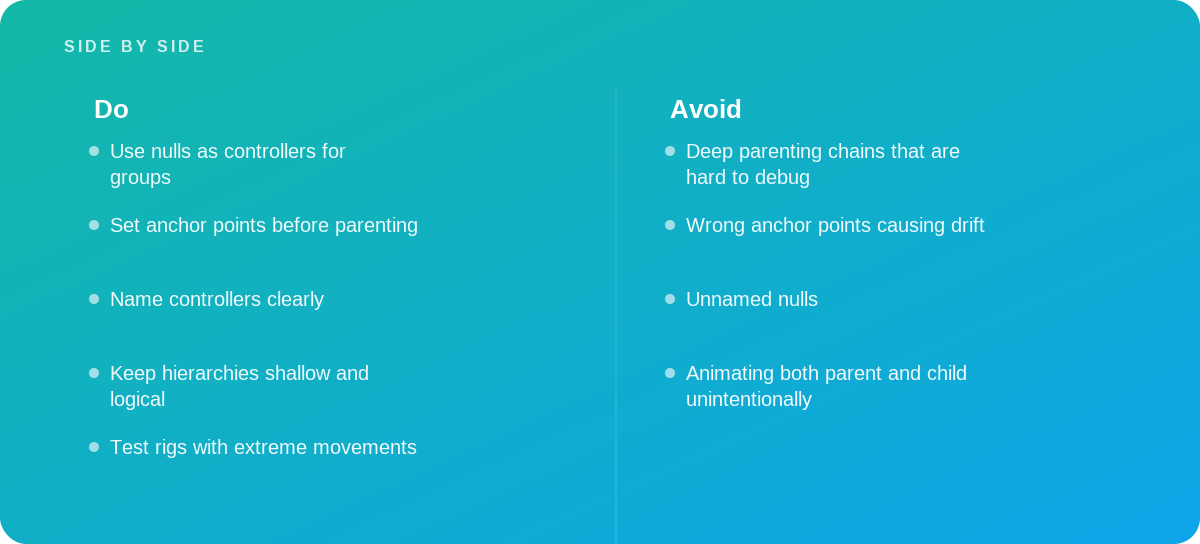
These checks map directly onto the good practice experienced riggers follow: nulls as controllers for groups, anchor points set before parenting, clear naming, shallow and logical hierarchies and rigs tested with extreme movements. If a delivered file passes all six steps, you have a durable asset. If it fails two or more, it is reasonable to ask for fixes before final payment, provided your statement of work asked for those standards in the first place, which is why the brief matters.
Judging the motion itself
Structure is necessary but not sufficient. A perfectly organized rig can still produce stiff, lifeless animation. When reviewing renders, look for overlapping action, where a hand settles slightly after the arm stops, and for arcs, where rotating limbs trace natural curves rather than straight lines. Both are made easier by good parenting, and both are core ideas in the principles of animation. A rig that makes these easy to achieve is doing its job.
Common Scenarios and What Good Structure Looks Like
It helps to know what a sensible hierarchy looks like for the kinds of projects buyers commission most often. These are descriptions of typical good practice, not rules; a skilled animator may reasonably choose differently and should be able to explain why.
Logo animations and brand stings
Expect a master null for the entire lockup, with separate child controllers for the symbol and wordmark if they animate independently. Individual letters or shape groups may be parented to those. The whole thing should be repositionable and scalable from the master, which is essential when the same sting has to sit in different corners of different formats. Much of this work is built with shape layers, and our guide to shape layers explains how their internal groups interact with layer-level parenting.
Explainer scenes and UI walkthroughs
Each scene typically has a scene controller, with sub-controllers for clusters of related elements such as a phone mockup and the interface inside it. Screens inside a device should be parented to the device so a camera-like move of the phone carries the screen along. Product and instructional pieces lean heavily on this, as covered in our guide to instructions-for-use animation, where a device may be rotated repeatedly to show different steps.
Characters
A master placement null at the root, a body or hip controller beneath it, then limb chains following anatomy, plus controllers for head, eyes and mouth. Expressions or sliders often switch mouth shapes or hand poses. This is where parenting and null objects meet full rigging, and where specialist skills pay off most.
Isometric and 2.5D scenes
In isometric illustrations, nulls often hold groups of objects aligned to the isometric grid, so moving a building moves its windows and signage together along the correct axes. In 2.5D parallax, nulls may be 3D layers acting as parents for layered artwork at different depths, driven by a camera. Parenting 3D and 2D layers together requires care, and suppliers experienced in isometric animation or parallax work will have settled conventions for it.
One inexpensive request covers all of these scenarios: ask for a short screen recording at handover in which the animator moves each master controller and explains the hierarchy. It takes them a few minutes, becomes a permanent training asset for your team or any future supplier, and should be filed alongside the collected project so the two never get separated.
When to Bring in a Specialist Rigger
Most motion designers can parent layers and set up nulls competently. Far fewer are strong riggers. The distinction matters most in two situations: building character rigs and building reusable animation systems. In both, the rig is effectively software that other people will use, and it needs the same qualities as good software: predictable behavior, clear interfaces, documentation and resilience against misuse.
Signs you need a specialist
- The character will appear across many pieces or be animated by several people.
- You want a template your in-house team can edit through Essential Graphics or a controlled set of sliders.
- The motion range includes walking, turning or complex hand interaction.
- You are combining 2D rigs with 3D camera moves or with procedural elements such as cloners and effectors.
How to structure that engagement
A common and sensible model is to split rigging and animation into separate phases, sometimes with separate people. The rigger delivers a tested, documented rig; animators then use it across the series. This makes cost visible, lets you approve the rig with test animations before committing to the full series and protects you if the animation supplier changes later. When you engage a studio for animation and motion graphics production, asking for the rig to be delivered and approved as its own milestone is a reasonable request.
When a generalist is the right call
For one-off pieces, logo work, simple infographics and most explainer scenes without characters, a capable generalist motion designer will set up appropriate parenting as a matter of course. Paying specialist rates here brings little benefit. The checks earlier in this guide will tell you whether their structure is sound.
Red flag: a supplier who proposes to build a complex reusable character rig but has no rigs to show in their portfolio.
- Animating well with someone else's rig and building a robust rig are different skills.
- Ask specifically for examples of rigs they built, not just animations they made.
Where the Money Should Go
If you remember one thing from this handbook, make it that structure is cheapest when it is specified early. Asking for named null controllers, sensible anchor points, shallow hierarchies and documented rigs in the brief costs little. Asking for them after delivery often means paying for a partial rebuild.
Spend proportionally. For a single piece that will not be revisited, accept light structure and put the budget into design and motion quality. For anything that will be revised, versioned or turned into a series, pay explicitly for artwork preparation, rigging, testing and documentation, and make source files and rig ownership part of the contract. Use the checklist to screen suppliers, the scorecard to compare quotes and the handover inspection to judge what you receive.
Verdict Parenting and null objects are invisible in the final video, but they decide how fast and how cheaply that video can change. Brief for structure, compare quotes on rigging scope and source-file terms before price, bring in a specialist rigger for characters and reusable systems, and do not sign off until the file passes a basic handover inspection.
Where this comes from
- Adobe Help Center — Parent and child layers
- Adobe Help Center — Null object layers
The figures and practices above come from the sources listed.
Working on something like this?
We take on Motion Graphics & Animation work for teams who want it done once, properly. Tell us what you are building and we will tell you honestly whether we are the right studio for it. Start a project.
Where to go next
Spotted something wrong? Report an error on this page. We correct on the page and say what changed.