Adobe Character Animator: The Decisions That Matter
Learn how to commission Adobe Character Animator work: what to ask for, what drives cost, how to compare quotes, key red flags and how to judge results.
 MediaScaleUp Editorial Team

Adobe Character Animator is software that drives layered character puppets in real time. A performer sits in front of a webcam and a microphone, and the puppet on screen mirrors their head turns, eyebrow raises, blinks and speech, while keyboard triggers swap in poses, hand gestures and props. The result can be recorded and refined like any other animation, or streamed live. It sits somewhere between traditional keyframed character animation and puppetry, and that middle position is exactly why it is worth understanding before you commission work built on it.
This guide is written for the person paying for the work: a marketing lead who wants a recurring animated host for social video, a training manager who needs a friendly narrator for dozens of modules, a producer planning a live-streamed show with a cartoon co-presenter, or an in-house team deciding whether to build puppets themselves or hire a studio. Adobe Character Animator makes character animation fast enough for live shows and regular content, but it does so at the cost of some control. Knowing where that trade-off bites is the difference between a character that carries a series for two years and one that looks stiff by episode three.
The sections below cover what to ask for, what actually drives cost, how to compare supplier quotes line by line, the red flags that predict trouble, and how to judge the finished puppet and the footage it produces. There is an illustrative worked example with realistic hours, a scorecard for comparing quotes and a checklist of questions you can send to suppliers as-is.
What Adobe Character Animator Is Good At, and Where It Gives Up Control
Every buying decision starts with fit. Adobe Character Animator earns its place when the value of speed and repeatability outweighs the value of frame-by-frame authorship. The tool reads a performer's face through a webcam and their voice through a microphone, then maps that data onto a puppet built from layered artwork with named parts. Mouth shapes follow the audio, eyes and brows follow the face, and the head tilts and turns within limits set by the rig. Anything the camera cannot read, such as a specific hand gesture or a change of costume, is usually handled with keyboard triggers that switch artwork on and off.
That architecture has direct consequences for what you can buy:
- Talking-head and presenter formats are the sweet spot. A character who speaks to camera, reacts, gestures and occasionally changes expression is exactly what the tool was designed for. Minutes of usable footage can be produced in the time a keyframed approach would take to finish seconds.
- Live output is a genuine differentiator. Puppets can be streamed live, so a character can host a webinar, answer questions on a stream or appear at an event with a human performer behind the scenes. Few other character pipelines make that practical at a reasonable budget.
- Full-body action is the weak spot. Complex walks, fights, dance, object interaction and dramatic camera moves either need heavy keyframed cleanup or a different pipeline altogether. The tool has walk and physics behaviors, but they produce a recognizable, somewhat generic motion that suits some brands and not others.
- Style is shaped by the rig. Because motion comes from swapping and warping prepared artwork, the look tends toward flat, cut-out or illustrated styles. Painterly, heavily rendered or fully 3D looks are possible only within the limits of layered 2D artwork.
If your brief is dominated by expressive acting to camera, regular output or live appearances, the tool is a strong fit. If your brief is a single 60-second hero film with sweeping action and bespoke acting in every shot, you will usually get a better result from traditional keyframed work, and our practical guide to character animation explains how those pipelines differ in method and effort.
- Input Webcam tracks face movement; microphone drives lip sync
- Puppets Built from layered artwork with named parts
- Triggers Keyboard triggers switch poses, gestures and props
- Live output Puppets can be streamed live to an audience
- Best fit Recurring presenters, explainers, live shows
- Weak fit Full-body action and bespoke frame-by-frame acting
What to Ask For: Writing a Brief a Puppet Studio Can Price
Most quotes for Character Animator work are vague because most briefs are vague. A supplier cannot price "a fun animated mascot" with any confidence, so they either pad the number or quote low and recover through change requests. A good brief separates the one-off asset (the puppet) from the recurring service (the performances and edits) and describes both in enough detail to be priced.
Describe the character's job, not just its look
State where the character will appear, how often and for how long. A host who appears in a weekly two-minute social clip has very different needs from a narrator who appears in thirty training modules, and both differ again from a character who performs live for an hour. Include the aspect ratios you need (16:9, 9:16, 1:1), whether the character will be framed head-and-shoulders or full body, and whether it must interact with on-screen graphics, text or products.
List the expressions and gestures the scripts actually need
Read three representative scripts and list what the character does in them: points at something, shrugs, gives a thumbs up, holds a product, looks surprised, looks worried, laughs. That list becomes the trigger and pose inventory, which is one of the main cost drivers. Ask for a small number of well-drawn poses rather than a long list of mediocre ones. Ten gestures that the performer can hit reliably are worth more than forty that nobody remembers during a take.
Say whether the artwork exists
If you already have a mascot drawn for print or social, say so and supply the source files. Be aware that existing artwork is rarely ready to rig. Character Animator reads the layer structure of the source file, so a flattened logo-style mascot must be redrawn and separated into parts: head, eyes, pupils, brows, mouth shapes, arms, hands and so on. The earlier character design step matters, and our guide on designing characters for animation covers the design decisions that make a character easy or hard to move.
Define the deliverables precisely
Specify whether you are buying the rigged puppet file itself, rendered footage, or both. Specify resolution, frame rate, file format, whether you need transparent backgrounds for compositing, and whether edits in Premiere Pro or After Effects are included. If the character will appear live, specify the streaming setup it must plug into and who will perform it.
What Drives the Cost of Character Animator Work
Quotes vary widely, and the variation is usually explained by a handful of factors. Understanding them lets you trim scope intelligently instead of simply asking for a lower number. No single figure can be quoted as a market price, because rates vary by region, studio size and seniority, but the relative weight of each driver is consistent.
| Cost driver | What increases it | What keeps it down |
|---|---|---|
| Artwork preparation | New character design, many layers, detailed shading, multiple outfits | Existing design redrawn once in a clean, flat style |
| Head views | Three-quarter and profile views in addition to front view | A single front view with modest head turn |
| Mouth and expression set | Custom mouth shapes per emotion, multiple expression sets | One standard mouth set with a few emotion overrides |
| Body and hands | Articulated arms, many hand poses, full-body walk | Head-and-shoulders framing with a few arm gestures |
| Trigger inventory | Dozens of poses, props and swap sets | Ten to fifteen poses chosen from real scripts |
| Performance and cleanup | Long running times, precise acting, heavy keyframe polish | Short episodes, forgiving style, template edits |
| Live setup | Custom streaming pipeline, multiple rehearsals, on-site support | Standard streaming software, one rehearsal, remote support |
The puppet is a capital cost; performances are running costs
The largest single line on a first quote is usually the puppet: designing or redrawing the character, separating it into correctly named layers, rigging it and testing it. That cost is paid once. After that, each episode costs performance time, cleanup and editing. This is why the tool makes most financial sense for recurring content. A puppet that appears in fifty clips spreads its build cost thinly; a puppet that appears in one clip carries its full cost on that single piece.
Head turns and views multiply the artwork
A character who only faces the camera needs one set of head artwork. A character who must turn to a three-quarter view or profile needs a separate drawn view for each, with its own eyes, brows and mouth set, and the rig must switch between them. Each extra view can add a substantial fraction of the original artwork effort. Ask yourself whether your scripts truly need the character to turn away from camera. For most presenter formats they do not.
Cleanup is where quality and budget meet
Raw capture from a webcam is rarely broadcast-ready. Heads jitter, blinks fire at odd moments, lip sync picks the wrong mouth shape on plosives, and arms float. Good suppliers record the performance in passes and then clean up the captured data afterward, re-recording weak sections, smoothing curves and hand-fixing visemes. Quotes that exclude cleanup are cheaper on paper and more expensive in reputation. Timing polish borrows from traditional animation, and the principles in our article on easing and timing curves apply directly to how a cleaned-up take should feel.
The Build Decisions Inside a Well-Made Puppet
You do not need to rig a puppet yourself to commission one well, but you do need to know what separates a professional build from a fragile one. These are the decisions a good supplier will explain without being asked.
Layer structure and naming
Character Animator identifies parts of the puppet from the layer structure and layer names in the source Photoshop or Illustrator file. Correctly named layers let the software auto-assign facial features such as eyes, pupils, brows and mouth shapes, and the order and grouping of layers decides what moves independently and what moves together. When you receive the source files, open them and look: a professional build will have a clear hierarchy with consistently named groups, not a flat stack of "Layer 47 copy 3." If the artwork is built in Illustrator, Adobe's own Adobe Help Center documentation covers layer and sublayer management, which is the foundation the puppet structure depends on.
Rigging before recording
Rigging means placing the handles, tags, sticks and behaviors that tell each part how to move: where the neck pivots, which parts stay rigid, which parts bend, how far the head can tilt. The rig must be finished and tested before any performance is recorded, because changes to the rig later can alter how recorded takes play back. A supplier who proposes to "record first and rig as we go" is setting up rework. The same structural thinking applies to any 2D rig, and our practical guide to 2D character rigging goes deeper into pivots, hierarchies and deformation.
Mouth shapes and lip sync
Lip sync in Character Animator works by analyzing audio and choosing from a set of drawn mouth shapes, known as visemes, for sounds such as "Ah," "Ee," "Oh," "M" and "F." The automatic result is good enough for rough cuts and live shows, but the quality of the drawn mouths matters enormously. Ask how many mouth shapes the puppet has, whether there are variants for different emotions (a smiling "Ah" versus a worried "Ah"), and whether the supplier hand-corrects visemes in recorded work.
Fallback poses and a neutral state
Every puppet needs a neutral rest pose and sensible fallbacks: what the character looks like when the tracking loses the performer's face, when no trigger is active, or when a trigger is released mid-sentence. Puppets with no fallback poses can snap into awkward positions or freeze when something goes wrong, which is survivable in recorded work and embarrassing live. Ask to see the puppet with the camera covered. It should settle into a composed idle state, ideally with subtle breathing and blinking, rather than locking in whatever expression it last held.
Reusability and variants
If you expect seasonal outfits, regional versions or a supporting cast, the first puppet should be built so it can be extended. Swap sets for clothing, a shared mouth library across characters and a consistent naming scheme all make later variants cheaper. Our piece on reusing rigs and templates explains how to decide what to standardize and what to leave bespoke.
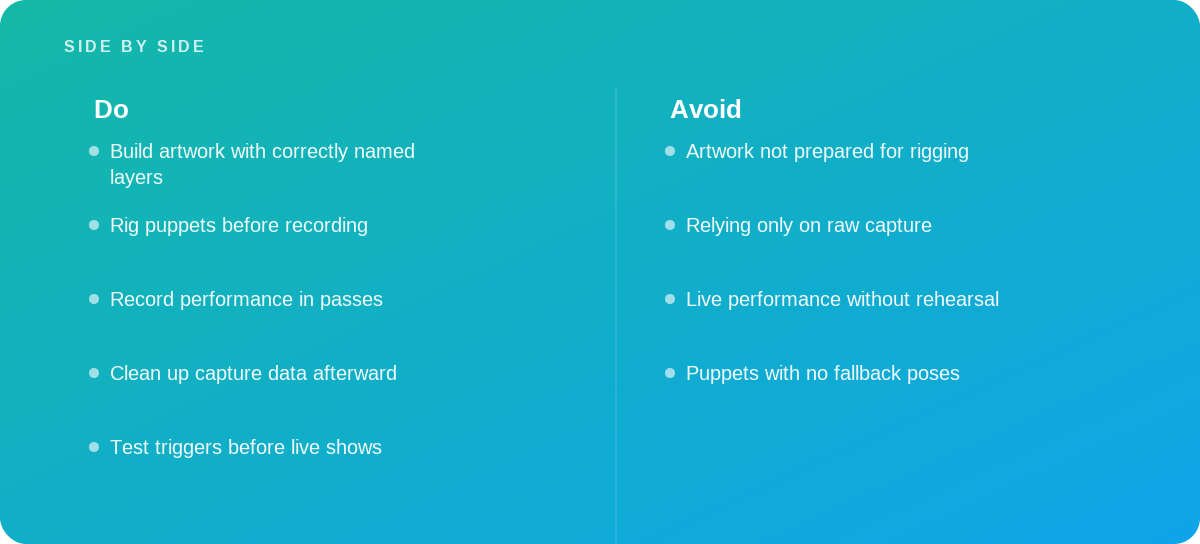
Red flag: artwork not prepared for rigging. If a supplier proposes to import your existing flattened mascot artwork and "animate it" without a redraw and separation step, expect stiff movement or a mid-project change request.
- Ask to see the layer structure planned for your character before rigging starts.
- Ask how mouths, eyes and brows will be separated and named.
- Ask which parts will bend and which stay rigid, and why.
Questions to Ask Every Supplier Before You Sign
A short written questionnaire does two jobs. It gets you comparable answers, and it reveals how a supplier thinks. Strong suppliers answer precisely and ask questions back; weak ones answer with generalities. Send the same list to every shortlisted studio or freelancer and compare the replies side by side.
- Can you show two or three Character Animator puppets you built, including the layered source file structure, not just finished footage?
- Will you redraw and separate our existing artwork, and who does the drawing versus the rigging?
- How many head views, mouth shapes and trigger poses are included in the quote, and what does each additional one cost?
- Do you record performances in passes, and how much cleanup of capture data is included per finished minute?
- Who performs the character, and can the same performer be retained for the series?
- What is the neutral idle state, and what happens when face tracking is lost?
- Which files do we receive at handover: the puppet, the layered artwork, the project files, rendered masters?
- Who owns the character design, the puppet and the recorded performances once paid for?
- For live work: how many rehearsals are included, what is the backup plan if the software or the stream fails, and who is on call during the show?
- How are revisions counted, and at which stages can we request changes without extra cost?
Pay attention to the answer about the performer. In Character Animator the performer is part of the character: their timing, energy and facial range become the puppet's personality. If a supplier uses a different junior operator every week, the character will feel inconsistent across episodes even if the artwork never changes. For series work, ask for continuity of performer in writing, and ask how voice and performance are handled if the original performer becomes unavailable.
Comparing Quotes Line by Line
Quotes for the same brief can differ by several multiples, and the lowest number is not always the cheapest outcome. The reliable way to compare them is to break every quote into the same line items and score each supplier on what is actually included. The scorecard below uses a five-point scale; weight the rows according to what matters for your project.
| Criterion | What a 5 looks like | What a 1 looks like | Suggested weight |
|---|---|---|---|
| Puppet scope clarity | Named list of views, mouth shapes, poses and props | "Fully rigged character" with no inventory | High |
| Artwork preparation | Redraw and layer separation priced as its own line | Assumes existing artwork is usable as supplied | High |
| Cleanup allowance | Cleanup included per finished minute, described in detail | Raw capture delivered as final | High |
| Performer continuity | Named performer retained for the series | Operator not specified | Medium |
| Handover files | Puppet, layered artwork, project files and masters | Rendered video only | Medium |
| Live readiness | Rehearsals, fallback plan and on-call support priced | "Can stream live" with no plan | High if live, otherwise low |
| Revision terms | Revision rounds tied to named stages | "Unlimited revisions" or none stated | Medium |
| Portfolio relevance | Puppets in a similar style and format | Only unrelated motion graphics | Medium |
Two patterns show up repeatedly when quotes are laid out this way. First, low quotes often drop cleanup entirely and deliver raw capture as final footage. Second, high quotes sometimes include a bespoke character design phase you do not need because you already have approved artwork. Neither is wrong in itself; the problem is comparing them as if they were the same product. Once every quote is broken into the same lines, you can ask the preferred supplier to remove or add specific items instead of negotiating on the total.
Also compare how each supplier proposes to split the work between Character Animator and other tools. Many studios record performance in Character Animator, then finish in After Effects or Premiere Pro, adding backgrounds, camera moves, on-screen text and sound design. That hybrid approach is normal and often gives the best result, but it should be visible in the quote. If on-screen text is part of the job, our guides on text animators in After Effects and on text legibility in motion will help you judge what you are being offered.
Red Flags in Proposals, Process and Performance
Some problems are visible at the proposal stage; others only surface in the first delivery. The following warning signs are the ones most likely to predict a disappointing character or a budget overrun, drawn from the mistakes that consistently cause trouble with this tool.
Relying only on raw capture
Webcam tracking is impressive, but it captures everything, including the performer's nervous head bobbing, an accidental glance at the script and a blink that lands mid-word. A proposal that treats capture as final output, with no pass-based recording and no cleanup step, will produce footage that looks cheap in exactly the way viewers notice first: restless heads and mushy mouths. Ask to see a before-and-after of a cleaned take.
No rehearsal before live work
Live performance without rehearsal is the single most avoidable failure. Triggers mapped to the wrong keys, a webcam that loses tracking under venue lighting, a microphone that picks up the room and drives lip sync on the wrong voice: all of these are found in a rehearsal and none of them should be found in front of an audience. Test triggers before live shows, every time, on the actual machine and network that will run the show.
Vague ownership and handover
If the contract does not say who owns the character design and the puppet, assume a dispute will eventually arise. Ask for the layered source artwork and the puppet file at handover, even if you never plan to open them, so that another supplier can continue the series if needed.
Red flag: live show with no fallback plan. If a supplier offers to perform a character live but cannot describe what happens when tracking drops, the software crashes or the stream stalls, the risk is sitting with you.
- Ask for a neutral idle pose the operator can hold while recovering.
- Ask for a pre-recorded holding clip or slate that can be cut to instantly.
- Ask for a full technical rehearsal on the show machine, network and streaming software.
An Illustrative Worked Example: Budgeting a Recurring Animated Host
The following example is illustrative, not a real client project. It shows how the cost drivers above translate into hours for a common brief, so you can sanity-check the quotes you receive. The hour ranges are planning assumptions of the kind a studio might use; your suppliers' numbers will differ with style, seniority and tooling.
The brief: a software company wants a cartoon host for a weekly social series. Each episode is 90 seconds, delivered in 9:16 and 16:9. The host appears head-and-shoulders, front view only, with a modest head turn. Scripts call for about a dozen gestures: pointing left and right, thumbs up, shrug, holding a phone, a laugh, a surprised take and a few others. The company already has an approved mascot drawing, but it is a single flattened illustration. The first run is twelve episodes.
| Phase | Illustrative hours | Notes |
|---|---|---|
| Redraw and layer separation | 16 to 24 | Front view, separated eyes, brows, pupils, arms and hands |
| Mouth set | 6 to 10 | Standard visemes plus smiling variants |
| Gesture and pose artwork | 12 to 20 | About twelve poses and two props |
| Rigging and behavior setup | 10 to 16 | Pivots, tags, triggers, idle breathing and blinking |
| Testing and revisions | 6 to 10 | Test performance, fix deformations, client review |
| Puppet subtotal | 50 to 80 | One-off cost |
| Per episode: performance in passes | 1.5 to 2.5 | Face, then gesture pass, then pickups |
| Per episode: cleanup | 2 to 4 | Visemes, head smoothing, blink timing |
| Per episode: edit and finishing | 2 to 3 | Backgrounds, text, sound, two aspect ratios |
| Per episode subtotal | 5.5 to 9.5 | Recurring cost |
Across twelve episodes, the recurring work comes to roughly 66 to 114 hours, and the puppet build adds 50 to 80 hours, for a total of about 116 to 194 hours. Divide that by twelve and each episode carries roughly 10 to 16 hours of effort in the first run. In a second run of twelve, with the puppet already paid for, the per-episode figure drops back to the 5.5 to 9.5 hours of recurring work. That is the economic case for the tool in one line: the second season is dramatically cheaper than the first.
Now apply the scope levers. If the company insisted on a three-quarter view as well as a front view, the redraw, mouth set and rigging lines would each grow substantially, and the puppet subtotal might rise by half or more. If it dropped cleanup to save money, it would save 24 to 48 hours across the run but accept footage with visible jitter and imprecise lip sync. If it asked for twenty-five gestures instead of twelve, the gesture artwork line would roughly double while the performer's ability to remember and use them would not. Put your actual supplier rates into the same structure and the comparison between quotes becomes arithmetic rather than guesswork.
Running a Production That Keeps the Character Consistent
Once the puppet is built, most of the quality risk moves from the build to the routine. A series that looks great in episode one and tired by episode ten usually suffered from process drift, not bad rigging. These are the production habits worth agreeing with your supplier upfront.
- Lock the script and audio first. Record or approve the voice track before performance. Lip sync is computed from audio, so changing a line after the performance means redoing both mouth and face work for that section.
- Record the performance in passes. Capture face and head in one pass, then add gestures and triggers in a second pass, then record pickups for weak moments. Separate passes make each one easier to perform well and easier to fix.
- Clean up capture data before editing. Smooth head movement, correct visemes on hard consonants, remove stray blinks and confirm trigger timing lands on the right words.
- Review against a reference episode. Keep one approved episode as the benchmark for energy, head movement range and gesture frequency, and compare each new episode to it.
- Finish in the editing tool. Add backgrounds, graphics, captions and sound in Premiere Pro or After Effects, using a template so each episode has consistent framing and typography.
- Archive the take and the puppet version. Record which puppet version each episode used, so later changes to the rig do not silently alter old projects that need re-exporting.
Gesture frequency deserves particular attention. Performers who discover the trigger keys tend to overuse them, and a character who points, shrugs and waves in every sentence quickly becomes tiring. Real presenters gesture to emphasize, not to decorate. If body language is central to your character, the specialist craft described on our gesture and body language animation service page is a useful reference for what purposeful gesture looks like.
Timing edits also matter more than people expect. Tightening a pause, holding a reaction a few frames longer or speeding up a transition can change how a performance reads. The techniques in our article on time remapping apply when a recorded take is nearly right but its rhythm needs adjusting in the edit.
Live Shows: What Changes When the Puppet Performs in Real Time
Live performance is where Adobe Character Animator does something few other tools can, and it is also where preparation matters most. Once the show starts there is no cleanup pass. Whatever the camera reads and the microphone hears goes straight to the audience, so every source of error must be removed beforehand.
Technical setup
A live puppet needs a dedicated machine with enough performance headroom to track, render and stream at the same time, a webcam positioned and lit so the performer's face is evenly visible, and a microphone that isolates the performer's voice. The puppet output is typically passed into streaming or production software, where it is composited with backgrounds, lower thirds and other sources. Agree in writing who owns each piece of that chain on the day.
Performer preparation
The performer should rehearse with the exact trigger map that will be used live, ideally printed and placed beside the keyboard. Keep the live trigger set smaller than the recorded one; under pressure, performers reliably use a handful of gestures, and unused keys are just opportunities to hit the wrong one. Agree a recovery routine: if tracking drops, the performer holds still and looks at the camera while the puppet returns to its neutral pose.
Rehearsal schedule
Plan at least one full technical rehearsal on the show hardware and network, not a desk test on a different computer. Venue lighting, network restrictions and audio routing are the usual culprits, and they only appear on the real setup. For public-facing or sensitive live content, such as community or civic broadcasts, the same discipline described in public information animation applies: accuracy and reliability matter more than flourish.
How to Judge the Finished Puppet and the Footage
Approving a puppet is harder than approving a still illustration, because the problems appear only in motion. Use a structured review rather than a general impression, and review in stages: the puppet itself, a test performance, then the first full episode.
Reviewing the puppet
- Idle state: with no input, does the character look composed and alive, or frozen?
- Range of motion: at the extremes of head tilt and turn, do parts separate, overlap badly or reveal gaps in the artwork?
- Mouth set: play a sentence with plenty of "M," "F" and "Oh" sounds. Do the mouths read clearly and suit the character's personality?
- Triggers: fire every trigger, one after another. Does each pose look finished, and does the character return cleanly to neutral when released?
- Files: open the layered source artwork. Are layers named consistently and grouped logically?
Reviewing footage
- Head movement: is it purposeful, or does the head drift and jitter throughout?
- Lip sync: watch with sound off for a few seconds. Do closed-mouth consonants actually close the mouth?
- Blinks and eyes: do blinks fall naturally between phrases, and do the eyes look at the camera or the object being discussed?
- Gesture rhythm: do gestures land on the stressed words and not every few seconds by habit?
- Consistency: does this episode match the energy and framing of the reference episode?
If a problem appears, describe it by timecode and category (for example, "0:42 to 0:47, head jitter" or "1:10, wrong mouth on 'probably'"). Supplier teams can fix categorized notes quickly; general notes like "feels a bit off" send them hunting.
A practical review habit: watch every episode once at full speed with sound, once with sound off, and once on a phone at the size your audience will see it. Each pass exposes different problems, namely acting, lip sync and legibility.
Build In-House or Bring in a Specialist?
Character Animator is approachable, and many in-house teams can produce a serviceable puppet and occasional clips. The question is not whether your team can use the tool but whether it can sustain the quality and cadence your plan requires. The general rule is simple: bring in help when characters must appear regularly or live.
In-house makes sense when the character is informal, appears occasionally, and the team already has an illustrator comfortable with layered files and someone willing to perform. It also makes sense for prototyping: a rough internal puppet is a cheap way to test whether a character concept works before paying for a polished build.
A specialist makes sense when the character represents the brand in public, when output must be weekly or faster, when live appearances are planned, or when the character must look consistent across many pieces and many months. A studio brings a tested puppet structure, an experienced performer, cleanup routines and a live-show checklist that an in-house team would otherwise learn through mistakes. Many organizations land on a hybrid: the studio builds the puppet and templates, and the in-house team handles routine episodes, with the studio on call for live shows and new poses. Explainer-heavy sectors, such as those covered in our piece on financial explainer animation, often use exactly this split.
If you are weighing options, our character animation services cover both puppet builds for real-time performance and traditional keyframed work, which is useful when a series needs both a quick weekly host and occasional polished hero pieces.
Verdict Adobe Character Animator is the right choice when you need a character to speak regularly or perform live, and the wrong choice when every shot needs bespoke, full-body acting. Pay properly for the puppet build, insist on correctly named layers, rigging before recording, pass-based performance and real cleanup, and never go live without a rehearsal and a fallback pose. Compare quotes on those line items rather than on the total, and the tool will repay its build cost many times over across a long-running series.
Where this comes from
- Adobe Help Center — Character Animator User Guide
- Adobe Help Center — Illustrator User Guide
The figures and practices above come from the sources listed.
Working on something like this?
We take on Motion Graphics & Animation work for teams who want it done once, properly. Tell us what you are building and we will tell you honestly whether we are the right studio for it. Start a project.
Where to go next
Spotted something wrong? Report an error on this page. We correct on the page and say what changed.