A Practical Guide to Isometric Animation
Learn how to commission isometric animation: what to put in the brief, what drives cost, how to compare quotes, red flags to catch and how to judge the result.
 Tomas Lindqvist
Isometric animation is motion built on an isometric grid: every object is drawn at the same fixed angles, with parallel edges that stay parallel and no vanishing point pulling lines together in the distance. The result is the tidy, slightly toy-like view you have seen in explainers about cloud infrastructure, warehouse logistics, smart cities and software onboarding. Nothing gets smaller as it moves away from the viewer, so a server rack at the back of the scene is drawn at the same scale as one at the front, and a viewer can compare parts of a system at a glance.
This handbook is for the person commissioning the work: a marketing lead who needs a product explainer, an operations or training manager who needs to show how a process flows, or a founder who wants a homepage loop that makes a complicated platform look understandable. It covers what to ask for, what actually drives the effort and the price, how to compare suppliers who quote very differently for what sounds like the same job, the red flags that predict trouble, and how to review the finished piece with a technically informed eye.
The short version is that isometric animation rewards planning. Its strengths, reusable parts, clean readability and a consistent visual system, only appear when a supplier builds a proper asset kit and respects the projection's rules. When they do not, you pay for a style without getting its benefits.
What you are buying when you commission isometric animation
An isometric project is really two products delivered together: a set of finished videos, and the kit of parts those videos are built from. Understanding that split is the single most useful thing a buyer can know, because it explains why quotes vary, why some suppliers seem slow at the start and fast later, and why the source files matter more than they do for most animation styles.
The projection itself
In a true isometric projection the three axes (width, depth and height) sit 120 degrees apart on the page. In flat 2D terms, that means the two "ground" axes run at 30 degrees above horizontal, one leaning left and one leaning right, while vertical stays vertical. Because there is no perspective convergence, a cube drawn at the back of the scene is exactly the same size as a cube at the front. Many digital illustrators use a close cousin, often called 2:1 or "pixel" isometric, where the ground lines run at roughly 26.57 degrees so that each line steps two pixels across for every one pixel up. That variant is technically dimetric, and it is perfectly acceptable, but a project must pick one and stick to it. Mixing the two is one of the most common reasons an isometric scene looks subtly wrong without anyone being able to say why.
The asset kit
Because every element shares the same angles, isometric parts combine like building blocks. A desk, a laptop, a delivery van, a cloud icon or a conveyor segment drawn once can be placed anywhere in any later scene without being redrawn for a new viewpoint. A good supplier treats this as a deliverable in its own right: a library of props, characters, buildings, tiles and interface panels, each on the grid, each named and organized. That kit is what makes the second, third and tenth video cheaper and faster than the first.
The motion rules
Isometric motion has its own grammar. Objects travel along the grid axes, so a truck drives along one of the 30-degree lines, not at an arbitrary diagonal. Elements rise, drop or extrude along the vertical axis. Depth is faked with stacking order: whatever is "closer" to the viewer must be drawn on top, and when an object moves behind another, its layer has to change at the right moment. None of this is exotic, but each rule adds planning and technical care, and it is where the difference between a practiced isometric team and a generalist shows up.
- Isometric projection
- A parallel projection where the three axes are drawn 120 degrees apart and measured at equal scale, with no vanishing point.
- Dimetric (2:1) projection
- A close variant, common in digital and game art, where ground lines run at about 26.57 degrees; visually similar to isometric but not interchangeable within one scene.
- Orthographic camera
- A 3D camera with no perspective; rotated to the right angles, it renders a true isometric view from 3D models.
- Stacking order (z-order)
- The drawing order of layers, used in 2D isometric work to fake depth so that nearer objects cover farther ones.
- Asset kit
- The organized library of reusable isometric props, characters and tiles from which scenes are assembled.
When isometric animation is the right call, and when it is not
Isometric scenes suit subjects where the viewer needs to see a whole system at once and understand how its parts relate. They are less suited to subjects that depend on emotion, faces or cinematic drama. Before you ask for the style by name, check whether your message matches its strengths.
Where it earns its place
- Processes and flows. Order fulfillment, data moving between services, a patient's journey through a clinic, a manufacturing line. The fixed viewpoint lets the audience track one item through many stations without the camera disorienting them.
- Products in context. A device on a desk, a sensor in a building, an app running across a team. Isometric framing shows the product and its environment together at a readable scale.
- City-style and ecosystem views. Platforms that connect many actors (buyers, sellers, couriers, banks) read well as a small isometric town where each actor has a building.
- Series and campaigns. If you plan several videos, social cut-downs, web illustrations and slide graphics, the reusable kit pays for itself.
Where another approach is better
If your story depends on a character's expression or a single human moment, a character-led 2D approach or close camera work will serve you better; our guide to designing characters for animation covers what that involves. Isometric characters are small and usually simplified, which is a feature for clarity and a limitation for empathy. If the subject is the precise mechanical behavior of a real product, such as tolerances, internal parts and assembly order, a perspective 3D treatment with accurate models is often the better fit, as discussed in our piece on product assembly animation. And for data-heavy science content, the priority is usually accurate charts and scales rather than a stylized world; see scientific data animation for that trade-off.
A useful test: sketch the story on one sheet as a single isometric scene. If most of the message fits in that one frozen view, with motion adding sequence and emphasis, isometric is probably right. If you find yourself wanting to cut to close-ups every few seconds, it probably is not.
Writing a brief for isometric animation that suppliers can quote accurately
Suppliers price uncertainty. A vague brief produces either a padded quote or a low quote that grows through change requests. The brief does not need to be long, but it does need to answer the questions that determine effort. Our article on scoping animation projects covers the general principles; the points below are specific to isometric work.
What to put in the brief
- The system you are explaining. List the actors, locations, objects and steps. "Customer places order, warehouse picks it, courier collects, customer receives, returns flow back" tells a supplier roughly how many environments and props they must build.
- Running time and versions. A 60-second main film plus three 15-second social edits in square and vertical formats is a very different job from one horizontal film. Aspect ratio matters more in isometric work than usual, because a wide diamond-shaped scene does not simply crop to 9:16; the layout often has to be rearranged.
- Style references. Share two or three examples you like and say what you like about each: the color palette, the level of detail, how characters are drawn, how the camera moves. Also say which projection you want if you know, true isometric or 2:1.
- Existing brand assets. Supply your logo, palette, typefaces, product screenshots and any icons. Say whether screens must show real interface designs or can be simplified.
- Future use. State whether you expect more videos, static illustrations, a website, presentations or interactive use. This determines how seriously the supplier should invest in the kit and how it should be organized.
- Approvals and reviewers. Name who signs off and how many people will comment. A reviewer group of six across three departments needs a different review schedule than a single decision-maker.
- Accuracy constraints. If a regulator, engineer or safety lead must check the content, say so up front. Training and compliance pieces need extra review rounds, as our guide to safety training animation explains.
What to leave to the supplier
Do not prescribe the toolset unless you have a real reason, such as an in-house team who will maintain the files. A capable studio may build in Illustrator and After Effects, model in Blender or Cinema 4D and render through an orthographic camera, or mix the two. What matters to you is the result, the editability of the files, and whether the approach fits your plans for reuse. Ask them to explain their choice rather than choosing for them.
What drives the cost of isometric animation
Rates vary widely by region, studio size and seniority, so any single price would mislead. What you can control is the scope, and in isometric work the scope drivers are fairly predictable. When you understand them, you can read a quote and see where the effort sits.
The asset build
The biggest up-front cost is designing the kit. Every unique building, vehicle, machine, character and interface panel must be drawn on the grid, usually with separate layers for parts that will move. A scene with 10 unique props costs far less to build than one with 40, even if both run for the same length. Detail level multiplies this: a flat, three-tone style with minimal texture is much quicker to draw than a richly detailed one with gradients, windows, cast shadows and small decorative objects.
Rigging and motion complexity
A truck that slides along a road is cheap. A truck whose wheels turn, whose doors open, whose driver steps out and walks to a building is expensive, because each moving part needs rigging and each character needs walk cycles drawn for the isometric directions they will face. In 2D isometric work, a character walking toward the viewer and one walking away usually need separate drawings, and turning a corner means switching between them. Characters are often the single largest motion cost, so ask how many are needed and how much they move.
2D versus 3D production
A 2D pipeline (for example, vector artwork animated in After Effects) is often faster for simple scenes with limited camera movement. A 3D pipeline, with models rendered through an orthographic camera, costs more to set up but makes camera moves, rotations, consistent lighting and shadows much easier, and it avoids many stacking-order problems because the renderer calculates depth. The Blender Foundation's documentation covers orthographic cameras, which are the basis of this approach. For projects with heavy reuse or many camera moves, the 3D route can be cheaper over the life of a series even though the first video costs more.
Other cost drivers
- Script and voiceover. Whether you supply an approved script or the supplier writes it, and whether a professional voice artist, music license and sound design are included.
- Versions and formats. Each aspect ratio can mean a partial re-layout; each language can mean new on-screen text, new voiceover and retiming.
- Review rounds. Most quotes include a fixed number of revision rounds per stage. Extra rounds, or changes to an approved stage, cost more because work downstream has to be redone.
- Interface accuracy. Recreating real product screens precisely inside isometric monitors is slow; simplified representations are much faster.
- Timeline. Compressed schedules may require more people working in parallel, which increases coordination and cost.
Red flag: a quote that gives one lump sum with no breakdown of design, animation and audio, and no statement of how many unique assets or characters are included.
- You cannot tell whether the price covers the scenes you described or a simpler version.
- Every addition later becomes a negotiation with no baseline to measure against.
- Ask for a line-item quote and an asset count before comparing it with anything else.
Worked example: scoping a 90-second isometric process explainer
The following example is illustrative, not a real client project. It shows how a buyer can turn a brief into an effort estimate and read quotes against it. Effort is expressed in production days so that it can be applied to whatever day rate your suppliers use.
Suppose a logistics software company wants a 90-second film showing how its platform connects a retailer, a warehouse, a courier and an end customer. It also wants three 15-second social edits and a set of static illustrations for its website. The supplier proposes a 2D pipeline with vector artwork and six scenes.
| Stage | What is produced | Illustrative effort (days) |
|---|---|---|
| Script and storyboard | Approved script, 18 storyboard frames, timing notes | 3 to 4 |
| Style frames | Two fully designed frames to lock the look | 2 to 3 |
| Asset kit | About 30 props, 4 buildings, 3 vehicles, 5 characters, road and floor tiles | 6 to 8 |
| Animation | 90 seconds across six scenes, including character walk cycles in two directions | 9 to 12 |
| Voiceover, music, sound design | Casting, recording, licensed track, effects mix | 2 to 3 |
| Social edits | Three 15-second cut-downs, re-laid out for 1:1 and 9:16 | 3 to 4 |
| Static illustrations | Five website illustrations assembled from the kit | 1 to 2 |
| Revisions and delivery | Two rounds per stage, exports, packaged source files | 2 to 3 |
| Total | 28 to 39 |
A few things stand out. The asset kit is about a fifth of the total. That is normal, and it is the investment that makes the static illustrations cheap: five website images at one to two days is only possible because every building and prop already exists. If the same company commissioned a second 90-second film six months later using the same world, the asset line might fall to two or three days for new props, and the whole job might come in at roughly two-thirds of the first.
The social edits are not trivial. A wide isometric city does not crop neatly to vertical, because its diamond shape leaves empty corners or cuts off the action. The supplier has to rearrange buildings and reroute motion paths for each ratio. Buyers who expect cut-downs to be "just exports" are often surprised by this line.
Finally, the range of 28 to 39 days is wide on purpose. The low end assumes a single decision-maker who gives consolidated feedback within two working days; the high end assumes more reviewers and some rework. The buyer controls much of that spread. If three quotes came back at roughly 15, 32 and 60 days of effort (or their price equivalents), the buyer would now have questions to ask: what has the low quote left out, and what is the high quote including that the brief did not ask for?
Questions to ask an isometric animation supplier
A general guide to choosing an animation studio will cover contracts, communication and fit. The questions below are the isometric-specific ones. Good suppliers answer them easily and in detail; weak answers are useful information too.
- Which projection will you use, true isometric at 30 degrees or 2:1 dimetric, and how do you keep every artist on the same grid?
- Will you build a reusable asset kit, and how will it be organized, named and delivered?
- Do you plan to work in 2D, 3D with an orthographic camera, or a hybrid, and why is that right for this project?
- How do you plan and manage stacking order when objects pass behind one another?
- How many unique props, environments and characters does your quote include?
- How will the scene be re-laid out for square and vertical formats rather than cropped?
- Which light direction will you set for shadows, and how will you keep it consistent across scenes?
- Can you show a past isometric project with both the finished film and its asset sheet?
- How many revision rounds are included at each stage, and what counts as a new request?
- Which source files will we receive, in which formats, and with what licensing for reuse?
Two of these deserve a follow-up. When a supplier shows an asset sheet from a past project, check that the same objects appear in several scenes of the film; that is evidence of a working kit rather than one-off drawings. And when you ask about stacking order, listen for a concrete method: layer naming conventions, pre-planned depth tiers, or a 3D render that handles depth automatically. "We just fix it as we go" usually means you will see the fixing in review.
Comparing isometric animation quotes side by side
Quotes rarely line up neatly. One supplier quotes per second of animation, another by phase, a third as a fixed package with a list of inclusions. Convert them into the same structure before comparing, using the stages from the worked example. Then rate each on the criteria that matter for isometric work specifically. The scorecard below shows one way to do it, with three illustrative suppliers.
| Criterion | Supplier A (low quote) | Supplier B (mid quote) | Supplier C (high quote) |
|---|---|---|---|
| Projection stated and consistent in portfolio | Not stated; portfolio mixes styles | True isometric, consistent | 2:1 dimetric, consistent |
| Asset count in quote | Not specified | 30 props, 5 characters | 45 props, 8 characters |
| Asset kit delivered as a library | No | Yes, organized by category | Yes, with usage guide |
| Pipeline | 2D | 2D with 3D for camera moves | Full 3D, orthographic render |
| Social formats re-laid out | Cropped exports | Re-laid out | Re-laid out |
| Revision rounds per stage | One total | Two | Three |
| Source files and reuse rights | Final video only | Full source, reuse permitted | Full source, reuse permitted |
| Fit with brief | Under-scoped | Matches brief | Exceeds brief |
Read the scorecard for patterns rather than totals. Supplier A is cheaper because it is quoting a smaller job: no kit, cropped social versions, one revision round and no source files. That may be fine for a one-off, but it destroys the main economic advantage of isometric work. Supplier C is quoting more than was asked for; the extra props and characters may be welcome, but ask whether they could be removed to bring the price toward B's. Supplier B matches the brief. In many comparisons the middle quote is simply the one that read the brief carefully, which is why normalizing scope matters more than negotiating rate.
Normalizing quotes in practice
- Rebuild each quote into the same stages: script and storyboard, style frames, asset build, animation, audio, versions, revisions and delivery.
- Write the asset and character count next to each, asking suppliers for it where missing.
- Mark what is excluded, such as voice talent, music licenses, extra formats or source files, and estimate what adding it would cost.
- Compare the adjusted totals, then weigh the qualitative criteria from the scorecard.
Red flags in isometric portfolios, proposals and early drafts
Most isometric problems are visible early if you know where to look. Catching them at storyboard or style-frame stage costs a conversation; catching them after animation costs days.
In the portfolio
Look closely at edges. In a consistent isometric scene, every horizontal edge runs along one of two angles. If you see a building at 30 degrees next to a car at 26 degrees, or a desk whose far edge is shorter than its near edge, the artist is mixing projections or letting perspective creep in. Stock assets from different libraries are a frequent cause, because they are often drawn on different grids. A single inconsistent object may be a slip; a pattern across several projects means the team does not work to a grid.
In the proposal
Be wary of proposals that promise heavy reliance on stock isometric packs to cut cost. Stock can be useful for background filler, but it often clashes with custom brand work in line weight, palette, angle and detail, and its license may limit how you reuse it. Ask which elements would be stock, which would be custom, and what the license permits.
Red flags in early drafts: these problems are cheap to fix at storyboard and style-frame stage and expensive afterward.
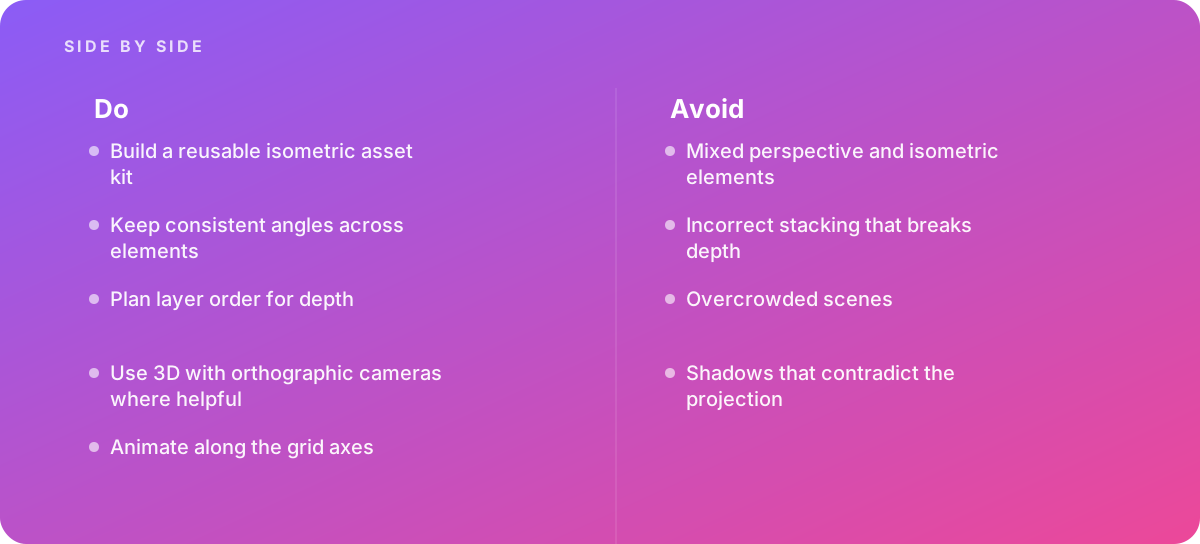
- Mixed perspective and isometric elements: a perspective product render dropped into a flat isometric world, or a vanishing-point background behind isometric props.
- Stacking errors: an object in front of a wall that is drawn behind it, or a character who walks behind a building and reappears on top of it.
- Overcrowded scenes: so many props that the one item the viewer should track gets lost.
- Contradictory shadows: shadows falling in different directions across a scene, or perspective-style shadows that fan out instead of running parallel.
Overcrowding deserves particular attention because it is the error suppliers are most tempted toward. An isometric world invites detail: potted plants, tiny people, parked cars, street lamps. Each one makes a still frame look richer and a moving frame harder to read. The discipline is to decide what the viewer's eye should follow in each shot and keep everything else quiet, desaturated or out of frame. For short social placements, where the viewer may watch with no sound and for only a few seconds, this matters even more; our piece on pacing for social video animation covers how much a viewer can take in per beat.
Judging the result: a technical review of isometric work
Reviewing animation well is a skill in its own right, and our guide to reviewing animation with clients covers how to structure feedback. For isometric work, add a short technical pass at each stage. You do not need to be an animator to do it; you need to know what to check.
At style-frame stage
- Check the angles. Place a straight edge on the screen along a floor line, then along a table edge, then along a roof. They should all match one of the two ground angles.
- Check the light. Pick one object and note which faces are lightest and darkest. Every other object should follow the same pattern. In isometric work, shadows should be cast in a single consistent direction and keep parallel edges, because the projection has no perspective for them to converge toward.
- Check readability at small size. Shrink the frame to phone size or look at it from across the room. The main subject should still be identifiable.
At animation stage
- Check the motion paths. Vehicles, packages and characters should travel along grid axes. Diagonal moves that ignore the grid look like mistakes, even to viewers who could not explain why.
- Check the handovers. Watch every moment where one object passes behind another, at full speed and frame by frame. Flicker, overlap or a one-frame pop are stacking-order errors.
- Check the camera. In a true isometric piece the camera usually pans or zooms without rotating. If the camera rotates in a 2D pipeline, the artwork has to be redrawn for the new angle, so ask how the supplier did it; in a 3D orthographic pipeline, rotation is straightforward.
- Check the pacing. Each step of the process should hold long enough to be understood. A useful self-test is to watch without sound and see whether you can narrate the process yourself.
At final delivery
Watch the final export on the platforms where it will actually play, at the sizes people will see it. Isometric line work can shimmer or alias at small sizes, particularly thin lines at 30-degree angles after compression. If you notice crawling edges, ask whether line weights can be increased slightly for the small-format versions.
An isometric scene should let a viewer follow one thing through a whole system without ever wondering where to look. Every angle, shadow and layer serves that single goal.
How the production tools affect what you receive
You do not need to choose the software, but knowing how common pipelines work helps you understand proposals and plan for maintaining the files.
2D vector pipelines
Many studios draw isometric artwork in Adobe Illustrator using an isometric grid, or by transforming flat front, side and top views into isometric faces with a combination of vertical scaling, shearing and rotation. The Adobe Help Center's Illustrator documentation covers the transform tools and grid settings involved. The artwork is then animated, often in After Effects, with each moving part on its own layer. The advantages are fast iteration on flat styles, crisp vector lines and files that many in-house designers can open. The disadvantages are that depth is managed by hand through layer order, camera rotation is effectively impossible without redrawing, and lighting consistency depends on the discipline of each artist.
3D pipelines with orthographic cameras
A 3D approach models every object once, then renders through an orthographic camera tilted to the isometric angle, which in practice means rotating the camera roughly 35.26 degrees down from horizontal and 45 degrees around the vertical axis. Blender, Cinema 4D and other 3D packages all support this. Depth and shadows are calculated correctly by the renderer, objects can be viewed from any side, and the camera can orbit smoothly. Styled shading and outline rendering can make the output look flat and illustrated rather than obviously 3D. The trade-off is setup time, heavier source files, and the need for someone with 3D skills to maintain them.
Hybrid pipelines
Many teams model complex objects in 3D, render them as isometric images or sequences, and composite them in a 2D animation tool alongside hand-drawn elements. This can combine the accuracy of 3D for machinery with the speed of 2D for interface panels and text. The risk is exactly the mixed-projection error described earlier, so ask how the supplier matches angles and line weight between the two sources. If you have an in-house designer who will make future static graphics from the kit, ask for the 2D assets as layered vector files even if the video itself was produced in 3D, because rendered objects are much harder for a generalist to edit than vectors.
Deliverables, source files and getting value from the kit afterward
The asset kit is only an asset if you can find it, open it and legally reuse it. Agree on the handover before production starts, not at the end, and use our guide to delivering animation source files as a reference for what a complete package includes.
What a complete isometric handover contains
- Final videos in every agreed format and aspect ratio, plus versions without text or voiceover for later localization.
- Project files for the animation software used, with fonts and linked assets collected so they open on another machine.
- The asset library, organized by category (buildings, vehicles, props, characters, tiles, interface panels), named consistently, and with each item on the grid.
- A style sheet documenting the projection, grid settings, palette, line weights, light direction and shadow treatment, so any future designer can extend the world consistently.
- A license statement covering custom assets, any stock elements, fonts and music, and what reuse is permitted.
Planning reuse
List the likely follow-on uses at the start: website illustrations, sales slides, onboarding screens, event graphics, trade-show backdrops. Some of these, such as large-format print, need higher-resolution or vector originals, which is easier to plan for than to retrofit. If the kit may also be used for interactive web experiences, discuss export formats early; our scroll-triggered animation guide explains the file and performance constraints that apply there. And once the project is finished, store the whole package somewhere durable with a short index, because a kit that nobody can find a year later has no reuse value. Keep the index to a single page listing what each folder holds, which software version opens it, and who owns it.
A buyer's timeline for an isometric animation project
Schedules depend on length, complexity and how fast feedback comes back, but the order of stages is consistent, and knowing it helps you plan reviewer availability. For a project like the worked example above, a typical flow runs as follows.
- Brief and quote. You send the brief and references; suppliers respond with questions and line-item quotes. Allow time for at least one clarification round.
- Script and storyboard. Lock the words and the sequence of scenes. This is the cheapest point to change the story, so involve every key reviewer here.
- Style frames. Approve the projection, palette, detail level and light direction on two representative frames. Run the technical checks described earlier.
- Asset build. The supplier builds the kit. You may see an asset sheet for approval; check for consistency and for anything missing from the storyboard.
- Animatic. A rough timed version with scratch or final voiceover. Confirm pacing and that each step reads clearly.
- Animation and audio. Full motion, sound design and music. Feedback here should be about motion and timing, not the script.
- Versions and delivery. Social formats, subtitles, exports and the source package.
The most expensive delays come from changes to earlier stages after later ones have started, such as rewriting a script line after animation, which may require new assets, new motion and a new voice session. Consolidate feedback from all reviewers before sending it, and make sure the person who can veto the project sees the storyboard.
Verdict Isometric animation is one of the best ways to explain a system, a process or a product in its environment, and it becomes more cost-effective the more you reuse it. Commission it with a brief that lists the actors, steps and future uses; compare quotes on asset counts, projection discipline, format handling and source files rather than headline price; and review early drafts for mixed angles, stacking errors, crowding and inconsistent shadows. The supplier who treats the asset kit as a deliverable in its own right is usually the one worth paying for.
If you are weighing isometric work against other approaches, our other motion graphics and animation articles cover alternatives such as character-led 2D, product 3D and data animation, with the same buyer-focused lens.
Where this comes from
- Adobe Help Center — Illustrator User Guide
- Blender Foundation — Blender Manual: Cameras
The figures and practices above come from the sources listed.
Working on something like this?
We take on Motion Graphics & Animation work for teams who want it done once, properly. Tell us what you are building and we will tell you honestly whether we are the right studio for it. Start a project.
Where to go next
Spotted something wrong? Report an error on this page. We correct on the page and say what changed.