A Practical Guide to Machinery Operation Animation
Learn how to commission machinery operation animation: what to hand a studio, what drives cost, how to compare quotes, red flags and how to judge accuracy.
 MediaScaleUp Editorial Team
Machinery operation animation is animated instruction that shows people how to run, maintain or service a piece of equipment: which guard to open, which valve to close first, where the hidden spring sits and what the machine should do when the sequence is right. It sits between the printed manual and hands-on training, and it earns its place because it does two things a photograph or a paragraph cannot. It removes most of the language barrier, since a motion path and a numbered step read the same in any plant, and it can show internal parts that a camera will never reach without a teardown.
This handbook is written for the person commissioning that work: an engineering manager, a technical documentation lead, a training coordinator, a product marketer at an equipment maker or an operations lead at a plant that inherited a machine with a thin manual. It covers what to hand a studio before work starts, what actually drives cost, which questions separate capable suppliers from confident ones, how to compare quotes that are structured differently, the red flags worth walking away from, and how to judge the finished animation against the procedure it is supposed to teach.
The thread running through all of it is simple. A machinery operation animation is only as good as the documented procedure behind it. Studios can make a machine look beautiful; your job as the buyer is to make sure it also shows the machine being operated correctly, safely and in the order your own manual says.
What a Machinery Operation Animation Has to Get Right
Before comparing suppliers, it helps to be clear about what separates a useful operating animation from a pleasant product film. Four requirements do most of the work, and every one of them should appear in your brief and in your acceptance criteria.
Sequence follows the documented procedure
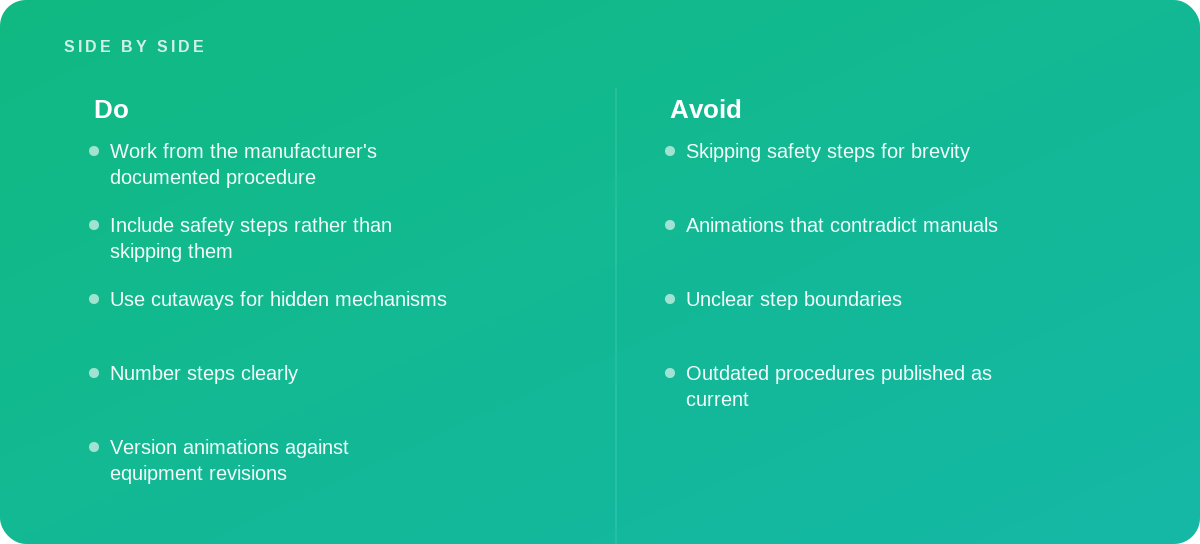
The steps must follow the manufacturer's documented procedure, in the same order, with the same step boundaries. If the manual says isolate power, release stored pressure, then open the access panel, the animation cannot open the panel first because it makes a better camera move. Operators learn sequence from animation more readily than from text, which is exactly why a wrong sequence is dangerous: it gets remembered.
Safety steps are shown, not skipped
Lockout and protective steps must be included. That means energy isolation, applying locks and tags, verifying zero energy, wearing the specified personal protective equipment and restoring guards before restart. These are the steps most often trimmed "for brevity" because they are visually repetitive. They are also the steps whose absence causes injuries. In the United States, the Occupational Safety and Health Administration's machine guarding and lockout guidance is the reference point most plants already train against, so your animation should show the same controls your safety program requires.
Cutaways reveal what the operator cannot see
Cutaway views show internal mechanisms: the cam that times a stroke, the check valve that holds pressure after shutdown, the shear pin that is meant to fail. This is the single biggest advantage animation has over video, and it is where a studio's modeling skill matters most. A cutaway should be honest about what it removes, usually with a clean section plane and a consistent color for cut surfaces, so viewers never confuse a sectioned view with the real assembled machine.
Versions track equipment revisions
Equipment revisions change procedures. A new interlock, a relocated fill port or a different fastener can make last year's animation wrong. Every animation should carry a version identifier tied to the equipment model, serial range or engineering change it describes, and someone on your side should own the decision to retire or update it.
What to Gather Before You Ask for Quotes
Most quote spreads on machinery work come from uncertainty about inputs, not from differences in studio talent. A supplier who does not know whether you have usable CAD data will either price in the worst case or price in the best case and send a change order later. Collecting the following before you approach anyone makes quotes comparable and shortens the project.
Engineering data
The most valuable asset is native or neutral-format CAD for the machine and any subassemblies the animation will open up. STEP files are the common neutral exchange format and most 3D studios can import them. Expect to hand over data that has been scrubbed of anything confidential; many manufacturers send a simplified or "shrink-wrapped" export that keeps external geometry and the specific internal parts the animation needs. Tell suppliers the part count and whether assemblies are organized logically, because a 4,000-part assembly with meaningless part names takes real hours to prepare.
If CAD does not exist, as with older equipment, the studio will need to model from photographs, measurements, drawings or a site visit. That is doable but slower, and it changes the accuracy you can reasonably expect. Say so up front.
The procedure itself
Provide the current manual section, work instruction or standard operating procedure the animation will illustrate, with its revision number. If the procedure is spread across a manual, a service bulletin and a tribal-knowledge checklist taped to the machine, consolidate it before the studio starts. Studios should animate a procedure, not write one. If you ask them to reconcile three conflicting sources, you are asking a motion designer to make engineering decisions.
Reference footage and access
Short phone videos of a skilled technician performing the task are enormously useful. They show hand positions, tool choice, how much force a step really takes and where people actually stand. Note anything in the footage that deviates from the documented procedure so the studio does not copy a shortcut.
Audience and viewing context
Decide who is watching and where. An operator on a noisy shop floor watching on a mounted tablet needs large on-screen labels and no reliance on voiceover. A field service technician on a phone needs vertical-friendly framing and chapters. A distributor's sales team needs a shorter overview cut. Languages matter too: list every language you will need, and whether you want text-free visuals with separate caption files or burned-in localized labels.
Writing a Brief Suppliers Can Actually Price
A good brief for machinery operation animation is short on adjectives and long on facts. It should let a supplier estimate modeling, animation and review effort without guessing. If you have not commissioned animation before, our guide to scoping animation projects and the decisions that shape them covers the general mechanics; the points below are specific to equipment work.
- Procedure list with step counts. Name each procedure (for example, daily startup, filter replacement, belt tensioning, jam clearance) and give the number of documented steps in each. Step count is a far better predictor of effort than target runtime.
- Required views. Flag which steps need cutaways, exploded views, close-ups of controls or on-screen readouts such as pressure gauges or HMI screens.
- Safety content. State which lockout, verification and protective steps must appear and whether your safety team will review them separately.
- Style. Say whether you want photoreal 3D, clean technical 3D with flat shading, or a 2D or isometric treatment. Include one or two references you like and explain why.
- Audio and text. Voiceover, music, on-screen text only, or a mix; list languages and whether captions are required.
- Deliverables. Aspect ratios, resolutions, file formats, chapter markers, stills for manuals, and source files.
- Reviewers and rounds. Who approves technical accuracy, who approves safety content, who approves brand, and how many review rounds each stage gets.
- Versioning. The equipment model, serial range or revision the animation represents, and how you want version labels shown.
Machinery operation animation overlaps heavily with assembly instruction, and many briefs mix the two. If part of your need is showing how the machine goes together rather than how it is run, read how to get product assembly animation right and decide whether that is a separate deliverable with its own review path.
What Drives the Cost of Machinery Operation Animation
Studios quote in different structures: some per finished minute, some per deliverable, some by estimated days. Underneath, the same handful of factors drive effort. Understanding them lets you have a sensible conversation about trade-offs instead of simply asking for a lower number.
| Cost driver | Lower effort | Higher effort | What you can do about it |
|---|---|---|---|
| Model preparation | Clean CAD with logical assemblies and part names | No CAD, or huge assemblies needing heavy cleanup | Send a simplified export containing only needed parts |
| Number of steps | Short procedures with repeated camera setups | Long procedures, each step needing a new setup | Group related procedures that share views |
| Cutaways and exploded views | A few static sections | Animated sections through moving mechanisms | Reserve cutaways for steps where hidden parts matter |
| Visual finish | Clean technical shading | Photoreal materials, environments and lighting | Match finish to audience; operators rarely need photoreal |
| Hands, tools and people | Tool-only or ghosted hands | Full human figures with realistic motion | Use simplified hands unless posture is the lesson |
| Localization | Text-free visuals with caption files | Burned-in text and voiceover per language | Design text-light from the start |
| Review rounds | One accountable technical approver | Many reviewers giving conflicting feedback | Consolidate feedback before it reaches the studio |
| Revisions over time | Modular scenes easy to swap | Monolithic renders rebuilt for each change | Ask for modular structure and source files |
Why runtime is a misleading unit
Per-minute pricing is familiar from explainer videos, but it fits machinery work poorly. A 90-second animation of a single complicated jam-clearing sequence with three animated cutaways can take more effort than four minutes of simple startup steps that reuse the same camera angle. When you compare quotes, translate them back into what each one assumes about steps, cutaways and model preparation.
Style choices that change the budget most
The biggest single lever is usually visual finish. Photoreal rendering multiplies look-development and render time, and it rarely improves comprehension for operators. Many teams get better results from clean, well-lit technical 3D with a restrained color code: one color for the part being acted on, one for moving parts, one for hazards. Some content suits a flat treatment entirely; isometric animation works well for overview sequences such as material flow through a line, and a studio offering 3D animation can mix the two when detailed steps need true 3D.
Questions to Ask Every Supplier
General advice on choosing an animation studio applies here, but equipment work has its own tests. The answers you want are specific and procedural. Vague reassurance about "attention to detail" is not an answer.
- Have you animated operating or service procedures before, and can you show a sample where the step sequence is visible from start to finish?
- What CAD formats do you import, and how do you handle large or poorly structured assemblies?
- Who on your team checks that the animation matches our documented procedure, and at which stages?
- How do you show lockout, energy verification and protective equipment steps, and will you ever suggest removing them for pacing?
- How do you mark cutaways and exploded views so viewers know what has been removed?
- How do you number steps and show where one step ends and the next begins?
- What gets approved at storyboard or animatic stage, before final rendering?
- How many review rounds are included at each stage, and what counts as a change versus a correction?
- How will you handle a mid-project engineering change to the equipment?
- How is the project structured so a single step can be updated later without rebuilding everything?
- Which source files, models and project files do we receive, and in what formats?
- How do you handle our confidential CAD data during and after the project?
- How do you approach localization: text-free design, caption files, or burned-in text?
Listen for how a supplier talks about your procedure. The strongest studios ask to see it early, ask who owns it and ask what happens when the manual and the technician disagree. Weaker ones talk about lighting and camera moves first.
Comparing Quotes Without Being Misled by the Totals
Three quotes for the same brief can differ widely and all be honest. One may assume your CAD is clean, one may include a site visit, one may quietly exclude localization. The only useful comparison normalizes what each quote actually includes. Score each supplier against the same criteria, then look at price.
| Criterion | What a strong quote shows | What a weak quote shows | Weight |
|---|---|---|---|
| Procedure fidelity | Named stage where your SOP is mapped step by step to scenes | No mention of your procedure document | High |
| Safety content | Lockout and protective steps listed as scope, with a safety review point | Safety steps absent or described as optional | High |
| Model preparation | Explicit assumptions about CAD quality and part count | Assumes models are "provided ready" | Medium |
| Cutaways and views | Counted and tied to specific steps | "Cutaways as needed" | Medium |
| Review process | Storyboard, animatic and render approvals with defined rounds | Single review at the end | High |
| Change handling | Clear rate or method for engineering changes | Silent on changes | Medium |
| Versioning and source files | Modular scenes, version labels, source handover defined | Final video files only | Medium |
| Localization | Languages, method and cost per language stated | Excluded or unmentioned | Depends on audience |
Normalizing different pricing structures
Ask every supplier to break their number into the same buckets: model preparation, storyboard and animatic, animation, rendering and compositing, audio and text, localization, review rounds and project management. You do not need identical figures, just the same categories, so you can see where one supplier is spending and another is assuming. If one quote is much lower, look for the bucket that is missing rather than assuming efficiency.
What to do with an outlier
An unusually high quote sometimes reflects a supplier who read the brief more carefully and priced in a real problem, such as a messy assembly or a sequence that needs more cutaways than you realized. Ask them what they saw. That conversation is free expertise, and it often improves the brief you send to everyone.
Red Flags That Should Make You Pause
Most failed equipment animations fail for predictable reasons that were visible during the sales conversation. The warnings below are the ones worth acting on.
Red flag: safety steps treated as optional.
- A supplier proposes cutting lockout, verification or guard restoration to keep the runtime down.
- Sample reels show maintenance on running machines or with guards removed and no explanation.
- The quote lists "safety overlays" as an add-on rather than core content.
Skipping safety steps for brevity is the most common and most serious mistake in this category. An animation that shows a technician reaching into a mechanism without isolating it teaches the wrong behavior with the authority of an official training asset. If your training program is built around machine safety more broadly, the principles in getting safety training animation right apply directly and should shape how hazards are shown here too.
Signs a studio will animate its own version of your procedure
Watch for a studio that is keen to "simplify the story" before it has read the manual, or that proposes reordering steps for visual flow. Reordering is sometimes legitimate in an overview film, but in an operating animation it produces something that contradicts the manual, which leaves operators choosing between two sources and usually choosing the more memorable one.
Signs the result will be hard to maintain
A supplier who will deliver only final rendered video, with no project files or models, is effectively selling you a document you cannot edit. When the equipment changes, you will pay to rebuild. Similarly, a supplier with no clear answer about how steps are separated in the project file is likely building one long timeline that is expensive to revise.
Other warning signs are quieter: no named reviewer on their side, no questions about your audience, no mention of step numbering, and portfolio pieces that are all marketing hero shots with nothing instructional in them.
Worked Example: Scoping a Filter Change and Jam-Clearing Package
This is an illustrative example, not a real client project. The numbers show how the reasoning works; your own effort estimates will depend on your equipment, data and studio.
Imagine a mid-sized maker of packaging equipment that wants two procedures animated for one machine model: a routine filter change and a jam-clearing procedure. The service manual documents the filter change in 9 steps and jam clearing in 14 steps. Both procedures begin with the same 5-step lockout sequence: stop the machine at the control panel, isolate the main disconnect, apply lock and tag, bleed residual pneumatic pressure, and verify zero energy by attempting a start. The customer base spans several countries, so the animations will be viewed with captions in four languages.
Step 1: count the real work
Because the lockout sequence is shared, the studio can build it once and reuse it at the start of both procedures, which means there are 5 shared steps plus 4 unique filter steps plus 9 unique jam-clearing steps, or 18 distinct animated steps rather than 23. That reuse is worth asking for explicitly; it cuts effort and guarantees the lockout sequence is identical in both films. Guard restoration and restart verification at the end are also shared, adding 3 more shared steps, for 21 distinct steps in total.
Step 2: identify cutaways
Of the unique steps, 3 need cutaways: showing the filter seal seating correctly, showing where the jammed product sits behind the forming shoulder, and showing a spring-loaded tensioner that must be released before the jam can be cleared. The tensioner cutaway is the most important safety detail in the package, because stored mechanical energy is what injures people after the power is off.
Step 3: estimate runtime by step, not by target
At roughly 8 to 12 seconds for a simple step and 15 to 20 seconds for a step with a cutaway, the filter change runs about 2 minutes including the lockout and restart, and jam clearing about 3 minutes. That gives about 5 minutes of finished runtime, of which roughly 1 minute is shared content.
Step 4: compare the three quotes
Suppose three studios respond. Studio A quotes the lowest total, but its breakdown assumes CAD is ready to animate and includes one review at the end. Studio B quotes about 30 percent more, with model preparation itemized, an animatic approval stage and a safety review checkpoint. Studio C quotes about 60 percent more, mostly because it proposes photoreal rendering and a factory environment. Scored against the table above, Studio B wins on procedure fidelity, safety and review, and the gap to Studio A narrows once you add the cost of the change orders Studio A's assumptions make likely. Studio C's extra spend buys finish the operators do not need; the useful move is to ask Studio C for a price at technical finish before ruling it out.
Step 5: budget for the second version
The manufacturer knows a revised tensioner is coming in the next hardware revision. Asking each studio how much it would cost to update only the tensioner steps, and receiving source files organized by step, turns a future rebuild into a contained edit. This is the question that most often changes the ranking between otherwise similar suppliers.
Reviewing the Animation Against the Procedure
The review process is where the technical accuracy of a machinery operation animation is won or lost. General best practice on reviewing animation with a studio applies, but equipment work adds a technical approver and a safety approver who both need structured checkpoints.
- Step map Before any animation, the studio produces a table mapping every documented step to a scene, with the manual's step numbers alongside. Your technical owner signs it off. This is the cheapest point to catch sequence errors.
- Storyboard Check framing: can the viewer see the control, fastener or part being acted on? Are cutaways marked? Is each step's start and end obvious?
- Animatic Watch timing with rough models. Confirm each step lingers long enough for an operator to follow, and that on-screen step numbers match the manual.
- Safety review Your safety lead checks every lockout, verification and protective step against your program, including PPE shown on hands or figures.
- Final render review Check labels, readouts, colors and captions. Changes here should be corrections, not new ideas.
- Floor test Have one experienced and one new operator watch it beside the machine. Note every hesitation; hesitations usually mean unclear step boundaries.
What good step design looks like
Clearly numbered steps are the backbone of an instructional animation. Documentation style guides reach the same conclusion for text: the Google developer documentation style guide recommends numbered lists for sequential procedures and one action per step, and those conventions translate well to motion. In practice that means one action per numbered step, a step number and short imperative label on screen ("3. Release tensioner"), a brief hold at the end of each step so the result is visible, and a consistent transition that signals "next step" rather than a stylistic cut.
Judging clarity
Ask of each step: what is being acted on, with what tool, in which direction, and what does "done" look like? If any of those four answers is not visible on screen, the step needs work. Motion arrows, a highlight color on the active part and a close-up of the end state usually solve it.
Red flag at review stage: contradicting the manual. If a reviewer spots a difference between the animation and the manual, do not accept "it reads better this way." Either the animation changes, or the manual is formally revised by the people who own it. An animation that contradicts the manual will be quoted back to you in the first incident review.
Versioning, Delivery and Keeping Animations Current
Outdated procedures published as current are a slow-moving failure. The animation was right when approved, the machine changed, and nobody retired the file. Preventing that is mostly a matter of structure agreed at the start.
Version labeling
Put a version identifier in the animation itself, usually in the end frame or a small persistent corner mark, and in the filename. Tie it to something your engineering team already tracks: model number and revision, serial range, or engineering change number. When a revision ships, the documentation owner checks which animations reference the affected parts.
Source files and modular structure
Ask for the scene files, prepared models, textures, project files and caption files, organized by procedure and step. Our guide to delivering animation source files sets out what a complete handover looks like. For equipment work, the key is modularity: each step should be a discrete, renderable section so a changed step can be updated and the film re-rendered without touching the rest.
Deliverables worth specifying up front
Machinery operation animation tends to live in more places than a marketing film: the learning management system, the service portal, a tablet mounted at the machine, a QR code on the guard, embedded clips in a digital manual and still frames in the printed one. Each destination has its own needs, and adding them after rendering costs more than planning for them. Specify landscape masters for training rooms, a vertical or square cut if technicians will watch on phones, chapter markers at each procedure boundary so a viewer can jump straight to jam clearing without scrubbing, and high-resolution stills of key steps and cutaways for use in manuals and service bulletins.
Localization is easiest when designed in from the first storyboard. Keep on-screen text short, place it in consistent zones that can hold longer translations, and deliver captions as separate files rather than burned into the picture where possible. Step numbers and universal symbols carry across languages with no translation at all, which is one of the reasons animated instruction works well for multilingual workforces. If voiceover is required, lock picture before recording and allow for translated narration running longer than the source language, which usually means building a little slack into the timing of each step.
Finally, agree on how the final files will be named and what metadata travels with them: equipment model, procedure name, procedure revision, animation version and language. That small discipline is what makes the versioning process above workable a year later, when the person who commissioned the work may have moved on.
Archiving and retirement
Keep superseded versions archived with their approval records, because you may need to show what an operator was trained on at a given date. Our notes on archiving animation projects cover folder structures and retention. Just as important is removal: when a version is superseded, pull it from the learning management system, the product page and the QR code on the machine at the same time.
A simple maintenance schedule keeps this from depending on memory:
- Project kickoff Agree version scheme, source file handover and step-based project structure
- Approval Record the equipment revision and procedure revision the animation matches
- Each engineering change Documentation owner checks affected steps against the step map
- Annual review Confirm every published animation still matches the current manual
- Retirement Archive the old version with approvals and remove it from every channel
When to Bring in Outside Help
Bring in help when equipment documentation moves to animation. That is the moment an organization discovers that its manuals, work instructions and shop-floor habits do not quite agree, and that the procedure needs an owner before it can be visualized. A capable studio will not resolve that for you, but it will surface it quickly, and the step map it produces is often the first time the whole procedure has been laid out in one place.
In-house teams with 3D skills can handle simple procedures, particularly if they already work in CAD and have a rendering pipeline. Outside help makes more sense when you need cutaways through complex mechanisms, multi-language output, a consistent visual system across a product range, or when the internal team's time is better spent on the engineering than on the animation. Some organizations split the work: the studio builds the visual system and the first set of procedures, and the in-house team maintains them using the modular source files.
Choosing between 3D and simpler treatments
Not every piece of equipment needs full 3D. Control panel sequences, HMI navigation and overview workflows can often be handled with 2D animated video at lower cost and with easier localization. Internal mechanisms, clearances and hand access almost always justify 3D. Many good packages combine both: a 2D overview for context, then 3D for the steps where spatial understanding matters.
Verdict Commission machinery operation animation as an extension of your documented procedure, not as a creative project that happens to feature a machine. Choose the supplier whose quote names your procedure, includes every safety step, counts its cutaways, builds in staged technical review and hands back modular, versioned source files. Pay for accuracy, clarity and maintainability before you pay for photoreal finish.
Where this comes from
- Occupational Safety and Health Administration — Machine guarding
- Google for Developers — Google developer documentation style guide
The figures and practices above come from the sources listed.
Working on something like this?
We take on Motion Graphics & Animation work for teams who want it done once, properly. Tell us what you are building and we will tell you honestly whether we are the right studio for it. Start a project.
Where to go next
Spotted something wrong? Report an error on this page. We correct on the page and say what changed.