Skip to content
3D Design & Development

Scene Assembly with References: What Actually Works

Building 3D scenes by referencing external asset files rather than importing copies into every scene.

MediaScaleUp Editorial Team 2 min read 18 views

Scene Assembly with References: What Actually Works

Why does it matter?

References let assets be updated once and propagate everywhere, which is essential when several people work in parallel.

What are the numbers?

  • Linked assets scenes point to external files
  • Updates changes to source assets appear in every scene
  • Overrides scenes can override properties locally
  • USD OpenUSD is built around layered composition

What should I do?

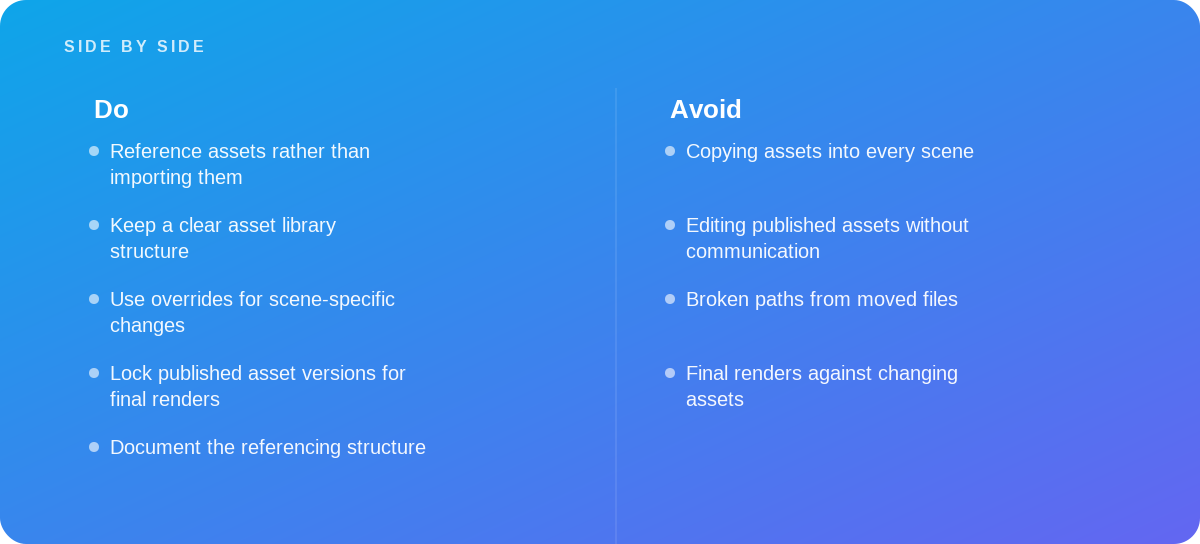
  1. Reference assets rather than importing them
  2. Keep a clear asset library structure
  3. Use overrides for scene-specific changes
  4. Lock published asset versions for final renders
  5. Document the referencing structure
What to do and what to avoid with scene assembly with references, side by side
Good practice against the usual mistakes, from the sources listed below.

What should I avoid?

Avoid:

  • Copying assets into every scene
  • Editing published assets without communication
  • Broken paths from moved files
  • Final renders against changing assets

When should I get help?

Short answer Bring in help when several artists share scenes.

Where this comes from

The figures and practices above come from the sources listed.

Working on something like this?

We take on 3D Design & Development work for teams who want it done once, properly. Tell us what you are building and we will tell you honestly whether we are the right studio for it. Start a project.

Where to go next

Spotted something wrong? Report an error on this page. We correct on the page and say what changed.


All services

The work behind this article, and what it costs.

See it in practice

All the work
Before: 3D Product Render: Clay Model to Finished Studio Shot
After: 3D Product Render: Clay Model to Finished Studio Shot
Clay render Final render

3D Product Render: Clay Model to Finished Studio Shot

Blender Cycles, PBR materials, custom thin-glass shader, HDRI plus key/fill/rim area lights, curved cyclorama, pedestal, depth of field, AgX color management

Studio demo on a public-domain photo, not a client job

Watch the video

Product Lighting E-commerce & Product 2-3 days

Before: 3D Interior Scene: Wireframe to Sunlit Final Render
After: 3D Interior Scene: Wireframe to Sunlit Final Render
Wireframe / clay Final render

3D Interior Scene: Wireframe to Sunlit Final Render

Blender Cycles scene layout, PBR textures, procedural shaders, sun + sky + window fill lighting, practical lamp, depth of field, AgX color management

Studio demo on a public-domain photo, not a client job

Architectural Visualization Real Estate & Interior Design 3-5 days

Before: 3D Packaging Render: From Clay Model to Shelf-Ready Hair Oil Box
After: 3D Packaging Render: From Clay Model to Shelf-Ready Hair Oil Box
Clay model pass Final product render

3D Packaging Render: From Clay Model to Shelf-Ready Hair Oil Box

Hard-surface modeling, UV unwrapping, label and dieline artwork, glass and liquid shaders, studio lighting, Cycles render

Studio demo on a public-domain photo, not a client job

Packaging Modeling Beauty & Personal Care 3-5 days

MediaScaleUp Editorial Team

Articles here are researched, written and checked by the MediaScaleUp studio team before they are published, and dated when they are reviewed.

Keep reading

More in 3D Design & Development