Motion Systems and Guidelines, Done Properly
Learn how to brief, price, compare and accept a motion system: duration scales, easing tokens, patterns, reduced motion, supplier questions and red flags.
 MediaScaleUp Editorial Team

Motion systems and guidelines are the agreed set of durations, easing curves and named patterns that make every animated moment in a product or brand feel like one decision rather than hundreds. A button press, a sheet sliding up, a chart drawing in, a logo resolving at the end of a social cut: without a system, each of those gets timed by whoever happened to build it, on the day they built it. With one, they all draw from the same short list of values, and the result feels designed rather than assembled.
This handbook is for the person commissioning that work: a product lead whose app has picked up a dozen slightly different slide-in speeds, a brand manager whose motion identity looks great in a launch film but falls apart in the product, or a design-system owner who has color, type and spacing tokens but nothing for time. It covers what to put in the brief, what questions to ask suppliers, what actually drives the effort and cost, how to compare quotes that look nothing alike, the red flags that predict a system nobody adopts, and how to judge the finished result before you pay the final invoice.
One idea runs through all of it. A motion system is only worth what developers and designers can implement from it. A beautiful showreel of transitions is not a system. A small, named, documented set of values, shipped as tokens and paired with a defined reduced-motion behavior for every pattern, is.
What you are buying when you commission motion systems and guidelines
It helps to be precise about the product before you talk to anyone. A complete motion system has three layers of content and two layers of delivery, and a proposal that is missing any of them is selling you something smaller than it sounds.
The three content layers
- A duration scale. A short ladder of named time values, for example four to six steps running from a quick micro-interaction value to a slow, deliberate value for large-surface transitions. The point is that nobody picks 230 milliseconds on a whim; they pick "medium" and the scale decides what medium means.
- A set of easing curves. Typically three to five named curves: a standard curve for elements moving on screen, a decelerating curve for things entering, an accelerating curve for things leaving, and possibly an emphasized or expressive curve for brand moments. Each is defined numerically, usually as a cubic-bezier, spring parameters, or both.
- Named patterns. Standard treatments for the moments that recur: entering, exiting and transforming, plus whatever your product specifically needs, such as list reordering, loading and progress, success and error feedback, or navigation between hierarchy levels. Each pattern specifies which duration token, which easing token, what properties animate, and in what order.
The two delivery layers
- Tokens. Durations and easings defined as named values in a format your engineering team consumes directly: design-token JSON, CSS custom properties, platform constants for iOS and Android, and matching variables or styles in your design tool. Tokens are what turn a guideline into something enforceable.
- Documentation. Written, browsable guidance with do and don't examples, rationale, pattern specs and reduced-motion alternatives. Documentation is not optional. A motion system that is not documented is not adopted, and a system that is not adopted does not exist.
Mature public systems show what this looks like at scale. The Material Design motion guidance defines duration and easing as named tokens and organizes transitions into reusable patterns, and it is worth reading before you brief anyone, simply to calibrate what "documented" means. You do not need anything as large as Material; most products need a fraction of it. But the shape is the same.
- Duration scale A small ladder of named time values, not arbitrary milliseconds
- Easing set Three to five named curves used consistently
- Patterns Standard treatments for entering, exiting and transforming
- Tokens Durations and easings shipped as values developers use directly
- Documentation Required, or the system is not adopted
- Reduced motion A defined alternative for every pattern
Signs your product or brand needs a motion layer now
Most organizations do not commission a motion system in a vacuum. They commission one because something has started to feel off. These are the situations where outside help usually pays for itself, and they are worth naming in your brief because they tell the supplier what problem they are solving.
Motion is inconsistent across the product
The classic symptom: open three modals in three parts of the app and they arrive at three different speeds with three different curves. Nobody decided that. It happened because each team or contractor picked values that looked fine in isolation. A quick audit usually confirms it; if you search a web codebase for transition and animation declarations, you will often find dozens of distinct duration values where four or five would do. That spread is the clearest possible evidence that you need a scale.
Your design system has no motion layer
Plenty of design systems have mature tokens for color, typography, spacing and elevation, and nothing for time. Components in the library animate, but each component encodes its own timing. When a system team says "we need motion tokens," they are really asking for the duration scale, easing set and patterns described above, plus the work to retrofit existing components.
Brand motion has to extend into the product interface
Brand motion, the kind used in films, social cuts and launch campaigns, is usually expressive, slower and more theatrical than interface motion needs to be. When the brand team wants the product to "feel like the brand," someone has to translate: keep the character of the curves and the choreography, but compress durations to interface speeds and strip out anything that would slow a user down on the hundredth repetition. That translation is specialist work, and it is one of the most common reasons to bring in a studio that works on both sides of the line.
You are about to scale production
If you are about to produce motion at volume, across many templates, markets or channels, a system is what keeps it coherent. Our guide to templating motion for scale covers the production side; the motion system is the rulebook those templates should be built from.
A motion system is not the same as motion principles. Principles are the beliefs ("motion should explain spatial relationships," "never animate just to decorate"). The system is the values and patterns that make those beliefs concrete. You need both, and a good supplier will ask about your principles first. If you have not written them down, read our piece on getting motion design principles right before you brief.
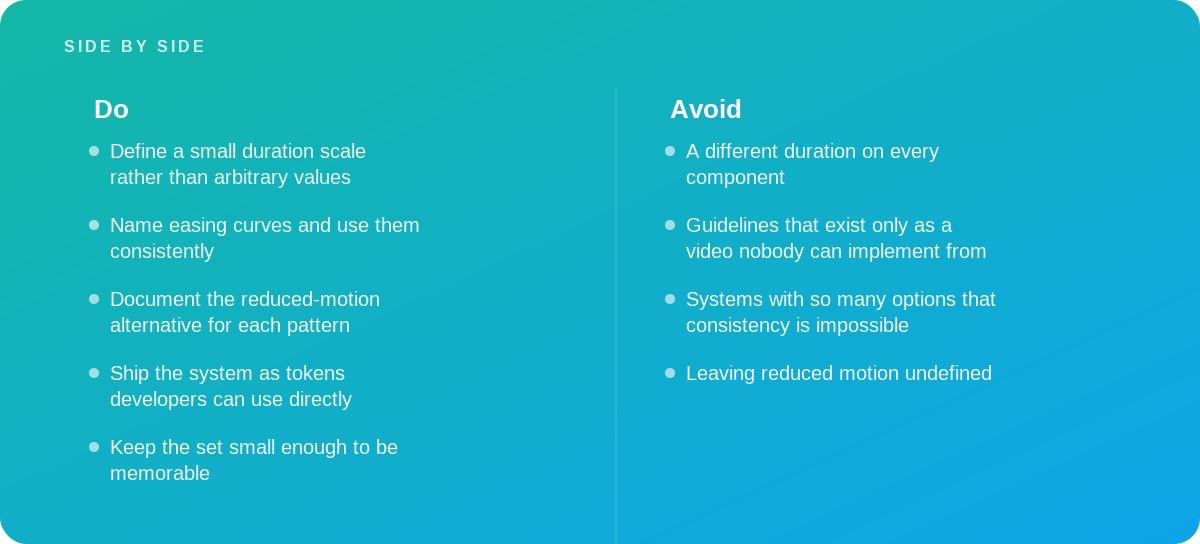
What to put in a motion system brief
A vague brief produces quotes you cannot compare. A specific one forces suppliers to price the same scope, and it surfaces early whether they understand what a system is. These are the sections a good motion-system brief should contain.
Scope and surfaces
List every surface the system must cover: web app, marketing site, iOS, Android, desktop, embedded screens, video and social output, presentations, in-store or exhibit screens. Each additional platform adds token formats, implementation notes and testing. Be honest about which are in scope now and which are "later," because "later" is where systems quietly fork.
Current state
Share what exists: the component library, any existing tokens, a screen recording of the current product, brand motion references, and ideally a rough inventory of the duration and easing values currently in the codebase. A supplier who can see that you have forty-odd distinct durations will scope the consolidation work far more accurately than one who has to guess.
Required deliverables
Name them explicitly, so nobody can quote for a mood film and call it a system:
- Duration scale with named steps and the value of each step
- Easing set with named curves, numeric definitions, and guidance on when each is used
- A named pattern library covering at minimum enter, exit and transform, plus any product-specific patterns you list
- Tokens in the formats your platforms consume, with the naming convention agreed in advance
- A reduced-motion specification for every pattern
- Written documentation with rationale and examples, delivered in your documentation platform or a format you can import
- Reference implementations or prototypes for the key patterns
- A handoff session and a defined support window after delivery
Constraints and standards
State your accessibility target, your supported platforms and versions, performance constraints (for example low-end Android devices or embedded hardware), and any platform conventions you want to respect. Apple's Human Interface Guidelines have specific expectations about motion and about honoring the system-level Reduce Motion setting; if you ship on Apple platforms, say so, and expect the supplier to design with those conventions rather than against them.
Success criteria
Write down how you will judge the result. "Every component in the library uses only scale durations and named easings." "Every pattern has a documented reduced-motion alternative." "A developer who has not seen the workshops can implement the three core patterns from the documentation alone." Criteria like these make acceptance a checklist rather than an argument.
Questions to ask a motion system supplier before you sign
Portfolios for this kind of work are misleading. A reel shows what motion looks like; it cannot show whether a system was adopted, whether developers could implement it, or whether it survived its first year. The questions below get at the parts a reel hides. Ask them in the pitch meeting and listen for specifics rather than adjectives.
- Can you show a motion system you delivered as tokens, not just as video, and walk us through how developers consumed it?
- How many duration steps and easing curves do you typically recommend, and how do you decide?
- How do you audit our current motion before proposing values, and what does that audit deliver?
- How do you define reduced-motion behavior, and will every pattern in the library have one?
- Which token formats will you deliver for each of our platforms, and who writes the platform-specific implementation notes?
- Who on your team writes the documentation, and can we see a sample from a previous system?
- How do you handle brand motion that is too slow or theatrical for interface use?
- What does your handoff include, and what support do you provide after delivery?
- How will you test the system on real devices, including lower-end hardware?
- What is explicitly out of scope in your proposal, and what would it cost in time to add it?
- Who owns the source files, prototypes and documentation when the project ends?
- How would you recommend we govern the system after launch, so it does not fork?
Good answers are concrete. A supplier who says "we usually land on four or five durations, and we derive them from an audit of your current values plus the sizes of the surfaces that move" understands the work. One who says "we'll create a motion language that captures your brand's energy" may make lovely films but is not describing a system.
Pay particular attention to the handoff answer. The gap between motion designers and engineers is where most systems fail, and the supplier should be able to explain exactly how specifications reach code. Our guide to motion specs for developer handoff describes what a well-formed spec contains, and it is a useful yardstick for judging sample documentation.
What drives the cost of a motion system
Pricing for this work varies widely between studios, regions and engagement models, so rather than quote figures, it is more useful to understand what moves the effort up or down. When two quotes differ by a large factor, the difference almost always traces back to one of these drivers, and usually to one supplier pricing a larger scope than the other.
Number of platforms
Each platform needs its own token output, its own implementation notes, and its own testing. Web alone is the simplest case. Web plus native iOS and Android roughly triples the delivery and verification work, even though the underlying design decisions are shared. Adding video, presentation and exhibit output adds a different kind of work: translating interface timing into editorial and broadcast contexts.
Size of the pattern library
Enter, exit and transform are the minimum. Real products also need navigation transitions, list and grid behavior, loading and skeleton states, feedback for success and error, data and chart animation, and perhaps onboarding or empty-state moments. Each pattern needs design, a spec, a reduced-motion alternative, a prototype and documentation. A library of eight patterns and a library of twenty-five are very different projects.
Retrofit versus greenfield
Defining a system for a product that does not exist yet is cheaper than consolidating an existing one. Retrofitting means auditing current values, mapping each to the new scale, identifying the edge cases that do not map cleanly, and often pairing with your developers to update components. It is also where most of the value is, so do not cut it to save money.
Brand translation
If the system has to carry brand character, someone needs to study the brand motion, extract what makes it distinctive, and recompose that into interface-speed curves. That is senior creative work and it is billed accordingly.
Documentation depth
A token file with a one-page reference is at one end; a fully illustrated documentation site with rationale, do and don't examples, embedded prototypes and per-platform code samples is at the other. The deeper version costs more and gets adopted far more reliably.
Implementation involvement
Some suppliers hand over files and leave. Others pair with your engineers for a sprint or two while components are updated. The second model costs more and catches the problems that only appear when real code meets the spec.
Comparing motion system quotes line by line
Quotes for motion systems rarely share a structure. One studio prices by phase, another by deliverable, a third by team-weeks. The only way to compare them fairly is to break each one down against the same criteria. The scorecard below is the framework we recommend; score each supplier from one to five on each row, and weight the rows by what matters most for your situation.
| Criterion | What a strong quote shows | What a weak quote shows | Suggested weight |
|---|---|---|---|
| Audit of current motion | A named audit phase with a written inventory of existing durations and easings | No audit, or "we'll review your product" with no output | High for retrofits |
| Duration scale and easing set | Explicit named deliverables with a stated target size | Folded into "motion language" with no definition | High |
| Pattern library | A list of patterns by name, with count and scope | "Key transitions" with no list | High |
| Token delivery | Specific formats per platform and an agreed naming convention | Video files or design-tool files only | High |
| Reduced motion | Defined alternative for every pattern, tested with system settings | Mentioned as a general intention or absent | High |
| Documentation | Written docs with rationale, examples and a sample shared in advance | A style-frame deck or reference video | High |
| Prototypes | Interactive or code prototypes for core patterns | Rendered animations only | Medium |
| Engineering support | Pairing time or review of implemented components | Handoff meeting only | Medium |
| Device testing | Named devices and conditions, including low-end hardware | Not mentioned | Medium |
| Governance guidance | A proposal for ownership, change requests and versioning | Not mentioned | Medium |
| Ownership and licensing | Full transfer of source files, tokens and docs | Ambiguous or retained by supplier | High |
Once scored, compare cost against the weighted total rather than against each other directly. A quote that is noticeably more expensive but scores high on tokens, documentation and reduced motion is almost always better value than a cheaper one that delivers a showreel and a deck, because the cheaper one leaves you to do the hardest part, turning motion into something implementable, yourself.
Also check what each supplier has assumed you will provide. Some quotes look lean because they assume your engineers will write all token outputs, or your design-system team will write the documentation. That may be fine, but it should be a decision you make, not a surprise you discover in week six.
Red flags in proposals, portfolios and pitches
Most failed motion systems fail in predictable ways, and most of those ways are visible in the proposal if you know where to look. These are the warning signs worth pausing on.
Red flag: The main deliverable is a video.
- Guidelines that exist only as a video cannot be implemented from. Developers need numbers, names and specs, not a reel to eyeball.
- If the proposal's headline deliverable is a "motion guidelines film," ask what the tokens and written specs will look like. If there are none, it is a brand film, not a system.
Too many options
Some proposals promise flexibility: a dozen durations, eight easings, variant after variant of every pattern. It sounds generous. In practice, systems with so many options make consistency impossible, because every designer and developer picks differently from a long menu, and you are back to where you started with extra documentation. A strong supplier will argue for a small set, small enough that people can remember it without looking it up.
No audit, straight to style frames
A supplier who jumps to visual exploration before understanding what your product currently does is designing a system for an imaginary product. For a retrofit, the audit is the foundation: it tells you which values to consolidate, which components are outliers, and where the current motion is already working and should be preserved.
Red flag: Reduced motion is missing or vague.
- Leaving reduced motion undefined is one of the most common mistakes in motion systems, and one of the most consequential for users with vestibular disorders.
- "We'll respect accessibility settings" is not a specification. Each pattern needs a stated alternative: a crossfade instead of a slide, an instant change instead of a zoom, or a shortened duration, chosen deliberately.
A different duration on every component
Review the supplier's past work if they will share it. If their "system" for another client assigns a unique duration to each component, the underlying problem was never solved; it was just documented. The whole point is that components share values.
No engineer in the room
If nobody on the supplier's side can talk comfortably about cubic-bezier values, spring parameters, CSS custom properties or platform animation APIs, the handoff will be rough. You do not need a supplier full of engineers, but you need at least one person who can speak to yours.
Vague ownership terms
You should own the tokens, documentation and source files outright. A supplier who retains rights to the system or charges for continued access to documentation is creating a dependency you will regret.
A worked example: scoping a motion layer for a SaaS product
The following is an illustrative example, not a client project. It shows how the brief, audit and scale decisions fit together for a realistic mid-sized product, with numbers chosen to be plausible rather than drawn from any real engagement.
The starting point
Imagine a B2B analytics product with a web app, an iOS companion app, and an active marketing team producing social video. The component library has around 60 components, of which roughly 25 animate in some way. A quick audit of the web codebase finds 31 distinct duration values ranging from 80 to 1,200 milliseconds, and 11 distinct easing definitions, several of which are near-duplicates of each other. The iOS app uses platform default animations in some places and hand-tuned values in others. The marketing team has a brand motion toolkit with a signature ease-out that feels distinctive but runs at 800 to 1,000 milliseconds for most moves.
Consolidating durations
The 31 values cluster naturally. Most micro-interactions (toggles, hover and press states, checkbox ticks) sit between 80 and 150 milliseconds. Component-level changes (dropdowns, tooltips, accordions) sit between 180 and 280. Larger surfaces (drawers, modals, full-screen sheets) sit between 300 and 450. A handful of outliers are much longer, mostly chart animations and one onboarding sequence.
A sensible proposal consolidates these into five named steps:
| Token | Value | Typical use | Audit values it replaces |
|---|---|---|---|
| duration-instant | 100 ms | Press, hover, toggle, checkbox | 80, 90, 100, 120, 125, 150 |
| duration-quick | 200 ms | Tooltips, dropdowns, small reveals | 180, 200, 220, 250 |
| duration-moderate | 300 ms | Accordions, cards, inline expansion | 270, 280, 300, 320 |
| duration-deliberate | 400 ms | Modals, drawers, sheets, page transitions | 350, 400, 450 |
| duration-extended | 600 ms | Charts drawing in, onboarding moments | 500 to 1,200 (all reviewed individually) |
Five steps is small enough to memorize and large enough to cover the product. The longest values in the audit are not simply clamped to 600 milliseconds; each one is reviewed, because some of them, especially chart animations, may need a separate pattern with its own rules. Our guide to data visualization in motion explains why charts often need staggered timing rather than one long duration.
Consolidating easing
The 11 easing definitions collapse into four named curves: a standard curve for on-screen movement, a decelerate curve for entering elements, an accelerate curve for exiting elements, and an emphasized curve derived from the brand's signature ease-out, reserved for a small number of brand moments such as onboarding completion and the first load of a dashboard. The brand curve keeps its shape but runs at the deliberate or extended duration rather than the 800 to 1,000 milliseconds used in video. That is the brand translation in practice: same character, interface speed.
Defining patterns
The illustrative system defines nine patterns: enter, exit, transform (size and position change), navigate forward, navigate back, list insert and remove, loading, confirm (success feedback), and chart reveal. Each pattern specifies its tokens, the properties that animate, choreography where several elements move, and a reduced-motion alternative. For example, "navigate forward" slides the incoming view 24 points from the trailing edge using duration-deliberate and the decelerate curve; its reduced-motion alternative is a crossfade at duration-quick with no positional movement.
Scoping the effort
Laid out as phases, the illustrative project might look like this:
- Weeks 1 to 2 Audit of web, iOS and brand motion; inventory of durations and easings; stakeholder interviews; principles confirmed
- Weeks 3 to 4 Duration scale and easing set proposed, prototyped and reviewed with design and engineering leads
- Weeks 5 to 7 Nine patterns designed, prototyped and specified, each with a reduced-motion alternative
- Week 8 Tokens delivered as design-token JSON, CSS custom properties and Swift constants; design-tool variables updated
- Weeks 8 to 9 Documentation written and published; developer walkthrough
- Weeks 10 to 11 Pairing with engineers on the first components; fixes to spec where implementation revealed gaps
Eleven weeks is a reasonable illustrative shape for a two-platform product with a nine-pattern library and a retrofit. A web-only greenfield product with five patterns could be considerably shorter; a four-platform product with brand, video and exhibit output could be considerably longer. The point of the example is not the number of weeks; it is that each phase maps to a deliverable you can inspect.
How to judge the finished motion system
Acceptance should be based on evidence, not on how the prototypes feel in a review meeting. Motion always looks good in a demo. The question is whether the system works when someone other than its author uses it.
The implementation test
Give the documentation to a developer who was not in any workshop and ask them to implement two or three patterns. Time how long it takes and note every question they have to ask. Each question is a gap in the documentation. A good system produces few questions, and the ones it does produce are about edge cases rather than basics.
The consistency test
After the first round of component updates, run the same audit you ran at the start. The number of distinct duration and easing values in the codebase should have dropped sharply and should map cleanly to token names. Any remaining raw values should be justified exceptions, documented as such.
The reduced-motion test
Turn on the operating system's reduced-motion setting on every supported platform and walk through the product. Every pattern should switch to its documented alternative. On the web, this is normally driven by the prefers-reduced-motion media query; on Apple platforms, by the Reduce Motion accessibility setting. The W3C Web Accessibility Initiative is the authoritative reference for the relevant guidance, including the WCAG success criteria covering animation from interactions and content that moves automatically. Our practical guide to motion accessibility and photosensitivity goes deeper on what vestibular-safe alternatives look like and on flashing thresholds that matter for video output.
The memory test
Ask three designers and three developers, without notes, to name the duration steps and easing curves. If they can, the system is small enough. If nobody can remember more than half of it, it is too big, and it will fragment.
The device test
Run the core patterns on the lowest-spec device you support. Motion that is smooth on a new laptop can stutter on an older phone, and a stuttering transition feels worse than no transition. If a pattern animates layout properties that force expensive recalculation, the spec should say how to achieve the same effect with transforms and opacity instead.
A common assumption is that a good motion system is judged by how impressive its transitions look. In reality, it is judged by whether people who did not design it use it correctly. The best systems are almost boring to present: a few durations, a few curves, a list of patterns, and documentation clear enough that nobody has to ask the author anything.
Extending the system beyond the product interface
Many organizations commission a motion system for their product and then discover it is equally useful everywhere else they move pixels. Planning for that from the brief onward is cheaper than bolting it on later.
Video, social and editorial output
Video runs on frames, not milliseconds, and editorial pacing is slower than interface pacing. A good system includes a translation table: at 30 frames per second, a 200-millisecond interface value is six frames, a 400-millisecond value is twelve. Editors do not need to reproduce interface timing exactly, but sharing the same easing character and choreography makes a product demo and a launch film feel related. If editors will work from templates, the system should feed directly into them; our article on motion graphics templates for editors covers how those are built so they stay on-system.
Real-time and game-engine contexts
Interactive installations, product configurators and broadcast graphics built in real-time engines have their own animation systems and curve editors. The same token values can be carried across, but someone has to map them to the engine's curve representation. If this is in scope, say so in the brief, and read our piece on real-time motion graphics in game engines for what changes in that environment.
Presentations and events
Slide software offers limited easing control, so the system should specify which built-in transitions and durations are the closest acceptable match, rather than pretending presenters will hand-tune curves. A one-page "presentation motion" sheet is often enough.
One practical request: ask for a frame-based version of the duration scale in the delivery. A small table converting each token to frames at 24, 25, 30 and 60 frames per second saves every editor and animator from doing the arithmetic themselves, and removes one excuse for going off-system.
Keeping the system alive after handoff
A motion system is a living part of your design system, not a one-off deliverable. Most of the value is lost in the first year if nobody owns it. Plan for governance before the supplier leaves.
Assign an owner
Someone on your side, usually on the design-system team, needs to own the motion tokens and patterns: approving changes, answering questions, and saying no to one-off values. Without an owner, every team that feels the scale does not quite fit will add its own value, and the drift begins again.
Define a change process
New patterns will be needed. Set out how they are proposed, reviewed and added, and require that every new pattern arrives with tokens, a spec, a reduced-motion alternative and documentation. That rule alone keeps the system coherent as it grows.
Version the tokens
Treat motion tokens like any other shared dependency. Version them, publish change logs, and avoid silently changing the value behind an existing name, because a change to duration-quick changes every component that uses it. That is the power of tokens and also the risk.
Lint and review
Where your tooling allows, add checks that flag raw duration and easing values in code, and add a motion line to design review checklists. The goal is not policing; it is making the on-system choice the easy one.
- Name the owner Assign motion tokens and patterns to a named person or team before handoff day.
- Publish the change process Document how new patterns are requested, reviewed and added, including the reduced-motion requirement.
- Version and log Release token changes as versions with change logs; never repurpose an existing name silently.
- Automate the obvious Add lint rules or review checks that flag raw durations and easings outside the token set.
- Re-audit on a schedule Repeat the original audit periodically and treat new raw values as issues to resolve.
Where the investment pays off, and where it does not
Not every organization needs a full motion system. A small marketing site with a handful of hover states can live on a two-line convention. A product with multiple teams, multiple platforms and a brand that wants to show up in the interface almost certainly needs one, and the cost of not having it compounds every time another screen ships with its own timing.
What a well-run system gives you:
- Motion across screens, platforms and channels feels like one decision
- Designers and developers stop debating timing on every ticket
- Reduced-motion behavior is designed once and applied everywhere
- Brand character carries into the product without slowing users down
- New components and templates start on-system by default
What it costs you, beyond the invoice:
- Retrofitting an existing product takes real engineering time
- Requires an internal owner, or it drifts within months
- Overbuilt systems with too many options fail as surely as no system
- Little return for very small products with minimal animation
If you are weighing whether to commission the work, the deciding questions are simple. Is motion noticeably inconsistent across your product today? Does your design system have tokens for everything except time? Does brand motion need to reach the interface? If the answer to any of those is yes, a well-scoped system will save more time than it costs, because every future screen, template and video starts from decisions already made. Our animation and motion graphics team works on both sides of that line, from brand films to product interfaces, which is often where the hardest translation work sits.
Verdict Commission a motion system when inconsistency is visible, when your design system lacks a motion layer, or when brand motion must reach the product. Insist on a small duration scale, named easings, named patterns with reduced-motion alternatives, tokens developers can use directly and written documentation. Judge suppliers on those deliverables, not on their showreel, and judge the result by whether someone who did not design it can implement it correctly.
Where this comes from
- Material Design — Motion system
- Apple Human Interface Guidelines — Motion
- W3C Web Accessibility Initiative — Motion preferences
The figures and practices above come from the sources listed.
Working on something like this?
We take on Motion Graphics & Animation work for teams who want it done once, properly. Tell us what you are building and we will tell you honestly whether we are the right studio for it. Start a project.
Where to go next
Spotted something wrong? Report an error on this page. We correct on the page and say what changed.