Motion and Pacing in the Edit: What Actually Works
Learn how shot length, cut placement, split edits, music and tempo changes shape an edit, and how to review, brief and budget for pacing that holds attention.
 MediaScaleUp Editorial Team

Motion and pacing in the edit are the rhythm of a finished video: how long each shot is held, where each cut lands against the sound, and how the tempo rises and falls from the first frame to the last. Two editors given identical footage, identical music and an identical script will produce films that feel completely different, and most of that difference lives in pacing rather than in shot selection. A piece that is paced well feels considered and confident. A piece that is paced badly feels rushed, sluggish or oddly flat, and viewers sense it long before they can explain why.
This matters to anyone who commissions, approves or makes video: marketing leads signing off a brand film, in-house teams turning one shoot into a dozen social cutdowns, agency producers handling client notes, and editors who want a sharper vocabulary for decisions they already make by instinct. Pacing is largely invisible when it is right, which is exactly why it tends to be the last thing anyone examines. Review notes gravitate to what is easy to point at, such as a logo size, a caption typo or a color shift, while the thing that actually decides whether people keep watching goes unexamined.
This briefing starts with an executive summary for decision-makers, then moves into the technical craft that specialists use to control rhythm, and closes with the practical implications for budgets, schedules, review processes and knowing when to bring in outside help.
Executive Summary: Five Decisions That Control Pacing
Pacing sounds abstract, but in practice it comes down to a small number of repeatable decisions. If you remember nothing else from this briefing, remember these five, because nearly every pacing problem traces back to one of them.
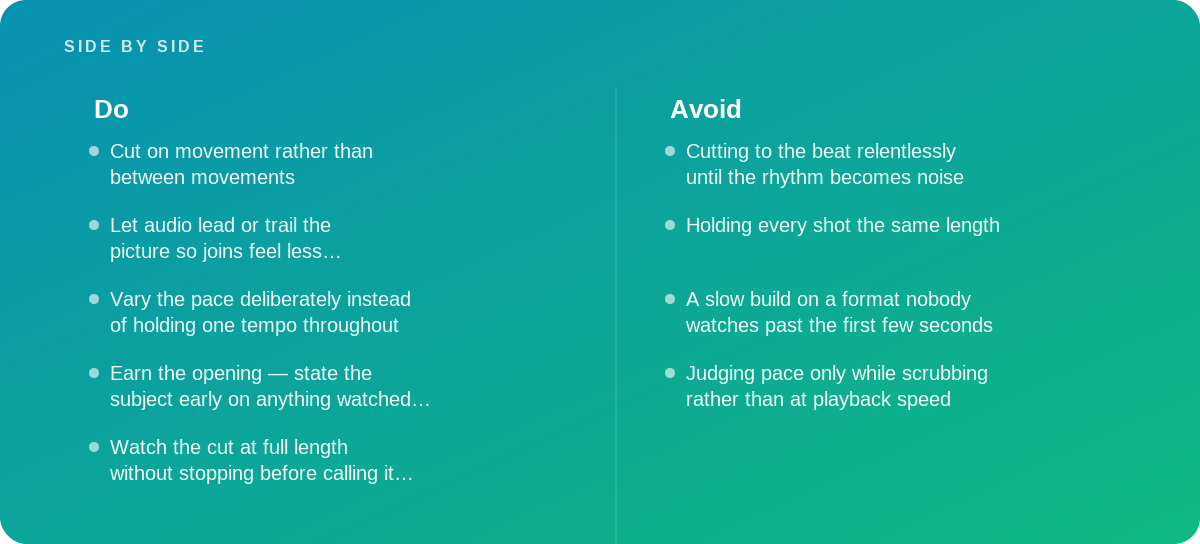
- Where the cut lands inside the action. A cut placed inside a movement reads as smoother than one placed while the subject is at rest. Cutting between movements exposes the join; cutting through them hides it.
- Whether sound and picture change at the same moment. When audio leads or trails the picture across a cut, the familiar J-cut and L-cut, joins feel less mechanical. When everything changes on the same frame, the edit starts to feel assembled rather than told.
- How the cuts relate to the music. Music-led editing places cuts against the beat or the phrase structure. Used with judgment it adds energy; used relentlessly it turns rhythm into noise.
- How the tempo changes over the piece. Sustained fast cutting flattens rather than energizes. A piece needs slower passages for the fast ones to register as fast.
- What happens in the opening seconds. On anything watched in a feed, the first seconds decide whether the rest is watched at all, so the subject must be stated early.
Those figures are simple arithmetic, not research findings, but they set the scale of the conversation. Pacing decisions are made in units of individual frames. Moving a cut two frames earlier, about 83 milliseconds at 24 frames per second, can be the difference between a join that disappears and one that feels like a stumble. That is why pacing cannot be judged from a storyboard or a script timing alone, and why it has to be checked at real playback speed.
For the business reader, the practical point is this: pacing is where a large share of an edit's quality is decided, it is hard to specify in a brief, and it is cheap to fix during the offline edit and expensive to fix after picture lock. Budget review time for it explicitly, and ask for it by name in feedback.
What Pacing Is Made Of: Shot Length, Cut Placement and Tempo
Editors talk about pacing as a single quality, but it is really three separate variables layered on top of each other. Separating them makes problems much easier to diagnose.
Shot length
The first variable is how long each shot stays on screen. Shot length should be driven by how long the shot takes to read. A wide establishing shot of a busy factory floor carries a lot of information and needs time; a close-up of a hand pressing a button carries one idea and is understood almost instantly. A useful working rule is to hold a shot until the viewer has taken in its point, then leave slightly before they begin to look for something else. Holding past that point creates drag; cutting well before it creates confusion.
The most common shot-length mistake is uniformity. When every shot is held for roughly the same duration, say two seconds each across a whole montage, the edit develops a metronomic quality that the viewer notices as monotony, even if each shot is individually well chosen. Varying shot length according to content is one of the simplest ways to make an edit feel alive.
Cut placement
The second variable is exactly where, within a shot, the cut happens. Two edits can have identical shot lengths and still feel very different because one cuts in the middle of a gesture and the other cuts just after the gesture ends. Cut placement determines whether a join is felt or hidden, and it is where cutting on action, match cuts and audio overlaps do their work.
Tempo and its changes
The third variable is tempo: the overall rate of change across a passage, and how that rate shifts between passages. Tempo is not just the average shot length. A sequence of long shots with fast camera movement or busy on-screen motion can feel faster than a sequence of short static shots. Tempo includes the internal motion of the frame, the density of the sound track, the rate of new information in narration, and the frequency of cuts.
Internal motion is also shaped by technical choices made before the edit. Frame rate and shutter settings determine how motion blurs and how smooth or staccato movement looks, which is covered in detail in our guide to frame rates and motion cadence. Retiming footage in the edit changes internal motion again, and the trade-offs of that are explored in speed ramping and slow motion decisions.
Insight: When someone says an edit "feels slow," first establish which variable they mean. The fix differs completely depending on the cause.
- Shots held past their read time: trim tails, often by only a handful of frames each.
- Joins landing at rest points: move cuts into movement rather than removing shots.
- A flat tempo with no variation: restructure passages so fast and slow sections contrast.
Cutting on Action: Why a Cut Inside Movement Disappears
Cutting on action is one of the oldest and most reliable techniques in editing. The principle is straightforward: when a movement begins in one shot and completes in the next, the viewer's attention follows the movement across the cut, and the change of angle registers far less than it would if the cut occurred while everything was still.
Why it works
A cut is a sudden discontinuity in the image. If the frame is static when the cut happens, the discontinuity is the most noticeable thing on screen. If the frame is full of motion, such as an arm swinging, a head turning or a door opening, the eye is busy tracking that motion and absorbs the change of angle as part of the action. The movement acts as a bridge. This is why a cut from a wide shot to a close-up as a person sits down feels natural, while the same cut made after they have settled feels abrupt.
Where exactly to cut
There is no universal frame, but practitioners generally find that cutting somewhere in the first third to the middle of a movement works better than cutting at its very start or very end. Cutting at the very start risks the viewer missing the initiation of the action; cutting at the very end effectively becomes a cut at rest. Many editors also overlap the action by a few frames, repeating a tiny part of the movement in the incoming shot, because the eye loses a fraction of a second re-orienting after the angle change. The exact overlap depends on the size of the angle change, the speed of the movement and the frame rate; the only reliable test is to watch it at speed.
Continuity details that break the effect
- Mismatched direction: If a hand moves left to right in the wide and right to left in the close-up because the camera crossed the axis, the bridge collapses.
- Mismatched speed: If one take was performed faster, the movement appears to jump in velocity at the cut.
- Prop and position continuity: A cup in the wrong hand draws attention to the join no matter how well the cut is timed.
- Frame-rate mismatches: Mixing footage with different capture rates without deliberate conversion can make movement cadence change at the cut.
Cutting on action is not only for drama. In product videos it hides the joins between a hand reaching for a device and the close-up of the screen; in interviews it smooths the transition to cutaway footage; in social cutdowns it lets an editor compress a long demonstration into a few seconds without the compression being felt.
Letting Audio Lead: J-Cuts, L-Cuts and the Sound Bed
A straight cut, where picture and sound change on the same frame, is the default in most editing software and the most mechanical-feeling join available. Split edits loosen that. In a J-cut, the audio from the next shot begins before the picture changes, so the viewer hears the next scene before seeing it. In an L-cut, the audio from the outgoing shot continues after the picture has changed. Both are described in the timeline editing documentation from Adobe's Help Center and the editing craft material from Avid, and both are core tools for controlling pace.
How split edits change perceived pace
A J-cut pulls the viewer forward. Hearing the next scene before seeing it creates a small moment of anticipation, and the picture change then satisfies it. This makes transitions feel motivated and generally quickens the sense of momentum. An L-cut does the opposite: it lets a moment linger, holding the emotional or informational weight of a line while the picture moves on to a reaction or a cutaway. L-cuts are the natural tool for letting a statement land.
In interview-driven content, split edits are what make a talking-head piece feel like a story rather than a sequence of answers. Cutting to b-roll on a J-cut as the speaker begins a new idea, and returning to the speaker on an L-cut as the idea concludes, produces a rhythm the viewer experiences as fluent. Our dedicated guide to J-cuts and L-cuts covers the mechanics in more depth.
The sound bed as the real pacing layer
Many experienced editors describe the sound track as the true carrier of pace, with the picture cut on top of it. Room tone, ambience, effects and music run continuously underneath the cuts and knit them together. When the sound bed is continuous, even a fairly aggressive picture cut can feel smooth. When the sound drops out or changes character at every cut, even gentle picture editing feels choppy. This is one reason to bring rough sound design into the offline edit rather than leaving all of it to the final mix; the approach is discussed further in our article on sound design for video.
Pace is heard before it is seen. If the sound bed runs continuously under the cuts, the picture can move quickly without ever feeling choppy.
Practical overlap lengths
There is no correct overlap length for a split edit, but a few working ranges help as starting points. Short overlaps of a few frames soften a join without the viewer consciously noticing the split. Overlaps of around half a second to a second are clearly perceived and work well for introducing a new speaker or location. Longer overlaps, several seconds of audio from one scene carried over images of another, become a deliberate storytelling device. Start in the middle of those ranges and adjust at playback speed.
Music-Led Editing Without Cutting Every Beat
Music-led editing places cuts against the beat or the phrase structure of a track. It is the backbone of montages, promos, event recaps and most social content. It is also the technique most prone to overuse.
Beats, bars and phrases in frames
Because edits are made in frames, it helps to convert tempo into frames before cutting. At a given beats per minute, one beat lasts 60 divided by the BPM in seconds; multiply by the frame rate to get frames. The table below shows the arithmetic for common combinations. Beat lengths that do not fall on whole frames mean cuts will drift slightly relative to the beat unless the editor alternates rounding, which is one reason editors often cut by feel against the waveform rather than by counting.
| Tempo | Seconds per beat | Frames per beat at 24 fps | Frames per beat at 30 fps | Frames per four-beat bar at 24 fps |
|---|---|---|---|---|
| 90 BPM | 0.667 | 16 | 20 | 64 |
| 100 BPM | 0.600 | 14.4 | 18 | 57.6 |
| 120 BPM | 0.500 | 12 | 15 | 48 |
| 128 BPM | 0.469 | 11.25 | 14.06 | 45 |
| 140 BPM | 0.429 | 10.29 | 12.86 | 41.14 |
Beat lengths that are not whole frames, as at 100, 128 and 140 BPM, are the reason cuts placed by counting frames alone drift away from the music over a long passage. Always run this arithmetic for your own project settings, and then confirm every musical cut by ear at playback speed rather than trusting the numbers or the waveform alone.
Cutting to the phrase rather than the beat
Cutting on every beat is almost always too much. At 120 BPM that is a cut every half-second, and after a few seconds the viewer stops perceiving the cuts as rhythmic and starts perceiving them as noise. More durable approaches include cutting on the downbeat of each bar, cutting on the first beat of each phrase and reserving beat-level cutting for short bursts at peaks in the track. Changes in musical section, such as a verse moving into a chorus or a drop after a build, are natural places for a change of visual tempo or a significant cut.
Cutting slightly off the beat
Many editors find that a cut landing exactly on the transient of a beat can feel slightly late, because the viewer's perception of the picture change and the sound transient do not align perfectly. Cutting a frame or two before the transient is a common adjustment. Others deliberately syncopate, placing some cuts between beats, to prevent the edit from becoming predictable. Neither is a rule; both are reasons to trust playback over the waveform display.
Movement within the frame on the beat
The most sophisticated music-led edits do not just cut on the beat; they place movement on it. A camera move that settles on a downbeat, a subject turning on the snare hit, a graphic element landing with the kick: these create rhythm without adding cuts. This is also where editing and motion design meet, since animated elements can be timed to the track as precisely as cuts. Teams that build reusable animated elements for this purpose will find our guide to motion graphics templates for editors useful.
Shaping Tempo Across a Whole Piece
The most consequential pacing decisions are not made at the level of individual cuts; they are made at the level of structure. A piece of any length needs a tempo shape: an arc of faster and slower passages that gives the viewer contrast and gives the important moments room to land.
Why sustained fast cutting flattens
It seems intuitive that faster cutting means more energy, but sustained fast cutting has the opposite effect. Perception adapts: once the viewer has been exposed to rapid cuts for a while, rapid cutting becomes the baseline and stops registering as exciting. The piece then has nowhere left to go. Energy in an edit comes from change in tempo, not from tempo itself. A fast passage after a slow one feels fast; a fast passage after another fast passage just feels like more.
Energy in an edit comes from changes in tempo, not from tempo itself. A fast passage only feels fast when something slower came before it.
Building a tempo map
Before fine-cutting, it helps to sketch a tempo map: a simple outline of each section of the piece with its intended pace. For a two-minute brand film this might read: a calm, held opening that establishes place; a quickening middle as the product or story develops; a peak of fast cutting around the key message; a sudden slow moment, one long held shot, for the emotional core; and a measured close. Writing this down before cutting prevents the most common structural fault, which is a piece that drifts into one tempo and stays there.
Breath points
Breath points are deliberate pauses: a held shot with no dialogue, a moment of ambient sound, a beat of black. They give the viewer time to absorb what they have just seen and reset their attention for what is next. Editors under pressure to shorten a piece often remove breath points first, because they seem to contain no information. That usually makes the piece feel longer, not shorter, because the viewer never gets the relief that makes the next passage feel fresh.
Holding every shot the same length
The micro-level version of a flat tempo map is uniform shot length. A common symptom is an edit assembled from selects that were all trimmed to a standard duration during logging. The fix is not to randomize lengths but to let each shot's content dictate its duration, and then look at the resulting rhythm across the passage and adjust for variety.
Glossary of Pacing Terms
Pacing conversations stall when people use the same words to mean different things. The terms below are the ones that come up most often in review sessions and edit notes, defined the way working editors use them.
- Cutting on action
- Placing a cut inside a movement so the motion carries the viewer across the change of shot.
- J-cut
- A split edit where audio from the incoming shot starts before its picture appears.
- L-cut
- A split edit where audio from the outgoing shot continues after the picture has changed.
- Tempo map
- A section-by-section plan of intended pace across a piece, sketched before fine-cutting.
- Breath point
- A deliberate pause in information, such as a held shot or ambient moment, that lets the viewer reset.
- Phrase
- A musical unit, typically several bars long, that provides natural points for structural cuts.
- Cutdown
- A shorter version of an edit made for a specific placement, such as a 15-second social ad from a longer film.
- Picture lock
- The point at which the edit's timing is fixed and handed on to sound, color and finishing.
The last term matters for pacing because it marks the point after which timing changes become expensive. Every downstream department works to the locked timing, so a pacing change after lock can mean re-conforming the sound mix, re-rendering graphics and re-checking color. The stages leading to lock are described in our guide to picture lock and edit stages.
Pacing for the Feed: The First Seconds Decide
For anything watched in a social feed, or anything that plays before a skippable ad, the opening seconds decide whether the rest is watched at all. This is the attention convention that governs social video, and it changes pacing priorities fundamentally.
Earning the opening
A slow build is a legitimate technique in a cinema, where the audience has committed to the full runtime. In a feed, nobody has committed to anything. A slow build on a format nobody watches past the first few seconds simply means most viewers never reach the payoff. The practical rule is to state the subject early: show the product, the person, the problem or the result in the opening moments, and use the rest of the runtime to develop it.
This does not mean the opening must be frantic. A single strong, clearly composed shot with an immediate statement of what the video is about often outperforms a rapid barrage of cuts, because the viewer understands instantly why they should keep watching. The goal is clarity at speed, not speed for its own sake.
Reading retention data
Platforms provide data that shows where viewers drop off. YouTube Help's documentation on audience retention reporting explains how to read the retention curve for a video, including how to spot the moments where viewers leave or rewatch. For an editor, the retention curve is the closest thing to an objective pacing diagnostic available. A sharp drop in the opening seconds points to an opening that does not state its subject. A steady decline through a section points to a passage that has gone flat. Spikes suggest moments people rewind to see again, which often reveal cuts that went by too fast.
Retention data should inform pacing decisions, not dictate them. A drop can be caused by a misleading thumbnail or title rather than by the edit. But when the same pattern appears across several videos, it is usually telling you something about how you cut.
Vertical and square formats
Aspect ratio affects pacing too. In a vertical frame, there is less lateral space for movement, so action that reads clearly in a wide landscape frame can become cramped or hard to follow, and editors often need to hold shots slightly longer or reframe to keep the action readable. The reframing decisions themselves are covered in our guide to aspect ratios and framing for social video.
Insight: Long-form and feed pacing are not the same craft applied at different lengths. A cutdown that simply trims a long edit usually inherits a slow opening that suited the long version and fails in the feed. Re-cut the opening for each placement rather than trimming the tail.
Worked Example: One Brand Film, Four Placements
The following example is illustrative, built to show the decisions involved rather than drawn from a specific client project. A company has a three-minute brand film for its website: it opens on a slow, atmospheric sequence of the workshop at dawn, introduces the founder in interview, shows the product being made, and closes on customers using it. The brief is to turn this into a 60-second version for landing pages, a 30-second pre-roll and a 15-second social cutdown.
| Version | Runtime | Opening approach | Tempo shape | Key pacing changes |
|---|---|---|---|---|
| Master film | 3:00 | 20 seconds of atmospheric workshop footage, founder heard on a J-cut before being seen | Slow open, building middle, fast montage peak, held emotional shot, measured close | Baseline; breath points throughout |
| Landing page | 1:00 | Atmosphere reduced to about 5 seconds; founder's first line brought forward | Short calm open, one build, one peak, brief close | Interview answers tightened with L-cuts over b-roll; one breath point kept before the close |
| Pre-roll | 0:30 | Product in hand in the first shot, with the founder's clearest one-line statement | Fast open, one sustained middle, clean end card | Atmospheric sequence cut entirely; montage cut to the phrase, not every beat |
| Social cutdown | 0:15 | Finished product and on-screen text naming it within the opening moments | A single rising passage with one held beat before the end | Built from the peak montage; captions timed to the music's phrase changes |
What the numbers imply
Going from three minutes to fifteen seconds is a reduction to one twelfth of the runtime. Trying to achieve that by trimming each shot proportionally would produce a 15-second film with the same structure as the three-minute one, but with every shot flashing past too fast to read. Instead, each version is rebuilt around what that placement needs. The 60-second version keeps the story shape; the 30-second version keeps the argument; the 15-second version keeps a single impression.
Music across versions
Suppose the track runs at 120 BPM. At 24 fps each bar is 48 frames, or two seconds, so the 15-second cutdown spans seven and a half bars. That is awkward: it is better to plan the cutdown around seven bars of music plus a short tail or an edited ending, so the music resolves rather than being chopped mid-phrase. The 30-second version gives exactly fifteen bars, which usually still requires a music edit to land on a phrase ending. These are the calculations that should happen before cutting, not after a client points out that the music ends awkwardly.
Where the time actually goes
In projects like this, the cutdowns can take a meaningful share of the total edit time even though they are short, because each one requires rethinking the opening and restructuring the tempo. Scheduling them as an afterthought is a common reason cutdown deliveries slip. Teams working across several editors on shared projects will find our guide to collaborative editing workflows helpful for keeping versions organized.
Reviewing Pace: Playback Speed, Fresh Eyes and Useful Notes
Pacing is the aspect of an edit most distorted by the way edits are usually reviewed. Scrubbing, jumping between markers and watching sections in isolation all hide the rhythm that the viewer will experience.
Watch at full length without stopping
Before calling a cut finished, watch it from start to finish at playback speed without stopping, without scrubbing and ideally without the timeline visible. Keep a notepad and jot a timecode or a quick word whenever your attention drifts or something feels abrupt, but do not stop to fix it. Pacing is a cumulative experience; the only way to judge whether the third minute drags is to have sat through the first two.
Judging at scrubbing speed is misleading
When scrubbing, the editor sees each cut in isolation and at an unnatural speed. Short shots look fine because the editor already knows what they contain; long holds look indulgent because scrubbing makes everything feel slow. Many pacing errors, particularly shots cut too short to read and breath points removed as dead time, come from decisions made while scrubbing rather than while watching.
Fresh eyes
Editors become habituated to their own cut. After dozens of viewings, the editor knows what every shot shows and can no longer experience it as a first-time viewer. Leaving an edit overnight, or showing it to someone who has not seen it, restores the perspective that pacing depends on. A colleague's reactions, where they lean in and where they glance away, are often more informative than their verbal notes.
Writing pacing notes that help
Vague notes such as "make it punchier" or "it feels long" leave the editor guessing. Useful pacing notes identify a location and a feeling: "from about 1:10 to 1:40 my attention drifted," or "the cut at 0:22 felt abrupt." The editor can then diagnose which variable is at fault: shot length, cut placement or tempo.
- Give timecodes or describe the shot rather than referring to "the middle part."
- Describe the experience ("I lost track," "felt rushed") rather than prescribing a fix.
- Note what works as well as what does not, so it is not changed in revisions.
- Consolidate notes from all reviewers before sending, so the editor is not re-pacing to conflicting instructions.
What This Means for the Business: Budgets, Schedules and Getting Help
Pacing has direct commercial consequences. A well-paced piece holds attention longer, communicates its message more clearly and survives being repurposed into shorter versions. A poorly paced piece can undermine a strong shoot, strong footage and a strong script. Yet pacing is rarely named in briefs, budgets or review processes, which is why it so often gets squeezed.
Build pacing into the schedule
Pacing work happens mostly in the later rounds of the offline edit, after the structure is agreed but before picture lock. Schedules that compress this phase, typically to protect a delivery date after late footage or late approvals, lose most of the fine-cutting where rhythm is refined. Protect at least one full review round dedicated to pace and flow, separate from rounds dealing with content accuracy, legal checks or branding.
Plan the versions up front
If one edit must serve as a long-form piece and as short cutdowns, say so in the brief. The editor can then identify candidate moments for each version during the main edit, choose music that has usable phrase endings at the target durations and structure the master film so its peak can stand alone. Discovering the cutdown requirement after the master is locked usually means rebuilding each version from scratch.
Deciding how much to handle in-house
Many teams can handle straightforward pacing competently in-house, especially for recurring formats with an established template. The table below summarizes where different approaches tend to fit.
| Situation | In-house editor | Specialist editor or studio |
|---|---|---|
| Recurring social format with an established template | Strong fit | Usually unnecessary |
| Piece tests as boring but nobody can say where | Difficult, due to habituation | Strong fit; fresh eyes and diagnostic experience |
| Long edit that must be cut down substantially | Possible with time and distance | Strong fit; restructuring rather than trimming |
| One edit serving long-form and several cutdowns | Possible if planned from the brief | Strong fit for version planning and music edits |
| Music-led promo with heavy motion graphics | Depends on motion design skills | Strong fit when edit and animation are timed together |
When to bring in help
Three situations reliably justify outside help. The first is a piece that tests as boring when nobody can say where: this is a pacing problem, and diagnosing it benefits from someone who has not been living with the cut. The second is a long edit that must be cut down substantially, where restructuring rather than trimming is needed. The third is an edit that must work both as a long-form piece and as a set of short cutdowns, where planning across versions from the start saves significant rework. For projects like these, our video editing and production services cover structure, pacing, cutdowns and finishing, and where the brief calls for animated elements timed to the edit, our motion graphics team can work alongside the editor from the first assembly.
Measuring the result
Pacing improvements are measurable where platforms report audience retention. Comparing retention curves between an original edit and a re-paced version of the same content, on the same placement and with the same title and thumbnail, is one of the clearest ways to judge whether pacing changes made a difference. Treat the comparison with care, since audiences and timing vary, but look for consistent changes in where viewers drop off rather than a single headline number.
Above all, name pacing explicitly. Put it in the brief, give it its own review round and ask for it in feedback. The rhythm of an edit is invisible when it works, and that is precisely why it needs to be managed deliberately.
Where this comes from
- Avid — Editing craft documentation
- Adobe Help Center — Timeline editing techniques
- YouTube Help — Audience retention reporting
The figures and practices above come from the sources listed.
Working on something like this?
We take on Video Editing & Production work for teams who want it done once, properly. Tell us what you are building and we will tell you honestly whether we are the right studio for it. Start a project.
Where to go next
Spotted something wrong? Report an error on this page. We correct on the page and say what changed.