Image SEO, Done Properly
Six common image SEO myths, debunked: what alt text, filenames, script loading, structured data and speed really do, plus a checklist for doing it right.
 MediaScaleUp Editorial Team

Image SEO is the work of making pictures findable and useful to search engines: the filenames you choose, the alt text you write, the copy that sits around each image, the structured data and sitemaps that describe it, and the way the file is actually delivered to a browser. None of it is glamorous, and most of it happens after the creative work is finished, which is exactly why it gets skipped. A beautifully retouched product shot named IMG_4821.jpg, injected into the page by a carousel script, with alt text reading "image," is close to invisible to search.
It matters most to visual businesses: retailers, interior designers, food brands, photographers, manufacturers with configurable products, travel and real estate companies. For them, image search is a meaningful traffic source, and it is driven almost entirely by the text and markup around the image rather than by the pixels themselves. The people who control that text are often not the people who made the image, so the job falls between the retoucher, the web team and the marketer, and nobody owns it.
This guide is organized around the misconceptions that cause most of the damage. Each one is common, each one sounds reasonable, and each one leads to a specific, fixable mistake. For every myth we explain why it is wrong, what search engines actually use, and what to do instead, then finish with a worked retrospective clean-up of a mid-sized library and a checklist you can hand to whoever uploads your images.
How Image Search Actually Reads a Picture
Before the myths, it helps to have an accurate model of what a crawler does when it meets an image. The process has three stages, and a failure at any one of them means the later stages never happen.
Discovery. The crawler has to find the image URL. It does that by parsing the HTML of a page it has already fetched and reading the src (and srcset) of img elements, or by reading an image sitemap. If the image URL only exists after a script runs, or only in a CSS background declaration, discovery becomes unreliable or impossible.
Fetching. The crawler must be allowed to request the file. A robots.txt rule that disallows the directory the image lives in, a CDN that blocks unfamiliar user agents, or signed URLs that expire within minutes all stop the process here, even when discovery succeeded.
Understanding and ranking. Once fetched, the image is associated with the page that referenced it. Search engines do run computer vision on images, but the dominant signals for what an image is about and which queries it should appear for are textual: the alt attribute, the filename, the caption, the heading and paragraph around it, the page title, and any structured data. The landing page's own quality matters too, because an image result sends the visitor to that page.
Google documents this model in its image guidance within Google Search Central, and the practical upshot is simple: image SEO is mostly text and plumbing work. The editing matters for conversion once someone arrives, but the text and the delivery decide whether they arrive at all.
The signals, ranked roughly by how much control and influence you have, look like this:
| Signal | What it tells a search engine | Relative weight | Who usually controls it |
|---|---|---|---|
| Alt text | The primary textual description of the image available to a crawler | High | Content editor or CMS template |
| Surrounding content | Context: captions, nearby headings and paragraphs inform how the image is interpreted | High | Copywriter, page designer |
| Page title and topic | What the landing page is about, and whether it satisfies the query | High | SEO lead, copywriter |
| Structured data | Entity details (product, recipe, article) and eligibility for rich results | Medium, feature-dependent | Developer |
| Filename | A weak but real hint about subject matter | Low | Retoucher, photographer, uploader |
| Image sitemap | Discovery on large or script-heavy libraries | Discovery only | Developer, platform |
| Licensing metadata | License details that can be surfaced in image results | Display feature, not ranking | Rights manager, developer |
| Delivery speed and format | Page experience, crawl efficiency, and whether large files are processed at all | Indirect but broad | Developer, retoucher at export |
Myth 1: Search Engines Can See Your Images, So the Words Barely Matter
This is the root misconception, and it sounds persuasive because machine vision really is good now. Upload a photo of a walnut dining table to any modern vision model and it will tell you it is a wooden table. So why bother describing it?
Myth: Search engines use visual recognition to understand images, so filenames, alt text and captions are legacy busywork that no longer affect image search.
Reality: Visual recognition tells a search engine roughly what is in the frame; it cannot tell it which query the image should answer, which product it is, what it costs, who made it, or why it is on this page. Those facts live in the text and markup around the image, and that is still where most of the ranking signal comes from.
Consider what the vision model cannot know. It sees a wooden table. It does not know that the table is the "Hollis 180 cm extending dining table in smoked oak," that it seats eight when extended, that it is sold by your store, or that this particular shot shows the extension leaf mechanism. A searcher looking for "extending oak dining table seats 8" is served by those facts, not by the generic label "table." The more specific the query, and the commercially valuable queries are almost always specific, the more the text decides the outcome.
Vision also cannot resolve ambiguity that only context can. A close-up of a hand on a tablet screen could illustrate an article about accessibility, a point-of-sale system, a children's education app or a stock photo of "technology." The paragraph beside it, the heading above it and the caption below it resolve which one it is. That is why placing images next to the text they illustrate is a real practice rather than a layout preference: an image dropped into a generic gallery at the bottom of the page, detached from any explanation, gives the search engine far less to work with than the same image placed under the heading it illustrates.
What to do instead
- Put every image that you want found near the text that explains it: under the relevant heading, beside the paragraph it illustrates, with a caption where a caption would help a human reader too.
- Make sure the landing page is genuinely about the thing in the image. A product image that ranks but lands on a category page with forty other items converts poorly and tends to lose position.
- Treat visual recognition as a tie-breaker that confirms your text, not as a substitute for it. If your alt text says "blue linen armchair" and the image shows a grey leather sofa, you have created a contradiction, not a keyword win.
Myth 2: Alt Text Is a Place to Put Keywords
Alt text is the primary textual description of an image available to a crawler, and once people learn that, the temptation is obvious: load it up. The result is attributes like "oak dining table, best oak dining table, cheap dining table, dining table sale, wooden table UK." This is the most common image SEO mistake we see in audits, and it hurts twice.
Myth: Because alt text is a strong signal, the more target keywords it contains the better the image will rank.
Reality: Alt text exists to describe the image to people who cannot see it. Search engines use it because it is usually an honest description; stuffed alt text reads as spam, degrades the experience for screen reader users, and adds nothing a single accurate phrase would not already provide.
The first harm is accessibility. A screen reader user landing on a product page hears every alt attribute read aloud. Five repetitions of a keyword phrase per image, across a gallery of eight images, is forty useless announcements before they reach the price. The W3C Web Accessibility Initiative images tutorial frames alt text around the image's purpose on the page: informative images get a concise description of the information they carry, functional images (a linked logo, an icon button) describe the action, and purely decorative images get an empty alt attribute so assistive technology skips them.
The second harm is to search itself. Search engines explicitly treat keyword stuffing as a negative quality signal, and even where it does not trigger a problem, it wastes the one field most likely to be used as the image's description. The useful question is not "which keywords can I fit?" but "what would I say about this image to someone on the phone who cannot see it, given why it is on this page?"
Writing alt text that does both jobs
Good alt text describes the image in its context. The same photograph can deserve different alt text on different pages, because its purpose changes. A studio shot of a leather tote bag might carry these alternatives:
- On the product page: "Cognac full-grain leather tote with brass hardware, shown open to reveal the laptop sleeve."
- In a care guide: "Leather tote after conditioning, with the surface showing an even satin sheen."
- In a blog post about the workshop: "A leatherworker stitching the handle of a cognac tote by hand."
Each one includes the natural terms a searcher would use (leather tote, cognac, laptop sleeve) because those are the accurate words, not because they were inserted. Practical rules of thumb: aim for a sentence or a phrase, usually well under 125 characters, because some assistive technologies handle long alt text poorly; do not begin with "image of" or "photo of," since the screen reader already announces it as an image; include text that appears inside the image if that text carries meaning; and leave decorative flourishes with an empty alt attribute rather than a missing one.
For a deeper treatment of the edge cases, including complex charts, images of text and functional icons, see our guide to image accessibility and alt text decisions. The short version is that accessible alt text and effective image SEO alt text are the same thing written by someone paying attention.
Myth 3: Filenames Stopped Mattering Years Ago
At the other end of the spectrum from alt text is the filename, which many teams dismiss entirely. The camera or the export action names the file, the CMS renames it on upload anyway, so why spend time on it?
Myth: Search engines ignore image filenames, so IMG_4821.jpg or final_v3_EDIT.jpg is as good as anything.
Reality: A descriptive filename is a weak but real signal. It will not rescue a poorly described image, but it costs almost nothing when done at the right moment, it helps when other signals are thin, and it pays off internally in asset management long before it pays off in search.
Weak is the right word. Nobody should expect a filename change to move an image from nowhere to page one. But image SEO is a game of accumulating consistent small signals, and the filename is often the only descriptive text that travels with the image everywhere: into the CDN URL, into a download, into a scraper's copy that someone later hotlinks. Search engines have said publicly that filenames can give a light clue about subject matter, and in the absence of good alt text or context, a light clue is better than a camera serial number.
The timing problem
The real reason filenames go wrong is timing. Renaming files after upload usually changes their URLs, which breaks any existing references and can reset whatever the search engine had already learned about that URL. The cheap moment to name a file well is before upload, ideally at export from the retouching application. That makes it a production decision, not a web decision, and it belongs in the brief the retoucher works from. We cover how to specify naming conventions in a practical guide to image briefs for retouchers, and how to keep names stable across revisions in our piece on getting image file versioning right.
A workable naming pattern for web delivery:
- Lowercase, words separated by hyphens rather than underscores or spaces: hollis-extending-dining-table-smoked-oak-front.jpg.
- Subject first, then the distinguishing variant (color, material, angle): the part a human would search for goes at the front.
- Keep version numbers and internal codes out of the public filename. Put the SKU at the end only if customers genuinely search for it.
- Five or six meaningful words is plenty. A filename is not a second alt text.
- Never reuse the same name for different images across the site, and never rename a live file without a redirect plan.
If your platform renames uploads to hashes automatically, check whether it preserves a descriptive slug somewhere in the delivered URL; many do if the original name is descriptive, and none can invent one if it is not.
Myth 4: If It Shows Up in the Browser, Google Will Find It
Modern sites increasingly load images through JavaScript: carousels, infinite scroll, "load more" buttons, lightbox galleries, product configurators and client-rendered frameworks. Everything looks fine in a browser, so the assumption is that everything is fine for search.
Myth: Any image a visitor can see on the page is discoverable by search engines, regardless of how it was loaded.
Reality: Images that exist only after a script runs, after a user interaction, or only as a CSS background may never be discovered or indexed. Search engines index images referenced by img elements in the rendered HTML; anything that requires a click, a scroll event, or a style declaration is at risk.
Search engines do render JavaScript, but rendering is deferred, resource-limited and does not simulate user behavior. A crawler does not click "next" on your carousel, does not hover to trigger a zoom image, and does not scroll to the bottom of an infinite list to fire the next batch. Google's documentation is explicit that it does not index images referenced only through CSS properties such as background-image. Designers love background images for hero banners because they crop gracefully; that is fine for decorative banners, and a problem for anything you want to rank.
Patterns that are safe, and patterns that are not
| Implementation | Discoverable? | Fix if needed |
|---|---|---|
| Plain img element with src in the server HTML | Yes, most reliable | None |
| Native lazy loading (loading="lazy" on an img) | Yes | None; keep the real URL in src |
| picture element with srcset and a fallback img | Yes | Make sure the fallback img has alt text |
| Script lazy loader that swaps data-src into src on scroll | Uncertain | Switch to native lazy loading, or add a noscript fallback and an image sitemap |
| Carousel that injects slides 2 onward on click | Often no | Render all slides' img elements in the HTML and hide them visually |
| CSS background-image | No | Use an img with object-fit for anything that should rank |
| Image URL fetched from an API after load | Unreliable | Server-render the markup, or list URLs in an image sitemap |
The quickest test is to view the page source (not the inspector, which shows the live DOM after scripts run) and search for the image filename. If it is not in the raw HTML, you are relying on rendering. Then use the URL inspection tool in Search Console to see the rendered HTML Google actually produced. If the image is missing from both, it is effectively not on the page as far as search is concerned.
A related trap is the "above the fold" lazy load: applying lazy loading to the main product image or the hero image. It rarely blocks discovery when done natively, but it delays the largest visible element, which hurts page speed metrics for no benefit. Lazy load what is below the first screen; load the primary image eagerly.
Robots.txt, CDNs and Image Sitemaps: The Plumbing Nobody Checks
Some of the most complete image SEO failures have nothing to do with content at all. The images are well named, well described and well placed, and they still never appear in image search, because the crawler is not allowed to fetch them or cannot find them in a large library.
Accidental blocking
Robots.txt files accumulate rules over the years. A line such as Disallow: /wp-content/ or Disallow: /assets/ added to reduce crawling of plugin files, or a staging-era Disallow: /media/ that survived launch, will quietly block every image in that directory. Blocking image directories by accident is one of the mistakes most worth checking for, because it silently zeroes an entire traffic channel and nothing on the page looks broken.
Check three things. First, read your robots.txt line by line and match each Disallow against the actual paths your images are served from. Second, check the robots.txt on your CDN or image subdomain separately; images.example.com has its own robots.txt, and some CDN defaults are restrictive. Third, check whether the CDN applies bot protection that challenges or rate-limits crawler user agents. A 403 served only to crawlers will not show up in your own browser.
Where image sitemaps actually help
Image sitemaps help discovery on large libraries. They do not rank anything by themselves; they tell a search engine that an image URL exists and which page it belongs to. That is most valuable when:
- The library runs to thousands of images and many pages are deep in pagination.
- Images are loaded by script and you cannot change the front end quickly.
- Images are served from a different host than the page, such as a CDN domain.
- You have just completed a large retrospective optimization and want the changes found promptly.
For a twenty-page brochure site with images in plain img tags, an image sitemap adds little. For a retailer with several thousand SKUs, each with six to ten images, it is cheap insurance. Most platforms can add image entries to an existing XML sitemap by listing image locations under each page URL; you do not need a separate file, although a separate one is easier to monitor.
Myth 5: Structured Data and Licensing Metadata Are Only for Big Retailers
Structured data has a reputation as an enterprise concern: something the platform team of a large marketplace handles. Smaller visual businesses tend to assume it is out of reach, or irrelevant to them.
Myth: Structured data and image licensing metadata only make a difference for large ecommerce sites, and small studios, photographers and brands can ignore them.
Reality: ImageObject and product markup support rich results for any site that qualifies, and licensing metadata can surface license information in image results. For photographers, illustrators and anyone whose images are licensable, that is often the most commercially direct piece of image SEO available.
Structured data is a vocabulary for stating facts in a machine-readable way, most commonly as a JSON-LD block in the page. The shared vocabulary lives at Schema.org, where the ImageObject type defines properties such as contentUrl, creator, creditText, copyrightNotice, license and acquireLicensePage. Product, Recipe, Article and similar types each accept an image property, and search engines use those images in rich results: a product's price and availability beside its thumbnail, a recipe card with its photo, an article with a large preview.
Three levels of effort
- Use the markup your platform already emits. Most ecommerce and publishing platforms output basic Product or Article markup. Check that it includes the right images, at a sufficient resolution, and that the image URLs match the ones on the page. Wrong or placeholder images in markup are common after theme changes.
- Complete the fields that matter for your business. Retailers should ensure every product has multiple images in the markup (different aspect ratios help different result layouts) alongside price, availability and identifiers. Publishers should make sure the article image is large and relevant.
- Add licensing metadata where images are licensable. If you sell or license imagery, provide the license URL and the page where someone can acquire a license. Search engines can then show a "licensable" indication in image results, which puts the path to purchase directly in front of the person who found your photo.
There are two routes for licensing information, and they complement each other. Structured data on the page describes the image as it appears there. Embedded IPTC photo metadata travels inside the file itself, so it survives when the image is downloaded and reposted elsewhere. The embedded route is set at export, which makes it a retouching and asset management task; our practical guide to image metadata and rights explains which fields to fill and how to stop export presets from stripping them. A common failure is a web export setting that removes all metadata to save a few kilobytes, taking the creator and copyright fields with it.
Validate any structured data change with a rich results testing tool before and after deployment. Markup that describes content not visible on the page, or claims a license that does not exist, is worse than no markup.
Myth 6: Image Speed Is a Developer Problem, Not an SEO Problem
File size and format decisions are often treated as a separate performance workstream, handed to developers after the images are "done." In practice, the retoucher's export settings determine most of the outcome, and speed affects everything downstream.
Myth: Image weight and format are a technical performance issue that has nothing to do with whether images rank or pages convert.
Reality: Serving images fast and in modern formats affects page experience, how efficiently a site is crawled, whether visitors wait for the page, and how the landing page performs once image search delivers them. Oversized images are usually decided at export, long before a developer sees them.
Images are commonly the heaviest assets on a page, and the main product or hero image is frequently the element that determines when the page is visually complete. When that image is a 6 MB, 6000-pixel JPEG served to a phone that will display it at around 400 CSS pixels wide, the visitor waits for data they will never see. Search engines factor page experience into ranking, and a slow landing page loses the visitor that image search just earned you.
Practical delivery standards
- Export at the sizes you display. Produce a set of widths (for example 480, 800, 1200 and 1600 pixels for a content image, plus a larger zoom asset for products) and let srcset and sizes pick the right one. There is no benefit to delivering a master file.
- Use modern formats with a fallback. WebP is supported by all current major browsers, and AVIF by most, and both usually produce substantially smaller files than JPEG at comparable visual quality. Serve them through a picture element or content negotiation, with JPEG or PNG as the fallback.
- Set dimensions. Include width and height attributes (or a CSS aspect ratio) so the browser reserves space and the layout does not jump as images arrive.
- Compress deliberately. Choose quality settings by eye on representative images, including difficult ones like gradients, skin and fine fabric texture, rather than applying a single aggressive number everywhere.
- Keep a crawlable large version. Search engines favor high-quality images for prominent placements. Make sure at least one reasonably large rendition (commonly 1200 pixels or more on the long edge) is referenced on the page or in markup.
Format migration is its own project when you have years of legacy files; our article on converting legacy image formats covers color profile handling, transparency and which conversions lose quality. And because a compression setting that looks fine on one image can band a sky or smear a fabric weave on another, speed work belongs inside your image quality control checks, not after them.
A Worked Example: Retrospective Image SEO for a 2,400-Image Catalog
To make this concrete, here is an illustrative project, not a real client, showing how the myths above turn into a prioritized clean-up. The numbers are realistic for a mid-sized online furniture retailer, but they are an example, not a benchmark.
Starting point. The retailer has 300 products with an average of eight images each: 2,400 product images, plus roughly 350 images across blog posts and landing pages. Image search sends almost no traffic, even though the product photography is strong. An audit of a random sample of 200 product images finds:
- 82 percent of filenames are camera or export defaults (DSC_ and IMG_ prefixes, or "final" variants).
- 61 percent of alt attributes are empty, 24 percent repeat the product name identically on every image, and the remainder are stuffed with keyword lists added by a previous agency.
- Gallery images 2 through 8 are injected by a carousel script on click, so only the first image per product appears in the raw HTML.
- The robots.txt contains Disallow: /media/catalog/cache/, and the resized images the theme actually serves live under that path.
- Average product image weight is 1.9 MB, served as JPEG at 2400 pixels wide to every device.
- Product markup exists but references a single, 300-pixel thumbnail.
Prioritization. The fixes are ordered by what blocks what. Nothing else matters while the crawler cannot fetch the files, so access comes first, then discovery, then description, then enhancement.
| Priority | Fix | Myth it corrects | Illustrative effort | Scope |
|---|---|---|---|---|
| 1 | Remove the robots.txt rule blocking the served image path; confirm the CDN serves crawlers | Plumbing | 1 to 2 hours | Site-wide |
| 2 | Render all gallery img elements in the HTML; switch to native lazy loading below the first image | Myth 4 | 1 to 3 developer days | Product template |
| 3 | Rewrite alt text per image in context, starting with the top 60 products by revenue | Myths 1 and 2 | Roughly 2 to 4 minutes per image | 480 images first, then the rest |
| 4 | Update product markup to include three large images per product | Myth 5 | 0.5 to 1 developer day | Product template |
| 5 | Re-export in responsive widths as WebP with JPEG fallback | Myth 6 | Batch process plus spot checks | All 2,400 images |
| 6 | Adopt descriptive filenames for all new uploads; rename legacy files only with redirects | Myth 3 | Change to brief and export presets | Going forward |
| 7 | Add image entries to the XML sitemap and resubmit | Plumbing | A few hours | Site-wide |
The arithmetic of the alt text work. At an average of three minutes per image, the 480 images for the top 60 products take about 24 hours of focused writing, which is three working days for one person. The full 2,400 would take around 120 hours. That is why the rollout is staged by commercial priority rather than attempted in one pass, and why templated alt text generated from product attributes (material, color, angle) is a reasonable baseline for the long tail, provided a human edits the images where the template produces nonsense, such as lifestyle shots with several products in frame.
The weight savings. Moving from one 2400-pixel JPEG averaging 1.9 MB to responsive WebP renditions means a phone might receive an 800-pixel file that is a small fraction of that weight. Across eight gallery images, the difference in data for a mobile visitor is measured in megabytes per page view, which is the difference between a gallery that feels instant and one that stutters.
What not to do. The team is tempted to rename all 2,400 legacy files to descriptive names at once. Because the images were largely blocked and undiscovered, there is little accumulated search value to lose, but renaming still breaks every external reference and every cached URL in marketing emails and marketplace feeds. The sensible decision is to rename only where images are being re-exported anyway (step 5), with redirects from the old URLs, and to name everything new correctly from the start.
Measuring the result. Track the image search type in Search Console's performance report, the count of indexed images reported in the sitemap report, and landing page speed metrics for the product template. Expect discovery and indexing changes to take weeks to settle, not days, because crawlers need to revisit thousands of URLs.
Where Image SEO Fits in the Production Pipeline
Most of the myths above persist because image SEO is treated as a final step someone else does. It works far better as a set of small responsibilities distributed across the people who already touch each image.
- Brief and shoot
- Decide which images need to rank and for what. A product needs a clean front view, detail shots of the features people search for, and an in-context shot; those map to specific queries and specific alt text later.
- Retouching and export
- Descriptive filenames, embedded creator and copyright metadata, correct color profile, and responsive export sizes are all set here. This is where our image editing and graphic design work naturally absorbs SEO requirements rather than handing them downstream.
- Upload and publishing
- Alt text written in context, images placed next to the text they illustrate, captions where they help, and a check that the CMS did not strip metadata or rename files to hashes without a slug.
- Development
- Plain img elements, native lazy loading below the fold, structured data, image sitemap entries, and a robots.txt and CDN configuration that lets crawlers fetch images.
- Review
- Periodic audits: sample alt text, test rendering, check the sitemap report for indexing gaps, and review image search performance.
Channel matters too. Images prepared for marketplaces are governed by the marketplace's own search and listing rules, which differ from open web search in background, framing and text overlay requirements; see our practical guide to image editing for marketplaces before assuming the same files and descriptions will work in both places. Cut-outs and composites deserve attention as well: clean image masking on product shots makes it possible to produce both a white-background version for listings and an in-context version for content pages from one shoot, each with its own alt text.
What to Do Instead: The Image SEO Checklist
Here is the practical standard, condensed. It works as an upload checklist for editors and as an audit checklist for an existing site.
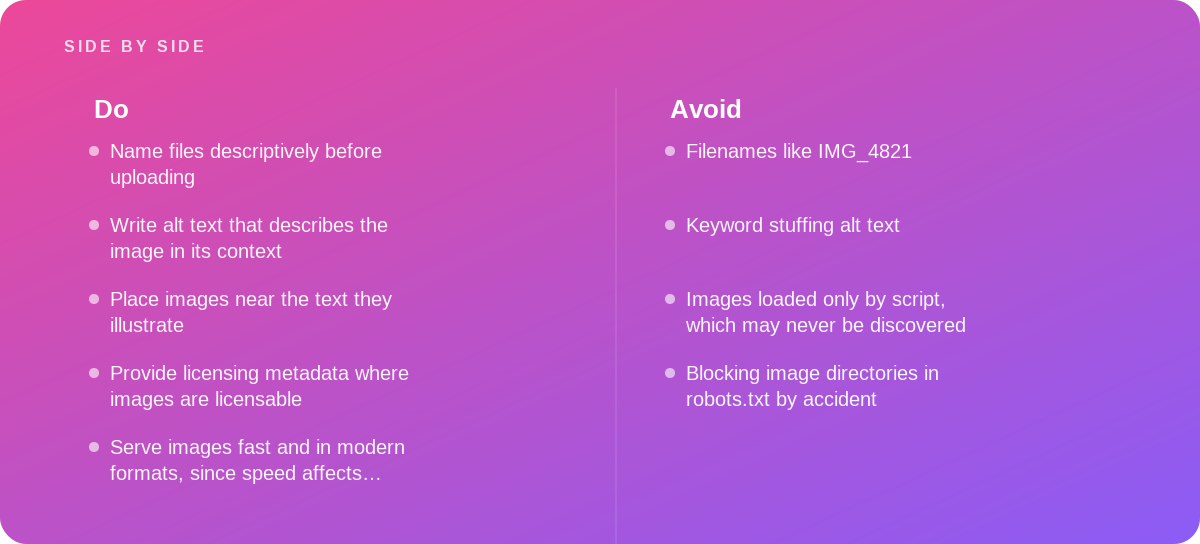
- Name every file descriptively before upload: lowercase, hyphen-separated, subject first, no camera defaults like IMG_4821.
- Write alt text that describes the image in the context of this page, in one natural sentence or phrase, with no keyword lists.
- Give purely decorative images an empty alt attribute so assistive technology skips them.
- Place each important image beside the heading and paragraph it illustrates, with a caption where a reader would benefit.
- Use plain img or picture elements with the real URL in the HTML; never rely on CSS backgrounds or click-triggered scripts for images you want found.
- Use native lazy loading below the first screen and load the primary image eagerly.
- Read robots.txt on both the main site and the image host, and confirm no rule blocks the paths images are actually served from.
- Add image entries to your sitemap when the library is large, script-loaded or served from a separate host.
- Include large, correct images in Product, Article or Recipe structured data and validate it.
- Provide licensing metadata, both embedded and in structured data, wherever images are licensable.
- Export responsive sizes in WebP or AVIF with a fallback, set width and height, and check compression by eye on difficult images.
- Review image search performance and indexed image counts quarterly.
When to bring in help
Much of this is achievable in-house with discipline. Outside help earns its cost in three situations. The first is when image search delivers no meaningful traffic to a business whose product is visual; that almost always indicates a structural problem such as blocking, script loading or missing markup, rather than a content one, and structural problems are faster to find with someone who has seen them before. The second is when a large library needs retrospective optimization: renaming, re-exporting, rewriting alt text and adding metadata across thousands of files is production work, and it goes faster through a team with batch processes and quality control in place. The third is when images are simply not being indexed at all despite being visible on the site.
If the images themselves also need work before they are worth ranking, such as inconsistent color, poor exposure or distracting backgrounds, it makes sense to handle the image editing and retouching and the SEO preparation in the same pass, so each file is exported once, correctly named, correctly sized and carrying the right metadata. Fixing the pixels and the plumbing separately usually means exporting everything twice.
Where this comes from
- Google Search Central — Image SEO best practices
- Schema.org — ImageObject
- W3C Web Accessibility Initiative — Images tutorial
The figures and practices above come from the sources listed.
Working on something like this?
We take on Image Editing & Retouching work for teams who want it done once, properly. Tell us what you are building and we will tell you honestly whether we are the right studio for it. Start a project.
Where to go next
Spotted something wrong? Report an error on this page. We correct on the page and say what changed.