Editorial Calendars: The Decisions That Matter
A phase-by-phase playbook for editorial calendars: define purpose, measure real capacity, build in review time, reserve reactive space and review what shipped.
 MediaScaleUp Editorial Team

Editorial calendars are plans that record what will be published, when, by whom, and why. That sounds like a spreadsheet with dates in it, and many teams build exactly that: a grid of topics stretched across twelve months, filled in during a burst of planning enthusiasm and quietly abandoned by spring. The difference between a calendar that runs a content program and one that decorates a shared drive comes down to a handful of decisions made early, most of them about capacity, lead time and flexibility rather than about topics.
This playbook is for business owners, marketing leads and in-house content teams who need a calendar that survives contact with real work. It walks through the process in the order you should follow it, from defining what each piece is for, to measuring how much your team can actually produce, to reviewing the plan against what shipped. Each phase has a goal, a set of actions, the outputs you should have at the end, and the checks that tell you whether it worked.
The central idea is simple: a calendar makes capacity visible, and capacity is the constraint that decides whether a content program survives its first quarter. Plan against the team you have, not the output you wish you had, and nearly every other decision gets easier.
How This Editorial Calendar Playbook Is Organized
The phases below are sequential. You can compress them, and a small team might finish the first four in a single afternoon, but skipping one usually creates a problem that shows up weeks later. A calendar built without a capacity check looks fine in week one and collapses in week six. A calendar without review time in the schedule works until the first piece needs legal sign-off. A calendar with no reactive slots breaks the first time a product launch moves.
Here is the whole procedure at a glance. Each step gets its own section afterward with actions, outputs and checks.
- Define purpose Decide what the program is for and give every planned piece a stated purpose tied to a business or reader goal.
- Measure capacity Count the real hours available for research, writing, editing, review and publishing, then convert them into a sustainable number of pieces.
- Build in lead time Work backward from each publish date through review, editing, drafting and research so deadlines reflect the full production path.
- Choose fields and a tool Settle on the minimum set of fields (topic, purpose, owner, deadline, channel, status) and a tool the whole team will actually update.
- Map fixed dates and seasonality Place the pieces whose timing is predictable first, then fill the remaining capacity with evergreen work.
- Reserve reactive space Hold back a deliberate share of capacity for work nobody can predict today.
- Review against what shipped Compare plan to reality weekly and monthly, and adjust volume, lead times and priorities from evidence.
If you already run a calendar that is slipping, you do not need to start over. Jump to the capacity phase and the review phase first; those two usually explain most of the slippage. If you want a broader view of how the calendar fits alongside workflows, roles and tooling, our guide to the operating decisions behind a content program covers the surrounding system.
Phase 1: Give Every Planned Piece a Stated Purpose
Goal: make sure every entry on the calendar exists for a reason someone can name, so that when capacity runs short you know what to cut.
Most calendars record a topic and a date. Few record why the piece exists. That omission matters more than it looks. When a deadline slips or a subject-matter expert goes on leave, somebody has to decide which piece moves. Without a recorded purpose, that decision defaults to whichever piece is furthest behind or whichever stakeholder is loudest. With a recorded purpose, it becomes a prioritization question you can answer in a minute.
Actions
- Write down the program's two or three goals. Examples: answer the questions prospects ask before a sales call; support customers after purchase so fewer contact support; establish expertise in a specific niche. Keep it to a short list, because a program with eight goals has none.
- Tag each planned piece with one primary purpose. Use a short controlled list, such as "acquire," "educate existing customers," "support launch," "reduce support load" or "build authority." A single dropdown field is enough.
- Name the reader. One line: who will read this, and what do they need to walk away with? This prevents the common problem of pieces written for internal stakeholders rather than the audience.
- Note how you will know it worked. Not a target figure pulled from the air, but the signal you will look at: search visibility for a query, use by the sales team, a drop in a specific type of support ticket, newsletter replies.
Guidance from the GOV.UK Service Manual makes a similar point from a public-sector angle: content should start from a user need, and if you cannot state the need, you should question whether the content should exist at all. The same discipline works for commercial content. A piece that exists only to "keep the blog active" is the first candidate for removal when the schedule tightens, and that is a feature, not a flaw.
Outputs
A short goals statement, a controlled list of purpose tags, and a backlog of candidate topics each carrying a purpose, a reader and a success signal. Do not put dates on anything yet. Dates come after capacity.
Checks
- Every candidate topic has exactly one primary purpose from the controlled list.
- Each purpose maps to one of the program's stated goals.
- No more than a small handful of purpose tags exist; if you have more than six, merge them.
- Each topic names a reader who is outside the organization, unless the program is explicitly internal.
- You could explain to a colleague, in one sentence, why each piece is on the list.
A useful test at this point: sort the backlog by purpose and look at the balance. If ninety percent of the list is "acquire" and nothing supports existing customers, that is a strategic choice you should make deliberately rather than by accident.
Phase 2: Measure Real Capacity Before You Commit to Volume
Goal: arrive at a publishing volume the team can sustain for a full quarter without quality dropping or people burning out.
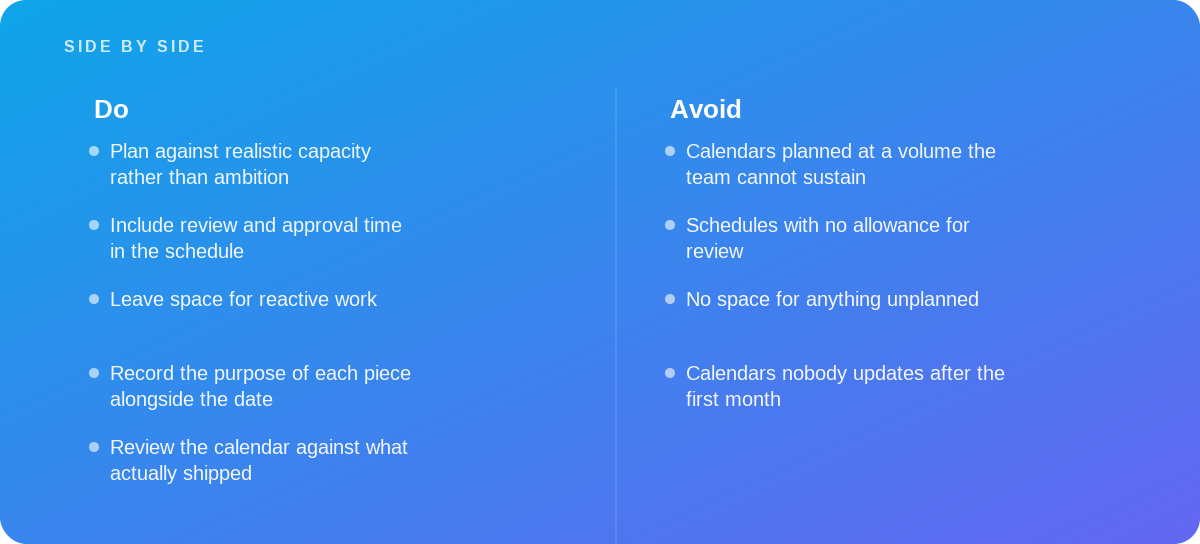
This is the phase that decides whether the calendar survives. Calendars planned at a volume the team cannot sustain are the most common failure in content planning, and the cause is almost always the same: someone estimated output from writing time alone, then forgot that research, editing, subject-matter review, approvals, formatting, imagery and publishing all consume hours too.
Actions
- List everyone who touches content. Writers, editors, designers, subject-matter experts, reviewers, approvers, and whoever uploads and formats the finished piece. Include freelancers and agencies.
- Record realistic weekly hours for content work. Ask each person how many hours per week they can reliably give to content after meetings, other duties and leave. Use the number they give for a normal week, not their best week. Part-time contributors and subject-matter experts often have far less time than managers assume.
- Estimate hours per piece by stage. Break a typical piece into research, drafting, editing, expert review, revisions, design or imagery, and publishing. Use your own recent history if you have it; if you do not, time the next two or three pieces carefully before committing to volume.
- Find the bottleneck role. Divide each role's weekly hours by the hours that role spends per piece. The smallest result is your real throughput, because the pipeline moves at the speed of its slowest stage.
- Apply a buffer. Plan at a fraction of the calculated maximum, since holidays, illness, urgent requests and rework will consume some capacity every month.
Shortcut: if you have no historical data, do not guess at hours per stage. Produce two pieces at your normal quality bar, log every hour against a stage, and use the average. Two measured pieces beat any number of estimates, and the exercise usually reveals that review and revisions take longer than anyone expected.
Outputs
A capacity sheet listing each role, their reliable weekly hours, their hours per piece, and the resulting pieces-per-week throughput for that role; the identified bottleneck; and a planned volume set below that bottleneck's limit.
Checks
Before you move on, confirm that the planned volume is below the bottleneck's throughput after the buffer, that the bottleneck is named (it is often an expert reviewer or a single editor, not the writers), and that the people whose hours you counted have agreed to the numbers. A capacity plan built from a manager's assumptions about someone else's time is not a capacity plan.
If writers are not the bottleneck but you are still considering adding freelancers, pause. Adding writers to a pipeline limited by editing or expert review simply grows the queue in front of the bottleneck. Our guide to running a freelance writer pool covers when outside writers genuinely add throughput and when they add only coordination load.
Worked Example: Sizing a Calendar for a Three-Person Team
To make the capacity arithmetic concrete, here is an illustrative example. The team and the hours are invented to show the method; your numbers will differ, and you should replace every figure below with your own measurements.
Imagine a mid-sized B2B company with a content lead who writes and edits, a marketing generalist who writes part-time, and a product specialist who reviews anything technical. The leadership team has asked for three long-form articles a week. Here is how the calculation plays out.
| Role | Reliable content hours per week | Hours per long-form piece | Pieces per week this role can support |
|---|---|---|---|
| Content lead (drafting share) | 8 | 6 (drafting half the pieces) | About 1.3 of their own drafts |
| Marketing generalist (drafting) | 10 | 8 (research plus drafting) | About 1.25 |
| Content lead (editing) | 6 | 2.5 (edit and revisions) | About 2.4 |
| Product specialist (review) | 3 | 1.5 (technical review) | About 2 |
| Publishing and imagery (shared) | 4 | 1.5 | About 2.7 |
Drafting capacity across both writers is roughly 2.5 pieces per week. Editing supports about 2.4. The product specialist's review supports about 2. The bottleneck is the specialist, at two pieces per week, and that is before any buffer.
Apply a buffer of around twenty to thirty percent for leave, urgent requests and rework, and the sustainable volume lands at roughly one and a half pieces per week. In practice, that means planning three pieces every two weeks, not three pieces every week. Leadership asked for double what the team can sustain.
The calendar now presents a real choice rather than a hidden one. The company can accept three pieces per fortnight; it can free up more of the specialist's time; it can reserve technical review only for pieces that genuinely need it, which raises throughput for non-technical pieces; or it can bring in additional editorial capacity. Each option has a cost, and each is visible because the calendar made capacity explicit. Without this step, the team would have committed to three a week, shipped two in week one, one in week two, and found itself three weeks behind by the end of the first month.
Notice also that the product specialist's three hours are a single point of failure. If they take a week off, technical pieces stop. The calendar should show that dependency, and the plan should put non-technical pieces in weeks when the specialist is known to be unavailable.
Phase 3: Work Backward From Publish Dates Through Review and Approval
Goal: make every deadline on the calendar reflect the full production path, not just the writing.
Research and review almost always take longer than writing. That is the lesson most first-time calendars miss. A publish date with no intermediate deadlines is really just a hope. Schedules with no allowance for review are the second most common failure after unrealistic volume, and they fail in a particularly frustrating way: the writing is done on time and the piece still misses its date because it sat in an approver's inbox.
Actions
- Map the stages every piece passes through. A typical path: brief, research, outline, draft, edit, expert review, revisions, approval, formatting and imagery, scheduled, published. Some pieces skip stages; note which.
- Assign an elapsed time to each stage, not an effort time. Editing may take two hours of effort, but if the editor handles several pieces a week, the elapsed time from submission to edited draft might be two or three working days. Calendars fail when they confuse effort with elapsed time.
- Set stage deadlines by counting backward. For each publish date, subtract the elapsed time of each stage to get the draft deadline, the brief deadline and the date research must start.
- Agree review turnaround times with reviewers. Get a named reviewer to commit to a turnaround, such as three working days, and record it. Unagreed review times are a guess.
- Define what happens when review is late. Decide in advance whether a piece publishes with a lighter review, moves to the next slot, or escalates. Making this decision in the moment wastes days.
Review is not only a scheduling issue; it is also a quality issue. A defined review stage is where accuracy, tone and standards are checked, and it is worth deciding what reviewers are actually assessing. Our guide to editorial quality rubrics covers how to give reviewers consistent criteria so reviews are faster and less subjective. For teams in finance, healthcare or other regulated sectors, where compliance review can add a week or more, calendars built for regulated teams need a different lead-time model entirely.
Outputs
A stage map with elapsed times, agreed reviewer turnarounds, a lead-time rule for each content type (for example, "long-form: research starts four weeks before publish"), and an escalation rule for late reviews.
Checks
- Each content type has a documented lead time from brief to publish.
- Review and approval appear as dated stages, not as an assumption inside the draft deadline.
- Every reviewer has agreed to a turnaround time in writing.
- There is a rule for what happens when review runs late.
- The first four weeks of the calendar already have briefs underway, because anything due sooner than the lead time cannot realistically make it.
A practical consequence of this phase: the first few weeks of a new calendar are usually thin. If lead time for long-form content is four weeks, anything planned for the next fortnight has to come from pieces already in progress. Accept that rather than cramming the opening weeks; an over-packed start trains the team to expect missed dates.
Phase 4: Choose the Minimum Fields and a Tool People Will Update
Goal: build a calendar structure simple enough that it stays current after the first month.
Calendars that nobody updates after the first month are a common way programs quietly die. The usual cause is over-design: twenty-five columns, color codes nobody remembers, and a tool that only one person knows how to use. The fix is to record only what drives decisions.
The core fields
At minimum, each entry needs a topic, a purpose, an owner, a deadline, a channel and a status. Those six fields answer the questions a calendar exists to answer: what, why, who, when, where and how far along. Add fields only when a specific recurring decision needs them.
| Field | What it records | Decision it supports | Common mistake |
|---|---|---|---|
| Topic | The working title and angle | Avoiding duplication; spotting gaps | Vague topics like "SEO post" that mean nothing in six weeks |
| Purpose | One tag from the controlled list | What to cut or move when capacity is short | Leaving it blank, or allowing free text |
| Owner | One named person accountable for getting it to publish | Who to chase; spotting overloaded people | Listing a team rather than a person |
| Deadline | Publish date plus key stage dates | Scheduling review; spotting pieces at risk | Recording only the publish date |
| Channel | Where it will appear: site, newsletter, social, partner outlet | Balancing channels; format requirements | Assuming everything goes everywhere |
| Status | A fixed set of stages matching Phase 3 | Seeing the pipeline at a glance | Statuses that do not match the real workflow |
Choosing the tool
The right tool is the one your team already opens every day. A shared spreadsheet works well for small teams and has the advantage that everyone understands it. A project management board with cards moving through status columns is useful when the pipeline has many stages and many hands. A dedicated content platform makes sense when you publish across many channels and need approvals, versioning and asset management in one place. The tool matters far less than the discipline of updating it.
Whatever you choose, give it two views: a calendar view by publish date, for planning and stakeholders, and a pipeline view by status, for the people doing the work. The calendar view answers "what is going out when"; the pipeline view answers "what is stuck."
Shortcut: make updating the status part of handing work over. When a writer submits a draft, the handoff is moving the entry to "In edit" and assigning the editor, not sending an email. If status changes are the handoff, the calendar stays current without anyone having to remember to update it.
Document how the calendar works in a single short page: the fields, the status definitions, who can add entries, and when the review meetings happen. Our guide to internal process documentation covers how to write that page so new team members and freelancers can follow it without a walkthrough.
Phase 5: Place Seasonal and Fixed-Date Content First
Goal: anchor the calendar with the pieces whose timing is predictable, then fill remaining capacity with evergreen work.
Some subjects have predictable timing. Tax deadlines, industry trade shows, product launches, annual budget cycles, holiday retail periods, regulatory changes with published effective dates, and the start of academic terms all create windows in which a piece is far more useful than it would be a month later. These pieces should go on the calendar first, because they cannot move.
Actions
- List the fixed dates for the next two quarters. Product releases, events, industry dates and company milestones. Ask sales, product and customer teams; they know dates marketing often does not.
- Work out when readers start looking. Interest in a seasonal subject often builds weeks before the date itself. If you have search data or past traffic history, use it to see when interest rises; publish ahead of that rise, not on the date.
- Apply the lead times from Phase 3. A piece that must be live six weeks before a trade show, with a four-week lead time, needs its brief ten weeks before the show.
- Fill remaining capacity with evergreen pieces. Evergreen content, meaning subjects that stay relevant for a long period, fills the gaps and gives the team flexible work that can move when fixed-date pieces need attention.
- Mark launch-dependent content clearly. Pieces tied to a product launch inherit the launch's risk. If the launch date moves, those pieces move with it.
Launch content deserves its own treatment because it tends to involve more stakeholders and tighter approvals. Our guide to launch content checklists covers the full set of assets a launch usually needs and the order in which to prepare them.
Outputs
A calendar with fixed-date pieces placed and their briefs scheduled backward, evergreen pieces filling the remaining planned capacity, and launch dependencies flagged.
Checks
Confirm that no fixed-date piece has a brief deadline in the past; that the total planned volume in any week stays within the capacity from Phase 2; and that weeks around major fixed dates are not overloaded. It is tempting to stack every seasonal piece into the same fortnight. Spread the work so that production is even, even if publication clusters.
One more point about evergreen content: search engines reward content written for people rather than for a schedule. Google Search Central's guidance on helpful content is explicit that content produced mainly to hit a publishing cadence or to attract search traffic, rather than to help a reader, is not what its systems aim to surface. A calendar should never be the reason a piece exists.
Phase 6: Hold Back Capacity for Reactive and Unplanned Work
Goal: make the calendar flexible enough to absorb change without being abandoned.
A calendar that cannot absorb a change gets abandoned. Every content program meets unplanned work: a competitor announcement, an industry news story, a customer question that suddenly appears everywhere, an urgent request from the chief executive, a correction to an existing piece. If every hour of capacity is already allocated, each of these pushes something else back, the plan drifts, and within weeks the team stops trusting it.
Actions
- Decide a reactive share. Reserve a portion of each period's capacity for work that is not yet known. Teams in fast-moving sectors or with frequent executive requests need more; teams producing mainly evergreen reference content need less. Start with a figure that feels slightly generous and adjust after a quarter of evidence.
- Represent it on the calendar. Put visible placeholder slots, labeled "reactive," on the calendar. Invisible slack gets filled with planned work; visible slack gets protected.
- Define what qualifies. Agree what counts as reactive: time-sensitive news in your field, corrections, urgent customer-facing updates. Routine "can you also write a post about this" requests should go into the backlog and be prioritized normally.
- Release unused reactive slots. If a reactive slot is still empty close to its date, fill it from a short list of ready-to-go evergreen pieces. Keep two or three pieces at "edited, ready to publish" for this purpose.
- Decide who can claim a slot. One named person, usually the content lead, decides whether a request uses reactive capacity. Without an owner, reactive slots become first come, first served.
Corrections deserve particular attention because they are the most predictable unpredictable work. Every program eventually needs to fix an error, update a figure or retract a claim. Our guide to corrections and editorial policies explains how to set a policy so corrections are handled quickly and consistently, which in turn makes them easier to absorb in the calendar.
Outputs
Visible reactive slots in each period, a written definition of what qualifies, a named decision-maker, and a small bank of ready evergreen pieces.
Checks
- Reactive slots are visible on the calendar, not implied.
- Planned work plus reactive slots does not exceed buffered capacity.
- One named person approves use of reactive capacity.
- At least two finished evergreen pieces are ready to fill empty slots.
- Routine requests are going to the backlog, not jumping the queue.
A Realistic First-Quarter Schedule for a New Editorial Calendar
How long does it take to go from no calendar to a calendar that runs reliably? For a small or mid-sized team, the setup work in Phases 1 through 6 usually takes a few weeks of part-time effort, and the calendar only proves itself after a full quarter of review. The schedule below is illustrative; adjust the weeks to your team's size and approval complexity.
- Week 1 Agree program goals and purpose tags. Collect the candidate topic backlog from sales, support, product and leadership. Tag each topic with a purpose and reader.
- Week 2 Collect reliable weekly hours from everyone involved. Time two pieces through the full pipeline, or pull hours from recent history. Identify the bottleneck role.
- Week 3 Map production stages and elapsed times. Agree reviewer turnarounds. Set lead-time rules per content type. Build the calendar structure and its two views.
- Week 4 Place fixed-date and seasonal pieces, schedule their briefs backward, fill remaining capacity with evergreen work, and add visible reactive slots. Start briefs for weeks five through eight.
- Weeks 5 to 8 Run the calendar. Hold a short weekly pipeline review. Log planned versus shipped for every piece, and note each slip's cause.
- Week 9 First monthly review: compare planned volume to shipped volume, measure actual stage times, and adjust volume or lead times.
- Weeks 10 to 12 Run the adjusted plan. Begin planning the next quarter using measured capacity rather than estimates.
- Week 13 Quarterly review: assess shipped volume, quality, purpose coverage and early performance signals. Reset the next quarter's plan.
Two features of this schedule are worth highlighting. First, the calendar is not "done" at week four. It is a working hypothesis about capacity and lead time that the next nine weeks test. Second, the quarterly review in week thirteen uses measured data. By then you know how long review actually takes, how many pieces actually shipped, and where slips actually came from. The second quarter's plan should be noticeably more accurate than the first.
Phase 7: Review the Calendar Against What Actually Shipped
Goal: keep the calendar honest by comparing plan to reality and adjusting from evidence.
A calendar that is never compared with what shipped drifts from reality within weeks. Reviewing it against actual output is the single practice that separates programs that improve from programs that repeat the same slips every quarter. The Nielsen Norman Group has long argued that content work benefits from a defined editorial process with clear ownership and regular review; the calendar review is where that process becomes concrete.
The weekly pipeline review
Keep this short, around fifteen to twenty minutes. Walk the pipeline view, not the calendar view. For each piece in progress, ask three questions: is it on track for its next stage deadline, is anything blocking it, and does anyone need help? Move pieces that are clearly going to miss their date now rather than on the date itself. A slip announced two weeks early is a scheduling adjustment; a slip announced on the day is a failure.
The monthly plan-versus-actual review
Once a month, compare what was planned with what shipped. Track four things:
- Volume: pieces planned versus pieces published. If you consistently ship less than planned, your capacity estimate is too high. Lower the planned volume rather than pushing harder.
- Stage times: planned elapsed time versus actual for each stage. If review consistently takes twice as long as planned, update the lead-time rule.
- Slip causes: for each missed date, record why. Group causes into a few categories, such as review delay, source unavailable, scope change, owner overloaded. The largest category tells you where to act.
- Reactive use: how much reactive capacity was used. Consistently unused reactive slots mean you can plan a little more; consistently overrun slots mean you need a bigger reserve or a stricter definition of reactive.
The quarterly strategic review
Each quarter, step back from execution. Look at the balance of purposes across what shipped, early performance signals against the success signals set in Phase 1, and whether the program's goals still reflect the business. This is also the right time to retire or update older pieces, which should compete for capacity like any new piece.
Outputs and checks
- A weekly pipeline review happens on a fixed day and time.
- Every missed date has a recorded cause.
- Planned volume for next month is adjusted using last month's shipped volume.
- Lead-time rules are updated when actual stage times differ consistently from planned.
- A quarterly review compares shipped content against purpose and success signals.
If your organization publishes under several brands or business units, calendars multiply and so do their conflicts. Our guide to editorial governance across brands explains how to coordinate review and ownership when several teams share reviewers, channels or audiences.
Common Failure Patterns and How the Playbook Prevents Them
Most calendar failures fall into four patterns. Each maps directly to a phase that was skipped or rushed.
Over-ambitious volume. The calendar was planned at the volume leadership wanted rather than the volume the team could sustain. Symptoms: missed dates from the second or third week, quality declining as people rush, and eventually a calendar that everyone ignores. The prevention is Phase 2. The fix, if you are already there, is to reduce planned volume to what the last month actually shipped and rebuild from that.
No review allowance. Drafts finish on time and then sit in review. Symptoms: many pieces at "in review" status, publish dates missed despite writers meeting their deadlines, and frustration directed at reviewers. The prevention is Phase 3. The fix is to agree turnaround times with reviewers and to move review into dated stages.
No space for the unplanned. Every urgent request pushes planned work back, and the plan drifts until it bears no relation to reality. The prevention is Phase 6. The fix is to reserve visible reactive slots and assign one person to approve their use.
The abandoned calendar. Nobody updates it after the first month. Symptoms: statuses weeks out of date, the team working from chat messages and memory. The prevention is Phase 4's simplicity and Phase 7's review rhythm. The fix is to cut the fields back to the core six, make status changes the handoff, and restart the weekly review.
These patterns compound. An over-ambitious volume with no review allowance and no reactive space will fail faster than any one of those problems alone. Conversely, fixing capacity first often relieves the other symptoms, because a team working at a sustainable pace has room to absorb review delays and urgent requests.
One more pattern is worth naming: quality quietly falling to meet a schedule. It is harder to see than a missed date, because the calendar looks healthy. Pieces ship on time, but they are thinner, less checked and less useful. If the monthly review shows full volume and declining quality or declining engagement, treat that as a capacity problem wearing a disguise.
When to Bring In Outside Help With Your Editorial Calendar
Many teams can run this playbook themselves. Outside help earns its cost in three situations.
- Publishing consistently slips. If you have run the monthly review for a quarter and still miss dates regularly, an outside view can often spot the bottleneck the team has normalized, whether that is a review step, an approval chain or an overloaded role.
- Quality has fallen to meet a schedule. When the calendar is being met at the expense of accuracy or depth, the program needs either more capacity or a lower volume, and an outside editor can add the former while you decide on the latter.
- The program needs planning against real capacity. Launching a new program, restarting a lapsed one, or scaling after a funding round or reorganization all benefit from a capacity-based plan built by people who have done it many times.
When evaluating help, ask how they would measure your capacity, how they build review time into schedules, and how they would handle reactive work. Answers that jump straight to topic ideas and publishing frequency, without touching capacity or review, suggest a plan that will look good on paper and slip in practice.
Our team builds and runs calendars on exactly this basis. If you want a plan sized to your real capacity, our editorial calendar service covers the capacity audit, the lead-time model, the calendar build and the first quarter of reviews, and our wider content strategy work connects the calendar to your goals, audience and measurement.
Whether you run it yourself or bring in help, the principle is the same. An editorial calendar is not a list of ambitions with dates attached. It is an honest statement of what your team can produce, when, and for what reason, reviewed often enough to stay true. Build it in that order, purpose, capacity, lead time, structure, fixed dates, reactive space and review, and it will still be running at the end of the year.
Where this comes from
- GOV.UK Service Manual — Content planning
- Nielsen Norman Group — Editorial process
- Google Search Central — Content quality guidance
The figures and practices above come from the sources listed.
Working on something like this?
We take on Content Strategy work for teams who want it done once, properly. Tell us what you are building and we will tell you honestly whether we are the right studio for it. Start a project.
Where to go next
Spotted something wrong? Report an error on this page. We correct on the page and say what changed.