A Practical Guide to Video Storyboarding and Pre-Production
Learn how video storyboarding and pre-production turn a script into a shot list, realistic schedule, permissions and references before any camera is booked.
 MediaScaleUp Editorial Team

Video storyboarding and pre-production is the planning stage where a script becomes a shot list, a schedule and a set of visual references before anyone books a camera. It is the least visible part of making a video and the part that decides most of the outcome. By the time a crew arrives on location, the important questions should already be answered: which shots the edit needs, in what order they will be captured, how long each setup will really take, who has agreed to appear on camera, and what the finished piece should look like.
This briefing is written for two audiences at once. Business owners, marketing leads and in-house content teams need to know what good pre-production looks like, what it costs them to skip it, and which decisions they must make themselves. Producers, directors, editors and camera operators want the working detail: how to break a script into shots, when a storyboard earns its time, how to build a schedule that survives contact with a real location, and how to plan for the edit before the first frame is recorded.
The organizing idea is simple. Every problem solved in pre-production costs a conversation. The same problem solved on the shoot day costs the time of everyone standing around waiting for it to be solved. Discovered in post-production, it may not be solvable at all, because the shot you needed was never recorded. Everything below follows from that.
Executive summary: what video storyboarding and pre-production decides
If you only read one section, read this one. Pre-production produces a small, predictable set of documents, and each exists to prevent a specific, expensive failure later.
The five outputs map to five questions. The script answers what the video says. The storyboard or shot list answers what the audience sees while it is being said. The schedule answers when each of those images gets captured and how long it realistically takes. The location plan answers where, with what access and under whose permission. The kit plan answers what equipment, crew and support that requires. A project that has all five in writing, agreed by the people who sign off on the final video, is ready to shoot. A project missing any of them is carrying risk into the most expensive day of the production.
For decision makers, the practical points are these:
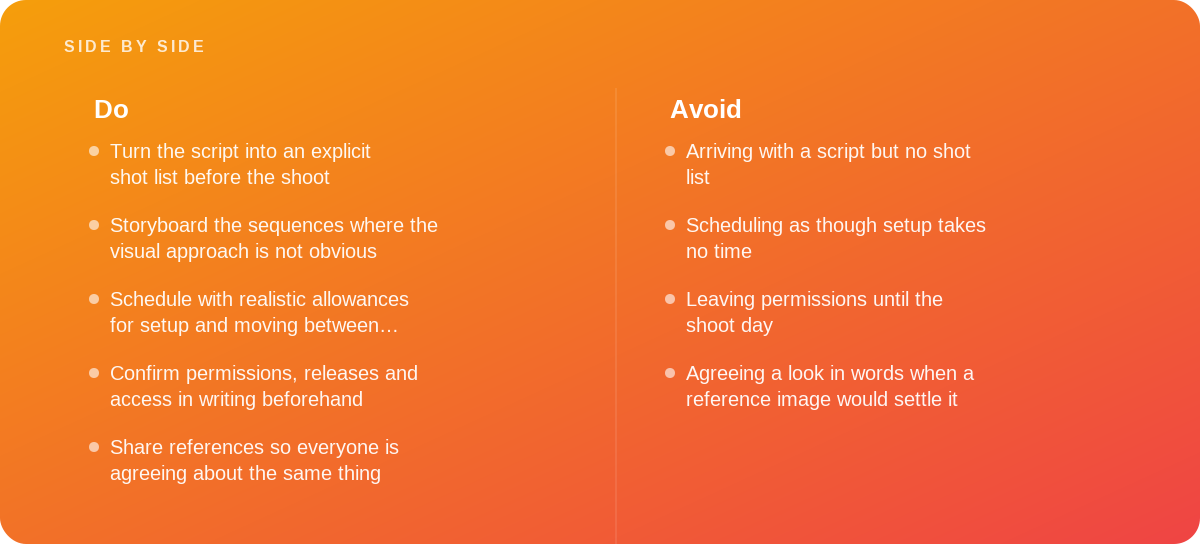
- Insist on a written shot list, not just a script. A script describes words; the edit is built from shots.
- Expect storyboards only where the visual approach is genuinely uncertain, such as an opening sequence, a product reveal or anything involving motion graphics. Storyboarding every talking-head interview is wasted effort.
- Question any schedule where the shooting time looks like most of the day. Setup and moves between positions routinely take longer than the recording itself.
- Get location access, appearance releases and insurance confirmed in writing before the shoot is booked, not on the morning.
- Settle the look with reference images, not adjectives. "Clean and premium" means something different to every person in the room.
Insight: The value of pre-production is not the documents themselves but the agreement they force. A shot list that the client, the director and the editor have all read is a contract about what the video will contain. Disagreements that surface while reading a document cost minutes; the same disagreements surfacing in the first edit review cost a reshoot.
The rest of this briefing goes into the technical depth behind each output, then returns to what it means for budgets, timelines and risk.
From script to shot list: the translation that makes a shoot possible
The most common pre-production mistake is arriving with a script but no shot list. A script is written for the ear: it contains narration, dialogue and perhaps a few scene descriptions. A crew cannot shoot a script directly, because it does not say how many camera positions a scene needs, which lines are covered by a wide shot and which by a close-up, or what cutaway footage the editor will need to cover a jump in an interview.
How to break a script into shots
Work through the script scene by scene, and for each line or beat ask what the viewer will be looking at. Write each answer as a numbered shot with, at minimum, these fields: scene number, shot number, shot size (wide, medium, close-up, insert), camera movement (static, pan, tilt, handheld, slider, gimbal), subject, action, audio (sync sound, voiceover, music only), location and any special requirement such as a prop, a screen recording or a second camera.
A 90-second product film with a voiceover might have 25 to 40 shots on its list. A 10-minute interview-led documentary piece might have only a handful of interview setups but dozens of B-roll shots to illustrate what the interviewees are saying. The count is less important than the coverage: every second of the final timeline must be supplied by something on the list.
Coverage: planning for the editor, not just the director
Good shot lists are written with the edit in mind. That means planning for:
- Cutaways and inserts to cover edits in interviews, so that the editor can shorten an answer without an obvious jump.
- Establishing shots for each location, so the audience knows where they are.
- Handles, meaning a few seconds of recording before action starts and after it ends, so that transitions and trims have room.
- Alternate versions of key lines or moments, including a safety take and, where the piece will be cut into shorter social versions, framings that work in vertical or square crops.
- Room tone, a short recording of the silent space at each audio location, so that dialogue edits can be smoothed.
Involving the editor at this stage pays off disproportionately. An editor reading a draft shot list will spot the missing reverse angle or the transition that has no footage to carry it. Our creative video editing work routinely starts with this kind of review because it is far cheaper than discovering the gap in the timeline.
Prioritizing the list
Mark each shot as essential, important or nice to have. When the day runs long, and many do, the director can drop from the bottom of the list rather than improvising under pressure. Essential shots are those without which the story does not work: the product in use, the key interview answer, the logo moment. If a shot is essential and can only happen once, such as a keynote reveal at an event, plan a second camera for it.
Storyboards: where to draw and where a list is enough
A storyboard is a sequence of frames, drawn, photographed or assembled from reference, that shows how a sequence will look shot by shot. Its purpose is agreeing the visual approach before it is expensive to change. Redrawing a panel takes minutes; relighting a set, rebuilding a prop or rebooking talent takes a day.
When storyboarding earns its time
Storyboard the sequences where the visual approach is not obvious. In practice that usually means:
- Opening sequences and title moments that set the tone for everything after them.
- Product reveals and demonstrations where framing, movement and timing carry the message.
- Sequences that combine live action with motion graphics, screen recordings or text, because the camera must leave space for elements added in post.
- Anything involving stunts, special rigs, drones or complex camera moves, where crew and safety planning depend on knowing exactly what will happen.
- Scripted drama or comedy, where performance and framing are inseparable.
By contrast, a seated interview or a straightforward event recording rarely needs a storyboard. A shot list with framing notes and a single reference image for the look does the job.
Levels of storyboard fidelity
Storyboards range from thumbnail sketches that fit six to a page, through clean line drawings with camera-movement arrows, to photographic boards made by shooting stand-ins on location with a phone, to fully rendered animatics timed against a scratch voiceover. The right level depends on how many people need to agree and how different their mental pictures are likely to be. A two-person team that has worked together for years can plan from thumbnails. A campaign that must be approved by a brand team, a legal reviewer and a regional marketing lead benefits from photographic boards or an animatic, because those leave far less room for interpretation.
An animatic is particularly useful for timing. Laying the storyboard frames against the voiceover shows immediately whether a 12-second line has enough visual material under it, or whether a planned shot will have to hold on screen uncomfortably long. If you want boards produced to that standard, our storyboarding service covers everything from sketch frames to timed animatics.
What each storyboard panel should carry
Each panel should be numbered to match the shot list and should note shot size, camera movement, the action within the frame, the line of dialogue or voiceover it plays under, and any graphics or text that will be added later. Arrows indicate camera movement and subject movement. Aspect ratio should match the delivery format; if the video will be delivered in 16:9 and 9:16, draw the safe area for the vertical crop on each panel so that critical action stays inside it.
A storyboard is not artwork. It is an agreement about what the camera will see, made while changing your mind still costs nothing.
Visual references and the look: settling arguments with images
One of the costliest avoidable errors in production is agreeing a look in words when a reference image would settle it. Words like "warm," "cinematic," "bright," "moody" or "corporate but friendly" feel precise in a meeting and mean different things to the client, the director of photography, the colorist and the editor.
Building a reference deck
A reference deck, sometimes called a mood board or look book, collects stills and short clips that show the intended approach to lighting, color, framing, pace, wardrobe, set dressing and graphics. For each reference, note what it is a reference for. A frame chosen for its lighting may have wardrobe you do not want, and saying so prevents the wrong lesson being taken from it.
Useful categories for a reference deck include:
- Lighting and contrast: soft and even, or directional with deep shadows.
- Color palette: including how skin tones and brand colors should render.
- Framing and lens choice: wide and environmental, or tight with shallow depth of field.
- Camera movement: locked-off, slow and smooth, or energetic handheld.
- Editing pace: clips showing cut rhythm are worth including for the editor.
- Typography and graphics: lower thirds, captions and title styles.
Connecting the look to post-production decisions
The look agreed in pre-production shapes technical choices on the shoot. If the reference deck calls for a strongly graded, filmic image, the camera team will typically record in a log profile or a raw format to retain latitude, and the post team will plan a color workflow with a look-up table. Our guide to LUTs in video post-production explains how those looks are built and applied. If the reference calls for a natural, lightly corrected image delivered quickly, a standard profile may serve better and save grading time. Deciding this in pre-production means the camera settings on the day serve the finished result rather than a default.
Share references with everyone who will make a visual decision: director, camera operator, gaffer, art department, wardrobe, editor and colorist. Share them with the approving stakeholders too, and get a clear yes. The goal is that everyone is agreeing about the same thing.
Scheduling the shoot day around setup, not recording time
Schedule reality is that setup and moves take longer than the shooting itself. New producers tend to schedule the recording: a two-minute scene, so perhaps 20 minutes with several takes. Experienced producers schedule everything around it: unloading, building the lighting, rigging sound, dressing the set, rehearsing, recording, checking playback, resetting for the next angle and packing down to move.
Building blocks of a realistic schedule
Planning allowances vary widely with crew size, kit and location, so treat any numbers as a starting point to adjust from experience rather than a standard. Still, the components are consistent:
| Activity | What drives the time | Common planning mistake |
|---|---|---|
| Load-in and unpacking | Distance from parking to set, stairs and lifts, security sign-in, amount of kit | Assuming the crew starts shooting at the call time |
| Lighting and camera setup | Number of fixtures, control of daylight, complexity of camera support | Treating a new camera angle as a quick adjustment rather than a partial relight |
| Sound setup | Number of speakers, radio microphones, background noise to manage | Forgetting to switch off air conditioning, refrigerators or phones |
| Talent preparation | Makeup, wardrobe, briefing, microphone fitting | Scheduling talent to arrive exactly when needed on camera |
| Recording | Takes needed, performer experience, script length | Assuming non-professional presenters will be ready in one or two takes |
| Reset between setups | Degree of change in lighting and set dressing | Not grouping shots by camera direction |
| Company move | Pack-down, travel, parking, re-entry and security at the next location | Counting only drive time |
| Breaks and meals | Crew size and length of day | Leaving them out entirely, then losing momentum later |
Shooting out of order on purpose
The shot list is written in story order; the schedule almost never is. Group shots that share a location, a lighting setup and a camera direction, and shoot them together. Shoot everything facing one way before turning around to face the other, because turning around usually means relighting and re-dressing. Schedule exterior shots for the light they need, and put the most demanding performances earlier in the day while talent is fresh. Plan anything dependent on a narrow window, such as a sunset or an event moment, with contingency before it.
Contingency that is real
Build buffer into the schedule explicitly rather than hoping it will appear. A practical approach is to identify which essential shots come late in the day and whether they could be moved earlier, and to list the nice-to-have shots that will be dropped first if time runs short. A schedule that can only succeed if nothing goes wrong is not a schedule; it is a hope.
Planning resources from the major post-production vendors, including the pre-production material published by Avid, treat scheduling and the shot list as linked documents for exactly this reason: the list defines the work and the schedule defines whether the work fits into the day.
Locations, permissions, releases and insurance
Permissions for locations, releases for people and insurance for the production are arranged in advance. Leaving them until the shoot day is one of the four classic mistakes, and it is the one most likely to stop a shoot entirely.
Location access and scouting
Every location needs a named contact with authority to grant access, written confirmation of the date and hours, and clarity on where the crew can park, load in, plug in and store kit. A recce, or location scout, before the shoot answers practical questions a photograph cannot: how loud the room is, where the sun falls at the scheduled time, whether there are enough power outlets on separate circuits, whether the ceiling is too low to hide a light, and what the space sounds like when the building's systems are running. Our guide to location scouting for video covers the recce checklist in detail.
Public spaces add another layer. Filming in streets, parks, transport hubs and some commercial premises may require permits from the local authority or the property owner, and requirements vary by city and country. Allow lead time for applications, and check whether the permit restricts crew size, tripod use, lighting or hours.
Releases for people and property
Anyone identifiable who appears on camera in a commercial video should sign an appearance release that covers the intended uses of the footage, including paid advertising and future edits if those are planned. Recognizable private property, artwork and branded products in shot may need releases or clearance too. For staff appearing in company videos, confirm whether the organization's policies require separate consent and what happens to the footage if the employee later leaves. The details are a legal matter for your own advisers, but the planning principle is universal: collect releases before or at the start of the shoot, never after the fact.
Insurance and safety
Many venues ask for proof of public liability insurance before they will confirm access. Productions with expensive rented kit need equipment cover, and productions with crew or talent working at height, near traffic, with drones or with special effects need a written risk assessment. Confirm what each venue requires early; a missing certificate discovered the day before is a cancellation.
Insight: Written confirmation matters more than verbal goodwill. A friendly facilities manager who said "yes, of course" on the phone may be on leave on the shoot day, and the colleague covering for them has no record of the agreement.
- Confirm access, hours and contact names by email.
- Collect insurance certificates before booking crew.
- Carry printed or digital copies of every permission to the shoot.
Crew, talent and kit planning that matches the shot list
The shot list and schedule together define the resources the shoot needs. Work backward from them rather than from a standard crew package.
Crew
A single operator can handle a simple interview with one camera and a lavalier microphone. Add a second camera, moving shots, controlled lighting or multiple speakers and the case for a dedicated sound recordist, a gaffer and a camera assistant grows quickly, because one person cannot monitor sound, focus and framing at the same time without compromising all three. A producer or production coordinator on the day keeps the schedule, manages talent and handles the client, freeing the director to direct. For a detailed breakdown of who does what, see our guide to getting video crew roles right.
Talent
Decide early whether on-camera roles will be filled by professional presenters or actors, by employees or by customers. Each choice affects the schedule: professionals typically need fewer takes and can deliver to a teleprompter, while non-professionals often need more time, more encouragement and a looser, interview-led format that plays to their strengths. The guide to casting talent for video covers how to match people to roles.
Kit
A kit plan lists cameras, lenses, support, lighting, sound, media and power, with quantities and backups. Derive it from the shot list: a slider move needs a slider; an exterior interview needs wind protection and a reflector or diffusion; a long event needs enough batteries and media to last the day with margin. Check which items are owned and tested and which must be rented, and schedule collection and return. Test any unfamiliar kit before the shoot, not on it.
Planning for the edit: formats, data and delivery
Pre-production is also where the handover to post-production is designed. Decisions about recording format, frame rate, file naming and storage made now determine how smoothly the edit runs later.
Recording format and frame rate
Choose the frame rate for the delivery destination and any slow-motion requirement, and keep it consistent across cameras. Decide whether to record in a compressed codec, an intermediate codec or raw, trading file size and processing time against grading latitude. Our guide to raw video formats sets out when that latitude is worth the extra data. If multiple cameras are used, match their settings and plan timecode sync or a clapperboard for every take so that multicam editing is straightforward.
Data management
Estimate the total data the shoot will generate from the recording format, expected recording hours and number of cameras, then provision media cards and storage with a margin. Plan who offloads cards, how many copies are made before a card is reformatted, and how the copies are verified. Organizations such as the European Broadcasting Union publish production guidelines on file-based workflows that are a useful reference for teams formalizing this process. For the storage side, including how long to keep rushes and where, see video file storage planning.
Deliverables list
Write down every deliverable before the shoot: master versions, cut-downs, aspect ratios, captioned and uncaptioned versions, thumbnails, stills and any language versions. A 16:9 master plus 9:16 and 1:1 social cut-downs needs framing decisions on the shoot, not just cropping in the edit. Production workflow guides in the Adobe Help Center are a good practical reference for how these versions are handled in the editing and export stages.
- Shot list
- A numbered list of every shot the edit needs, with framing, movement, subject, audio and location for each.
- Storyboard
- A sequence of frames showing how a sequence will look shot by shot, used to agree the visual approach before shooting.
- Animatic
- Storyboard frames timed against a scratch voiceover or music to test pacing before production.
- Recce
- A location scouting visit to check access, light, sound, power and logistics in person.
- Coverage
- The range of angles and shot sizes captured for a scene, giving the editor choices.
- Room tone
- A short recording of a location's ambient silence, used to smooth dialogue edits.
- Company move
- Relocating the whole crew and kit from one location to the next during a shoot day.
- Call sheet
- The daily document giving everyone their call time, location, contacts and schedule.
Worked example: planning a two-location product launch shoot
The following is an illustrative example, not a client project. It shows how the principles above turn into a real plan and why the numbers matter.
A company is launching a new piece of kitchen equipment and wants a 90-second hero film, a 30-second cut-down and three 15-second vertical social clips. The script has a voiceover, two short customer-style testimonials delivered by staff volunteers, and product-in-use sequences in a test kitchen and a client restaurant across town.
Step 1: script to shot list
Breaking the script down produces 34 shots: 6 establishing and exterior shots, 16 product-in-use shots, 2 testimonial setups with 3 framings each, 4 detail inserts of controls and materials, and a closing hero shot of the product with space left for the logo and tagline. Of these, 14 are marked essential, 12 important and 8 nice to have. Every shot intended for the vertical clips is flagged so that it is framed with a 9:16 safe area.
Step 2: selective storyboarding
Only two sequences are storyboarded: the 10-second opening, which intercuts fast details, and the product reveal, which uses a slider move ending on the hero frame. The testimonials and general B-roll are planned from the shot list and a one-page reference deck showing lighting, color and framing.
Step 3: the schedule
A naive schedule would allocate the morning to the test kitchen and the afternoon to the restaurant. The realistic schedule looks different once setup and moves are counted, as the table below shows with illustrative planning allowances.
| Time | Activity | Planning note |
|---|---|---|
| 07:30 | Crew call and load-in at the test kitchen | Service entrance booked in writing; 45 minutes allowed for access and unpacking |
| 08:15 | Light and dress for product shots facing the counter | All counter-facing shots grouped to avoid relighting |
| 09:15 | Product-in-use shots, counter direction | Essential shots first |
| 10:45 | Turnaround and relight for reveal and slider move | Storyboarded, so framing already agreed |
| 11:30 | Hero reveal and detail inserts | Second take on the slider built in |
| 12:30 | Lunch | Talent for the afternoon briefed by phone |
| 13:15 | Pack down and company move | Drive time is 25 minutes; 90 minutes allowed in total for pack, travel, parking and load-in |
| 14:45 | Restaurant setup and sound check | Kitchen extraction switched off by arrangement for sync sound |
| 15:30 | Two testimonial setups | Releases signed on arrival; room tone recorded |
| 16:45 | Restaurant B-roll and exteriors | Nice-to-have shots dropped first if running late |
| 18:00 | Wrap, data offload verified, pack down | Two verified copies before any card is reused |
Of a 10.5-hour day, only about four hours are allocated to recording. That is not inefficiency; it is what the work actually takes. A schedule that assumed eight hours of recording would have run out of day before the testimonials, which are essential.
Step 4: permissions and deliverables
Both locations confirm access in writing, the restaurant requests a liability insurance certificate a week ahead, and both staff volunteers receive release forms to read two days before so that nobody is signing something unfamiliar on camera day. The deliverables list names all five versions, caption requirements and the thumbnail frame, so the editor starts with a clear brief. The project follows the general approach set out in our guide to product video production.
Implications for the business: cost, risk and control
For anyone commissioning or managing video, pre-production is where you have the most control over cost and quality at the lowest price. The shoot day concentrates cost: crew rates, kit rental, venue hire and talent fees all run by the hour or day. Post-production is where missing material becomes permanent. Pre-production sits in front of both and costs mainly time and attention.
Where the money goes when pre-production is skipped
The costs of weak planning rarely appear on a single invoice line, which is why they are underestimated. They show up as overtime when the schedule runs long, as a second shoot day to capture what was missed, as extended editing time spent working around gaps, and as approval cycles that drag on because stakeholders only discover they disagree about the look when they see the first cut. None of these is inevitable, and each traces back to a decision that could have been made in a meeting.
Every problem solved in pre-production costs a conversation. Solved on the shoot, it costs the crew's day. Discovered in the edit, it may not be solvable at all.
What the client side should own
Even when an agency or studio runs production, some decisions sit with the business and cannot be delegated:
- Approval of the script and shot list by whoever will approve the final video. Late involvement of a senior stakeholder is a frequent cause of reshoots.
- Access and permissions for company premises, staff participation and customer involvement.
- Brand and legal requirements, such as claims that need substantiation, required disclaimers and product accuracy.
- A single point of contact on the shoot day with authority to make decisions quickly.
Regulated and multi-site organizations
Businesses in regulated sectors, or those producing video across many branches or franchise locations, benefit even more from rigorous pre-production because the cost of an error multiplies. A compliance issue found in one approved script is fixed once; found in finished videos across many sites, it is fixed many times. Our guides to franchise video standards and financial services video go deeper on those contexts.
When to bring in help with pre-production
Many teams can plan a simple interview or a product demo themselves. Specialist help is worth bringing in when the cost of getting it wrong is high and the chance to correct it is low. Three situations stand out.
One chance at an event
A conference keynote, a product launch, a ceremony or a live performance happens once. There is no second take, so the plan must cover camera positions, backup recording, audio feeds from the venue's sound desk, run-of-show timings and who is watching for which moment. An experienced event producer will also have a plan for the things that go wrong: a presenter who runs over, a speaker who walks out of frame, a venue that changes the stage layout the night before. Our guide to event video coverage sets out how that planning works.
Several locations in one day
Each company move eats time, and the risks compound: a late start at the first location pushes every subsequent one. Planning a multi-location day needs realistic travel and setup allowances, confirmed access windows at every site and a clear order of priorities for what gets dropped if the day slips.
A visual approach still under debate
If stakeholders are still arguing about the look close to the shoot, that is a signal to pause and resolve it with references and storyboards rather than hoping the debate will settle itself on set. An outside director or storyboard artist can turn competing descriptions into concrete frames that people can actually choose between. For campaigns where the look is central to the message, such as promotional videos, this step is often the difference between a smooth approval and a painful one.
Insight: The best time to bring in help is before the shoot date is fixed. Once dates, venues and talent are locked, the planning is constrained by decisions already made, and a specialist can only mitigate rather than design.
Pre-production for recurring content and video series
Pre-production scales. For organizations producing video regularly, much of the planning work can be done once and reused, which lowers the per-video cost and raises consistency.
Templates that carry forward
A standing set of templates removes repeated effort: a shot list template with the standard coverage every episode needs, a reference deck that defines the series look, a lighting plan for a regular studio or office setup, standard release forms and a deliverables list for each platform. Each new episode then needs only its episode-specific planning: the script, the particular guests or products, and any new locations.
Batching shoots
Because setup takes longer than shooting, batching several episodes into a single shoot day, in a single setup, is one of the most effective ways to reduce cost per video. Pre-production makes batching possible, since every script and shot list must be ready before the batch day. Our guide to planning a video series covers the editorial side of this in more depth.
Reviewing and improving the process
After each shoot, hold a short review: which shots were missed, where the schedule ran over, which permissions caused friction and what the editor had to work around. Update the templates with those lessons. Over a few productions, the pre-production process becomes a record of what works for your organization, your locations and your audience, and each shoot becomes more predictable than the last.
The discipline is the same whatever the scale. Turn the script into an explicit shot list, storyboard where the approach is not obvious, schedule honestly for setup and moves, confirm permissions in writing and share references until everyone is agreeing about the same thing. Do those five things and the shoot day becomes execution rather than improvisation, and the edit becomes assembly rather than rescue.
Where this comes from
- Avid — Pre-production planning
- Adobe Help Center — Production workflow guides
- European Broadcasting Union — Production guidelines
The figures and practices above come from the sources listed.
Working on something like this?
We take on Video Editing & Production work for teams who want it done once, properly. Tell us what you are building and we will tell you honestly whether we are the right studio for it. Start a project.
Where to go next
Spotted something wrong? Report an error on this page. We correct on the page and say what changed.












