Video SEO: What Actually Works
A phase-by-phase video SEO playbook: audit your library, build watch pages, write titles and thumbnails, add transcripts and VideoObject markup, then monitor.
 MediaScaleUp Editorial Team

Video SEO is the work of making a video discoverable: in Google's main results and video tab, in the search box of the platform that hosts it, and in the recommendation systems that decide what viewers see next. It sounds like an editing problem, but it mostly is not. Search engines do not watch your footage and judge the color grade. They read the page the video sits on, the structured data that describes it, the title, the description, the thumbnail file and whatever text accompanies the player. A beautifully cut film on a page Google cannot index is invisible; a plain screen recording on a well-built page with a transcript and clean markup can rank for years.
This playbook is for marketers, business owners and in-house teams who already produce video and want it found, and for editors and developers who have to implement the details. It is organized as phases you follow in order, from auditing what you have to monitoring what happens after publication. Each phase states its goal, the actions involved, what you should have at the end, and the checks that tell you it worked. The same sequence applies whether you publish ten videos a year or ten a week; what changes is how much of it you automate.
One principle runs through everything below: discoverability is decided by the page, the markup, the title and the transcript far more than by the edit. That does not make production quality irrelevant, because watch time and engagement shape how platforms recommend a video once people find it. But the first job is to make sure search engines can find, understand and display the video at all, and most libraries fail at that step long before quality comes into it.
The Video SEO Playbook at a Glance
Before the detail, here is the whole procedure in the order you should run it. Teams that skip ahead to titles and thumbnails usually discover later that half their videos were never indexed, so resist the temptation to start with the visible parts.
- Audit the library and the pages List every video, where it is hosted, which URL it lives on, and whether that URL is indexable. This tells you where the real problems are.
- Choose a hosting and page model Decide per video whether it should rank on your own site, on a platform such as YouTube, or both, and give every site video its own indexable watch page.
- Research what people actually search Find the phrases your audience types, separate web-search intent from platform-search intent, and assign one primary query per video.
- Write titles, descriptions and chapters Write for the searcher first and the platform second, with descriptions that read naturally and chapters that map to real sections.
- Design thumbnails that survive small sizes Test every thumbnail at the size it actually appears in results before publishing.
- Publish transcripts and captions Put an accurate transcript on the page and upload captions to the player so the spoken content becomes indexable text.
- Add structured data and a video sitemap Mark every watch page up as a VideoObject that matches what the page shows, and add a video sitemap when the library is large.
- Validate, publish and monitor Test the markup, confirm indexing in Search Console, and review platform analytics on a fixed schedule.
The phases build on each other. Research informs titles; titles inform thumbnails; the transcript feeds the description; the structured data must agree with all of it. If you change one element later, check the others still match.
Phase 1: Audit Your Video Library and Where It Lives
Goal: know exactly what you have, where each video is hosted, and whether search engines can reach it. Output: a single spreadsheet that becomes the working document for every later phase.
Build the inventory
Start with one row per video. Record the title, the hosting platform (YouTube, Vimeo, Wistia, a self-hosted file, a social platform), the embed or file URL, every page on your site where it appears, the publish date, the duration, and whether a transcript or captions exist. Add a column for the business purpose: product demo, training, brand film, testimonial, event recording. Purpose matters later because a training video and a brand film should target very different searches.
You will almost always find duplicates: the same video embedded on four pages, or three versions of a product demo with slightly different intros. Mark one canonical page for each video now. If you do not, you end up with several of your own pages competing for the same query and none of them winning clearly.
Check indexability, not just visibility
A video that plays for a visitor is not necessarily one Google can index. For each canonical page, confirm that the page itself is indexable (no noindex tag, not blocked in robots.txt, returns a 200 status), that the video player loads without requiring a login or a click on a consent layer that hides it from crawlers, and that the video file or embed is not blocked. Google's own Search Central guidance on video best practices is explicit that the video must be crawlable and the page it sits on must be indexable; it is the first thing to verify and the most common reason a library earns nothing.
Look especially hard at pages built with heavy JavaScript. Players that are only injected after a user scrolls, clicks a tab or accepts cookies may never render for a crawler. Use the URL Inspection tool in Search Console to view the rendered HTML and confirm the player markup is present.
Find the gallery problem
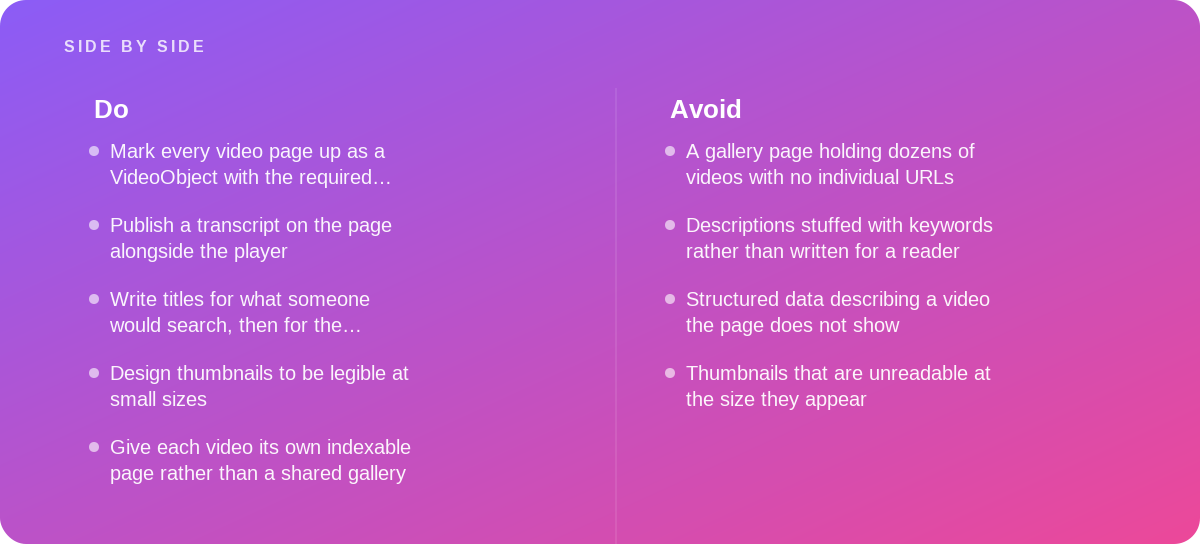
The single most damaging pattern in video SEO is a gallery or resources page holding dozens of videos with no individual URLs. Search engines generally treat a page as being about one main video. When thirty videos share a page, at best one of them is associated with it and the rest have nowhere to rank. Flag every gallery in the audit; Phase 2 fixes them.
- Every video is listed once with its hosting platform, duration and publish date.
- Each video has one canonical page on your site, or is marked as platform-only.
- Every canonical page returns 200, is indexable and is not blocked by robots.txt.
- The player renders in Search Console's URL Inspection view without user interaction.
- Gallery pages holding multiple videos are flagged for splitting.
- Existing transcripts and caption files are recorded, with their accuracy noted.
Phase 2: Decide Where Each Video Should Rank
Goal: choose, for every video, whether its job is to rank on your website, on a video platform, or both, and build the page structure that supports that decision. Output: a hosting decision per video and one indexable watch page for each site video.
Site ranking, platform ranking, or both
These are different goals with different mechanics. Ranking on YouTube depends heavily on the platform's own signals: title, description, thumbnail click-through and how long people keep watching. Ranking in Google's web results for a video on your own domain depends on your page, your markup and your site's authority. A video can succeed at one and fail at the other.
A useful rule of thumb: if the video answers a question people search on YouTube, such as a tutorial, a review or a how-to, publish it there and optimize it for the platform. If the video supports a page that should convert, such as a product page, a service page or a landing page, host it in a way that keeps the viewer on your site and optimize the page. Many teams do both, publishing the full video on YouTube and embedding it on a dedicated page with its own transcript and markup. That is legitimate, but know which asset you expect to rank for which query so you do not optimize both for the same phrase and split the result.
Your choice of player also affects page speed and user experience, which matters for the page's overall performance in search. Our guide to embedding video on websites covers lazy loading, facade players and the trade-offs between platform embeds and self-hosted files in more depth.
Give every video its own watch page
Google's documentation describes a watch page as a page where the video is the main content, not a supporting element. For each site video, create a page whose URL, title and heading are about that video, with the player near the top, the transcript beneath it, and supporting text that adds context. Keep gallery pages if they help people browse, but make each tile link to the individual watch page rather than playing inline.
When a video genuinely belongs on a broader page, for example a product demo on a product page, the product page can still rank with the video as a feature. The point is that every video you want found should have at least one page where it is clearly the primary subject.
Self-hosting requirements
If you host files yourself, serve them from a URL crawlers can fetch, use a widely supported format, and do not block the file path in robots.txt. Modern codecs matter for delivery: AV1 and HEVC can cut file sizes substantially, but check playback support across the browsers your audience uses and keep a broadly compatible fallback. Search visibility is not helped by a file only some browsers can play.
A practical point when splitting galleries: when you split a gallery into individual watch pages, keep the gallery URL live as a browse page and link each tile to its new page. You preserve any links pointing at the gallery, and the new pages inherit internal links immediately instead of waiting to be discovered.
Phase 3: Research the Searches Your Video Should Answer
Goal: assign each video one primary query and a small set of related ones, based on how your audience actually searches. Output: a target query column in the inventory, labeled as web-search or platform-search intent.
Separate web intent from platform intent
People search differently on Google and on YouTube. On Google, a query such as "how to calibrate a monitor for photo editing" may return articles, videos and forum threads; the video competes with text. On YouTube, the same person might type "monitor calibration tutorial", expecting only video. Check both. Type the candidate phrase into Google and note whether a video block appears in the results. If it does not, a video is unlikely to earn visibility for that phrase in web search, however good it is, and the platform may be the better target.
Where to find real queries
- Search Console: the Performance report, filtered by search appearance, shows queries where your pages already appear with video features.
- Platform autocomplete: the suggestions in YouTube's search box reflect what people type. Start typing your topic and note the completions.
- Platform analytics: YouTube Studio's search terms report shows which queries already bring viewers to your channel.
- Sales and support teams: the questions customers ask repeatedly are often the queries nobody has answered well on video.
- The "People also ask" and video results in Google: they show how Google interprets a topic and which formats it prefers for it.
Assign one primary query per video
Pick one primary phrase for each video and two or three secondary ones that naturally fit. If two videos target the same primary query, either merge them, differentiate them (beginner versus advanced, for example), or choose one to target the query and point the other elsewhere. Genre shapes this: a training or how-to video usually maps cleanly to a question-style query, while a brand film rarely has a search query at all and should be judged on other goals.
Be honest about videos that have no search demand. Many corporate films, event recaps and internal messages will never be searched for. They still deserve basic markup and a clean page, but spending hours on keyword research for them is wasted effort. Put that time into the videos that answer real questions.
By the end of this phase, every searchable video should have one primary query and two or three secondary queries, each labeled as web-search, platform-search or both according to what the results actually show. No two videos should share a primary query without a clear difference in angle, and videos with no search demand should be marked for baseline optimization only.
Phase 4: Write Titles, Descriptions and Chapters for Searchers
Goal: produce metadata that tells both people and machines exactly what the video covers. Output: a final title, description and chapter list for each video, plus a matching page title and heading for each watch page.
Titles: the searcher first, the platform second
Write the title for what someone would search, then adjust it for the platform. A searcher looking for help with a specific task wants to recognize their problem in the title immediately. Lead with the core phrase, keep the most important words near the start so they survive truncation, and add the differentiator (the product name, the audience, the year of the software version) after it. YouTube allows up to 100 characters, but far fewer are visible in most result layouts, so front-load meaning.
Avoid titles that only make sense to your team. "Q3 Webinar Recording" tells a searcher nothing; "How to Forecast Inventory for Seasonal Demand (Webinar Recording)" does. Clickbait that the video does not deliver also backfires: viewers who leave in the first seconds send exactly the signal platforms use to stop recommending a video.
Descriptions: written for a reader
The description should read like a short, useful summary, not a list of phrases. Open with one or two sentences that say what the viewer will learn and who it is for, using the primary query naturally once. Follow with the key points covered, any resources mentioned, and relevant links. Keyword-stuffed descriptions, where the same phrase is repeated in slight variations, are a known spam pattern and do nothing a clear summary does not do better. YouTube's help documentation on search and discovery is consistent on this point: accurate, relevant metadata helps; misleading or repetitive metadata can breach its policies.
On your own site, the page's meta description and the VideoObject description serve similar purposes. They can share wording, but the page text itself should add context the video does not, such as prerequisites, related steps or a written summary for people who will not press play.
Chapters and key moments
Chapters help viewers jump to what they need and give search engines a map of the video's structure. On YouTube, you create chapters by listing timestamps in the description; the first must start at 0:00, you need at least three, and each should be at least 10 seconds long. Name each chapter as a searcher would describe that section, not with internal labels. On your own site, Google can show key moments when you provide Clip markup with start times and labels, or SeekToAction markup that tells it how your player's URLs jump to a timestamp.
Chapters work best when the edit supports them. A video with clearly separated sections, each opening with a spoken or on-screen signpost, chapters itself; a video that wanders does not. This is one of the few places where editorial decisions in the cut directly affect discoverability, and it is worth briefing your editor on it before the edit starts rather than retrofitting chapter points afterward.
| Element | Weak version | Stronger version | Why it works better |
|---|---|---|---|
| Title | Product Demo v3 Final | How to Set Up Automated Invoicing in Five Minutes | Matches a task-based query and states the outcome |
| Description opening | Invoicing invoicing software automated invoices best invoicing tool | A walkthrough of automatic invoicing for small teams, from connecting your bank to sending the first scheduled invoice. | Reads naturally and says who it is for |
| Chapter label | Section 2 | Connecting your bank account | Mirrors how a viewer would describe that moment |
| Page heading | Videos | Setting Up Automated Invoicing: Video Walkthrough | Makes the video the clear subject of its own page |
Phase 5: Design Thumbnails That Earn the Click
Goal: give each video a thumbnail that is legible and compelling at the size it actually appears. Output: a custom thumbnail per video, tested at small sizes, plus a matching image file for your structured data.
Why the thumbnail matters so much
On platform search, the thumbnail is the main determinant of whether someone clicks. Viewers scan a grid of images before they read titles. A thumbnail that clearly shows the subject, a readable phrase and a face or object with strong contrast will be chosen over a random frame from the middle of the video, even when the underlying videos are equally good.
Design for the smallest size first
Thumbnails appear at very different sizes: large on a desktop watch page, small in mobile search results, tiny in a sidebar of suggested videos. The common mistake is designing at full size on a large monitor and never checking the small version. Text that looks bold at full size becomes an unreadable smudge at small sizes.
- Limit on-image text to a few words, set large and in a heavy weight with strong contrast against the background.
- Use one clear focal point: a face, a product or a before-and-after split, not a busy scene.
- Keep the bottom-right corner clear on YouTube, where the duration stamp covers part of the image.
- Keep a consistent visual system across a series so returning viewers recognize your videos, but vary enough that each is distinguishable.
- Do not promise what the video does not show. A misleading thumbnail may win a click but loses the viewer seconds later.
YouTube recommends custom thumbnails at 1280 by 720 pixels in a 16:9 ratio, and you should check its help pages for the current file size limit and formats before exporting. For your own site, the thumbnail URL in your structured data must point to an image file that crawlers can fetch; Google's documentation lists the supported formats and minimum dimensions, and a thumbnail blocked by robots.txt or served only after a script runs can prevent the video from appearing with a preview.
Frame choice starts on set. Shots with a clear subject, clean backgrounds and good separation make better thumbnails, and choices such as lens choice in video affect how isolated and readable the subject is when the frame is shrunk to a small rectangle. Ask the crew to capture a few deliberate thumbnail stills rather than relying on screen grabs from motion.
Shortcut: export each thumbnail draft, shrink it to roughly the width of a mobile search result, and view it on an actual phone at arm's length. If you cannot read the words or identify the subject in two seconds, simplify it. This takes under a minute per thumbnail and catches most failures.
Phase 6: Publish Transcripts and Captions
Goal: turn the spoken content of every video into accurate, indexable text on the page and in the player. Output: a reviewed transcript on each watch page and a caption file uploaded to the player.
Why transcripts matter for search
Search engines index text far more reliably than audio. A transcript on the page gives them the full vocabulary of the video: every term, product name and step, in the words your audience uses. That text supports the page for many long-tail queries the title and description could never cover. It also serves people who cannot or will not play audio, which is a large share of viewers in offices, on public transport and in accessibility contexts.
How to produce them well
- Generate a first draft with automatic speech recognition, whether from your editing software, your hosting platform or a transcription service.
- Correct it by hand. Automatic transcripts routinely mishear product names, technical terms, acronyms and proper nouns, which are precisely the words that matter most for search.
- Add speaker labels for interviews and panels, and break the text into paragraphs at natural topic changes. A wall of text helps nobody.
- Add subheadings that match your chapters so the transcript doubles as a skimmable written version.
- Export a caption file in the format your player requires (WebVTT for most web players, SRT for many platforms) and upload it as a proper caption track rather than burning text into the picture.
Place the transcript in the page HTML, below the player, and keep it visible or in an expandable section that exists in the HTML on load. Text loaded only after a click, from a separate file, may not be associated with the page. Clean audio makes all of this easier: good dialogue recording and sound design for video that keeps speech clear over music and effects reduce correction time and improve automatic captions on platforms that generate their own.
Regulated sectors have extra reasons to get transcripts right. A pharmaceutical video or public-sector communication may need accurate captions for compliance or accessibility obligations, and in those cases the transcript is reviewed by the same people who approve the script, not treated as a search add-on.
- Each watch page shows a hand-corrected transcript in the HTML, below or beside the player.
- Product names, technical terms and proper nouns are spelled correctly throughout.
- Transcript subheadings match the video's chapters.
- A caption file is uploaded to the player as a selectable track, not burned in.
- Caption timing has been spot-checked at the start, middle and end of each video.
Phase 7: Implement VideoObject Structured Data and a Video Sitemap
Goal: describe each video to search engines in a machine-readable format that matches exactly what the page shows. Output: valid VideoObject markup on every watch page and, for larger libraries, a video sitemap.
What VideoObject markup should contain
The Schema.org VideoObject type is the standard vocabulary for describing a video. Mark every video page up with it, including at least these properties:
- name: the video's title, matching the visible title on the page.
- description: a plain summary of what the video covers.
- thumbnailUrl: the URL of a crawlable image file.
- uploadDate: the publish date in ISO 8601 format, with a time zone where possible.
- duration: the length in ISO 8601 duration format, for example PT4M30S for four minutes and thirty seconds.
- contentUrl or embedUrl: the actual video file or the player URL, so the video can be fetched.
Google's documentation distinguishes required from recommended properties and adds optional features such as Clip markup for key moments, SeekToAction for automatic key moments, and properties for live broadcasts. Treat the recommended properties as required in practice; a complete record gives the search engine more to work with and costs nothing extra once your template generates it.
The markup must describe what the page shows
Structured data describing a video the page does not show is one of the mistakes most likely to cause problems. It happens in predictable ways: a template adds markup for a video that was later removed, a page carries markup for several videos but plays only one, or the markup's title and thumbnail belong to an older version of the video. Search engines treat mismatched markup as unreliable at best and as a policy violation at worst. Generate the markup from the same data source that renders the player, so the two cannot drift apart.
When a video sitemap is worth it
A video sitemap is an option for sites with substantial video libraries. It lists each watch page with video details such as the title, description, thumbnail location and either the content location or player location. It helps search engines discover videos that are hard to find through links alone, and it gives you a single place to confirm what you expect to be indexed. For a site with a handful of well-linked videos, good internal linking and on-page markup are usually sufficient. For a library of hundreds of videos, or one where new videos arrive weekly, a sitemap generated automatically from your content system is worth setting up.
Whatever you choose, the sitemap, the markup and the page must agree. If the sitemap lists a thumbnail the page no longer uses, or a video the page no longer shows, you have recreated the mismatch problem in a second place.
Shortcut: build the VideoObject markup into your page template once, reading from the same fields your editors fill in for the player and transcript. After that, every new video is marked up correctly by default, and nobody has to hand-edit JSON-LD for each upload.
A Worked Example: Rescuing a 40-Video Training Library
The following is an illustrative scenario, not a real client project. It shows how the phases combine and how the effort divides, using realistic assumptions for a mid-sized business.
A software company has 40 training videos, each between 3 and 12 minutes long, totaling roughly 5 hours of footage. They are all embedded on a single "Tutorials" page, hosted on YouTube, with titles such as "Module 7 Part 2." Search Console shows the tutorials page receives some traffic for the brand name and almost none for task-based queries. The YouTube channel gets modest views, mostly from existing customers following links in onboarding emails.
The audit shows three problems immediately: no video has its own page on the company site, no transcripts exist, and none of the titles match a phrase anyone would search. Research finds that 28 of the 40 videos answer a task customers do search for ("how to export reports to CSV", "set up user permissions"), 8 are conceptual overviews with little demand, and 4 are outdated and should be retired or replaced.
The team's plan, with effort shown as ranges because the real figures depend on tooling, transcript accuracy and approval speed:
| Task | Scope | Estimated effort | Main variable |
|---|---|---|---|
| Audit and inventory | 40 videos, 1 gallery page | 4 to 8 hours | How scattered the embeds are |
| Query research | 28 searchable videos | 6 to 10 hours | Access to Search Console and support tickets |
| Watch page template and markup | One template for all pages | 8 to 16 developer hours | How flexible the content system is |
| Transcript correction | About 5 hours of footage | Roughly 2 to 4 hours per hour of footage | Audio quality and technical vocabulary |
| Titles, descriptions, chapters | 36 kept videos | 20 to 40 minutes each | Whether chapters fit the existing edit |
| New thumbnails | 36 kept videos | 15 to 30 minutes each using a template | Whether usable stills exist |
At those rates, the whole project fits into a few weeks of part-time work for a small team. The 36 kept videos each get a watch page under a tutorials section, with the YouTube player, a corrected transcript with subheadings, and VideoObject markup generated from the template. The old tutorials page stays as a browse page linking to each new page. On YouTube, titles are rewritten to lead with the task, descriptions open with a plain summary, and chapters are added where the videos already had clear sections. The four outdated videos are removed from the site and unlisted on YouTube, with the pages redirected to their closest replacements.
What the team should expect is not an overnight change. Pages must be crawled and indexed, and rankings settle over weeks and months. The measurable early signal is in Search Console: video pages appearing in the Video indexing report as indexed, and impressions beginning to accumulate for task-based queries that previously showed nothing.
A Realistic Schedule for Your First Video SEO Project
Teams often underestimate how long the first pass takes and overestimate how long maintenance takes afterward. The first project involves building templates, agreeing processes and correcting a backlog; later videos flow through the same system in a fraction of the time. Here is a realistic schedule for a library of a few dozen videos with one person leading and occasional developer support.
- Week 1 Audit the library, record indexability issues, flag gallery pages and decide which videos to retire.
- Week 2 Research queries, assign primary phrases, and agree the hosting model for each video.
- Weeks 2 to 3 Build the watch page template with transcript area and generated VideoObject markup; test it on one video end to end.
- Weeks 3 to 5 Correct transcripts, write titles, descriptions and chapters, and produce thumbnails in batches.
- Week 5 Publish pages, set redirects for retired videos, update internal links and submit a video sitemap if the library warrants one.
- Weeks 6 to 12 Monitor indexing in Search Console, fix reported issues, and review platform analytics for early click-through and retention patterns.
- Every quarter after Review performance, refresh underperforming titles and thumbnails, and update or retire outdated videos.
If a developer is not available, the template step is the one that slips. It is still worth waiting for it: hand-built markup on dozens of pages is slower, more error-prone and harder to maintain than a template that generates it.
Phase 8: Validate, Monitor and Improve After Launch
Goal: confirm that videos are indexed and displayed correctly, and use the data to improve what underperforms. Output: a clean Video indexing report, a monitoring routine and a list of improvements for the next cycle.
Validate before and after publishing
Run each page template through Google's Rich Results Test before launch to confirm the VideoObject markup is detected and valid. After publication, use URL Inspection to request indexing for the most important pages and check the rendered HTML. Then watch the Video indexing report in Search Console, which lists pages where Google found a video and whether it could index it. The most common reasons given for a video not being indexed include the video not being the main content of the page, the video being outside the viewport or too small, and an invalid or unfetchable thumbnail. Each of these points back to a specific earlier phase.
What to monitor, and how often
- Monthly in Search Console: indexed video pages versus total, impressions and clicks for video search appearances, and new errors in the Video indexing report.
- Monthly in platform analytics: impressions, click-through rate on thumbnails, average view duration and the search terms that bring viewers.
- Quarterly: a review of the ten weakest and ten strongest videos to find patterns in titles, thumbnails and topics.
How to improve what underperforms
Diagnose before you change anything. A video with many impressions and few clicks has a title or thumbnail problem. A video with good clicks but viewers leaving quickly has a mismatch between the promise and the content, or an opening that takes too long to reach the point; that is an edit problem, and a tighter opening from a creative video editing pass can fix it. A video with no impressions at all usually has an indexing or demand problem: check the indexing report first, then revisit whether anyone searches for the topic.
Change one variable at a time where you can, and give each change a few weeks before judging it. Platforms need time to gather enough impressions to show a difference, and swapping title, thumbnail and description simultaneously leaves you unable to tell which change helped.
- The watch page template passes the Rich Results Test with valid VideoObject markup.
- Priority pages have been inspected and submitted through URL Inspection.
- The Video indexing report shows the expected number of indexed video pages, with reasons reviewed for any that are not.
- Monthly monitoring dates are in the calendar with a named owner.
- Underperforming videos are diagnosed as a click, retention, indexing or demand problem before anything is changed.
Where Video SEO Fits With the Rest of Your Video Strategy
Search is one distribution channel among several, and not every video should be judged by it. Some videos exist mainly to convert people already on a page, some to support campaigns, some to inform investors or staff. Being clear about each video's job keeps you from spending search effort where it will not pay off.
Videos that should be built to rank
Tutorials, explainers, product walkthroughs, comparisons and answers to common questions are the strongest search candidates, because people actively look for them. These deserve the full playbook. A corporate or brand video, by contrast, is usually found through your homepage, social channels and campaigns rather than search, and needs only baseline optimization: an indexable page, markup, a transcript and a clear title.
Videos whose job is elsewhere
A video on a landing page is judged by conversions, not rankings, and design choices for video on landing pages such as autoplay, length and placement follow different logic. Videos in email campaigns and paid media are distributed directly to viewers and are not found through search at all. Even so, if any of these videos also live on an indexable page, give that page the basics; they cost little and occasionally surface in search in ways nobody expected.
Production choices that help discoverability
A few decisions made before and during production make every later phase easier. Plan videos around one clear question or task each, rather than covering five topics in one long recording. Structure the edit into distinct sections with spoken signposts, which makes chapters and key moments straightforward. Record clean dialogue so transcripts need little correction. Capture thumbnail stills on set. And keep project files organized so you can re-cut an outdated segment without reshooting, which is often the cheapest way to keep a ranking video current.
When a library gets no search traffic despite good content, when Search Console reports video indexing problems you cannot resolve, or when videos must rank as well as being hosted on a platform, it is worth bringing in help that covers both the production and the technical side. Our video editing and production services handle the edit, captions, thumbnails and delivery formats that make the rest of this playbook work.
Where this comes from
- Google Search Central — Video SEO best practices
- Schema.org — VideoObject
- YouTube Help — Search and discovery
The figures and practices above come from the sources listed.
Working on something like this?
We take on Video Editing & Production work for teams who want it done once, properly. Tell us what you are building and we will tell you honestly whether we are the right studio for it. Start a project.
Where to go next
Spotted something wrong? Report an error on this page. We correct on the page and say what changed.












