Audio Description, Done Properly
Compare integrated, standard, extended and transcript-based audio description, score them against WCAG and production criteria, and choose the right one.
 MediaScaleUp Editorial Team

Audio description is an additional narration track that tells viewers who are blind or have low vision what is happening on screen: the actions, the on-screen text, the scene changes and the names and faces that sighted viewers take in without thinking. Captions make dialogue accessible to people who cannot hear it, but they do nothing for someone who cannot see the chart, the product close-up or the lower third that identifies the speaker. Audio description closes that gap, and for most organizations publishing prerecorded video it is not optional once they commit to WCAG level AA.
This guide is for marketers, in-house video teams, communications leads and procurement owners who have to decide how audio description gets made and delivered. There is more than one way to do it, and the right choice depends on how your video is scripted, what your player supports, which conformance level you are aiming for and how much of the cut is already locked. The wrong choice usually shows up late: a finished edit with no pauses, a narrator talking over the CEO, or a vendor delivering a track your platform cannot play.
What follows is a decision framework. We lay out the realistic options, define the criteria that separate them, score each option against those criteria, and finish with a recommendation for the situations teams actually find themselves in. Along the way there is a worked example with timings, a comparison table and the specific mistakes that make description fail in practice.
What audio description has to accomplish, and what the standards require
Before comparing methods, it helps to be precise about the job. Audio description exists to convey visual information that is necessary to understand the content and that is not already carried by the soundtrack. That qualifier matters. A talking-head interview where the speaker introduces herself by name and the only visual is her face needs very little description. A product demo in which the presenter says "click here, then here" while the screen does the real work is almost meaningless without it.
The Web Content Accessibility Guidelines treat description as a ladder of success criteria, published and explained by the W3C Web Accessibility Initiative's guidance on describing visual information:
- WCAG 1.2.3, Audio Description or Media Alternative (Level A): prerecorded video with audio needs either audio description or a full text alternative that conveys the same information.
- WCAG 1.2.5, Audio Description (Level AA): prerecorded video must have audio description. At AA, the text alternative on its own is no longer enough.
- WCAG 1.2.7, Extended Audio Description (Level AAA): where the natural pauses in the soundtrack are too short to carry the description, the video pauses so that description can be delivered, then resumes.
Most public-sector bodies, universities, large enterprises and anyone answering a procurement questionnaire that cites WCAG 2.x AA land on 1.2.5. That is the practical baseline this article assumes. Broadcasters in the United States face a separate regime: the Federal Communications Commission's audio description rules require certain broadcast and cable networks in covered markets to carry description on a portion of their programming. If your video will air, the distributor's delivery specification, not WCAG, will dictate format and loudness.
What gets described, and what does not
Good description is selective. The priority order most describers work to is roughly this: on-screen text that carries meaning (titles, lower thirds, captions burned into graphics, figures on a chart, URLs, phone numbers, legal supers); who is speaking or appearing, especially when they are not named aloud; key actions that move the story or demonstrate a point; changes of scene, location or time; and finally, the tone and setting where they change meaning. What gets left out is decoration: the color of a background, a generic b-roll shot of hands on a keyboard, camera moves that carry no information. A describer who narrates every detail produces a track that is exhausting to listen to and crowds out the dialogue.
The test for each candidate description is simple: if a viewer missed this, would they misunderstand or lose something the sighted audience got? If yes, describe it. If not, let the soundtrack breathe.
The four realistic options for delivering audio description
In practice, teams choose among four approaches. They are not mutually exclusive, and the strongest programs combine two of them, but each has a different cost profile, a different dependency on the edit and a different ceiling on quality.
- Integrated description, sometimes called inclusive or open description: the visual information is written into the main narration or presenter script from the start, so a single mix serves everyone.
- Standard audio description on a separate track: a describer writes description to fit the natural pauses in a finished or near-finished cut, and it is voiced and mixed into an alternate audio track that viewers select.
- Extended audio description: the same separate-track approach, but the player or an alternate render pauses the picture where gaps are too short, so full description can be delivered.
- Descriptive transcript: a text document that combines the dialogue with descriptions of the visual information, read with a screen reader or braille display rather than heard alongside the video.
A fifth decision cuts across options two and three: whether the description is voiced by a human narrator or generated with a synthetic voice. We treat that as a production choice within those options rather than a separate option, and cover it below.
Option one: integrated description written into the script
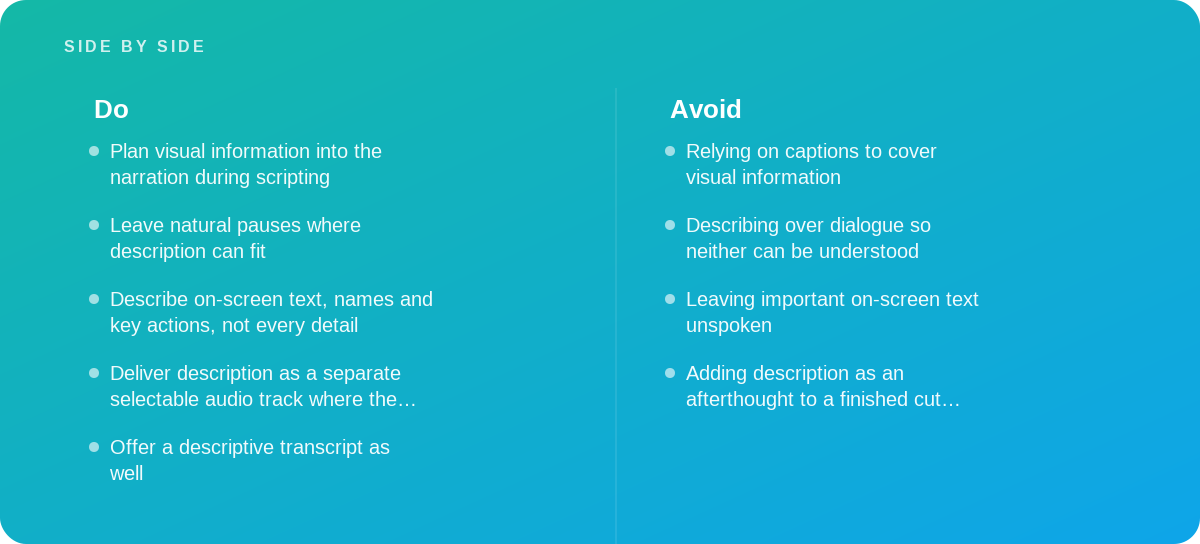
Integrated description is the approach the reference guidance favors wherever it is possible: plan the visual information into the narration during scripting. The presenter does not say "as you can see here"; she says "the dashboard now shows revenue by region, with the northeast leading." The on-screen title card is read aloud by the voiceover. A new speaker introduces himself by name and role. When it works, there is no separate description track at all, because nothing essential is locked in the picture.
This is the cheapest option by a wide margin when it is decided early, because the cost is absorbed into scripting and recording that were happening anyway. It is also the option that produces the most natural listening experience, since description never competes with dialogue; it is the dialogue. For explainer videos, training modules, internal announcements and most corporate content with a scripted voiceover, integrated description can satisfy the intent of 1.2.5 on its own, provided a review confirms nothing essential is left visual-only.
It has limits. It is hard to retrofit, because changing the words means re-recording. It can feel stilted in documentary or emotional content, where a narrator explaining what the audience is looking at breaks the mood. And it depends on discipline across the whole team: an editor who drops in a new graphic late in the process can silently break conformance. If your team already works from transcripts, text-based editing workflows make it much easier to see whether every visual beat has a spoken counterpart.
Pros
- Lowest incremental cost when planned at the script stage
- One mix for every viewer, so no player support for alternate tracks is needed
- Most natural listening experience; description never talks over dialogue
- Improves the video for sighted viewers who are watching with half an eye
Cons
- Expensive or impossible to retrofit once voiceover is recorded
- Can sound forced in narrative, emotional or documentary work
- Late graphic changes can quietly break coverage
- Rarely sufficient for unscripted footage such as events or interviews
Option two: a standard audio description track fitted to natural pauses
This is what most people picture when they hear the term. A describer watches the locked cut, identifies the gaps between lines of dialogue and important sound, writes description that fits those gaps, and a narrator records it. The description is then mixed with the program audio, with the program ducked slightly under each described passage, and delivered as a second audio track that viewers switch on in the player.
The reference guidance is explicit that description should be delivered as a separate selectable audio track where the player allows. That keeps the default experience unchanged for viewers who do not need description, and it keeps the description available to those who do without a separate upload. Most modern web players and the major video platforms support multiple audio tracks; many simpler embeds and social platforms do not. Where the player cannot carry an alternate track, the fallback is a second, fully mixed version of the video labeled clearly as the described version and linked from the same page.
Writing to the gaps
The craft is compression. A gap of two seconds holds only a handful of words at a natural speaking rate, so the describer has to choose the single most important fact and phrase it tightly: "Maria, now in the warehouse." "Chart: sales doubled since March." Description should be written in the present tense, in the third person, and should describe rather than interpret; "she frowns" rather than "she is angry," unless the emotion is unambiguous and essential. Names are introduced once and then used consistently.
Timing matters as much as words. Description should land just before or during the visual it refers to, not after it. It should never be placed over dialogue, lyrics that carry meaning or sound effects the listener needs, and it should leave a small cushion before the next line so the two do not collide. The editing conventions that shape pacing, including J-cuts and L-cuts that carry audio across picture edits, directly change how much room exists. A cut built on tight L-cuts with continuous dialogue can leave almost nothing.
Human or synthetic voice: both are used for standard description, and the choice is mostly about content and budget rather than conformance.
- A human narrator handles tone, pronunciation of names and pacing in tight gaps better, which matters for brand, narrative and emotional work.
- A synthetic voice is faster to revise and can be regenerated after every re-edit, which suits training libraries and frequently updated product videos.
- Either way, the script is the hard part; a well-written script in a plain synthetic voice beats a poor script read beautifully.
Standard description is the workhorse because it can be added to video that already exists, it leaves the main cut untouched, and it scales across a library. Its weakness is that it is entirely hostage to the gaps. A fast-paced promo with wall-to-wall voiceover and music gives the describer nowhere to go, and the result is either a track that omits essentials or a track that talks over the program. Both are failures.
Pros
- Works on finished and legacy video without touching the main cut
- Default viewers hear the original mix; described viewers opt in
- Scales well across a library with a consistent style guide
- Directly addresses WCAG 1.2.5 when coverage is complete
Cons
- Coverage is limited by the natural pauses in the cut
- Needs a player that supports alternate audio tracks, or a second rendered version
- Every re-edit of the program can invalidate the description timing
- Adds a separate writing, recording and mixing pass to the schedule
Option three: extended audio description that pauses the picture
Extended description is the answer when the gaps are simply not there. Instead of squeezing description into silence that does not exist, the video holds, either on a freeze frame in a rendered alternate version or through a player that pauses playback, while the description is delivered, and then resumes. WCAG places this at level AAA under 1.2.7, which means it is not required for AA conformance, but it is often the only way to give complete description for dense content.
The reference guidance names this situation directly: bring in help when the cut has no space for description and extended description is needed. Typical candidates are dense product demonstrations, software walkthroughs where the screen changes every second, data-heavy investor updates, and training videos in which a presenter talks continuously over complex visuals. For something like investor and earnings video, where a chart or a figure on screen may be the whole point of the segment, extended description can be the difference between a described video and a merely decorated one.
There are two technical routes. The more robust for most organizations is a separately rendered described version in which the editor inserts holds at the right moments and the description plays over those holds. It works in any player. The more elegant route is player-driven pausing, where description is delivered as timed text or a separate audio file and the player pauses the program while it plays. That depends on player support that is still uneven, so confirm it on every platform you publish to before committing.
Do not solve a gap problem by describing over dialogue: when there is no room, the temptation is to lay description on top of the speaker and duck the program under it. Neither voice is then intelligible, and the track fails the very viewers it was made for. If the gaps are too short, the honest options are to re-edit to open pauses, move to extended description, or rebuild the script with integrated description.
Pros
- Delivers complete description even for dense, fast content
- Meets WCAG 1.2.7 (AAA) as well as the AA requirement
- Does not require re-editing or re-recording the original program
- A rendered version plays anywhere, with no player dependency
Cons
- Longer runtime and a noticeably different viewing rhythm
- Player-driven pausing is not supported everywhere
- A second render doubles the files to manage and update
- Freeze frames need careful editing to avoid feeling broken
Option four: the descriptive transcript as a companion, not a substitute
A descriptive transcript is a text document that contains all of the dialogue plus descriptions of the essential visual information, in reading order. Because it is text, it works with screen readers and refreshable braille displays, it can be read at the viewer's own pace, and it is the only format that serves people who are deafblind. The reference guidance recommends offering one as well as audio description, and that "as well" is the important part.
At level A, a full text alternative can stand in for audio description under 1.2.3. At level AA, it cannot. If your target is AA, the transcript is a companion that adds real value, not a way to skip the track. It is also cheap to produce once description has been written, because the describer's script and the caption file together are most of the transcript already. If you are already investing in accurate captions and subtitles, the dialogue half of the transcript is essentially done.
Transcripts also do useful work beyond accessibility: they are indexable text on the page, they let people skim before committing minutes to a video, and they give legal and compliance reviewers something to sign off. Publish the transcript on the same page as the video, linked immediately beneath the player, not in a separate downloads area.
The criteria that decide between the options
Once the options are clear, the decision turns on a small set of criteria. We use seven, and they are worth scoring honestly for each project rather than assuming a house default.
- Conformance coverage
- Does the option, on its own, meet the conformance level you are committed to? Integrated and standard description can meet AA if coverage is complete; extended description reaches AAA; a transcript alone meets only A.
- Stage of production
- Is the script still open, or is the cut locked and the voiceover recorded? Integrated description needs an open script. Standard and extended description work on a locked cut.
- Gap availability
- How much natural silence does the program have, and are the gaps where the visuals change? Dense content favors extended description or integrated scripting.
- Player and platform support
- Can every place you publish carry an alternate audio track, or will you need a separately rendered described version?
- Incremental cost
- What is added on top of the production you were doing anyway? Integrated description is cheapest when early; separate tracks add writing, voicing and mixing; extended adds editing and a second render.
- Maintenance burden
- How often will this video change? Frequently updated training and product videos punish options that need re-timing after every edit.
- Listening experience
- How natural is the result for a blind viewer? Integrated description scores highest; extended description is complete but changes the rhythm; a squeezed standard track can feel hurried.
Two criteria usually dominate. Stage of production determines which options are even available, and gap availability determines whether standard description can achieve full coverage. Settle those two first and the rest often follows.
Scoring the audio description options side by side
The scorecard below rates each option from 1 (weak) to 5 (strong) against the criteria above. These ratings are our editorial judgment based on how the methods behave in typical corporate and marketing production, not measured data; your project's constraints can move any score by a point or two. The totals are useful for orientation, but read the rows, because a single low score on conformance can disqualify an option regardless of its total.
| Criterion | Integrated description | Standard separate track | Extended description | Descriptive transcript only |
|---|---|---|---|---|
| Conformance coverage | 4 (AA if complete) | 4 (AA if complete) | 5 (AAA) | 2 (A only) |
| Works on a locked cut | 1 | 5 | 5 | 5 |
| Copes with few natural gaps | 5 | 2 | 5 | 5 |
| Player independence | 5 | 3 | 4 (rendered version) | 5 |
| Incremental cost | 5 if planned early | 3 | 2 | 4 |
| Maintenance burden | 3 | 2 | 2 | 4 |
| Listening experience | 5 | 4 | 3 | n/a (text) |
Read across the rows and a pattern emerges. Integrated description wins on almost everything except the one criterion that is binary: whether the script is still open. Standard description is the most flexible for existing video but lives or dies on gaps. Extended description is the most complete but the most disruptive and the most expensive to maintain. The transcript is excellent support and weak as a standalone answer at AA.
A worked example: describing a three-minute product explainer
To make the trade-offs concrete, here is an illustrative project, not a real client engagement, with realistic numbers. A software company has a three-minute (180-second) explainer for a new reporting feature. The voiceover is recorded and the cut is locked. The organization's accessibility policy requires WCAG 2.1 AA for everything on its public website.
Step one: map the gaps
The editor exports a timeline of the voiceover and marks every pause longer than about one second where no essential sound is playing. The illustrative result: voiceover and essential sound occupy about 150 seconds, leaving roughly 30 seconds of usable silence spread across 14 gaps. Only 6 of those gaps are longer than two seconds; the rest are between one and two seconds.
Step two: list what must be described
The describer watches the cut with the sound off, then with the picture off, and lists everything essential that is visual-only. In this example there are 18 items: 5 on-screen text elements (the feature name, two statistics in callouts, a URL and a legal super), 9 interface actions the voiceover refers to only as "here" or "this," 2 speaker identifications for a customer testimonial clip, and 2 scene changes from product screen to office setting.
Step three: estimate the words needed against the words available
Natural description is typically spoken somewhere in the range of two to three words per second. At that rate, 30 seconds of usable silence carries roughly 60 to 90 words. Writing each of the 18 items as tightly as possible, the describer needs about 140 words. The gap is obvious before a single line is recorded.
| Item type | Count | Approx. words needed | Fits in natural gaps? |
|---|---|---|---|
| On-screen text (titles, callouts, URL, legal super) | 5 | 45 | Partly; the legal super does not |
| Interface actions referred to as "here" | 9 | 60 | About half |
| Speaker identification | 2 | 15 | Yes |
| Scene changes | 2 | 20 | Yes |
| Total | 18 | 140 | Roughly 60 to 90 words of capacity |
Step four: choose the approach
The team has three honest paths. It could re-record about a dozen voiceover lines so the presenter names the interface actions and reads the on-screen statistics aloud, which is integrated description applied late; that cuts the words needed from the description track to perhaps 50 and makes a standard track feasible. It could keep the voiceover and produce an extended described version with holds totaling perhaps 25 to 35 seconds. Or it could combine the two: fix the most egregious "click here" lines in a short pickup session and use a standard track for the rest. In this illustrative case, the combined route is usually the best value, because the re-record fixes the video for every viewer, not only for description users. If a re-record is on the table, the planning in our guide to pickup shoots and reshoots applies directly.
Step five: deliver and document
The final package in this example is the original video, an alternate described audio track loaded into the player, a descriptive transcript published beneath the video, and a short note in the accessibility statement explaining how to switch on description. The describer's script is archived with the project so that any future edit can be re-timed rather than rewritten.
Recommendations by situation
With the options scored, the recommendation depends mostly on where the project is when the decision is made and what kind of content it is. These are the situations we see most often, with the approach that usually serves each one best.
New scripted content not yet recorded
Choose integrated description, with a review pass before recording to confirm every visual beat has a spoken counterpart. Add a descriptive transcript. Budget a small allowance for a standard track in case late graphics change the picture. This is the cheapest route to AA and produces the best experience for everyone.
An existing library of finished marketing and training video
Choose standard description on a separate track, prioritized by traffic and by legal exposure. Audit each video's gaps first; any that fail the gap test go to the extended-description queue rather than getting a squeezed track. A synthetic voice is reasonable for high-volume, frequently updated training material; keep a human narrator for flagship brand pieces.
Dense demos, data presentations and continuous-talk content
Choose extended description as a separately rendered version, or re-script with integrated description if a new version is due anyway. Standard description rarely gives complete coverage here, and incomplete coverage fails AA.
Public sector, healthcare and regulated communications
These organizations usually have explicit AA obligations and procurement language to match. Plan integrated description into scripts, deliver a standard track and a transcript, and document conformance per video. The considerations in government communication video and in healthcare video and patient privacy overlap heavily with description: plain language, named speakers and on-screen text that must be spoken.
Content destined for broadcast
Follow the distributor's specification, which will reflect FCC requirements where they apply, and expect a separate described audio stream mixed to their loudness target. Web delivery of the same program can reuse the description with minor re-timing.
Verdict If the script is still open, write the description into it; that is the cheapest and best-sounding route to AA. If the cut is locked and has room, a separate standard track plus a descriptive transcript is the dependable default. If the cut is locked and dense, go to extended description or re-record the lines that point at the screen. A transcript on its own is never enough once you have committed to AA.
Producing and mixing the description track properly
The quality of the final track depends on details that are easy to overlook in a schedule that treats description as a box to tick. These are the production decisions that separate a usable track from a merely present one.
Script format and review
Write the description script against timecode, with an in point and an approximate duration for each line, and the dialogue or sound it sits between. Have someone other than the writer review it with the picture off: if they cannot follow the video, something essential is missing. Check every name, product term and number against the source, and confirm pronunciation for names before the recording session.
Voicing
The narrator's voice should be clearly distinguishable from the program's presenters, typically by contrasting timbre or gender, so listeners always know which voice is description. Delivery should be neutral and even-paced; description is not a performance. Record in the same session conditions throughout so the track sounds consistent when re-edits force pickups.
Mixing and loudness
Description should sit clearly above the program under it, with the program ducked just enough during each described passage and restored smoothly afterward. Avoid hard ducks that pump; gentle, short fades are less fatiguing. The full described mix must meet the same loudness target as the main mix, because a described track that is noticeably louder or quieter is an accessibility failure of its own. Our practical guide to audio loudness standards covers the targets for web, streaming and broadcast, and specialist audio editing is often the right place to hand off the final mix.
Delivery and labeling
Name the alternate track clearly in the player ("English, audio description" rather than "Track 2"). If you publish a separately rendered described version, title it identically with "(audio described)" appended and place it next to the standard version. Mention description availability in the video description text and in your accessibility statement.
The mistakes that make audio description fail
Most failed description is not a writing problem; it is a planning problem. These are the mistakes we see repeatedly, and each one maps back to a choice in the framework above.
- Relying on captions to cover visual information. Captions transcribe what is heard. They do nothing for the chart, the demo or the person who appears without being named. A video with perfect captions and no description does not meet 1.2.5.
- Describing over dialogue so neither can be understood. This is what happens when a standard track is forced onto a cut without gaps. The fix is structural (re-edit, extend or re-script), not a louder narrator.
- Leaving important on-screen text unspoken. Statistics, URLs, phone numbers, legal supers and lower thirds are the most commonly missed items, and often the most important. Audit every text element on screen.
- Adding description as an afterthought to a finished cut with no gaps. The single most expensive mistake. Deciding on description at the script stage costs almost nothing; discovering the need after lock can mean a re-record or an extended version.
- Describing everything. Over-description is tiring and pushes out what matters. Describe what the sighted audience needs, not everything the sighted audience can see.
- Letting description drift out of sync after re-edits. Any change to the program after description is recorded needs a re-timing pass. Build that into the change process.
Several of these trace back to shooting and editing decisions made long before description is discussed. Framing that puts text in the shot, graphics that carry the argument and presenters who point rather than name all increase the description load; the principles of shot types and framing are worth revisiting with a blind viewer in mind.
Building description into the production process so these mistakes never happen
The organizations that handle description well treat it as a stage of production, not a remediation project. In practice that means a few standing habits.
At the brief stage, record the conformance target and the publishing platforms, and confirm whether each platform supports alternate audio tracks. At the script stage, run an accessibility read: mark every line that refers to something visual without naming it, and rewrite it so the words carry the meaning. At the edit stage, protect a few natural pauses at moments where visuals change, rather than trimming every breath; editors who know description is coming will leave room. After picture lock, map the gaps and decide between standard and extended description before any description is written. At delivery, ship the described track or version, the descriptive transcript and the caption file together, and archive the description script with the project.
When should you bring in outside help? The reference guidance is clear: when video must meet WCAG AA or a procurement requirement, or when the cut has no space for description and extended description is needed. Those are the cases where judgment about what to describe, how to fit it and how to deliver it has the biggest consequences. A production partner who handles both the edit and the description, such as our video editing and production team, can re-open pauses in the cut or render an extended version without the back-and-forth of two separate vendors.
Done this way, audio description stops being an expensive retrofit and becomes one more deliverable, like captions or a thumbnail, that every finished video ships with. The decision framework does not change from project to project: know your conformance target, know where you are in production, check the gaps, and choose the option that gives complete coverage with the least disruption.
Where this comes from
- W3C Web Accessibility Initiative — Understanding SC 1.2.5 Audio Description (Prerecorded)
- W3C Web Accessibility Initiative — Description of visual information
- Federal Communications Commission — Audio description
The figures and practices above come from the sources listed.
Working on something like this?
We take on Video Editing & Production work for teams who want it done once, properly. Tell us what you are building and we will tell you honestly whether we are the right studio for it. Start a project.
Where to go next
Spotted something wrong? Report an error on this page. We correct on the page and say what changed.












