How to Get Animated iMessage Stickers Right
Learn how to commission animated iMessage stickers: Apple's size and file rules, what drives cost, questions to ask, how to compare quotes and red flags.
 MediaScaleUp Editorial Team

Animated iMessage stickers are small looping images that people peel off a tray in Apple's Messages app and drop into a conversation, either as a standalone message or layered on top of a bubble or photo. For a brand, a mascot or a character-led product, they are one of the few formats that live inside private, everyday conversations rather than in a feed that people scroll past. When a sticker gets used, it is because someone chose it to say something on their behalf, which is a very different kind of attention from an ad impression.
That intimacy comes with strict constraints. Apple sets fixed sticker sizes, a hard file-size ceiling and a short list of accepted formats, and a sticker pack has to pass App Store review before anyone can install it. Inside those limits, the work is part character design, part animation and part compression engineering. A sticker that looks charming in a designer's review file can turn to mush at 300 pixels, blow past the file limit, or vanish against a dark-mode background.
This handbook is written for the person commissioning the work: a marketing lead, a brand manager, a product owner or a founder who wants a sticker pack made well and needs to know what to ask for, what drives cost, how to compare suppliers, which warning signs to watch for and how to judge the stickers when they arrive. Practitioners will find the technical detail they need to hold a supplier to a clear standard.
What you are actually buying when you commission a sticker pack
A sticker pack looks like a handful of small animations, but a finished, publishable pack is a bundle of several distinct deliverables. Knowing what they are lets you write a scope that suppliers can price consistently, and it stops the most common surprise at the end of a project: discovering that "the stickers" did not include the thing you needed to actually ship them.
The creative layer
At the heart of the pack is a set of expressions. Each sticker is a single idea, such as a greeting, a reaction, a celebration, an apology or a sign-off, expressed through a character, a mark or typography. The creative work covers concept development (which moments in a conversation the pack serves), character or style development if you do not already have one, rough sketches, final artwork and animation. If you are starting from an existing mascot, you are paying for adaptation; if you are starting from nothing, you are paying for character design first, which is a project in its own right. Our guide to designing characters for animation covers that earlier stage in depth.
The production layer
Each animated sticker has to be exported at one of Apple's fixed sizes, in a supported format, with transparency handled correctly, and under the file-size ceiling. That means frame-count planning, palette decisions, compression passes and repeated checks on real devices. This is where the difference between an illustrator who animates and a studio that ships stickers shows up most clearly. A beautiful twelve-second loop with soft gradients is not a sticker; it is a file that will be rejected or that will have to be butchered at the last minute.
The packaging layer
Stickers reach people through a sticker pack app distributed on the App Store. Someone has to assemble the pack in Apple's tooling, provide the app icons Messages requires, write the store listing, prepare screenshots and submit the pack for review under a developer account. Some suppliers do all of this; many deliver only the image files and leave packaging to you. Neither is wrong, but you need to know which you are buying, and who owns the developer account the pack is published under.
The asset layer
Finally, there are the working files: layered artwork, animation project files, color references and export presets. These matter if you ever want to add stickers, fix one, adapt the set for another platform or move to a different supplier. We cover what a complete handover should include later in this handbook.
Apple's rules for animated iMessage stickers, in plain terms
Everything a supplier makes has to fit a small set of published requirements. Apple documents these in its Human Interface Guidelines for iMessage apps and stickers, and they are not negotiable: a pack that ignores them either fails review or displays badly. The figures below are the ones you should expect every supplier to quote back to you without being prompted.
- Small size 300 by 300 pixels, for packs that show many stickers in the tray at once
- Regular size 408 by 408 pixels, the middle option and a common default
- Large size 618 by 618 pixels, for fewer, more detailed stickers per row
- File size ceiling 500 KB or smaller for each sticker file
- Accepted formats PNG, APNG, GIF and JPEG
- Transparency supported, so stickers can sit on top of bubbles and photos
What the size choice really decides
The three sizes are not just resolutions; they determine how the sticker appears in the tray and how much detail a viewer can resolve. A pack is built at one size, so the choice is made once for the whole set. Small stickers suit simple, bold expressions and larger collections where a user browses many options quickly. Large stickers give room for a detailed character or legible short words, but the viewer sees fewer at a time. The regular size is a sensible compromise for most brand packs. Ask your supplier to justify the size against your content: a pack of dense typographic stickers argues for large, while a pack of simple emoji-like faces works well at small.
What the format choice really decides
For animation, the realistic choices are APNG and GIF. JPEG does not animate and does not support transparency, so it is only suitable for static stickers with a solid background, which rarely suits Messages. PNG is the standard for static stickers with transparency. Between the animated formats, the practical differences are significant:
- APNG supports full alpha transparency, so soft edges, shadows and anti-aliased outlines blend cleanly over any bubble or photo. It also supports full color depth. The trade-off is that files can grow quickly if frames are not optimized.
- GIF is limited to a palette of 256 colors per frame and to on-or-off transparency, where each pixel is either fully visible or fully transparent. That produces jagged or haloed edges against backgrounds the artwork was not designed for, which is exactly the problem in Messages, where the background changes constantly.
For most animated sticker work, APNG is the better default, and a supplier who proposes GIF should explain why. We go deeper on the format itself in our practical guide to animated WebP and APNG, and the GIF constraints are covered in how to get animated GIFs right.
What the file ceiling really decides
The 500 KB limit is the constraint that shapes the animation more than any other. Every frame adds weight, every gradient adds weight, and every pixel of change between frames adds weight. A supplier who understands this plans the animation around the budget from the first sketch: limited frame counts, flat or lightly shaded color, movement concentrated in part of the image rather than the whole frame, and loops measured in a second or two rather than many seconds. A supplier who does not will animate freely and then try to compress the result, which is where banding, dropped frames and muddy color come from.
Writing a brief that gets comparable quotes
Quotes for sticker work vary widely, and the main reason is that briefs are vague. "A fun animated sticker pack for our brand" can be read as eight simple loops using an existing mascot or as thirty fully animated scenes with a new character. The more of the following decisions you make before asking for quotes, the more directly you can compare the numbers that come back.
Decide the conversational job of the pack
Stickers get used when they say something people already want to say. Start by listing the moments your audience actually talks about: greetings, thanks, congratulations, sympathy, running late, celebration, agreement, laughter, a seasonal occasion or something specific to your product's community. Then decide how many of those moments the pack must cover. A pack that is all brand messaging and no genuine conversational use tends to be installed and ignored. Ask for a mix where most stickers are useful reactions expressed in your brand's style, and only a few carry overtly branded content.
Decide the count and the animation depth
Specify how many stickers you want and how many of them should animate. It is common and sensible to mix static and animated stickers in one pack: static ones are cheaper to make and carry no file-size risk, while animated ones do the heavy expressive lifting. For each animated sticker, state the expected depth. A simple loop, such as a blink, a bounce or a wave, is far cheaper than a sticker with a short piece of acting, like a character who spots something, reacts and settles.
Decide what you are supplying
List your inputs: an existing character sheet, brand guidelines, color values, typefaces and any existing animation. If your mascot already moves in other media, share that footage so the supplier can match its personality. If your brand already has an animated mark, the relationship between the logo animation and the stickers is worth thinking about; our guide to animated logos and stings explains how motion identity is usually defined.
Decide packaging and ownership
State whether you want image files only or a submitted pack, whose Apple developer account will publish it, who writes the store listing and who handles review feedback. State the rights you need: full ownership of the artwork, a license for specific uses or the ability to reuse the stickers on other platforms. Rights are one of the biggest hidden variables in pricing, especially when a supplier is also creating a new character.
Decide the languages and text
Stickers with words are more specific and often more popular, but every word is a localization decision. If your audience spans languages, decide whether you want text-free stickers, one language, or separate language variants, which multiply the production work. Text also needs to be legible at the chosen size, which pushes you toward regular or large stickers and bold lettering.
What drives the cost of an animated sticker pack
We are not going to quote prices, because rates vary by market, by supplier and by the depth of the work, and any single figure would be misleading. What we can do is explain the variables that move a quote up or down, so that you can read the numbers you receive and see where the money is going.
Character development
If the supplier is creating the character, expect this to be a significant share of the budget and the timeline. Character design involves exploration, feedback rounds, turnarounds and expression sheets before a single sticker is animated. An existing, well-documented character removes most of this cost. A partially defined one, such as a logo mark that must now become a character with a face and limbs, sits in between and is often underestimated.
Number of stickers and share that animate
Cost scales roughly with the number of animated stickers, but not linearly. The first few stickers carry the setup cost: rigging or building the character for animation, establishing the style, defining the timing language and building the export and compression workflow. Later stickers reuse all of that. This is why a pack of twelve is usually much cheaper per sticker than a pack of four, and why adding stickers later, from the same supplier with the same setup, can be efficient.
Animation technique
The technique affects both cost and file size. Frame-by-frame hand animation, where each frame is drawn, gives the most expressive result and the most organic feel, but it is labor-intensive and produces frames that differ everywhere, which costs file weight. Rigged or puppet animation, where a character is built from parts and moved, is faster for large sets and produces cleaner frame-to-frame changes. Many studios mix the two: rigged motion for the body, a few hand-drawn frames for expressive accents. Ask which technique is proposed and why.
Loop length and frame rate
Longer loops and higher frame rates mean more frames to draw or render and more weight to compress. For stickers, the useful range is short: most successful loops complete their idea in one to three seconds. Frame rates in the range of roughly 10 to 15 frames per second are common for sticker work because they give readable motion while keeping file size manageable. A supplier proposing smooth 30 fps motion for every sticker is either planning for very simple content or has not yet confronted the file-size ceiling.
Revision rounds
Each round of changes after animation begins is expensive, because a change to a pose or timing can ripple through every frame. Quotes differ in how many rounds they include and at which stage. Revisions at sketch stage are cheap; revisions after final animation are costly. A good quote sets out rounds per stage, and a good process front-loads approval so that late revisions are rare.
Packaging, submission and support
Assembling the pack, creating the app icons, preparing store assets and managing review add a modest but real cost. Some suppliers include ongoing support, for example fixing a rejected submission or updating the pack for a seasonal refresh; others charge for each change. Make sure you know what happens if Apple's review sends the pack back.
Rights and exclusivity
Full buyout of a newly created character, with the right to use it anywhere, is priced differently from a license to use a set of stickers in Messages. If you want the character for future animation, merchandise or campaigns, say so up front. Negotiating rights after the fact is almost always more expensive than scoping them at the start.
Questions to ask a sticker studio before you sign
Portfolios tell you whether a supplier can draw. The questions below tell you whether they can ship a pack that works in Messages, on time and within Apple's rules. Ask them in writing and compare the answers side by side; vague or evasive answers are informative in themselves.
- Which sticker size do you recommend for our content, and why that size rather than the other two?
- Will you deliver animated stickers as APNG or GIF, and how will you handle soft edges and transparency?
- How do you keep each animated sticker under the 500 KB limit, and at what stage do you check file size?
- What loop length and frame rate do you plan for, and how do you make the loop seamless?
- How will you test the stickers on light and dark message backgrounds and over photos?
- Can you show published sticker packs you have made, and can we install one to test it?
- Which stages include revisions, how many rounds, and what counts as a new request?
- Do you assemble and submit the pack, and under whose developer account?
- What happens, and what does it cost, if App Store review rejects the pack?
- Which working files do we receive at the end, in which formats and in what structure?
- What rights do we get in the artwork and any character you create?
- How would you approach adding more stickers later, and what would carry over?
The most revealing question is usually the one about file size. A studio that has shipped stickers will answer with a method: a frame budget, a palette plan, an early test export and a check on every file before delivery. A studio that has not will say something like "we'll optimize at the end," which tells you the constraint has not yet shaped their thinking.
The second most revealing question is about testing. Messages shows stickers over blue and gray bubbles, over photos and over both light and dark appearance modes. A supplier who only reviews stickers on a white artboard will miss the halo around a GIF edge, the dark outline that disappears in dark mode, or the pale character that washes out against a light bubble.
Comparing sticker pack quotes side by side
Once you have two or three proposals, put them into a common structure. Quotes are rarely laid out the same way, so a scorecard forces the differences into view: one supplier's lower number may exclude packaging, another's may include only one revision round, and a third may propose GIF where you need APNG. Score each proposal on each line, and note where information is missing, because a gap in a proposal is usually a cost you will pay later.
| What to compare | Strong proposal | Weak proposal |
|---|---|---|
| Scope clarity | States sticker count, how many animate, loop lengths and size | Says "a set of animated stickers" with no numbers |
| Technical compliance | Names the size, APNG or justified GIF, and a method for staying under 500 KB | Does not mention file limits or format |
| Process and approvals | Concept, sketch, animatic or test loop, final animation, each with sign-off | Single delivery of finished animation, then revisions |
| Revisions | Defined rounds per stage, with what counts as a change | "Unlimited revisions" or no mention at all |
| Testing | Device testing on light and dark modes, bubbles and photos | Review on artboards or in a browser only |
| Packaging | Clear on whether pack assembly, icons and submission are included | Silent on how the stickers reach the App Store |
| Handover | Lists source files, export presets and naming conventions | Delivers exported stickers only |
| Rights | States ownership or license terms in writing | Rights left to be discussed later |
| Timeline | Dates for each stage, with dependencies on your feedback | One end date with no milestones |
How to weigh the scores
Not every line matters equally. Technical compliance and testing are close to pass-or-fail: a proposal that ignores them will cost you time, money or a rejected submission. Process and revisions determine how much control you have over the result. Handover and rights determine what you own at the end. Price should be compared only after these lines are equalized; if one supplier includes packaging and another does not, add an honest estimate of the missing work to the cheaper quote before comparing.
Normalizing quotes
A practical way to compare is to convert each proposal to the same scope. Take the scope you actually want, say twelve stickers with eight animated at the regular size, APNG, two revision rounds per stage, packaging and submission, and full ownership. Ask each supplier to price exactly that, then list options separately. Suppliers who refuse to price a clear scope, or who keep reverting to their own package, are telling you how the project will be run.
Red flags in proposals, samples and first drafts
Most sticker projects that go wrong show warning signs early, often in the proposal or the first round of work. The problems below are the ones that most reliably lead to rejected files, late rework or a pack nobody uses.
Red flag: the proposal never mentions the 500 KB limit or which sticker size will be used.
- This usually means the supplier has not made stickers for Messages before and is treating the job as general animation.
- Expect heavy late compression, dropped frames or a request to simplify animation after you have approved it.
- Ask for a single test sticker exported at final size and format before the full pack goes into production.
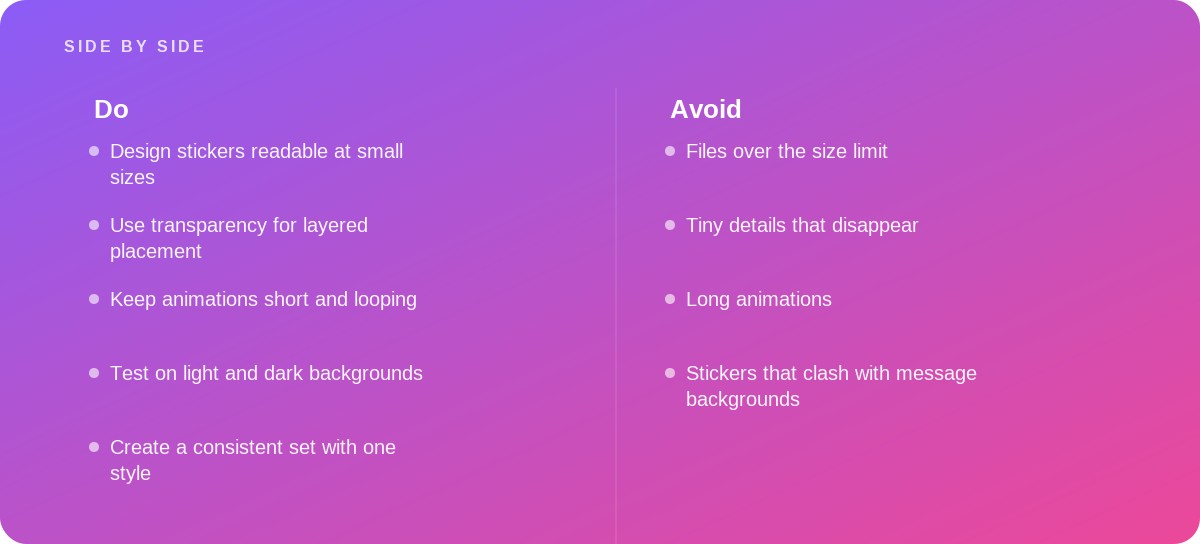
A second group of problems shows up in samples. Ask to see stickers at their real size, installed on a phone, rather than enlarged in a presentation. Enlarged previews flatter fine detail that disappears at 300 or 408 pixels. Thin line work, small facial features and tiny text all look crisp in a slide deck and dissolve on a phone. The Apple guidance to design stickers that read clearly at small sizes is the standard to hold samples to, and your own eye at arm's length is the test.
A third group appears in the animation itself. Long animations that tell a story are a poor fit for a format that people glance at in a conversation. If a sticker needs more than a couple of seconds to make its point, it will usually be both too heavy and too slow. Loops that jump or stutter where the last frame meets the first are also a sign of haste; a sticker loops endlessly on screen, so a visible seam becomes the most noticeable thing about it.
Red flag: stickers are only ever shown on a white background.
- Stickers in Messages sit over colored bubbles, photos and dark-mode backgrounds, not white artboards.
- Dark outlines disappear in dark mode; pale fills vanish over light bubbles; GIF edges show halos over photos.
- Ask for every sticker to be presented over light, dark, bubble and photo backgrounds at each review stage.
There are also commercial red flags. "Unlimited revisions" sounds generous but usually means an undefined process, and it tends to produce either late friction or a supplier who quietly stops responding to change requests. A proposal with no stage approvals means you will see the work for the first time when it is finished, which is the most expensive moment to change it. And a supplier who is vague about rights, or who plans to publish the pack under their own developer account without saying so, may leave you unable to update or remove your own stickers later.
Worked example: an illustrative twelve-sticker brand pack
The following example is illustrative, built to show how the constraints interact in a realistic brief. It is not a client project, and the hours are planning ranges rather than quotes.
Imagine a coffee brand with an existing mascot, a small cup character with a face, already defined in a character sheet. The brand wants a pack of twelve stickers at the regular 408-pixel size, eight of them animated and four static, in APNG with transparent backgrounds. The pack will cover everyday reactions (good morning, thanks, running late, celebration, sleepy, love it, on my way, nope) with two lightly branded stickers for a seasonal drink and four static stickers for simple signs such as "yes" and "same."
Setting the frame budget
The supplier begins with arithmetic. With a 500 KB ceiling and a plan for loops of about two seconds at 12 frames per second, each animated sticker has around 24 frames. Dividing the ceiling across the frames gives an average of roughly 20 KB per frame, before accounting for the fact that APNG can store only the changed region of each frame. That average is a warning line, not a target: a sticker whose whole character moves every frame will use more, while one where only an arm waves will use far less. The practical rule the supplier sets is to keep flat fills, avoid full-frame gradients, and concentrate motion in part of the character wherever the expression allows.
| Sticker | Motion idea | Loop length | Frames at 12 fps | Planning target |
|---|---|---|---|---|
| Good morning | Stretch and yawn, steam rises | 2.0 s | 24 | Under 400 KB |
| Thanks | Small bow, heart pops | 1.5 s | 18 | Under 300 KB |
| Running late | Legs spin, sweat drop | 1.0 s | 12 | Under 250 KB |
| Celebration | Jump, confetti burst | 2.0 s | 24 | Under 450 KB |
| Sleepy | Eyes droop, head nods | 2.5 s | 30 | Under 350 KB |
| Love it | Eyes turn to hearts, pulse | 1.5 s | 18 | Under 300 KB |
| Seasonal drink A | Cup tilts, sparkle | 2.0 s | 24 | Under 400 KB |
| Seasonal drink B | Wink and thumbs-up | 1.5 s | 18 | Under 300 KB |
Notice the celebration sticker. Confetti is a classic file-size trap because many small particles move across the whole frame on every frame, so nothing can be reused between frames. The supplier sets it a higher target and plans a limited number of larger confetti shapes rather than a storm of tiny ones. That is both lighter and easier to read at 408 pixels, which shows how a good file-size decision often improves legibility too.
Planning the schedule
With an existing character, the supplier might plan the project in stages: a short concept and expression-list stage; rough sketches of all twelve stickers on a single sheet so the set can be judged as a family; one test sticker fully animated and exported to prove the size and format pipeline; animation of the remaining seven; final export, device testing and packaging. The test sticker is the key decision point. It is where the client sees real motion at real size on a real phone, and where the supplier confirms that the frame budget holds.
Where the effort goes
In a plan like this, the largest block of effort is the animation of the eight moving stickers, followed by setup (preparing the character for animation, defining timing and building export presets) and then testing and compression. Packaging and submission are a smaller block. If the brand had no character and needed one designed, character development could easily rival the animation work, which is why a brief should always state whether a character exists.
The lesson from the example is that the constraints are not an afterthought. The file ceiling determined the frame rate, the frame rate determined the loop lengths, and the loop lengths determined which expressions were worth animating. A supplier who does this arithmetic at the start gives you a pack that ships; one who does it at the end gives you a negotiation.
How to judge the finished animated iMessage stickers
When the stickers arrive, resist the urge to review them on a laptop in a folder of files. Judge them the way people will use them: installed on a phone, in real conversations, at real size. Here is a review procedure that catches the problems that matter.
Check compliance first
Before anyone discusses taste, confirm the technical basics. Every file should be at the agreed size, 300, 408 or 618 pixels square, in the agreed format, and at or under 500 KB. File properties show the size and dimensions, and a quick look in any file browser shows the weight. It takes minutes, and a single noncompliant file is enough to hold up a submission. Apple's developer documentation for Messages is the reference to check against if there is any doubt about current requirements.
Check legibility at arm's length
Install the pack on a phone, open a conversation and look at the tray and at stickers placed in the thread. Hold the phone at a normal distance. Can you tell what each sticker says in under a second? Are facial expressions readable? Is any text legible without zooming? Stickers are read in a glance, so anything that needs study has failed, however lovely it looks enlarged.
Check every background
Place each sticker over sent and received bubbles, over a photo, and on the open conversation background in both light and dark appearance. Look at edges for halos or jagged pixels, at outlines that vanish against dark backgrounds, and at pale areas that blend into light bubbles. Many studios add a thin light or dark outline around the character, sometimes called a sticker border, precisely so the shape holds up on any background. If the pack does not use one, check that the artwork survives without it.
Check the loops
Watch each animated sticker loop at least five or six times. Look for a jump or hitch where the loop restarts, for motion that feels too fast or too slow for the expression, and for animation that becomes irritating on repeat. A sticker that is delightful once but grating on the fourth loop is a common failure; gentler motion or a short hold on the key pose usually fixes it.
Check the set as a family
Lay all the stickers out together in the tray. Do they share line weight, color palette, level of detail and timing style? Does the character look like the same character in every sticker? Does any single sticker stand out as heavier, busier or differently drawn? Apple's guidance to create a consistent set in one style is as much about recognition as aesthetics: a coherent pack is instantly identifiable as yours in the tray.
Check usefulness
Finally, ask a few colleagues who were not involved to use the pack in real conversations for a day or two. Which stickers do they reach for? Which do they ignore? Stickers that nobody uses in a trial are unlikely to be used by your audience, and the feedback is worth having before the pack is published rather than after.
Source files, ownership and keeping the pack alive
A sticker pack is rarely a one-off. Brands add seasonal stickers, respond to moments in their community, fix a sticker that underperforms or bring the character to other platforms. All of that depends on what you received at handover, and on who controls the published pack.
What a complete handover includes
At minimum, ask for the final exported stickers in their delivered format, the layered source artwork, the animation project files in the software the supplier used, the character's color values and line-weight specifications, and the export and compression presets that produced the final files. Ask for a clear naming convention and a short note on how the files are organized. Without the presets, a different animator can recreate a sticker but may struggle to hit the same quality under the same file ceiling. Our practical guide to delivering animation source files sets out what a professional handover looks like across animation formats.
Who controls the published pack
If the pack is published under the supplier's developer account, you depend on them for every update, and on their account remaining active. Publishing under your own organization's account is usually the safer arrangement for a brand, even if the supplier does the technical work. If you do not yet have an account, factor the setup time into the schedule, since account enrollment for organizations involves verification steps that can take time.
Reusing stickers beyond Messages
Once you have a character animated in short loops, the same work can feed other channels: reaction GIFs for social platforms, small animations in email, or website micro-interactions. Each channel has its own format and size rules, so the stickers are a starting point rather than a finished asset. If reuse matters, make sure the rights in your contract cover it and that the source files were built at a resolution that allows it. Teams planning broader short-loop work may want to look at our animated GIF production service, which covers many of the same constraints for web and social use.
Planning refreshes
If you expect to add stickers, agree the terms at the start: a rate or a process for additional stickers, the same style and setup, and a turnaround time. Because the setup cost of a pack sits mostly in the first stickers, additions from the original supplier can be efficient; additions from a new supplier depend entirely on the quality of your handover.
When to hire a studio and when to keep it in-house
Not every sticker project needs an outside supplier. A small static pack in an existing illustration style can be made by an in-house designer with modest effort, because PNG stickers at a fixed size are straightforward to produce. The case for bringing in help grows with animation, with character work and with the importance of the brand.
Pros
- A specialist studio brings animation skill, a file-size workflow and experience of App Store review.
- Character development and consistent expression across a whole set are handled by people who do it regularly.
- Device testing, packaging and submission are part of a practiced process rather than learned on the job.
Cons
- External work adds cost, coordination and feedback cycles to a small-looking format.
- Your team may learn less about the character than if it built the pack internally.
- Ownership and publishing arrangements need careful contract terms to avoid later dependence.
The reference guidance on this is simple: bring in help when you are building sticker packs for a brand or a character. That is where consistency, expression and technical compliance all matter at once, and where a weak result is visible to your audience every time someone opens the tray. For teams that want to see how sticker work fits alongside other motion projects, our animation and motion graphics services page describes the broader range, and the full set of motion graphics and animation articles covers related formats in the same depth.
A mixed model that often works
Many brands split the work. A studio develops the character, defines the style and animates the first pack, including a documented setup and presets. The in-house team then produces simple static additions, such as seasonal variants, using those assets, and goes back to the studio for new animated stickers. This keeps the expensive expressive work with specialists while giving the brand agility for small updates.
The commissioning decision in one page
If you remember nothing else from this handbook, remember that the format's constraints should shape the work from the first conversation. Apple's sizes, the 500 KB ceiling, the supported formats and the realities of message backgrounds are not details to tidy up at the end; they decide which expressions to animate, for how long, at what frame rate and in what style. The suppliers worth hiring talk about these constraints before you ask, show you real stickers on a real phone and propose a process with an early test sticker and staged approvals.
When you brief, be specific about count, animation depth, size, packaging and rights. When you compare, normalize every quote to the same scope and weigh technical compliance and testing ahead of price. When you review, install the pack and judge it in conversation, over every background, on repeat. And when you sign, make sure you will own the files and control the published pack.
Verdict Commission animated iMessage stickers from a supplier who plans around Apple's rules from the start: a clear size choice, APNG with proper transparency unless there is a stated reason for GIF, loops of a second or two kept under 500 KB, testing on light and dark backgrounds, a consistent style across the set, and a complete handover with your organization in control of the published pack. Price matters, but a cheaper quote that skips these points usually costs more by the time the pack ships.
Where this comes from
- Apple Human Interface Guidelines — iMessage apps and stickers
- Apple Developer — Messages
The figures and practices above come from the sources listed.
Working on something like this?
We take on Motion Graphics & Animation work for teams who want it done once, properly. Tell us what you are building and we will tell you honestly whether we are the right studio for it. Start a project.
Where to go next
Spotted something wrong? Report an error on this page. We correct on the page and say what changed.