A Practical Guide to Seamless Loops
Learn how to plan, build and deliver seamless loops: matching frames, loopOut() expressions, tricky noise and footage, file size and WCAG pause controls.
 MediaScaleUp Editorial Team

Seamless loops are animations that repeat without a visible jump: the last frame flows into the first so smoothly that a viewer cannot tell where the cycle begins or ends. They are everywhere once you start looking. Website hero backgrounds, animated GIFs in email and chat, product spins on ecommerce pages, social posts that replay automatically, lobby screens and retail digital signage all rely on motion that repeats cleanly for minutes or hours at a time.
The reason the subject deserves a full briefing is that a loop is judged at its weakest point. A thirty-second explainer can survive one slightly awkward transition because the viewer sees it once. A six-second loop on a homepage may play hundreds of times in a single session on a trade-show screen, and if there is a hitch at the seam, a pop in brightness, a stutter, or an object that snaps back to its start position, that flaw repeats every six seconds. Repetition turns a small technical error into the most noticeable thing about the piece, and it quietly signals that the work was rushed.
This guide is written for two readers. Marketing leads, brand managers and business owners get an executive summary up front and a closing section on budgets, risk and when to bring in specialists. Designers and animators get the technical depth in between: how to plan loop length, how to avoid the classic off-by-one frame, how After Effects expressions such as loopOut() do the repetitive work, how to loop difficult material like noise, particles and live footage, and how to deliver loops that behave on the web and meet accessibility requirements.
Seamless Loops in Brief: The Executive Summary
If you read nothing else, read this section. A seamless loop has four requirements, and almost every failed loop breaks one of them.
- Continuity of position and value. Every animated property, including position, rotation, scale, color, opacity and effect parameters, must be at the same value on the frame after the last frame as it is on the first frame. The last frame must flow into the first.
- Continuity of velocity. Matching values is not enough. If an object is moving quickly at the end of the loop and starts from rest at the beginning, the viewer sees a lurch. Speed and direction must also carry across the seam.
- No duplicated frame. The single most common technical error is rendering the same image twice, once as the last frame and again as the first, which produces a tiny but perceptible hold at every repeat.
- Appropriate length and controls. Loops should be as short as the motion allows to keep file sizes down, and on websites any moving content that plays automatically for more than five seconds needs a way for the user to pause, stop or hide it.
For decision-makers, the practical translation is simple. Ask for the loop length and frame rate to be agreed before animation starts, ask to see the seam reviewed on repeat at full size before sign-off, set a file-size budget for every placement, and make sure the website build includes a visible pause control. Those four asks cost almost nothing at the planning stage and prevent the most expensive round of revisions, the one that happens after a loop is already live on the homepage.
For practitioners, the discipline is to design the loop as a cycle from the beginning rather than trying to stitch the ends of a linear animation together at the last minute. Loops that are planned as cycles almost always close cleanly. Loops that are rescued in the edit rarely do.
Why the Seam Is Where Loops Succeed or Fail
A viewer watching a linear animation follows the story: where things are going, what happens next. A viewer watching a loop, after the first cycle or two, stops following the story and starts perceiving the pattern. At that point the brain becomes very good at detecting any irregularity in the rhythm. That is why a loop with modest design quality but a perfect seam often feels more polished than a beautifully illustrated loop with a one-frame hitch.
The three kinds of seam failure
Seam problems fall into three categories, and it helps to name them because each has a different fix.
- Positional pops. A value is different on the first frame than it was one frame after the last. A logo that ends a few pixels to the left of where it starts, a gradient whose hue has drifted, a shadow that fades out but never fades back in. These are the easiest to spot and fix because a frame-by-frame comparison reveals them directly.
- Temporal hitches. The values match, but the timing does not. A duplicated frame causes a brief hold; a missing frame causes a skip; easing that decelerates to a full stop at the end and accelerates from a full stop at the start causes a visible pause even though nothing technically jumps. These are harder to see in a still comparison and are best caught by watching playback on repeat.
- Delivery artifacts. The loop is perfect in the animation software but not in the wild. A video player introduces a brief gap when it restarts, a codec places a quality drop at the start of the file, a GIF optimizer shifts the color palette between frames, or the web page reloads the video instead of looping it. These require testing in the actual destination, not just the render.
Why repetition magnifies small errors
Consider a flaw that is visible for one frame at 24 frames per second, roughly 42 milliseconds. In a single viewing, many people would miss it. In a four-second loop that plays for two minutes while someone reads the page, the same flaw appears thirty times at a perfectly regular interval. Regularity is what makes it noticeable: the eye learns to anticipate the glitch and then cannot stop seeing it. This is also why seamless loops matter more on content that plays many times, such as digital signage in a waiting area, than on a social post that most people scroll past after one pass.
Insight: Loop quality is less about the complexity of the animation and more about the integrity of one moment, the transition from the final frame back to the first. Budget review time accordingly. A simple loop with a seam that has been checked frame by frame will outperform an elaborate one that has only been watched once through.
Planning Loop Length Before the First Keyframe
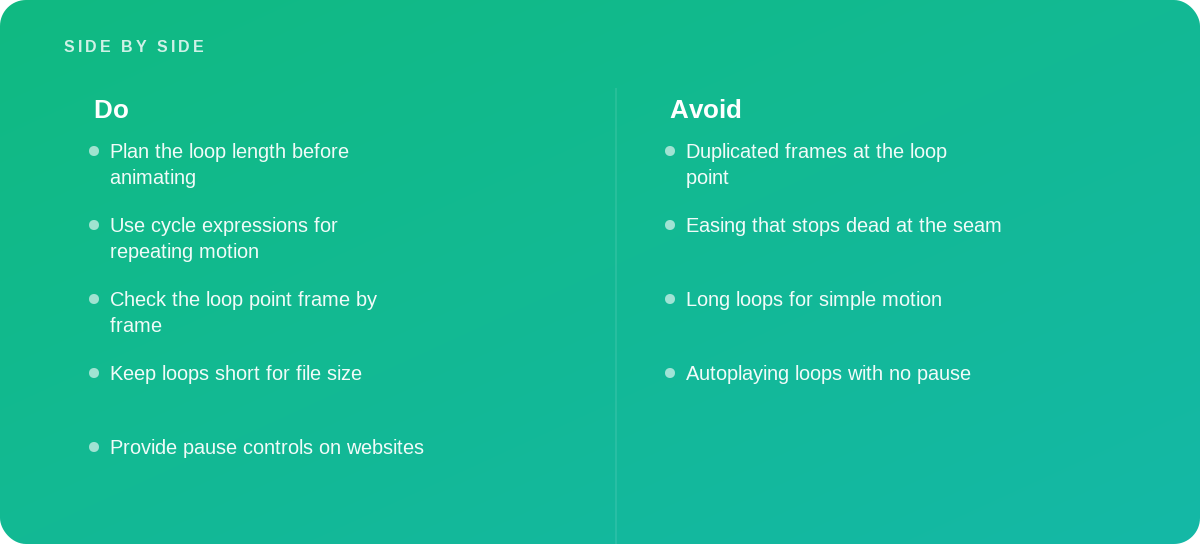
The single most effective habit in loop production is deciding the loop length before animating anything. When the duration is fixed first, every element can be designed to complete a whole number of cycles within it, and the seam takes care of itself. When the duration is decided afterward, animators end up trimming, speeding up or crossfading to force the ends to meet, and that is where most seam problems come from.
Choosing the duration
Start with the placement. A background video behind a headline needs to be long enough that the repetition is not obvious to someone reading for thirty seconds, but short enough to keep the file light. A GIF in a marketing email should usually be very short because every frame adds weight. A signage loop in a lobby can be longer because file size is rarely the constraint and viewers may be present for many minutes. In practice, most web and social loops land somewhere between two and fifteen seconds, and the right point in that range depends on how much distinct motion the piece contains. Simple motion, such as a gentle float, a rotating icon, or a pulsing glow, should use short loops. Stretching simple motion over a long loop adds file size without adding anything the viewer can perceive.
For more on the specific constraints of homepage and hero placements, our guide to background video loops for websites covers layout, legibility and performance in detail, and the companion piece on pacing for social video animation explains how feed behavior affects the ideal length of looping social content.
Making multiple cycles agree
Most loops contain several elements moving at different rhythms. A background gradient might shift slowly, a set of icons might bob up and down, and a highlight might pulse. Each element has its own period, the time it takes to complete one cycle. For the whole composition to loop seamlessly, the loop length must be a whole-number multiple of every element's period. Mathematically, the shortest loop that works is the least common multiple of the individual periods.
If the icons bob on a two-second cycle and the highlight pulses on a three-second cycle, the shortest seamless loop is six seconds: the icons complete three cycles and the highlight completes two. If you had chosen a five-second loop instead, the highlight would be two-thirds of the way through its third cycle when the loop restarts, and it would snap back visibly. The fix is almost always to adjust the periods rather than the loop length. Changing the pulse to 2.5 seconds, or the loop to six seconds, gives every element a clean fit.
Frame rate matters here too. At 24 frames per second, a two-second period is 48 frames and a three-second period is 72 frames, both whole numbers. At 30 frames per second they are 60 and 90. Periods that do not resolve to whole frames, such as a 1.3-second cycle at 24 frames per second, which is 31.2 frames, will drift by a fraction of a frame every cycle and can produce subtle stepping at the seam. Choose periods that divide evenly into frames at your delivery frame rate.
| Element periods | Shortest seamless loop | Frames at 24 fps | Frames at 30 fps |
|---|---|---|---|
| 2 s only | 2 s | 48 | 60 |
| 2 s and 4 s | 4 s | 96 | 120 |
| 2 s and 3 s | 6 s | 144 | 180 |
| 3 s and 4 s | 12 s | 288 | 360 |
| 2 s, 3 s and 5 s | 30 s | 720 | 900 |
The last row is the warning. Three innocent-looking periods produce a thirty-second loop, which may be far heavier than the placement can afford. When the least common multiple gets large, simplify: make the periods share factors, such as two, four and eight seconds, so the loop stays short.
Plan in the style frame and animatic stage
Loop decisions belong in pre-production. When a team signs off style frames, it is worth marking which frame represents the loop point, since the composition at that moment must work both as an ending and as a beginning. Many experienced animators deliberately place the loop point at a calm moment, when motion is slow and the frame is visually balanced, because any tiny imperfection is least visible there.
Design the loop as a cycle from the first keyframe. Loops that are planned as cycles close cleanly; loops rescued in the edit rarely do.
Keyframes, Easing and the Off-by-One Frame
Once the length is set, the mechanics of keyframing determine whether the seam is clean. Two issues account for most technical failures: duplicated frames and easing that stops dead at the seam.
The duplicated frame problem
Suppose you want an object to rotate 360 degrees over a 48-frame loop at 24 frames per second. A natural instinct is to put a keyframe of 0 degrees on frame 0 and 360 degrees on frame 47, the last frame of the composition. But 0 degrees and 360 degrees look identical. When the loop restarts, frame 47 shows the object at 360 degrees, and frame 0 shows it at 0 degrees, the same image twice in a row. The result is a one-frame hold at every repeat.
The correct approach is to place the closing keyframe one frame after the end of the composition, on frame 48. The composition runs from frame 0 to frame 47, so frame 48 is never rendered, but the interpolation between frame 0 and frame 48 means frame 47 shows the object at 352.5 degrees, exactly one step short of a full revolution. When playback wraps to frame 0, the next step lands at 360, which is the same as 0, and the motion continues without a hitch.
The same principle applies to any property. The value on the first frame should equal the value one frame beyond the last frame, not the value on the last frame itself. Some animators achieve this by extending the work area by one frame while keyframing, then trimming it back before rendering. Others keyframe the full cycle and simply set the render range to exclude the final frame. Either method works as long as it is applied consistently and everyone on the project knows which convention is in use.
Easing that stops dead at the seam
Easy ease is the default habit of most motion designers, and in linear animation it gives motion a natural weight. At a loop seam it can be a problem. If the last keyframe eases in to a stop and the first keyframe eases out from a stop, the object decelerates to zero speed, holds for an instant, and then accelerates again. Even with perfectly matched values and no duplicated frame, the viewer perceives a pause at every repeat.
Sometimes that pause is intentional. A bouncing ball that lands and rests, or a breathing icon that settles before the next breath, may be designed to rest at the loop point. The problem is when the pause is accidental, when the motion is supposed to be continuous but the easing introduces a stop. The fixes are straightforward:
- For continuous motion such as rotation, scrolling or drifting, use linear interpolation at the seam, or no seam keyframes at all and let an expression drive the property.
- For oscillating motion such as bobbing or swaying, make sure the velocity going out of the first keyframe matches the velocity coming into the last. In the graph editor, the curve should be continuous across the seam, so if you imagine the graph repeating side by side, there should be no kink where one copy meets the next.
- For motion that genuinely rests, make the rest deliberate and visible, long enough to read as a pose, rather than a one- or two-frame near-stop that reads as a glitch.
Reading the graph editor for seams
The graph editor is the most reliable diagnostic tool for keyframed loops. Switch to the speed graph and look at the first and last points. For continuous motion, the speed at the end should match the speed at the start. Switch to the value graph and imagine placing a copy of the curve immediately to the right. If the two copies join smoothly, value and slope both matching, the property will loop cleanly. If there is a step, the value does not match. If there is a corner, the velocity does not match. This mental tiling exercise catches problems long before a render does.
Expressions That Loop for You: loopOut() and Its Relatives
For repeating motion, manually copying keyframes is slow and fragile. Adobe After Effects provides looping expressions that take an existing set of keyframes and repeat them for the rest of the layer's duration. The Adobe Help Center's After Effects User Guide documents these expressions alongside the rest of the expression language, and they are among the most widely used expressions in motion design because they solve exactly this problem.
The main loop types
The loopOut() expression repeats keyframes after the last keyframe, and its counterpart loopIn() repeats them before the first keyframe. Both accept a type argument that controls how the repetition behaves:
- cycle repeats the keyframed segment from the beginning each time. This is the default and the one used most for seamless loops: animate one cycle, then let the expression repeat it.
- pingpong plays the segment forward, then backward, then forward again. This suits swaying, breathing and pendulum motion, where reversing looks natural. It does not suit motion with a clear direction, such as walking or rotating, because reversal looks wrong.
- offset repeats the segment but adds the change from the previous cycle each time, so motion accumulates. A layer that moves 100 pixels to the right in one cycle keeps moving right, 100 more pixels each cycle. This is useful for things like a conveyor belt or a rotation that keeps increasing.
- continue does not repeat at all; it carries on at the velocity of the last keyframe. It is useful for motion that should drift off, but it is not a looping tool.
Both expressions also accept an optional second argument that limits the loop to the last few keyframes, which is handy when a layer has an intro animation followed by a repeating section. A related pair, loopOutDuration() and loopInDuration(), takes a duration in seconds instead of a keyframe count.
Using cycle correctly for a seamless result
The cycle type repeats the segment between the first and last keyframes. That means the off-by-one rule still applies. If the first keyframe and the last keyframe hold the same value, the cycle will show that value twice in a row at every repeat. The safe approach is to keyframe one complete cycle where the last keyframe returns to the starting value, and set the cycle length to equal the planned period exactly. A two-second bob at 24 frames per second should have its keyframes at frame 0 and frame 48, not 0 and 47, so that the repeated segment is 48 frames long and every repeat lines up.
If the cycle length divides evenly into the composition length, the composition itself will loop seamlessly as well. A 48-frame cycle in a 144-frame composition completes exactly three repeats, and frame 143 flows into frame 0.
Time remapping and nested compositions
Looping expressions work on almost any keyframeable property, including the time remap property of a precomposed layer. This is a powerful technique: build a complex animated element once inside a precomp, enable time remapping on the precomp layer in the main composition, and apply a cycle loop to the time remap keyframes. The entire precomp then repeats as a unit. The same off-by-one caution applies, and it is worth checking that the precomp's own duration and the time remap keyframes agree, because a mismatch of a single frame here produces a hold that is difficult to trace.
Mathematical motion instead of keyframes
For simple periodic motion, many animators skip keyframes entirely and drive the property with a sine wave expression that uses the composition time. A position that oscillates with a sine function whose period is set to two seconds will loop perfectly at any composition length that is a multiple of two seconds, with no keyframes, no easing decisions and no seam to check. Rotation can be driven the same way: a linear expression that adds a fixed number of degrees per second will complete a full turn in a known time. The trade-off is readability. An expression is invisible in the timeline, so a teammate opening the project may not understand why a layer is moving. Add a comment in the expression and a note in the layer name, and keep period values in an expression controller where they can be adjusted without editing code.
Wiggle-style expressions deserve a specific warning. Random motion is not periodic by default, so a layer driven by random noise will be in a different place at the end of the loop than at the start. There are expression techniques that blend two copies of random motion across the loop so the ends match, but for most commercial work it is simpler to keyframe a gentle, designed drift that returns to its starting point.
- Loop point (seam)
- The moment when playback wraps from the final frame back to the first frame; the one transition every seamless loop must hide.
- Period
- The time an individual element takes to complete one cycle of its motion, such as one bob, one pulse or one rotation.
- Least common multiple
- The shortest duration that is a whole-number multiple of every element's period, and therefore the shortest loop in which all elements return to their starting states together.
- Off-by-one frame
- The error of rendering the start state on both the last and first frames, which produces a one-frame hold at every repeat.
- loopOut() and loopIn()
- After Effects expressions that repeat a layer's keyframes after the last keyframe or before the first, using cycle, pingpong, offset or continue behavior.
- Crossfade loop
- A technique for making non-cyclic material loop by overlapping the end of a clip with its beginning and dissolving between them.
- Pre-roll
- Simulating or rendering time before the loop begins so that particles, physics or trails are already in a steady state when the visible loop starts.
Looping the Hard Stuff: Noise, Particles, Cameras and Footage
Keyframed shapes and icons are the easy case. The harder material, procedural textures, particle systems, camera moves and live-action footage, does not naturally return to its starting state, so each needs its own strategy.
Procedural noise and textures
Animated noise is a staple of backgrounds: drifting smoke, shimmering gradients, organic textures. Noise is generated from an evolution or seed value that changes over time, and unless it is told otherwise, the texture at the end of the loop will be unrelated to the texture at the start. After Effects' Fractal Noise effect addresses this with an evolution option that cycles the evolution over a set number of revolutions, so that the texture returns to its starting state. Set the evolution to complete a whole number of revolutions over exactly the loop duration, again respecting the off-by-one rule, and the noise will loop. Any other animated noise parameters, such as offset or scale, must also either stay constant or complete a full cycle in the same time.
Other tools and plug-ins offer similar looping options for their noise functions. If a generator does not, a common workaround is to sample the noise along a circular path through its parameter space rather than a straight line, because a circle returns to its start. This is more technical but produces genuinely seamless procedural motion.
Particle systems
Particles are born, move and die over time, and a particle system at frame zero typically starts empty. Two techniques make particles loop. The first is pre-roll: let the simulation run for a while before the visible loop starts, so that the system is in a steady state with particles at every stage of life. The second is the crossfade: render a longer stretch of the steady-state simulation, then overlap the end with the beginning and dissolve between them over a portion of the loop. The dissolve hides the discontinuity because individual particles are small and numerous, and the eye reads the overall density rather than tracking specific particles. For very sparse particle systems, where individual particles are noticeable, the crossfade can produce visible ghosting, and it is often better to hand-animate a small number of elements on designed cycles instead.
Camera moves
A camera that pushes in, pans or orbits must return to its start position and speed at the loop point. Orbits are naturally cyclic if they complete a full revolution. Pushes are not: a camera that moves forward forever eventually leaves the scene. The standard solution for an apparently endless forward move is a repeating environment. The camera travels exactly one tile length through a scene that repeats, so the frame at the end of the move is identical to the frame at the start. Isometric scenes, tunnels, cityscapes and patterned landscapes are all built this way. Isometric illustration lends itself especially well to this kind of modular, repeating travel.
Live-action and stock footage
Real footage almost never loops on its own. Waves, clouds, flickering fire and waving grass all change continuously. The crossfade technique is the usual answer: choose a section of footage with consistent motion and lighting, duplicate it, offset the duplicate so that its midpoint aligns with the original's end, and dissolve between them. Because the transition happens in the middle of continuous motion, it is much less visible than a cut. The length of the dissolve is a judgment call. Too short and the transition is obvious; too long and there is noticeable doubling. Motion that is chaotic and uniform, such as water, smoke or foliage, hides crossfades well. Motion with clear structure, such as a person walking, a car driving through frame or a recognizable face, does not. For those, either choose a clip where the action naturally returns to its start, or accept that the piece should not be a loop.
Frame-by-frame and hand-drawn loops
Traditional animation cycles, including walk cycles, runs, flags and flames, are the original seamless loops. The principles are the same: the drawing after the last drawing is the first drawing, and spacing across the seam must be as even as spacing anywhere else. Cycles are usually planned on twos or ones, and it is worth remembering that a cycle that looks smooth in the timeline can still show a hitch if the spacing tightens near the ends.
Insight: Every difficult loop falls back on one of three strategies. Choose one deliberately at the planning stage rather than discovering it during revisions:
- Make it cyclic: design motion that genuinely returns to its start, as with orbits, sine waves and cycling noise.
- Make it steady-state: pre-roll the simulation so the start and end look statistically alike, then crossfade.
- Make it repeat spatially: build a tiling environment so that travel lands exactly one tile further on.
Checking the Seam Frame by Frame
A loop is not finished until the seam has been checked, and it should be checked twice: once in the animation software, and again in the delivered file on the destination platform. Watching a loop play once through tells you almost nothing about the seam. The checks below are the ones experienced studios run before any loop is signed off.
In the animation software
- Compare the first frame and the frame after the last. Temporarily extend the composition by one frame and toggle between frame 0 and the new final frame. They should be identical. Any difference, including a nudge in position, a shift in color, or a change in opacity, is a positional pop.
- Step across the seam. Set the work area to straddle the loop point, for example the last six frames and the first six, and step through frame by frame. Spacing between frames should be as even across the seam as it is anywhere else in the loop.
- Look at the speed graph. Check that every animated property has matching speed at the end and start, unless a rest is intended.
- Preview on repeat at full resolution. Low-resolution previews hide small positional errors. Let the loop play ten or twenty times in a row at full size and watch the seam specifically.
- Offset the composition. Many animators temporarily shift the entire loop by half its length, so the seam falls in the middle of the timeline. Any discontinuity is then far easier to see and scrub around, and it is a trick borrowed from tiling textures in game art.
In the delivered file
Rendering and encoding can introduce problems the composition did not have. Play the final video or GIF in the actual destination: the web page, the email client, the signage player, the social platform. Watch for a brief pause or black frame when a video restarts, a jump in compression quality at the start of the file, color shifts between the first and last frames of a GIF, and audio clicks if the loop has sound. Our guide to rendering and output for motion covers codec and export settings in depth, and several of its recommendations, including consistent frame rates and avoiding re-encoding, directly affect whether a loop survives delivery intact.
If a loop has sound, the audio needs the same attention as the picture. Audio loops click at the seam if the waveform does not cross zero at matching points, and music must be edited to the exact loop length. Loops driven by sound, where visuals respond to a track, add another layer of synchronization; our article on audio-reactive animation discusses how to keep analysis-driven motion consistent across repeats.
Delivery Formats: Video, GIF and Code-Driven Loops
The same animation may need to loop in several formats, and each has its own behavior at the seam and its own trade-offs in weight and quality. Keeping loops short is the most reliable way to control file size in every one of them.
Video on the web
For websites, a short video file is usually the best vehicle for a seamless loop. The HTML video element supports a loop attribute that restarts playback automatically when the clip ends. Background videos that autoplay are typically also muted and set to play inline on mobile, because browsers restrict autoplay of videos with sound. In most modern browsers, a well-encoded file loops smoothly, but some combinations of browser, codec and file structure can produce a brief stall at the restart. Test in the browsers your audience actually uses, and if a stall appears, re-encode with settings that place a keyframe at the very start, keep the frame rate constant, and avoid trailing audio tracks or metadata that extend the file beyond the last video frame.
Video compression also affects the seam. Encoders allocate quality across the file, and the first frames sometimes look slightly different from the last, which can produce a subtle pulse in sharpness at every repeat. A constant quality setting and a reasonable bitrate usually solve this. For background video specifically, visual softness is often an advantage: slower, lower-contrast motion compresses better and competes less with the page's text.
Animated GIFs
GIF remains the universal format for email, chat and places where video will not play. It has hard limits, a palette of 256 colors per frame and no modern compression, so GIF loops should be short, simple and designed with a limited palette from the start. A GIF's looping behavior is controlled by a setting in the file itself; the export must specify infinite looping or the animation will stop after one or a few plays. Palette handling at the seam matters: if the export tool calculates a different palette for different frames, colors can shift slightly across the loop point. Use a global palette where possible. Our dedicated guide to getting animated GIFs right covers dithering, palette choice and file-size budgets in detail.
Code-driven and interactive loops
Loops rendered live in the browser, whether through CSS animations, SVG, canvas or animation libraries, have a structural advantage: they are defined mathematically, so they can loop perfectly at any length without any stored frames at all. A rotating icon in CSS is a few lines of code with infinite iteration and a linear timing function. Canvas animation exported from tools such as Adobe Animate can loop timelines natively, as our guide to HTML5 canvas animation with Adobe Animate explains. The trade-off is processing: code-driven animation runs on the viewer's device, so complex scenes can drain battery and drop frames on low-powered phones, where a video would simply play.
Signage and displays
Digital signage players vary widely in how they handle loops. Some play a single file on repeat seamlessly; others insert a brief black frame between plays or reload the file from storage. Ask for the player's specifications early and test on the actual hardware. For signage, the loop length is often driven by the content schedule, since the loop may need to fit a playlist slot, rather than by file size.
A loop is not finished until the seam has been checked twice: once in the animation software and again in the delivered file, on the platform where it will actually play.
Accessibility: Pause Controls and Motion Sensitivity
Seamless loops are, by design, motion that does not end. That creates specific obligations on websites. The W3C Web Accessibility Initiative's guidance on Success Criterion 2.2.2, Pause, Stop, Hide sets out the requirement: moving content that starts automatically, lasts more than five seconds and is presented alongside other content must come with a mechanism for the user to pause, stop or hide it, unless the movement is essential. A decorative background loop on a homepage clearly falls within scope. The five-second threshold means that almost any looping background qualifies, since the loop repeats indefinitely even if each cycle is short.
Why the requirement exists
Continuous motion near text makes reading harder for many people, including people with attention-related conditions, some cognitive disabilities and low vision. For some people with vestibular disorders, certain kinds of motion, especially large-scale movement, parallax and zooming, can cause dizziness or nausea. A pause control is not a nicety; it is the difference between a page some visitors can use and one they have to leave.
Implementing it well
- Make the control visible and reachable. A clearly labeled pause button near the moving content, operable by keyboard and announced correctly to screen readers, meets the need far better than a hidden option.
- Remember the choice. If a user pauses the background, keep it paused as they move between pages during the session.
- Respect the reduced-motion preference. Operating systems let users request reduced motion, and browsers expose that preference to websites through the prefers-reduced-motion media query. A thoughtful build shows a static poster frame instead of the loop for users who have set it.
- Choose a good poster frame. The still image shown before the video loads, or when motion is reduced, should be a well-composed frame that stands on its own. The calm loop point you planned in pre-production is often the right choice.
- Avoid flashing. Loops with rapid brightness changes or strobing elements, common in glitch-style work, need particular care. Our piece on glitch and distortion effects covers how to keep that style within safe limits.
Autoplaying loops with no pause control are one of the mistakes most worth avoiding, both because they exclude users and because accessibility requirements increasingly carry legal and procurement consequences for organizations. Building the control in from the start costs very little; retrofitting it after launch usually means reopening the page template.
Worked Example: Planning a Homepage Hero Loop
The following example is illustrative, a composite of a typical brief rather than a specific client project, and the numbers are planning targets rather than published benchmarks. It shows how the principles in this guide translate into concrete decisions.
The brief
A software company wants an animated background behind the headline on its homepage. The brand style uses soft gradients and a handful of floating product icons. The page must stay fast on mobile, the headline must remain legible over the animation, and the site must meet WCAG Level AA.
The decisions
- Loop length and frame rate. The team chooses an eight-second loop at 24 frames per second, which is 192 frames, numbered 0 to 191. Eight seconds is long enough that a reader scanning the headline and subhead will not notice the repetition, and short enough to keep the file light.
- Element periods. The gradient drift completes one full cycle in eight seconds. The icons bob on a four-second cycle, two full bobs per loop. A soft highlight pulses on a two-second cycle, four pulses per loop. All three periods divide evenly into eight seconds and into whole frames: 192, 96 and 48 frames respectively.
- Animation method. Icon bobbing is keyframed once, with keyframes at frame 0 and frame 96, and repeated with a cycle loop. The pulse is driven by a sine expression with a two-second period. The gradient uses a cycling noise evolution set to one revolution over 192 frames.
- Seam placement. The loop point is placed where the icons are at the top of their bob and moving slowly, and the gradient is in its most neutral state, so that the calm frame also serves as the poster image.
- File budget. The team sets a target of roughly 2 MB for the mobile video. At eight seconds, that implies an average bitrate of about 2 megabits per second, which is achievable for soft, low-contrast motion at a modest resolution. A larger desktop version is budgeted separately.
- Accessibility. The build includes a visible pause button, keeps the paused state across pages, and serves the poster frame to users with reduced motion enabled.
What could go wrong, and what the plan prevents
Had the team chosen a ten-second loop without checking periods, the four-second bob would have been halfway through its third cycle at the seam, and every icon would have snapped back. Had the icon keyframes been placed at frames 0 and 95, the bob would have held for a frame at every repeat. Had the highlight used a three-second period, the shortest seamless loop would have grown to 24 seconds, three times the file weight. Each of these is a common real-world mistake, and each is prevented by decisions made before animation started.
| Element | Period | Cycles per 8 s loop | Frames per cycle at 24 fps | Method |
|---|---|---|---|---|
| Gradient drift | 8 s | 1 | 192 | Cycling noise evolution |
| Icon bob | 4 s | 2 | 96 | Keyframes with cycle loop |
| Highlight pulse | 2 s | 4 | 48 | Sine expression |
What Seamless Loops Mean for Budgets, Brands and Teams
The technical detail above has direct business consequences. Loops are short, which makes them look cheap to produce, but their exposure is often very high. A homepage background may be the most-viewed piece of motion a company owns. A signage loop may play thousands of times a week. The cost of getting the seam wrong is not the cost of the animation; it is the cumulative impression of a flaw repeated to every visitor.
Where the effort actually goes
Budget conversations about loops often focus on animation time, but in practice planning and quality control account for a large share of the work that makes a loop succeed. Choosing the loop length, aligning periods, designing a seam-friendly composition, and checking the seam in software and in the destination all take time that is invisible in the final piece. When comparing quotes, ask whether the price includes testing on the actual platforms and delivery in multiple formats, such as a desktop video, a mobile video, a GIF fallback and a poster frame. Those deliverables are where scope differences between suppliers usually hide.
Brand consistency and reuse
Loops are ideal candidates for reuse across a brand: the same motion language on the website, in social posts, in presentations and on event screens. Planning that reuse at the start, with a master composition at the highest needed resolution and cutdowns for each placement, is far cheaper than recreating the loop for every channel. Well-built loops can also be packaged as templates for in-house editors, as long as the looping mechanics, including expressions, periods and seam placement, are documented; our article on motion graphics templates for editors covers what makes that handover work.
Risk and compliance
Two risks deserve attention at the business level. The first is performance: a heavy background video can slow page loads, particularly on mobile connections, and slow pages lose visitors. A file-size budget per placement, agreed in advance, keeps design ambition and performance in balance. The second is accessibility: autoplaying motion without a pause control fails a baseline accessibility requirement, and fixing it after launch involves both design and development time.
When to bring in help
Simple loops, such as a spinning icon, a pulsing button or a short social GIF, are well within the reach of a capable in-house designer who follows the practices in this guide. Bring in specialist help when the loop will run for long periods in high-visibility places: websites where it greets every visitor, displays that play all day, and ads served at scale. Those placements combine every challenge in this guide, including seam integrity under constant repetition, tight file budgets, multiple delivery formats and accessibility requirements, and they are where experience pays for itself. Our animation and motion graphics team plans loops from the brief onward, with the seam, the file budget and the pause control built in rather than bolted on.
Verdict Seamless loops reward planning far more than they reward complexity. Fix the length and frame rate first, make every element's period divide into it, place the closing keyframe one frame past the end, let loopOut() and cyclic expressions do the repetition, check the seam frame by frame in the software and again on the real platform, keep loops as short as the motion allows, and give website visitors a way to pause. Teams that follow those steps get loops that hold up after the hundredth play, not just the first.
Where this comes from
- Adobe Help Center — After Effects User Guide
- W3C Web Accessibility Initiative — Understanding Success Criterion 2.2.2 Pause, Stop, Hide
The figures and practices above come from the sources listed.
Working on something like this?
We take on Motion Graphics & Animation work for teams who want it done once, properly. Tell us what you are building and we will tell you honestly whether we are the right studio for it. Start a project.
Where to go next
Spotted something wrong? Report an error on this page. We correct on the page and say what changed.