Multilingual and Localized Websites: What Actually Works
An illustrative project that walks through building multilingual and localized websites: URL structure, hreflang, right-to-left layouts, translation and upkeep.
 MediaScaleUp Editorial Team

Multilingual and localized websites serve the same organization to people in more than one language or more than one region, with the URL structure, markup and editorial process needed to support it. A translated page is only the visible part. Underneath it sit decisions about where each version lives, how search engines are told which version is for whom, how layouts cope with longer words or right-to-left scripts, and who keeps each version current after launch.
This matters to anyone whose customers do not all read the same language: exporters, software companies selling internationally, universities recruiting abroad, nonprofits serving diverse communities, and any business entering a second market. It matters because search engines need explicit signals about which version serves which audience. Without them, the versions compete with one another instead of each ranking in its own market, and the wrong language turns up in front of the wrong people.
Rather than list principles in the abstract, this article follows one project from brief to delivery and explains each decision as it was made. The project is an illustrative example, not a client story: the company, its numbers and its timeline are composites chosen to show how the choices interact. Where a figure appears, treat it as a realistic planning assumption for this example, not as a benchmark.
The illustrative brief: one English site, four new markets
The company in this example makes and sells commercial kitchen equipment. It has an established English-language website aimed at the United States, with about 180 pages: product families, individual product pages, a dealer locator, support documentation, case-study-style application notes and a blog. Sales in Germany, France, Mexico and the United Arab Emirates have grown through distributors, and the company now wants a site that serves each of those markets directly.
The brief it wrote was short and, like most first briefs, mixed a real goal with a proposed solution. It asked for "the website in German, French, Spanish and Arabic, with automatic language detection." The real goal, once the project team talked it through, was different: prospective buyers in each market should find a version written for them in search results, land on it, understand the products and contact the right distributor. Automatic language detection was a solution someone had seen elsewhere; as the project would show, it was the wrong one.
Writing that goal down before anything else paid off repeatedly. Every later decision, from URL structure to which pages to translate first, was tested against it. If you are at the stage of commissioning this kind of work, our guide to writing a website RFP covers how to separate goals from proposed solutions in a brief.
Discovery: deciding what each market actually needs
The first two weeks were spent on discovery, and most of that time went on questions that were not about translation at all.
Language or region, or both?
A language is not a market. Spanish for Mexico differs from Spanish for Spain in vocabulary, spelling conventions, currency and tone. German is spoken in Germany, Austria and Switzerland, each with its own distributors, regulations and prices. The team mapped each target market to a combination of language and region, then asked whether anything about the content differed by region: prices, distributors, certifications, delivery terms, support hours, legal pages.
For this company, the answer shaped the locale list. Germany needed its own region-specific version because it had its own distributor and pricing. Austria and Switzerland would, for now, be served by the German-language content without a region-specific variant. France got a French version for France. Mexico got Spanish for Mexico. The UAE got Arabic, with an English fallback, because many buyers in the region work in English and the existing US site was not appropriate for them (US pricing, US dealers).
Which pages to localize first
Translating all 180 pages into four languages at once was neither affordable nor useful. The team ranked pages by what a buyer in a new market needed to reach the goal: product families and product pages first, then the distributor locator and contact pages, then support documentation for the most-sold products, then application notes. The blog was left out of the first phase entirely. That produced a first-phase scope of about 90 pages per locale, roughly half the site.
This kind of prioritization is where localization projects most often go over budget, because every page is someone's favorite. Tying the list to the stated goal made the decisions defensible.
Decision: Localize by market, not by language, and launch each locale with a deliberately partial scope.
- Each locale was defined as a language plus, where it mattered, a region.
- Pages were ranked by what a buyer in that market needed, and the first phase covered roughly half the site.
- Untranslated sections were left out of the locale's navigation rather than shown half-finished.
Choosing a URL structure and sticking to it
There are three common ways to organize the versions of a multilingual site: subdirectories on one domain (example.com/de/), subdomains (de.example.com), or separate country-code top-level domains (example.de). Google's guidance on localized versions of pages describes all three as workable. The right choice depends on the organization more than on search engines.
| Structure | Example | Strengths | Trade-offs |
|---|---|---|---|
| Subdirectory | example.com/de-de/ | One domain, one hosting setup, one certificate; authority is shared; simplest to maintain | Weaker local signal than a country domain; everything shares one server location unless a CDN is used |
| Subdomain | de.example.com | Can be hosted separately; useful when different teams or platforms run each version | More infrastructure to manage; each subdomain may need its own setup in analytics and search tools |
| Country-code domain | example.de | Strongest geographic signal; can feel most local to users | Domains must be registered and renewed per country, some with residency rules; highest cost and maintenance; targets a country, not a language |
The company chose subdirectories, using language-region codes: /de-de/, /fr-fr/, /es-mx/, /ar-ae/ and /en-ae/, with the existing US site staying at the root. The reasons were practical. It had one small web team and one content management system, so a single domain was easiest to operate. It did not own the country domains for all its markets, and buying them would have added cost and renewal risk for little benefit. And the subdirectory approach let each locale inherit the authority the main domain had built up.
The rule that mattered more than the choice was consistency. Pick one URL structure and keep it across the whole site. A site that uses subdirectories for some languages, a subdomain for another and a parameter such as ?lang=fr for a third makes hreflang harder to implement, confuses analytics and invites mistakes during every future change.
Should URLs themselves be translated?
Once the locale prefix was settled, the team had to decide whether the rest of the path would be translated: /de-de/produkte/kombidaempfer/ or /de-de/products/combi-steamer/. Translated slugs are more readable for local users and can reinforce relevance. They also mean every slug needs translating, managing and redirecting if it changes. The team chose translated slugs for product families and product pages, where users read and share URLs, and kept English slugs for support documentation, where the pages are generated from a shared system. The decision was recorded so future editors would not mix the two approaches within a section. Characters outside basic ASCII, such as German umlauts, were transliterated in slugs to keep URLs predictable when copied and pasted.
Implementing hreflang the way search engines expect
hreflang annotations are the signal search engines use for language and region targeting. They tell Google that a set of pages are equivalent versions for different audiences, so it can show the right one in each market instead of treating them as competing or duplicate content. Getting them right was the most technical part of the project, and the part where a partial effort is worse than useless.
The three rules the team worked to
- Every version lists every version. If the German product page names the French one as an alternate, the French page must name the German one in return. hreflang must be bidirectional or it is ignored.
- Every version references itself. Each page includes an hreflang entry for its own language and URL, as well as for the others.
- Codes are valid and specific. The language code comes first (ISO 639-1, such as de or es), optionally followed by a region code (ISO 3166-1 alpha-2, such as DE or MX). A region code alone is not valid, and the United Kingdom is GB, not UK.
The team also added an x-default entry pointing to a language selection page, which tells search engines what to show users who do not match any of the listed locales.
Where the annotations live
hreflang can be declared in link elements in the page head, in HTTP headers (useful for PDFs and other non-HTML files), or in the XML sitemap. For a site with five locales and around 90 localized pages per locale, head elements would add a block of six lines (five locales plus x-default) to every page, generated automatically by the content management system from its record of which pages are translations of which. The team chose the sitemap for the bulk of the site, because it kept the logic in one generated file that was easy to validate, and used HTTP headers for the downloadable spec sheets in PDF form. Whichever method you choose, use one per page type; declaring the same relationships in two places invites them to drift apart.
Handling pages that exist in only some locales
Because the first phase localized only half the site, many English pages had no equivalents. The rule was simple: hreflang lists only versions that exist. An English page with no German version does not name one. But every version that does exist names all the others, including itself. The content management system generated the clusters from translation links, so as a new translation was published, it was added to every page in its cluster automatically.
Canonicals and hreflang together
Each localized page carried a canonical tag pointing to itself, not to the English original. Pointing the canonical of a German page at its English equivalent tells search engines the German page is a duplicate, which undermines the hreflang annotation. The team checked this in the templates, because it is a common default in plugins that were designed for single-language sites.
Trap avoided: Partial hreflang that names some versions and not others.
A first draft of the templates generated hreflang only on the English pages, pointing out to the translations. The translations did not point back, so the annotations were not reciprocal and would have been ignored. The fix was to generate clusters from the translation relationships in the content system, so that every page in a cluster received the same, complete set of entries, including its own.
Language selection without automatic redirects
The original brief asked for automatic language detection. The team's recommendation was not to redirect users automatically, and to offer a clear choice instead.
Why automatic redirection by IP address fails
Automatic redirection by IP address traps people in the wrong version. A French-speaking engineer traveling in Germany gets the German site. A buyer in the UAE using a corporate VPN routed through London gets whatever the UK logic says. An English-speaking expatriate in Mexico cannot reach the English site without fighting the redirect. Search engine crawlers are affected too: Google's documentation notes that its crawler often requests pages from US addresses, so a site that redirects by location can hide its other versions from being crawled at all. Redirecting by the browser's language setting is somewhat better, but still overrides a deliberate choice.
What was built instead
- A language and region selector in the header on every page, labeled with each language's own name (Deutsch, Français, Español, العربية), not with flags, because flags represent countries rather than languages.
- Switching language takes the user to the equivalent page in the chosen locale where it exists, and to that locale's nearest parent page where it does not, rather than to the locale's homepage.
- A dismissible suggestion banner: if the browser's language preference matches an available locale that differs from the current page, the site offers a link to it, in that language, without moving the user.
- The user's explicit choice is remembered in a cookie and respected on later visits, but a direct link to a specific locale always shows that locale.
This satisfied the intent behind the original request, helping people reach the right version, without the failure modes.
Decision: Suggest, never force. The site offers the likely locale in a banner and remembers what the user picks, but it never redirects based on IP address or browser settings.
Designing for right-to-left and for text that grows
Adding Arabic meant supporting a right-to-left script, and adding German meant supporting words and labels that are often considerably longer than their English equivalents. Both were design problems, and both were cheaper to solve in the component library than page by page.
The dir attribute and the lang attribute
Every page declares its language on the html element, such as lang="ar" for Arabic or lang="de" for German. Arabic pages also declare dir="rtl". The W3C internationalization guidance recommends setting direction in markup with the dir attribute rather than relying only on CSS, because the direction is a property of the content, and user agents, assistive technology and translation tools read it. The lang attribute also drives correct hyphenation, font selection and screen reader pronunciation, so it matters even for left-to-right languages.
Mixed-direction content needed attention too. Product names, model numbers and measurements in Latin characters appear inside Arabic sentences, and without care the punctuation around them ends up on the wrong side. The team wrapped such inline runs in elements with dir="ltr" or used the bdi element where the direction of inserted data was unknown, such as user-entered distributor names.
Logical CSS properties
The existing stylesheet used physical properties such as margin-left, padding-right, left and text-align: left. In a right-to-left layout those all need to flip. The traditional fix is a separate RTL stylesheet that overrides each one, which doubles the maintenance and drifts over time. Instead, the team converted the component library to logical properties, as documented on MDN Web Docs: margin-inline-start instead of margin-left, padding-inline-end instead of padding-right, inset-inline-start instead of left, and text-align: start instead of text-align: left. With logical properties, the same stylesheet lays out correctly in both directions once the dir attribute is set, so right-to-left layouts do not need a separate stylesheet.
A few things still needed manual attention. Directional icons such as arrows and chevrons in carousels and breadcrumbs were mirrored for right-to-left pages; icons that represent real-world objects, such as a clock or a checkmark, were not. Charts and diagrams in the application notes were reviewed individually. The Arabic typeface was chosen for legibility at small sizes and paired with the brand's Latin typeface so mixed-script lines did not look mismatched.
Designing for text expansion
German navigation labels and button text overflowed several components that had been designed around short English words. The team tested every component with long strings before any real translation arrived, using pseudo-localized text (English strings artificially lengthened and wrapped in accented characters) to reveal fixed widths, truncation and clipped buttons. Fixes included allowing buttons to wrap onto two lines, replacing fixed-width navigation with a layout that could collapse to a menu earlier, and allowing product specification tables to scroll horizontally on small screens.
Formats that are not text
Dates, numbers, currencies and units differ by locale. The German site shows 1.250,50 € where the US site shows $1,250.50; the French site uses a space as a thousands separator. The team formatted these with the browser's built-in internationalization API and the server's locale libraries rather than hard-coding them, and showed dimensions in metric for all new locales. Phone number fields and address forms were adapted to each country's formats, because a form that requires a US ZIP code will lose every lead from Mexico.
Trap avoided: Building a separate right-to-left stylesheet.
It looks quicker at first, but every future change to a component has to be made twice, and the Arabic version quietly falls behind. Converting to logical CSS properties took longer up front and removed that maintenance for good.
Translation, review and the metadata most sites forget
The company had considered publishing machine translation directly to save money. The team's recommendation was to use machine translation as a first draft only, with every page reviewed and edited by a fluent speaker who understood the products before it went live.
Why machine translation without review is a false saving
Machine translation has improved, but it still mistranslates technical terms, product names and idioms, and it has no knowledge of the company's preferred terminology. In a technical category, a mistranslated spec (a voltage, a capacity, a safety instruction) is more than embarrassing. Unreviewed translation also reads as unreviewed, which undermines trust in exactly the markets the company is trying to win.
The workflow that was set up
- A glossary of product names, technical terms and brand phrases, with the approved translation for each locale and a list of terms never to translate.
- Machine translation as a first draft, using the glossary.
- Editing by a professional translator fluent in the target language and familiar with commercial kitchen equipment.
- Review by the local distributor for product accuracy and tone, with a time limit so review did not become a bottleneck.
- Publication, with the translation stored in a translation memory so that repeated phrases in future updates did not have to be paid for again.
Translate everything the user and the search engine see
Translating the body copy is not enough. Each localized page needed its own translated title tag, meta description, image alt text, form labels and error messages, button text, cookie banner, and structured data. The structured data was the part most easily missed: product schema carried English product descriptions and US prices on every locale until the templates were changed to pull localized values. Our guide to structured data for websites covers how to keep that markup aligned with the visible page. PDFs, such as spec sheets and manuals, were localized for the highest-volume products and labeled clearly by language where they were not.
Localization, not just translation
Some content needed rewriting, not translating. Application notes referenced US health codes, which were irrelevant in Germany and France; those sections were replaced with references relevant to each market or removed. Contact pages listed the local distributor, local phone numbers and local business hours. Legal pages, such as privacy notices and terms, were prepared by the company's advisers for each jurisdiction rather than translated from the US versions, because the legal requirements differ and a translation of a US privacy notice is not a compliant European one.
Decision: Machine translation is a draft, never a publication. Every page gets a fluent human edit and a product-accuracy review before it goes live, and the metadata and structured data are translated with the page, not after it.
The project timeline, phase by phase
The project was planned as a phased launch rather than a single release, with one locale going live at a time. This spread the translation load, allowed lessons from the first locale to be applied to the rest, and reduced the risk of launching five versions with the same mistake. Our article on phased website launches covers the general approach.
- Weeks 1 to 2 Discovery: goals, locale list, page priorities, URL structure, and translation workflow agreed.
- Weeks 3 to 5 Engineering: locale routing, hreflang generation, canonical fixes, language selector and suggestion banner, conversion to logical CSS properties.
- Weeks 4 to 6 Content setup: glossary, translation memory, pseudo-localization testing of every component, template changes for metadata and structured data.
- Weeks 6 to 8 German locale translated, reviewed, tested and launched as the pilot.
- Weeks 9 to 11 French and Spanish (Mexico) locales launched, using fixes learned from the pilot.
- Weeks 12 to 15 Arabic and English (UAE) locales, with extra time for right-to-left testing and mixed-direction content.
- Week 16 Post-launch review: search console checks, hreflang validation, analytics by locale and handover to locale owners.
The overlapping phases were deliberate. Content setup could start while engineering was still under way, because the glossary and translation memory did not depend on the templates. The Arabic locale was given more time than the others, not because translation took longer, but because right-to-left testing surfaced layout issues that the other locales did not. Estimating that kind of uneven workload is its own skill; our guide to estimating development work explains how to account for it.
Testing and launch checks for each locale
Each locale went through the same launch checks before going live. Treating them as a fixed list, rather than a judgment call each time, is what kept the fifth locale as clean as the first.
| Check | What was tested | How |
|---|---|---|
| hreflang reciprocity | Every page in a cluster lists all versions, including itself, with valid codes | Crawl of the staging site with a tool that reports missing return links and invalid codes |
| Canonical tags | Each localized page's canonical points to itself | Same crawl, filtered by locale |
| lang and dir | Correct language on the html element; dir="rtl" on Arabic pages | Template review and spot checks |
| Layout | No overflow, truncation or mirrored-icon errors | Visual review on desktop and mobile for key templates |
| Metadata and structured data | Titles, descriptions and schema translated and locale-correct | Crawl output and structured data testing |
| Forms and formats | Addresses, phone numbers, dates and currency match the country | Test submissions from each locale |
| Language switching | Selector reaches equivalent page; no forced redirects | Manual testing, including from a VPN in each market |
| Indexing | Locale not blocked by robots rules or noindex left from staging | Robots file and page header checks |
The last row caught a real mistake during the pilot: the German locale had inherited a noindex tag from the staging environment. It was fixed before launch, and the check was added to the list so it could not recur. That kind of launch-day risk is common in any site change; our guide to website migration planning covers the wider checklist.
After launch: owners, drift and measurement
A multilingual site does not stay aligned on its own. The most common long-term failure is a locale that was launched and then never updated. Product specs change, a product is discontinued, prices change, a new distributor is appointed, and the English site is updated while the others keep the old information. After a year, the localized versions are not just out of date; they are wrong.
A named owner for each locale
Each locale was given an owner responsible for keeping it current. For this company, the German and French owners were marketing staff at the local distributors, working to an agreed service level; the Spanish and Arabic owners were bilingual staff at headquarters. The owner's job was not to translate everything personally but to know what was out of date, approve updates and flag content that needed local rewriting.
Change propagation
The content management system was configured to flag translations as out of date whenever their source page changed, with a dashboard showing each locale's backlog. Changes were classified: a correction to a technical spec had to reach every locale within days, while a rewrite of marketing copy could be batched monthly. The translation memory kept the cost of updates proportional to the change rather than to the page. For the ongoing routine, our guide to planning website maintenance covers how to schedule this alongside other upkeep.
What was measured
- Which version ranks where. Search console data filtered by country showed whether the German pages, not the US ones, appeared for searches in Germany. When the wrong language version ranks in a market, that is usually a sign of an hreflang or canonical problem.
- Locale traffic and engagement. Analytics segmented by locale subdirectory showed how many visitors each version attracted and whether they reached product and distributor pages.
- Language switching. How often users changed locale after landing, and from where to where, indicated whether search engines were sending them to the right version and whether the suggestion banner was working.
- Leads by market. Distributor contact form submissions by locale were the measure closest to the business goal.
- Translation backlog. The number of out-of-date pages per locale, reviewed monthly, showed whether owners were keeping up.
What this project shows about multilingual and localized websites
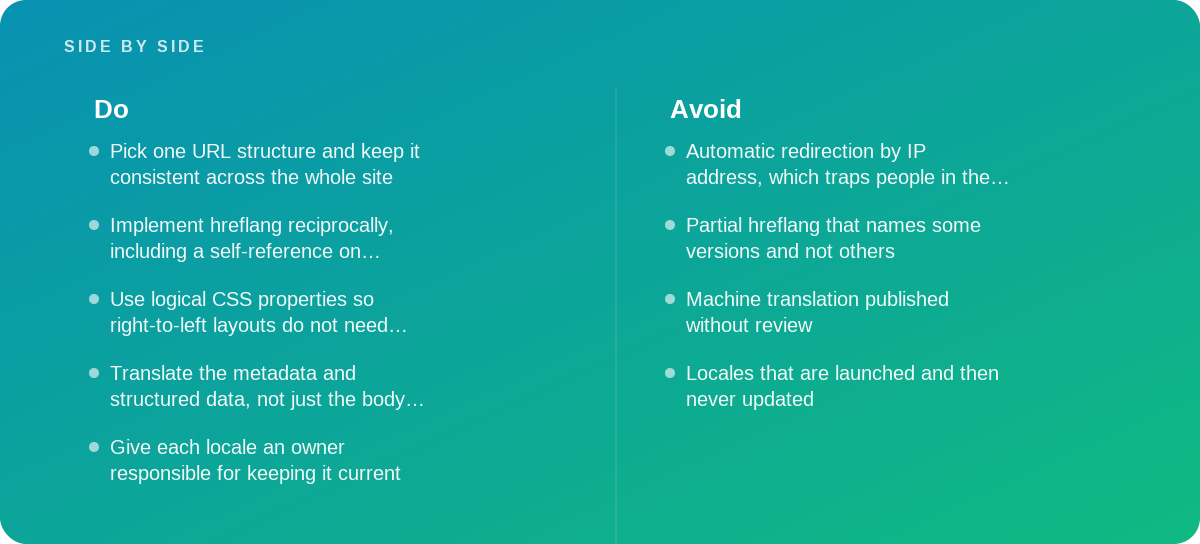
Looking back across the illustrative project, a few decisions did most of the work. Defining locales by market rather than by language shaped everything downstream. Choosing one URL structure and keeping it consistent made hreflang manageable. Generating hreflang clusters from the content system's translation relationships, rather than writing them by hand, made them reciprocal and self-referencing by default. Converting to logical CSS properties made right-to-left support a property of the design system rather than a parallel project. And giving each locale an owner was the only thing that kept the versions from drifting after launch.
The traps avoided were equally instructive: automatic redirection by IP address, partial hreflang, machine translation published without review, and locales left to go stale. Each looks like a shortcut at the time and costs more to fix later.
When to bring in help
Organizations can often run a first locale themselves. Bring in help when the wrong language version ranks in a market, when locales have drifted out of sync, or when a new market needs launching against an existing structure that was not designed for it. Those are the points where the fixes touch routing, templates, markup and editorial process at once, and where experience with the failure modes saves time. Our web design and development service covers multilingual builds and audits, and more articles on the subject are collected under web design and development.
Where this comes from
- Google Search Central — Localized versions of your pages
- MDN Web Docs — CSS logical properties
- W3C — Internationalization best practices
The figures and practices above come from the sources listed.
Working on something like this?
We take on Web Design & Development work for teams who want it done once, properly. Tell us what you are building and we will tell you honestly whether we are the right studio for it. Start a project.
Where to go next
Spotted something wrong? Report an error on this page. We correct on the page and say what changed.








