How to Get Podcast Chapters and Episode Metadata Right
A phase-by-phase playbook for podcast chapters, titles, show notes, numbering and transcripts, with a worked example, schedule and QA checks before release.
 Tomas Lindqvist

Podcast chapters and episode metadata are the layer of information that sits around the audio itself: the episode title, the description and show notes, the season and episode numbers, the episode type, the chapter markers that let a listener jump to the segment they care about, and the transcript that makes the whole conversation readable and searchable. None of it changes a single sample of the recording, yet it decides whether someone scrolling a podcast app understands what an episode is about, whether they can find the fifteen minutes they actually need inside a ninety-minute interview, and whether the show turns up when someone searches for a guest or a topic.
This matters to anyone who publishes episodes on a schedule: independent hosts, brand and B2B podcasts run by marketing teams, agencies producing shows for clients, and networks managing large back catalogs. Good metadata improves discoverability and makes long episodes far easier to use. Poor metadata, such as a title that reads only "Episode 147," a description stuffed with keywords, or chapters that drift away from the audio after a late edit, leaves listeners guessing and quietly costs you plays that the content itself had earned.
This playbook treats metadata as a production phase rather than an afterthought typed into a hosting dashboard five minutes before publishing. It walks through seven phases in the order a production team actually meets them, from setting conventions before the first recording to a final QA pass against the published feed. Each phase states its goal, the actions involved, what it should produce and how to check it. A worked example and a realistic weekly schedule follow, along with advice on cleaning up a back catalog.
The Seven-Phase Playbook for Podcast Chapters and Episode Metadata
The biggest single cause of bad podcast metadata is timing. When titles, descriptions and chapters are written at the very end, by whoever happens to be uploading, they are rushed, inconsistent from one episode to the next and often wrong, because nobody re-checks them after the final edit. The fix is to spread the work across the production process so each piece is created at the moment the information is freshest and cheapest to capture.
- Set conventions once Decide your title pattern, numbering scheme, episode types, guest-name format, description template and chapter policy before the first episode, and write them down.
- Capture chapter points live Log topic changes with timestamps during recording and refine them during the edit, instead of reconstructing structure from the finished file.
- Write the title from the content Draft a descriptive title that works without the episode number, names the guest where relevant and reflects what listeners will actually hear.
- Build the show notes Write a short summary, a longer description, the chapter list, guest details and every link mentioned on the show.
- Produce chapters in each delivery format Embed chapters in the audio file, publish them through a supported feed tag, or both, and add timestamps where a platform reads them from the description.
- Create and correct the transcript Generate a transcript from the final audio, correct names and terms, and attach it where your host and the apps support it.
- Run a pre-publish and post-publish QA pass Check every chapter against the final audio, validate the feed and look at the episode in at least two real podcast apps.
Phases one and seven bracket the process; the middle five happen alongside recording and editing. On a weekly show, phase one is done once and revisited perhaps twice a year, while phases two through seven repeat every episode. The rest of this guide takes them in order.
Phase 1: Define Title, Numbering and Metadata Conventions
Goal: make every episode's metadata predictable, so listeners and apps can rely on it and so anyone on the team can produce it to the same standard.
Most of the fields you will fill in every week live in your podcast RSS feed, which your hosting platform generates from what you enter in its dashboard. If you are not yet comfortable with how those fields map to tags, our practical guide to podcast RSS feeds explains the structure. For conventions, the point is to decide how you will use each field before you have forty episodes that each do it differently.
The fields that need a rule
| Field | What it does | Convention to decide |
|---|---|---|
| Episode title | The main label listeners see in every app | Pattern (topic first, guest name placement), length target, whether numbers ever appear |
| Episode number | Lets apps order and display episodes | Put it in the dedicated field, not the title; decide whether bonus episodes get numbers |
| Season number | Groups episodes into seasons in apps that support it | Use only if the show genuinely runs in seasons; keep it consistent once started |
| Episode type | Distinguishes full episodes, trailers and bonus content | Which formats count as bonus versus full; how trailers are labeled |
| Description / show notes | Summary and details shown on the episode page | Template order: hook, summary, guest bio, chapters, links, credits |
| Chapters | Navigation points inside the audio | Minimum episode length that gets chapters, naming style, format(s) used |
| Transcript | Text version of the audio | Generated or human-corrected, file format, who signs it off |
Numbering is a field, not a title prefix
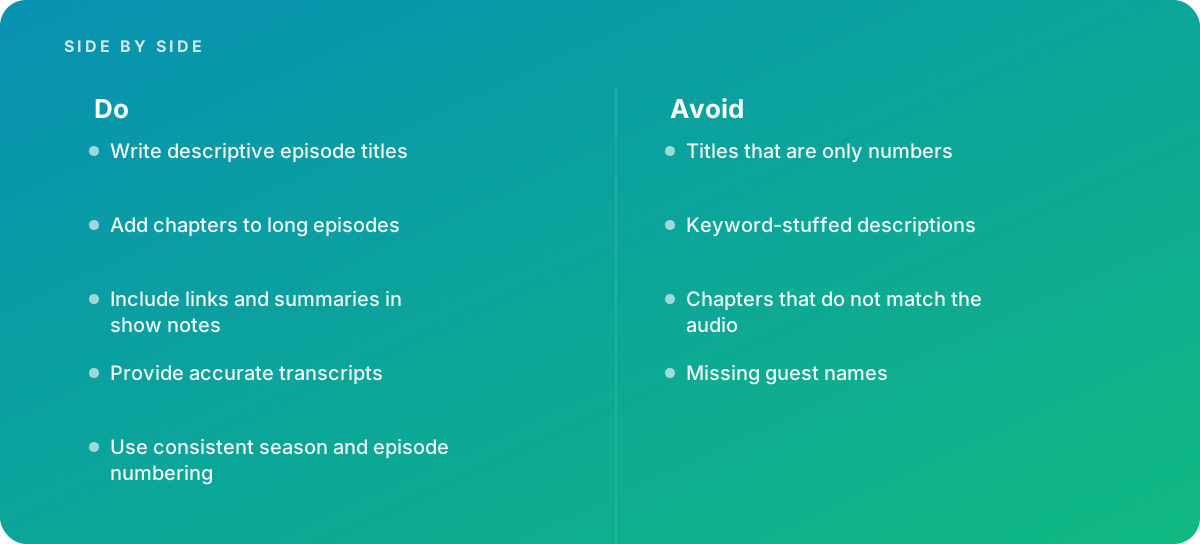
The principle is simple: episode titles should describe the episode without relying on episode numbers alone, and season and episode numbering should be consistent. Apple's creator documentation at Apple Podcasts for Creators covers the dedicated season, episode and episode-type fields, and apps use those fields to sort and display episodes. When you also bake "Ep. 147 |" into the title, you spend the most valuable characters of the title on information the app already shows, and on small screens the descriptive part is what gets truncated.
Decide now how you will handle the awkward cases, because they always turn up: a bonus Q&A released between numbered episodes, a two-part interview, a re-release of an old episode with a new intro, and a trailer for the next season. A common and workable rule is that full episodes get sequential numbers, bonus and trailer episodes are marked with the episode-type field and left unnumbered, and multi-part episodes get their own numbers with "Part 1" and "Part 2" in the title text. For how trailers fit into the feed, see what actually works for podcast trailers.
Guest names and a written template
Missing guest names are one of the most common metadata mistakes, and one of the most costly, because people search for the person as often as for the topic. Set a rule: the guest's full name, spelled as they spell it, appears in the title or at the start of the description of every interview episode, along with their role and organization. Collect the correct spelling and preferred title during booking; good podcast guest preparation includes exactly this kind of detail. Then put the whole convention into a one-page style sheet that sits alongside your editing templates. Consistency across episodes is a production discipline in its own right, which we cover in episode-to-episode consistency.
- Title pattern written down with two or three example titles
- Episode and season numbers set in dedicated fields, never only in the title
- Rules for trailers, bonus episodes, multi-part and re-released episodes
- Guest-name format and a booking form field for correct spelling and role
- Show-notes template with a fixed section order
- Chapter policy: which episodes get chapters, naming style and delivery format
- Transcript policy: generated or corrected, and who approves it
Phase 2: Capture Chapter Points During Recording and the Edit
Goal: produce an accurate list of topic changes with timestamps, tied to the final edited audio, with as little retrospective listening as possible.
Reconstructing chapters from a finished file means listening to the whole episode again, which on a seventy-minute interview is seventy minutes of someone's time plus the writing. Capturing structure while it happens is far cheaper. During the recording, a producer or the host keeps a running log: the wall-clock time or recorder time of each topic change and a few words about it. Most recording software and many portable recorders let you drop markers with a single key or button; if yours does not, a text file with timestamps typed against the session clock works well enough.
Converting raw markers into edit-accurate chapters
Raw markers are only a starting point, because editing moves everything. Cut three minutes of warm-up chatter and every marker after it shifts by three minutes; remove a tangent in the middle and the later chapters shift again. The reliable approach is to carry the markers into the editing session as markers, not as a separate list, so they move with the audio as you cut. Most digital audio workstations support this, as long as the markers are attached to the timeline and you edit in a mode that ripples later material. A good session template can include a dedicated marker lane and naming convention so this happens by default.
Once the edit is locked, review the markers in order. Nudge each one so it lands at the beginning of the sentence that starts the new topic, not the middle of it, and ideally in a short pause just before that sentence. A chapter that starts two seconds late drops the listener into a half-finished phrase, which feels careless. Then add markers for the fixed segments: the cold open, the intro, any sponsor read, and the outro or listener mail.
How many chapters, and how long
There is no single correct count, but practical ranges help. Chapters are most useful on long episodes, roughly anything over twenty to thirty minutes, and on shows where listeners are likely to want a specific segment. For a typical interview, chapters that each cover a few minutes to around fifteen minutes of audio tend to be most usable: short enough to be meaningful navigation, long enough that the list does not become a wall of entries. A one-hour episode often lands somewhere between six and twelve chapters. Much more than that, and each entry says less; much fewer, and a listener looking for one idea still has to scrub.
Shortcut: If you use dynamic ad insertion, place a marker at every ad slot during the edit and name it consistently, such as "Break 1." It helps whoever builds the chapters and makes it obvious where inserted ads will shift the timing, which Phase 7 checks.
Phase 3: Write Episode Titles That Work Without the Number
Goal: a title that tells a stranger scrolling an app exactly what they will get from this episode, accurately and in plain language.
An episode title has several jobs. It must tell existing subscribers whether this episode is for them, persuade a new listener browsing the show page, and match the words someone would type into search. It must also survive truncation: in list views on phones, only the first several words may be visible. That means putting the most specific information first.
A practical title formula
For interview shows, a reliable structure is the concrete subject first, then the guest: "Pricing a Service Business in a Downturn, with Priya Raman." For solo or panel episodes, lead with the problem or question the episode answers: "Why Your Onboarding Emails Get Ignored." For narrative shows, where intrigue is part of the format, the title can be more evocative, but it still needs at least one concrete noun that tells a listener what the story is about.
Some rules of thumb that hold across formats:
- Lead with the specific. "Hiring Your First Salesperson" beats "Growth Conversations: Hiring" because the specific part survives truncation.
- Do not repeat the show name. The app already displays it, so it wastes space.
- Name the guest. Use the full name as they spell it. If they are better known by their organization, add it in the description.
- Match the actual content. A title promising "the complete guide" to a topic covered for twelve minutes will disappoint the listeners it attracts.
- Keep it readable. Avoid strings of keywords separated by pipes; write it as a phrase a person would say.
- Save part numbers for the end. "Building a Remote Team, Part 2" keeps the descriptive part visible.
Testing a title before you publish
A quick test: read the title aloud to someone who has not heard the episode and ask them what they think it covers. If their answer is close to the episode's real content, the title works. If they guess wrong, or say "no idea," rewrite it. Another check is to look at the last ten titles together, as they will appear on the show page. Titles that all start with the same phrase, or that all rely on the guest's name with no topic, make the feed hard to scan. Titles that reuse the same structure but with specific topics read well as a set.
- Most specific information in the first few words
- Guest's full name included for interview episodes
- No episode number and no show name in the title text
- Promise in the title matches what the episode delivers
- Reads as a natural phrase, not a keyword list
- Checked alongside recent titles for scannability
Phase 4: Build Show Notes That Summarize, Link and Stay Honest
Goal: an episode description that helps a listener decide to press play, gives them everything mentioned on the show, and reads like it was written for people rather than for a search algorithm.
Good show notes combine a summary with links, and they avoid keyword stuffing. Both points matter. Podcast apps show only the opening of a description in most views, so the first two sentences do the persuading. The rest of the description serves listeners who already chose the episode and want the details: the guest's background, the resources mentioned and where to find them, and the chapter list.
A show-notes template that works for most shows
- Hook (one or two sentences). What the listener will learn or hear, stated specifically. This is the part most apps show before "more."
- Summary (one short paragraph). The main points or story arc, in plain language, including the guest's name and role.
- Guest details. Full name, title, organization and one or two links the guest wants shared.
- Chapter list with timestamps. The same chapter titles as the embedded chapters, in "00:00 Title" format.
- Links mentioned. Every book, tool, article or earlier episode referred to, with descriptive link text.
- Credits and housekeeping. Host, producer, editor, music credits, and any required disclosures such as sponsorship.
What keyword stuffing looks like, and what to do instead
Keyword stuffing in show notes usually looks like a line at the bottom that reads something like "marketing podcast, marketing tips, best marketing podcast, small business marketing" or a summary that repeats the same phrase in every sentence. It reads badly to humans, and platforms state in their creator guidelines that metadata should accurately represent the content, so it risks more than it gains. The better approach is to describe the episode accurately using the words your audience actually uses. If an episode is about email onboarding sequences, a natural summary will mention "onboarding emails" once or twice because that is what the episode is about. That is enough.
Links are where show notes earn their keep. Listeners who hear a book or tool mentioned at 40 minutes into a commute rarely remember it later; a complete list in the notes gives them a reason to come back to the episode page. Make link text descriptive, check that every link works before publishing, and prefer stable pages to temporary campaign URLs that might break in six months.
Shortcut: Ask the editor to add a marker named "LINK" with a few words each time a resource is mentioned during the edit. At the end, the marker list becomes the first draft of the links section, and nothing mentioned in passing gets missed.
A final consideration is sponsorship and disclosure. If an episode contains paid promotion, say so in the description as well as in the audio. How ads are placed in the file also affects chapters and timestamps, which we return to in Phase 7; the details of ad placement are covered in dynamic ad insertion in podcasts, done properly.
Phase 5: Produce Chapters in the Formats Your Listeners' Apps Read
Goal: the same accurate chapter list, delivered in every format your target apps support, so listeners see chapters wherever they listen.
Chapters can be embedded in the audio file itself or provided through supported feed tags. Different apps read different mechanisms, and hosting platforms differ in what they generate for you, so the practical answer for most shows is to produce one master chapter list and output it in more than one form.
The main delivery methods
| Method | How it works | Strengths | Watch out for |
|---|---|---|---|
| Embedded in MP3 (ID3 chapter frames) | Chapter start times and titles stored in the file's ID3 tags | Travels with the file; widely read by podcast apps | Must be regenerated if the audio changes; inserted ads can offset times |
| Embedded in M4A/AAC | Chapter track stored inside the MP4 container | Long-standing support in Apple software | Fewer shows distribute AAC as their main feed format |
| Feed tag pointing to a chapters file | The RSS feed links to a separate JSON chapters file | Editable without re-uploading audio; can include links and images per chapter | Only apps that support the tag will read it; the file must stay online |
| Timestamps in the description | Lines such as "12:40 Pricing mistakes" in the episode description | Readable by humans everywhere; some platforms turn them into chapters | Formatting rules vary by platform; easy to leave stale after edits |
Platform documentation is the authority on what each app reads and how, and it changes over time. Spotify for Creators documents its own chapter support, including how timestamps in episode descriptions are used, and Apple's creator documentation covers how chapters appear in Apple Podcasts. Check both before settling on your workflow, and re-check when you change hosting provider.
Writing chapter titles
Chapter titles are tiny pieces of navigation copy. They should tell a listener what is in that segment, in three to eight words, in language consistent with the episode title. "Why annual pricing backfired" is useful; "Part 3" or "Discussion continues" is not. Keep functional segments short and consistent across episodes: "Intro," "Sponsor," "Listener question," "Wrap-up." Avoid jokes or in-references that only make sense after hearing the segment, because the whole point is to help someone decide where to go before they hear it.
Tools and the master list
Many editors and podcast processing tools can write chapter markers directly into exported files or import a marker list and embed it. Whatever you use, keep one master chapter list per episode, typically a simple text or spreadsheet file with start time and title, stored with the episode's project files. Every output, whether embedded tags, a JSON chapters file or description timestamps, is generated from that single list. When something changes, you update the master and regenerate, rather than editing three places by hand and hoping they agree. If your team already handles embedded metadata in production files, the same discipline applies as for Broadcast WAV and iXML metadata: one source of truth, written by tools, checked on output.
- One master chapter list per episode, stored with the project files
- Chapter titles specific, three to eight words, consistent functional labels
- Chapters embedded in the final distribution file
- Feed-tag chapters file published if your host and target apps support it
- Description timestamps formatted to the platform's current requirements
- All outputs generated from the master list after the edit was locked
Phase 6: Create, Correct and Attach Accurate Transcripts
Goal: a transcript that accurately represents the final audio, with names, terms and speaker labels correct, attached where apps and your website can use it.
Transcripts serve several audiences at once. They make episodes accessible to deaf and hard-of-hearing listeners, let people skim or search an episode before committing an hour to it, and give your website a text version of the conversation that search engines can read. Apple Podcasts displays transcripts, and generates its own for many episodes; creators can also supply their own. Because an automatic transcript is what many listeners will see if you do nothing, the question is whether you want that version, errors included, to represent your show.
The practical transcript workflow
Generate the transcript from the final mixed audio, never from a rough cut, so the timing and content match what is published. Automatic speech recognition is now good enough to produce a strong first draft for clear, well-recorded speech, but it consistently struggles in predictable places: proper names, company and product names, technical vocabulary, acronyms, accented speech and crosstalk. Those are exactly the words that matter most for search and for the guest's goodwill.
A correction pass should therefore focus on those areas rather than reading every word with equal care. Start with a list of names and terms from the booking notes and show notes, search the transcript for likely mis-hearings, and fix them throughout. Then check speaker labels, particularly at points where speakers interrupt one another. Finally, skim the whole text at reading speed for obvious nonsense, such as a sentence the recognizer invented from background noise. For a one-hour interview with clean audio, a focused correction pass typically takes a fraction of the running time; heavily technical or multi-speaker recordings take longer.
Formats and where transcripts go
Transcripts are usually delivered as timed caption files, such as WebVTT or SRT, for apps and video platforms, and as clean readable text for the episode web page. Timed formats let apps highlight text as the audio plays; readable text on your site is easier for people and search engines to consume. Check your host's documentation for which formats it accepts and how it passes them to apps. If you also publish a video version, the same corrected transcript can feed the captions; see our guide to video podcast production for how the two workflows fit together.
A useful shortcut: add every guest name, company and recurring technical term to your transcription tool's custom vocabulary or glossary, if it has one. The first correction pass on each new episode gets shorter every week as the list grows.
An accurate transcript also protects the chapter list. If a chapter title claims the guest discusses a subject at 31:10, the transcript lets anyone verify it in seconds without listening, which makes it the best QA tool for Phase 7.
Phase 7: QA Chapters and Metadata Against the Final Audio and Live Feed
Goal: confirm that what listeners receive matches what you intended, in the actual apps, before and just after publishing.
Chapters that do not match the audio are one of the named mistakes to avoid, and they are usually the result of a change made after the chapters were produced: a last-minute trim, a replaced intro, a re-exported file with different lead-in silence, or ads inserted at delivery time. The QA pass exists to catch exactly those changes.
Pre-publish checks
Open the final distribution file, the exact file you will upload, in a player that shows chapters. Jump to each chapter and listen to the first few seconds: the audio should start at or just before the first words of the new topic. Compare the chapter list in the file with the timestamps in the show notes and with the feed chapters file if you use one; all three should agree. Read the title and description once more as a listener would, check that every link opens the intended page, and confirm the episode number, season and episode type fields are set correctly.
The dynamic ad insertion problem
If your host inserts ads dynamically, the audio a listener downloads may be longer than your master file, and everything after an insertion point shifts by the length of the ad. Some hosting platforms adjust embedded chapter times and feed chapters to account for inserted ads; others do not, or handle only some formats. Description timestamps are plain text and will not adjust at all. Find out how your host behaves, test it by downloading an episode with ads through a podcast app, and if your host does not compensate, consider placing chapters so ad breaks fall at chapter boundaries, where a short offset is least noticeable, or leave description timestamps off episodes with inserted ads.
Post-publish checks
Once the episode is live, look at it in at least two widely used podcast apps. Check that the title is not truncated in an unhelpful place, that the description's first lines make sense on their own, that chapters appear and land correctly, and that the transcript is attached if you supplied one. Validate the feed with your host's tools or a feed validator after any change to feed settings. Because the published result is what counts, how your host counts downloads is worth understanding too: re-uploading audio to fix chapters can, depending on the host, affect how downloads are counted or cause apps to re-download the file.
Before and after every release, confirm the following:
- Every chapter in the final file lands at the start of its topic
- Embedded chapters, feed chapters and description timestamps agree
- Title, description, guest name and all links checked
- Episode number, season and episode type set in their fields
- Behavior with dynamically inserted ads tested on a real download
- Episode reviewed in at least two apps after publishing
- Transcript attached and displaying where supported
Worked Example: Applying the Playbook to a 72-Minute Interview Episode
The following is an illustrative example, not a real client project. It shows how the phases fit together on a typical weekly B2B interview show, with realistic numbers.
The show records a 95-minute conversation with a guest, a head of customer success at a software company. During recording, the producer logs eleven topic changes with the recorder's time code. In the edit, the editor removes an 8-minute warm-up, a 6-minute tangent about the guest's commute, several false starts and a long off-topic story, bringing the episode to 72 minutes. Because the producer's markers were imported into the editing session, they move with each cut. Two of the original markers fall inside removed sections and are deleted; the editor adds markers for the cold open, the intro, a mid-roll sponsor slot and the outro.
The resulting master chapter list has ten entries:
| Start | Chapter title | Length |
|---|---|---|
| 00:00 | Cold open: the renewal that nearly failed | 1:10 |
| 01:10 | Intro | 1:30 |
| 02:40 | From support lead to customer success | 7:20 |
| 10:00 | Designing the first 90 days after signing | 11:45 |
| 21:45 | Health scores that predict churn, and ones that do not | 9:15 |
| 31:00 | Sponsor | 1:00 |
| 32:00 | Running renewal calls with finance in the room | 12:30 |
| 44:30 | Hiring and training a CS team of five | 13:10 |
| 57:40 | Listener question: CS in a product-led company | 10:50 |
| 68:30 | Wrap-up and where to find the guest | 3:30 |
The title follows the show's convention of subject first, guest second: "Designing the First 90 Days After a Customer Signs, with [guest's full name]." The number 118 goes into the episode-number field, and the episode type is set to full. The show notes open with a two-sentence hook naming the guest and the three main takeaways, followed by a short summary, the guest's role and company, the chapter list, six links collected from "LINK" markers during the edit, and credits including the sponsor disclosure.
The team exports the MP3 with embedded chapters generated from the master list, publishes a JSON chapters file through the host's feed support, and pastes the same list into the description as timestamps. An automatic transcript is generated from the final mix; the correction pass fixes the guest's surname in fourteen places, the company's product name in nine and two software tool names, and splits three passages where speakers overlapped. On this clean two-person recording, that pass takes about 25 minutes.
During QA, the editor notices the host inserts a pre-roll ad of variable length at delivery time. A test download shows embedded and feed chapters are adjusted by the host but the description timestamps are not. The team adds a line above the timestamps noting that times may shift slightly because of ads, and decides to raise the issue with the host. Total metadata time for the episode, excluding the recording itself, comes to roughly two hours across producer, editor and host, most of it in the show notes and transcript correction.
A Realistic Weekly Schedule for Metadata Work
Metadata goes wrong when it is squeezed into the last hour before release. On a weekly show, it fits comfortably into the normal production cycle if each piece has a slot. The schedule below assumes recording early in the week and release the following Tuesday, and works for most interview formats; adjust the days to your own cadence.
- Booking, one to three weeks ahead Collect the guest's name spelling, role, organization, preferred links and a short bio; add names and terms to the transcription glossary.
- Recording day Producer logs topic changes and "LINK" moments against the recorder clock; host notes working title ideas while the conversation is fresh.
- Edit days (two to three days after recording) Markers move with the edit; editor adds fixed-segment markers and finalizes marker positions once the cut is locked.
- Lock plus one day Master chapter list exported; title drafted and tested; show notes written from the template, including links and chapter timestamps.
- Lock plus two days Final mix exported with embedded chapters; transcript generated and corrected; feed chapters file prepared.
- Day before release Pre-publish QA against the exact upload file; episode scheduled with all fields filled.
- Release day Post-publish checks in two apps; ad-insertion behavior spot-checked; any fixes made the same morning.
Two practices make the schedule hold. First, one named person owns metadata for each episode, even if several people contribute, so it never falls between roles. Second, the style sheet from Phase 1 and the show-notes template live in the same place as the editing templates, so new team members or freelancers produce work that matches the rest of the catalog. Metadata is also part of the wider editing decisions that shape an episode; the decisions that matter in podcast editing covers how structure is set during the cut, which is where good chapters begin.
Cleaning Up a Back Catalog and Knowing When to Bring In Help
Many shows reach episode 80 or 150 before deciding to take metadata seriously, and then face a back catalog of number-only titles, thin descriptions and no chapters. Fixing all of it at once is rarely practical, and it is not necessary. Prioritize by impact.
A triage order for older episodes
- Titles first. Rewrite number-only or vague titles on your most-listened episodes and on any episode with a well-known guest. Titles are the cheapest change with the largest effect on browsing and search.
- Guest names and summaries. Add missing guest names and a proper two-sentence opening to descriptions, starting with the same priority list.
- Numbering. Move episode numbers out of titles into the dedicated fields and set episode types, which tidies how the whole catalog displays.
- Chapters for evergreen long episodes. Add chapters to long episodes that still attract new listeners. Use the transcript to find topic changes quickly instead of relistening.
- Transcripts last, selectively. Correct transcripts for your most important episodes; accept automatic transcripts on the long tail if resources are limited.
Before changing anything in bulk, check how your host handles edits to published episodes. Title and description changes generally propagate to apps on the next feed refresh without side effects. Re-uploading audio to embed chapters is a bigger change: it can cause some apps to treat the file as new, and some hosts handle it differently for analytics. A feed-tag chapters file, where supported, can add chapters to older episodes without touching the audio at all, which makes it attractive for catalog work.
When outside help makes sense
It usually makes sense to bring in help when you are growing a podcast's audience or managing a large back catalog, and those are the two situations where metadata work stops being a small weekly task. A growth push means every episode's title, description and chapters are doing marketing work and deserve the same care as the audio. A catalog of hundreds of episodes means dozens of hours of focused, repetitive work that is easy to start and hard to finish alongside a weekly release schedule. A production partner can take on the full metadata phase each week or run a one-off catalog cleanup with a consistent style. If that is where you are, our podcast production service covers chapters, show notes and transcripts as part of the workflow, and our podcast editing service can take on marker-based chapter preparation during the edit.
Whichever route you choose, the principle is the same: podcast chapters and episode metadata are part of the product a listener receives, not administrative leftovers. Treat them as a production phase with an owner, a template and a QA step, and the difference shows up in every app your show appears in.
Where this comes from
- Apple Podcasts for Creators — Episode metadata and chapters
- Spotify for Creators — Podcast chapters
The figures and practices above come from the sources listed.
Working on something like this?
We take on Audio Editing & Production work for teams who want it done once, properly. Tell us what you are building and we will tell you honestly whether we are the right studio for it. Start a project.
Where to go next
Spotted something wrong? Report an error on this page. We correct on the page and say what changed.